A bit of web-scraping with Cheerio
17 Feb 2025I had an idea for a little holiday project that required a list of episodes from The Rest Is History podcast. On their ‘Episodes’ page, they have a player, and a list of post entries for the most recent eighteen podcasts. There is a ‘show all’ button, but it doesn’t work.
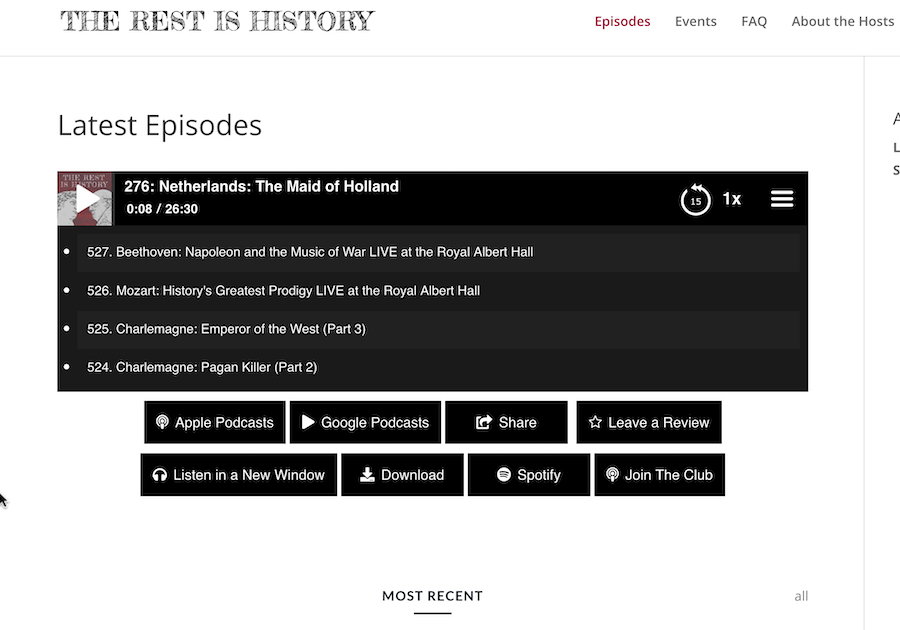
The player does contain the full list of episodes (about 600) including a number of duplicates, so I expected if I inspected the network calls that I’d see a JSON package arriving with what I wanted. This is what I almost always find these days so I’ve had very little call to do any real web scraping - it’s normally just a matter of locating the endpoint and perhaps extracting an API key from a header.
So the list must be in the HTML - let’s have a look. This is a big file (4000 lines formatted) with a lot of divs and jQuery, but here’s our
- with the list of episodes.
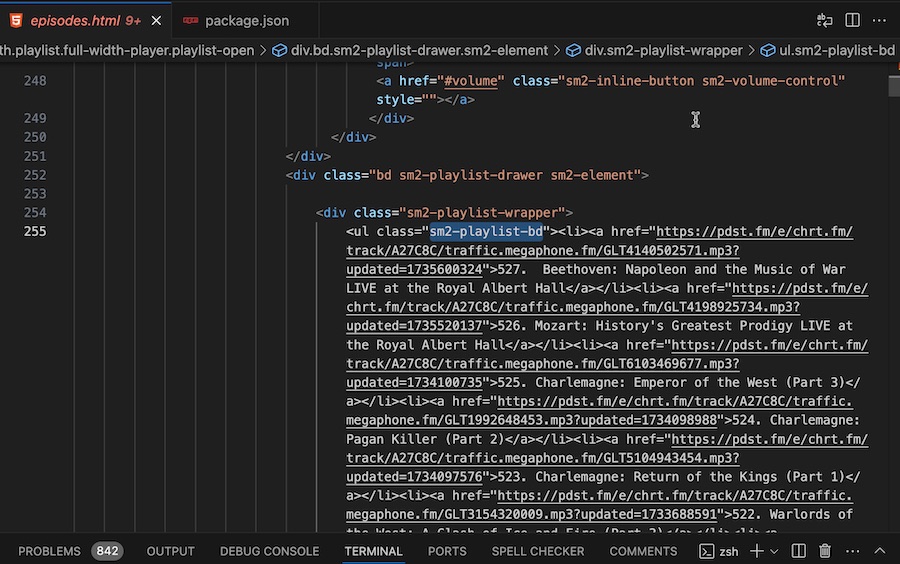
The list is nicely named with a unique class (which I’ve highlighted above), so this is going to be a simple job, and therefore a good demo.
We might just dive into the code then pull it apart.
function enumeratePlaylist(html) {
  // Load the HTML into cheerio
  const $ = cheerio.load(html);

  // Find all list items within the playlist
  const $playlistItems = $("ul.sm2-playlist-bd li");
  if ($playlistItems.length === 0) {
    console.warn("Warning: No playlist items found");
    return;
  }

  console.log(`Info: Found ${$playlistItems.length} items in playlist`);

  // Process each playlist item
  for (const item of $playlistItems) {
    const title = $(item).find("a").text().trim();
    const link = $(item).find("a").attr("href");

    if (!title || !link) {
      console.warn("Warning: Skipping item with missing title or link");
      continue;
    }

    outputEpisode(title, link);
  }
}
Cheerio is a library often used for this purpose, if you’re familiar with jQuery which is used to manipulate the DOM on the browser side, it’s not unreasonable to think of Cheerio as the same thing running in the server. In fact, a lot of the conventions established by jQuery are brought over to Cherio which brings us to our first code snippet.
const $ = cheerio.load(html);
‘html’ is just the HTML we’ve fetched into a string, and here we’re initialising a cheerio object with it and assigning it to a variable named ‘$’. If this is the first time you are encountering this, if would be reasonable to be affronted by this variable name - but this is the convention, so roll with it.
In jQuery, we just have one ‘$’ - the document we’re in, but in Cheerio working on the server we might want to load multiple - hence the load step that doesn’t exist in jQuery.
You can think of ‘$’ as now containing a collection of DOM elements. We can select a sub-set of them with a CSS like syntax:
  // Find all list items within the playlist
  const $playlistItems = $("ul.sm2-playlist-bd li");
In this case, we’re selecting all the list items <li> inside the unordered list <ul> with a class="sm2-playlist-bd".
The Cheerio docs do a great job of explaining the selectors, but basically you are selecting elements, classes get a period in front of them, having elements separated by spaces means you want all the descendants (as in the example above), a ‘>’ limits this to the direct descendants, and there’s a bunch of pseudo selectors such as odd, find, first etc which are used with a colon. The underlying library is css-select, so you can read all the fine details in their readme .
Notice we’ve used the ‘$’ at the start of our variable. Once again, this is the convention, but not as rigorously used for these sub-sets as the single ‘$’ is for the base Cheerio object.
Next we loop through the $playListItems and break down the HTML anchor into the title and the link texts.
    const title = $(item).find("a").text().trim();
    const link = $(item).find("a").attr("href");
Cheerio can do a bit more with the DOM - including manipulating the elements, but really we’ve explained everything you need to know for web scraping with it - it’s a very simple library to use, encapsulating some very complex code we don’t want to write - the perfect reason for using such an abstraction.
Here’s our final code:
import * as cheerio from "cheerio";

function outputEpisode(title, link) {
  console.log();
  console.log(`Title: ${title}`);
  console.log(`Link: ${link}`);
}

function enumeratePlaylist(html) {
  // Load the HTML into cheerio
  const $ = cheerio.load(html);

  // Find all list items within the playlist
  const $playlistItems = $("ul.sm2-playlist-bd li");
  if ($playlistItems.length === 0) {
    console.warn("Warning: No playlist items found");
    return;
  }

  console.log(`Info: Found ${$playlistItems.length} items in playlist`);

  // Process each playlist item
  for (const item of $playlistItems) {
    const title = $(item).find("a").text().trim();
    const link = $(item).find("a").attr("href");

    if (!title || !link) {
      console.warn("Warning: Skipping item with missing title or link");
      continue;
    }

    outputEpisode(title, link);
  }
}

async function loadHtmlFromUrl(url) {
  try {
    // Fetch the webpage content
    const response = await fetch(url);
    if (!response.ok) {
      console.error(`Error: Received ${response.status} for URL: ${url}`);
      return;
    }
    return await response.text();
  } catch (error) {
    console.error(`Error: Error fetching HTML from ${url}:`, error.message);
    return;
  }
}

async function main() {
  const url = "https://therestishistory.com/episodes/";
  console.log(`Info: Fetching HTML from: ${url}`);
  const html = await loadHtmlFromUrl(url);
  if (html) {
    enumeratePlaylist(html);
  }
}

main().catch((err) => console.error("Error:", err));