Allowing Proxmox to use a Dynamic IP
6 Apr 2023I’ve discussed before , that when you first install Proxmox, it grabs an IP address from your DHCP server (this usually runs in your ISP modem if you haven’t created a better setup), but then it stores it as a static ip. This is a sort of compromise that makes sense and works for most circumstances.
As soon as I’ve provisioned a new Proxmox server, I then usually tell the DHCP server, to always serve that address to the MAC address of the new Proxmox server. Since Proxmox does not use the DHCP server on subsequent boots, all that really does is prevent the DHCP server give the same IP address out to another device - which had happened to me prompting the earlier post. The DHCP server had given the address to a wifi lightbulb while the server was off, then when the Proxmox server booted up, the netwrok access was all messed up.
In general, servers should have a static IP address - they are providing resources that other devices on the network need to access, so the combination of grabbing a DHCP address, using it statically, then me locking it in at the DHCP server makes sense.
Except that I’m building a system with a couple of VM’s and a NAS that I’m going to post off, and have it set up by a non-techie at a remote site. So I really need Proxmox on that machine to look for a DHCP server when it boots and collect a dynamic IP address. Like a lot of things in Linux, this is quite a simple change if you know where to look.
What to Change
The configuration file for the network interfaces is /etc/network/interfaces the one on the Proxmox machine I’m setting up looked like this:
iface lo inet loopback

iface eno1 inet manual

auto vmbr0
iface vmbr0 inet static
	address 192.168.100.30/24
	gateway 192.168.100.1
	bridge-ports eno1
	bridge-stp off
	bridge-fd 0
iface is short for interface, and is followed by the interface name. These are the same names you see when you type in ip addr to see the IP addresses.
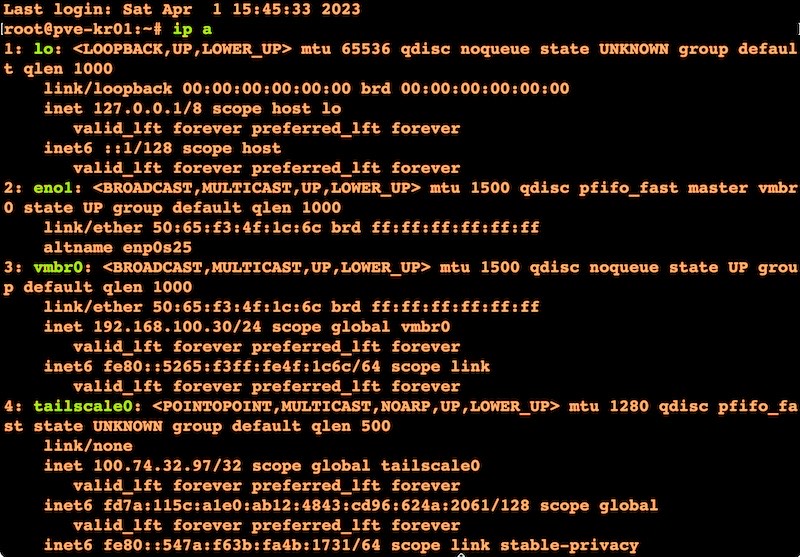
So this is the bit we are interested in:
iface vmbr0 inet static
	address 192.168.100.30/24
	gateway 192.168.100.1
	bridge-ports eno1
	bridge-stp off
	bridge-fd 0
All that bridge stuff can stay the same, I’ll comment out the static bits and change it to use the DHCP. The final file looks like:
auto lo
iface lo inet loopback

iface eno1 inet manual

auto vmbr0
#iface vmbr0 inet static
#	address 192.168.100.30/24
#	gateway 192.168.100.1
iface vmbr0 inet dhcp
	bridge-ports eno1
	bridge-stp off
	bridge-fd 0
I used the mac address to tell the DCHP server to allocate it a different address, and rebooted and Proxmox picked up the new address perfectly.
Hosts
Now the server had a new address, there’s one more place I need to update; /etc/hosts contains the domain information you set during the Proxmox install, and it will include that old IP address. Once the system has a new one, it needs to be edited to include that.
127.0.0.1 localhost.localdomain localhost
192.168.100.28 pve-kr01.local pve-kr01

# The following lines are desirable for IPv6 capable hosts

::1     ip6-localhost ip6-loopback
fe00::0 ip6-localnet
ff00::0 ip6-mcastprefix
ff02::1 ip6-allnodes
ff02::2 ip6-allrouters
ff02::3 ip6-allhosts
After the system is installed at the remote site and booted up, I’ll ssh in (with Tailscale) and make that change, and hopefully be able to access the DHCP server so it does not change in future.
Resources
I found these posts useful when figuring this out:
Versions: Proxmox 7.4-3