Authentication basics for Node apps
19 Aug 2024
Pretty much every serious web app needs to include a way for users to log in securely and to be served their content. Since there’s a lot of complexity in this, it’s highly advisable to use good libraries to support this. In a future post we’re going to use those libraries, but first I want to explain what’s happening at the lower level and tease out some of the concepts as we build a secure system from the ground up.
HTTP
Before we dive into our authentication story, it’s worth thinking about how HTTP works and putting some names to things. We often don’t think too much about this level because the mechanics are most abstracted away for us by libraries such as express.js.
A HTTP request is just a bunch of lines of text arriving at TCP port 80. It’s an agreed on Internet standard originally written by Tim Berners-Lee . The request will include the type of request it is (GET, POST etc), the resource being requested (usually a web-page) - these make up the request line. Then there will be some lines of data called the header that might include things like the type of browser making the request, and optionally a body of the request. The body might contain form data being submitted or a JSON description of an object. If there is a body, there will be a blank line separating it from the header.
GET /hello.txt HTTP/1.1
User-Agent: curl/7.64.1
Host: www.example.com
Accept-Language: en, mi
Similarly, the HTTP response is just some lines of text. A status line (which includes the famous status code such as 404), some headers and the body.
HTTP/1.1 200 OK
Date: Mon, 27 Jul 2009 12:28:53 GMT
Server: Apache
Last-Modified: Wed, 22 Jul 2009 19:15:56 GMT
ETag: "34aa387-d-1568eb00"
Accept-Ranges: bytes
Content-Length: 51
Vary: Accept-Encoding
Content-Type: text/plain

Hello World! My content includes a trailing CRLF.
Sessions
A web app might be serving thousands of users, so we need some way for the server to know which user it is talking to. If our app is a todo list, we don’t want to be showing Jane’s todo items to Fred - each user only wants to see their own items. A common way of doing this is that the browser making requests to the server could send a bit of text along with each request. These little bits of text are called ‘cookies’.
In a very simple example, the cookie could contain the name of our user - for example ‘Fred’ or ‘Jane’. Then when the server received each request, it could read the cookie to know which user was making the request. Here’s our code:
const express = require('express');

const app = express();

// Route to handle requests
app.get('/', (req, res) => {
  if (req.headers.cookie && req.headers.cookie.includes('name=Fred')) {
    res.send('Hello Fred!');
  } else if (req.headers.cookie && req.headers.cookie.includes('name=Jane')) {
    res.send('Hello Jane!');
  } else {
    res.send('Hello stranger!');
  }
});

// Start the server
const PORT = 3000;
app.listen(PORT, () => {
  console.log(`Server is running on port ${PORT}`);
});
The cookie is just a line of text included in the header of the request. Perhaps the request looks like this:
GET / HTTP/1.1
Accept: application/json, text/plain, */*
Cookie: name=Fred
User-Agent: axios/1.5.1
Accept-Encoding: gzip, compress, deflate, br
Host: 127.0.0.1:3000
At the user’s end the cookie is probably stored in an sqlite database - this implementation detail is left up to the browser. When the users browser sends the request, it checks to see if it’s got a cookie for this host and encodes it into the header of the request.
Testing this code
There’s no simple way to test the server code above since regular browsers don’t allow us to set the cookie values. There are however a number of tools that can send customised requests. Some examples of these API testing tools are Postman and Insomnia. Since the Insomnia rug-pull , I’ve been a big fan of Bruno .
All of these tools allow you to specify the URL, the type of request, and any header or body to go with it. They can make the call to the server and show the results.
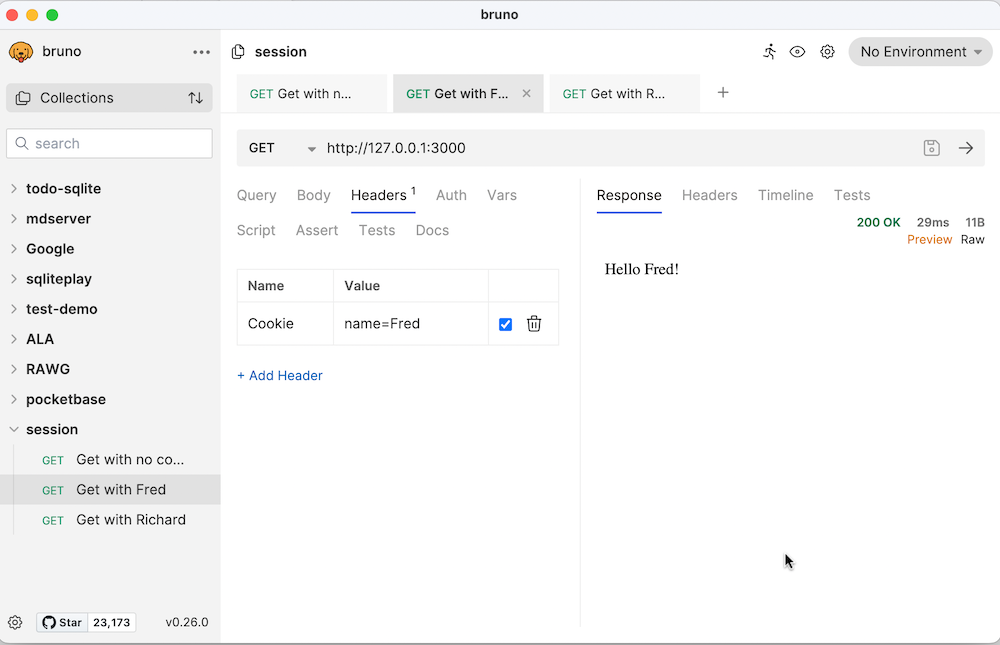
Setting a Cookie
Our server as it stands at the moment is not very secure. Any hacker can just change the value of the cookie to see the content intended for Fred or Jane. We’ll get to authentication eventually, and when we do, we’ll need to be able to set a cookie in the client. How does that work?
Again, we’ll npm install a little library to assist us. cookie-parser is some middleware that lets us easily work with cookies. For the demonstration we’ll just add some routes to set the name to ‘Jane’ or to clear it. Setting it to ‘Jane’ will look like this:
// Route to set a cookie for 'Jane'
app.get("/setuserjane", (req, res) => {
  res.cookie("name", "Jane"); // Set a cookie named 'name' with value 'Jane'
  res.send("Cookie set for Jane");
});
And clearing it, like this:
// Route to clear the 'name' cookie
app.get("/clearuser", (req, res) => {
  res.clearCookie("name");
  res.send("Cookie cleared");
});
And since we’re using cookie-parser, we may as well use it for reading the cookie to tidy things up a bit as well
const express = require("express");
const cookieParser = require("cookie-parser");

const app = express();

// cookie middleware
app.use(cookieParser());

app.get("/", (req, res) => {
  if (req.cookies.name === "Fred") {
    res.send("Hello Fred!");
  } else if (req.cookies.name === "Jane") {
    res.send("Hello Jane!");
  } else {
    res.send("Hello stranger!");
  }
});

// Route to set a cookie for 'Jane'
app.get("/setuserjane", (req, res) => {
  res.cookie("name", "Jane");
  res.send("Cookie set for Jane");
});

// Route to clear the 'name' cookie
app.get("/clearuser", (req, res) => {
  res.clearCookie("name");
  res.send("Cookie cleared");
});

// Start the server
const PORT = 3000;
app.listen(PORT, () => {
  console.log(`Server is running on port ${PORT}`);
});
With this code, we can just use a regular browser for testing. Visiting 127.0.0.1:3000/clearuser will delete the name cookie, which we could test by visiting 127.0.0.1:3000 and getting the “Hello stranger!” message. If we then go to 127.0.0.1:3000/setuserjane and back to 127.0.0.1:3000 we’ll see “Hello Jane!”.
Session ID
Clearly this setup is still insecure since a hacker can easily just include a name cookie to pretend to be any particular user. A better system would be to store a unique ID in the cookie, then match that internally to a particular user. This means we’d have to maintain the links between each GUID and user on the server, but it would massively reduce the chance of a hacker being able to pretend to be a particular user since the chance of correctly guessing a GUID would be very low.
Let’s think about what we’d need to do to make this work for /setuserjane.
- generate a unique ID
- save that ID along with ‘Jane’ in the local store
- save the UID to the cookie to go back to the browser
app.get("/setuserjane", (req, res) => {
  const sessionId = uuidv4(); // Generate a new GUID
  sessions.push({ sessionId, name: "Jane" });
  res.cookie("sessionId", sessionId);
  res.send("Session set for Jane");
});
Then when we needed to check who the user was at a route, we’d need to:
- extract the session ID from the cookie if there is one
- look it up in the server’s session store
- use that to identify the name
app.get("/", (req, res) => {
  const sessionId = req.cookies.sessionId;
  const session = sessions.find(s => s.sessionId === sessionId);

  if (session) {
    res.send(`Hello ${session.name}!`);
  } else {
    res.send("Hello stranger!");
  }
});
Here’s the whole thing. The store of session id:name keypairs is just an array of objects (so it will be wiped on every server restart), and we’re using the uuid library to generate globally unique ids.
const express = require("express");
const cookieParser = require("cookie-parser");
const { v4: uuidv4 } = require("uuid");

const app = express();

// cookie middleware
app.use(cookieParser());

// Array to store session objects
const sessions = [];

app.get("/", (req, res) => {
  const sessionId = req.cookies.sessionId;
  const session = sessions.find(s => s.sessionId === sessionId);

  if (session) {
    res.send(`Hello ${session.name}!`);
  } else {
    res.send("Hello stranger!");
  }
});

// Route to set a session for 'Jane'
app.get("/setuserjane", (req, res) => {
  const sessionId = uuidv4(); // Generate a new GUID
  sessions.push({ sessionId, name: "Jane" });
  res.cookie("sessionId", sessionId);
  res.send("Session set for Jane");
});

// Route to clear the session
app.get("/clearuser", (req, res) => {
  const sessionId = req.cookies.sessionId;
  const index = sessions.findIndex(s => s.sessionId === sessionId);
  if (index !== -1) {
    sessions.splice(index, 1);
  }
  res.clearCookie("sessionId");
  res.send("Session cleared");
});

// Start the server
const PORT = 3000;
app.listen(PORT, () => {
  console.log(`Server is running on port ${PORT}`);
});
express-session
The code above is a great improvement, however in practice, instead of managing session ids ourselves, we’d make use of express-session. Although general good practice is to avoid dependencies, when we’re working with security related code, it’s often advisable to use a trusted library since they will have already dealt with a lot of the edge cases and potential weaknesses.
This is the case with express-session which does basically what we have above, but also deals with potential cross-site scripting, regenerates session id’s to avoid fixation attacks, and signs the cookies to reduce the chance of session data being tampered with. express-session will also handle the storage for the key value pairs for us.
const express = require("express");
const cookieParser = require("cookie-parser");
const session = require("express-session");

const app = express();

// cookie middleware
app.use(cookieParser());

// session middleware
app.use(
  session({
    secret: "REtKU9xyvahuHGd3", // Replace with a strong secret key
    resave: false,
    saveUninitialized: true,
    cookie: { secure: false }, // Set to true if using HTTPS
  })
);

app.get("/", (req, res) => {
  if (req.session.name) {
    res.send(`Hello ${req.session.name}!`);
  } else {
    res.send("Hello stranger!");
  }
});

// Route to set a session for 'Jane'
app.get("/setuserjane", (req, res) => {
  req.session.name = "Jane";
  res.send("Session set for Jane");
});

// Route to clear the session
app.get("/clearuser", (req, res) => {
  req.session.destroy((err) => {
    if (err) {
      res.send("Error clearing session");
    } else {
      res.send("Session cleared");
    }
  });
});

// Start the server
const PORT = 3000;
app.listen(PORT, () => {
  console.log(`Server is running on port ${PORT}`);
});
Authentication flow
Everyone in the world by now is familiar with having to use a username and password to sign into a web app and use it. If we think about how that is going to work with the session ID, it would be something like this:
- When a user tries to access a route that needs authorisation, we check the session object to see if there’s a logged in user attached to it.
- If there is, then the route is served, if not they are redirected to a log in page
- At the log in page, we take a username and password, and check it against an internal store. If they match, we update the session to identify the user
app.get("/", (req, res) => {
  if (req.session.name) {
    res.send(`Hello ${req.session.name}!`);
  } else {
    res.render("login.ejs");
  }
});
I’m using the EJS templating system for this app because it will be handy for later. I’m not going to explain it more here other than to say you can just imagine the above is loading the login form HTML. In fact, it just looks like this:
<!DOCTYPE html>
<html lang="en">
  <head>
    <meta charset="UTF-8" />
    <meta name="viewport" content="width=device-width, initial-scale=1.0" />
    <title>Login</title>
  </head>
  <body>
    <h1>Login</h1>
    <form action="/login" method="post">
      <div>
        <label for="username">Username:</label>
        <input type="text" id="username" name="username" />
      </div>
      <div>
        <label for="password">Password:</label>
        <input type="password" id="password" name="password" />
      </div>
      <button type="submit">Login</button>
    </form>
  </body>
</html>
This form posts to the /login route, which looks like this:
app.post("/login", (req, res) => {
  const { username, password } = req.body;
  if (username === "demo" && password === "password") {
    req.session.name = username;
    res.send("Logged in");
  } else {
    res.send("Invalid username or password");
  }
});
It extracts the user name and password from the body of the request (ie from the form). If they are a match, then it sets “name” in the session which signifies to the rest of the app that we are validly logged in.
To log out, we just tell express-session to destroy the session:
app.get("/logout", (req, res) => {
  req.session.destroy((err) => {
    if (err) {
      res.send("Error clearing session");
    } else {
      res.send("Session cleared");
    }
  });
});
Tidy up
We just need a bit of refactoring before we move on. Currently our /login route only allows a single user, and is not great to read, let’s change it to:
app.post("/login", (req, res) => {
  const { username, password } = req.body;
  if (isValidCredentials(username, password)) {
    req.session.name = username;
    res.send("Logged in");
  } else {
    res.send("Invalid username or password");
  }
});
That’s better, and for the isValidCredentials() we’ll check against an array of objects like so:
const validCredentials = [
  { username: "demo", password: "password" },
  { username: "Jane", password: "password" },
  { username: "Fred", password: "password" },
];

function isValidCredentials(username, password) {
  return validCredentials.some(
    (cred) => cred.username === username && cred.password === password
  );
}
If you haven’t met the JavaScript .some() method, it’s used to run a callback function against the elements in an array until it returns true or comes to the end of an array.
We’ve made a few changes, lets revisit the complete server.js code:
// npm install cookie-parser express express-session

const express = require("express");
const cookieParser = require("cookie-parser");
const session = require("express-session");
const bodyParser = require("body-parser");

const app = express();

// Set up view engine
app.set("views", "views");
app.set("view engine", "ejs");

app.use(cookieParser());
app.use(bodyParser.urlencoded({ extended: false }));

// session middleware
app.use(
  session({
    secret: "REtKU9xyvahuHGd3", // Replace with a strong secret key
    resave: false,
    saveUninitialized: true,
    cookie: { secure: false }, // Set to true if using HTTPS
  })
);

app.get("/", (req, res) => {
  if (req.session.name) {
    res.send(`Hello ${req.session.name}!`);
  } else {
    res.render("login.ejs");
  }
});

// Route to clear the session
app.get("/logout", (req, res) => {
  req.session.destroy((err) => {
    if (err) {
      res.send("Error clearing session");
    } else {
      res.send("Session cleared");
    }
  });
});

const validCredentials = [
  { username: "demo", password: "password" },
  { username: "Jane", password: "password" },
  { username: "Fred", password: "password" },
];

function isValidCredentials(username, password) {
  return validCredentials.some(
    (cred) => cred.username === username && cred.password === password
  );
}

app.post("/login", (req, res) => {
  const { username, password } = req.body;
  if (isValidCredentials(username, password)) {
    req.session.name = username;
    res.send("Logged in");
  } else {
    res.send("Invalid username or password");
  }
});

// Start the server
const PORT = 3000;
app.listen(PORT, () => {
  console.log(`Server is running on port ${PORT}`);
});
Plaintext passwords
It’s a bad idea to ever store passwords in plaintext anywhere. A solution for this is to hash the password before storing it, then when we need to test a password a user has entered, we test the hash of the password the user has entered against the hashes we have stored. I’m being very casual in my language here - I should probably be saying salting and hashing. For the purposes of this discussion the idea is to turn each password into gobbledygook in such a way it’s not possible to turn it back into the password.
We’re going to use the bcrypt to do the heavy lifting for us since it’s going to be more cryptographically sound than anything we could write.
The encryption process is resource intensive, so these are going to be async operations.It’s a small trade-off for the security we’re adding.
const bcrypt = require("bcrypt");

const validCredentials = [
  {
    username: "demo",
    hashedPassword:
      "$2b$10$MYd23sm2O1AuAU1l0sPV7enE.XkJpTYC4fga1Dm8Wx33u/8T.L9HC",
  },
  {
    username: "Jane",
    hashedPassword:
      "$2b$10$MYd23sm2O1AuAU1l0sPV7enE.XkJpTYC4fga1Dm8Wx33u/8T.L9HC",
  },
  {
    username: "Fred",
    hashedPassword:
      "$2b$10$MYd23sm2O1AuAU1l0sPV7enE.XkJpTYC4fga1Dm8Wx33u/8T.L9HC",
  },
];

async function isValidCredentials(username, password) {
  const user = validCredentials.find((cred) => cred.username === username);
  if (!user) return false;
  return await bcrypt.compare(password, user.hashedPassword);
}

app.post("/login", async (req, res) => {
  const { username, password } = req.body;
  if (await isValidCredentials(username, password)) {
    req.session.name = username;
    res.send("Logged in");
  } else {
    res.send("Invalid username or password");
  }
});
Okay, now we have a login system, with safeish password storage and session management so the user doesn’t have to log in on every page.
Persisting sessions
One last thing before we wrap up this overly long post. Currently, if Jane is logged in, and the server is rebooted, when she returns, her session will have been eliminated. That’s to say, her browser will pass the session id in it’s cookie, but the server won’t recognise it and will force her to log in again. That’s not the end of the world (in fact a future improvement should probably be to expire sessions every now and then) but it would be nicer if the session information survived server reboots.
By default, express-session uses a memory store, but this can be swapped out for other types of stores. Frequently, production apps will use a database of some kind to keep the session data, but for a single instance app with a hundred or so users a simpler system is just to use the host file system. Such a thing is built into express-session in the form of session-file-store.
Implementing this is simple, we just need to declare a variable for the class, then include it in our initialisation of the session middleware.
const FileStore = require("session-file-store")(session);

const app = express();

// Set up view engine
app.set("views", "views");
app.set("view engine", "ejs");

app.use(cookieParser());
app.use(bodyParser.urlencoded({ extended: false }));

// session middleware
app.use(
  session({
    secret: "REtKU9xyvahuHGd3", // Replace with a strong secret key
    resave: false,
    saveUninitialized: true,
    cookie: { secure: false },
    store: new FileStore({logFn: function(){}})
  })
);
You don’t need the business with logFn, that’s just a hack to subdue the logs. Without it, express-session logs an error each time a session id arrives in a cookie and there’s no corresponding file for it. That happens all the time when I’m developing so I foolishly turn it off.
Now every time a session is created, it will be stored as a text file of JSON in the sessions directory. When a browser makes a request, the express-session will check for a file matching the session id from the cookie, and load the session data from it if needed.
Since express-session is now dealing with our cookies, we can eliminate cookie-parser.
Here’s where we’re up to:
const express = require("express");
const session = require("express-session");
const bodyParser = require("body-parser");
const bcrypt = require("bcrypt");
const FileStore = require("session-file-store")(session);

const app = express();

// Set up view engine
app.set("views", "views");
app.set("view engine", "ejs");

app.use(bodyParser.urlencoded({ extended: false }));

// session middleware
app.use(
  session({
    secret: "REtKU9xyvahuHGd3", // Replace with a strong secret key
    resave: false,
    saveUninitialized: true,
    cookie: { secure: false },
    store: new FileStore({logFn: function(){}})
  })
);

app.get("/", (req, res) => {
  if (req.session.name) {
    res.send(`Hello ${req.session.name}!`);
  } else {
    res.render("login.ejs");
  }
});

// Route to clear the session
app.get("/logout", (req, res) => {
  req.session.destroy((err) => {
    if (err) {
      res.send("Error clearing session");
    } else {
      res.send("Session cleared");
    }
  });
});

const validCredentials = [
  {
    username: "demo",
    hashedPassword:
      "$2b$10$MYd23sm2O1AuAU1l0sPV7enE.XkJpTYC4fga1Dm8Wx33u/8T.L9HC",
  },
  {
    username: "Jane",
    hashedPassword:
      "$2b$10$MYd23sm2O1AuAU1l0sPV7enE.XkJpTYC4fga1Dm8Wx33u/8T.L9HC",
  },
  {
    username: "Fred",
    hashedPassword:
      "$2b$10$MYd23sm2O1AuAU1l0sPV7enE.XkJpTYC4fga1Dm8Wx33u/8T.L9HC",
  },
];

async function isValidCredentials(username, password) {
  const user = validCredentials.find((cred) => cred.username === username);
  if (!user) return false;
  return await bcrypt.compare(password, user.hashedPassword);
}

app.post("/login", async (req, res) => {
  const { username, password } = req.body;
  if (await isValidCredentials(username, password)) {
    req.session.name = username;
    res.send("Logged in");
  } else {
    res.send("Invalid username or password");
  }
});

// Start the server
const PORT = 3000;
app.listen(PORT, () => {
  console.log(`Server is running on port ${PORT}`);
});
Where next?
It’s been a bit of a trek to get to this point, so I’m winding this up here, and we’ll take it to the next level in a future post. Some of the next steps to explore are to move our secrets out of the source file, and to use Passport.js like the two million other projects who downloaded it this week.