Beginning Python
5 May 2023
I’ve gotten interested in Plain Text Accounting , and I’m looking at using BeanCount for small business & personal finances. If you haven’t heard of this, it’s a command line program that uses text files with a human comprehensible syntax to define transactions, then acts on them to create the needed reports etc. A side benefit for developers is that it’s then easily version controlled using GIT, and of course there’s VS Code plugins for it.
Transactions in one of these BeanCount text files looks like this:
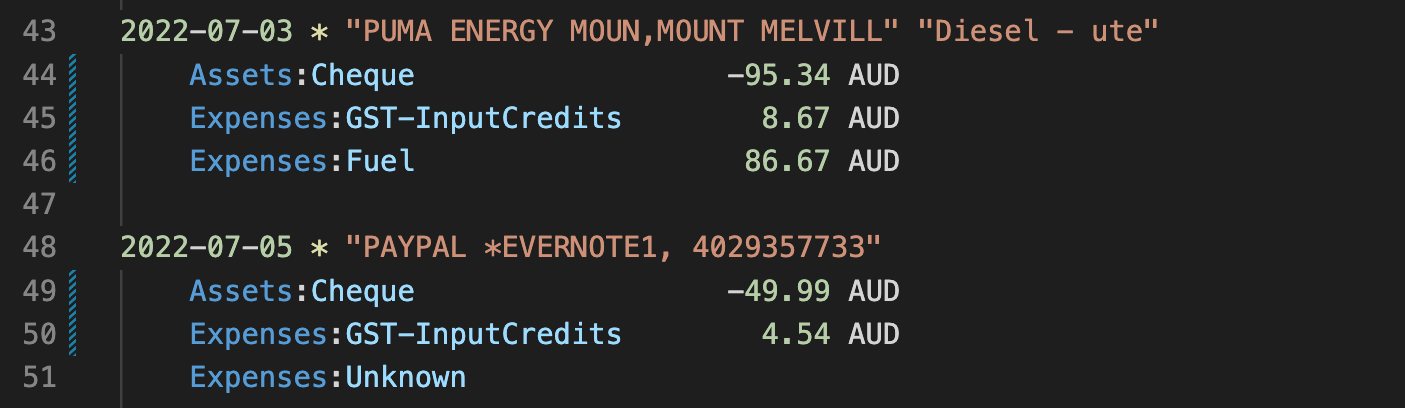
A good way to enter all these transactions is from your bank statement. Banks make this data available to customers, usually in a range of formats that are digestible by accounting programs. One of the formats I can get this data in looks like this:
"116-002 123456789","05/07/2022","WDL05","-49.99","RETAIL PURCHASE","PAYPAL *EVERNOTE1, 4029357733","0107 AUD000000004999"
"116-002 123456789","03/07/2022","WDL05","-95.34","RETAIL PURCHASE","PUMA ENERGY MOUN,MOUNT MELVILL","0207 AUD000000009534"
So the question is how do I get from one format to the other. BeanCount does have the hooks to enable you to write some Python to facilitate these imports, but I might want to do some extra processing - for example, the only thing I ever buy from Mt Melvile Puma is diesel for my ute, so that transaction can be written without any human intervention.
So what I need is a command line program that takes the bank’s CSV input and spits out nicely formatted BeanCount format transaction text with as much of my work done for me as possible. I decided to do this in Python for a few reasons, but mostly because it’s the right tool for this sort of job, I might be able to contribute something back to BeanCount, and I should really learn the Python basics.
The rest of this post looks at snippets of things I learned in the process. They might be helpful to someone completely new to Python but with some other programming experience.
Python Environment
I’m all in on VS Code these days, and I assumed Python was already installed on my Mac somewhere since BeanCount is in Python and I’d been using that all evening. Sure enough, when I created a .py file, VS Code suggested the Microsoft Plugin, then when I allowed that it prompted my to set up the environment, which I also agreed to. It found two versions of Python - a HomeBrew one and the BeanCount one which was a bit newer.
Once I’d chosen that, it created a .venv, and I could type in Python code and execute it from VS Code, or drop into the terminal and run it at the command line. The whole operation was delightful.
Python
Python is a high-level, general-purpose, dynamically typed language. It is interpreted and garbage collected - I sort of think of it as scripting, but with a real programming language - but that is majorly underselling it.
Coming from Delphi/C++/Swift the use of indentation to define code blocks is slightly discomfiting, but no doubt I’ll get use to it. Python uses a combination of the colon and white space for blocks.
Command Line Arguments
My plan for this utility is that I’ll type something like this at the command line to process the bank CSV file into a text file full of the BeanCount transactions:
python csv2bean.py bank.csv > 2022_July.bean
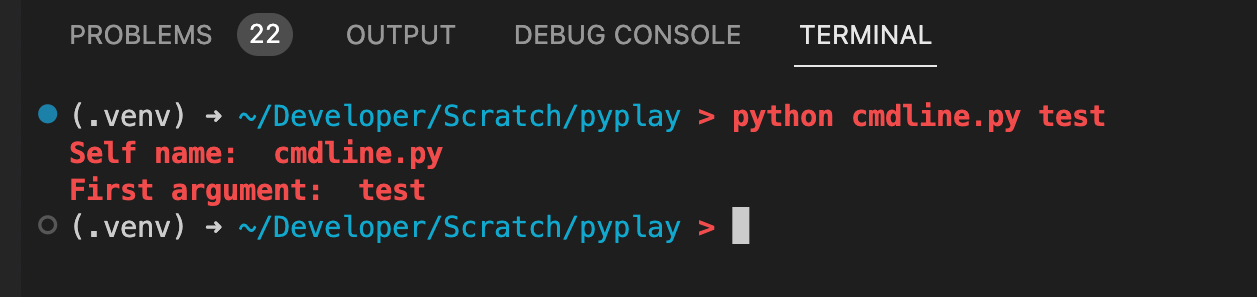
So the first problem is grabbing the command line arguments. There’s a library to import for that - sys. The arguments will be in an array argv[]so the demo code could look like this:
import sys

print('Self name: ', sys.argv[0])
if len(sys.argv) > 1:
    print('First argument: ', sys.argv[1])
CSV Processing
There’s a couple of library options for processing CSV files. One is just called csv, and the other pandas. pandas is a popular library that does all sorts of powerful stuff for data processing type tasks. For our simple needs, [csv](https://docs.python.org/3/library/csv.html) seems fine.
csv.reader(filename) will give us a collection of lines to iterate through, and we can break each line into a row array which will contain each piece of text.
# process a bank extended csv file to a beancount transaction
import csv, sys

if len(sys.argv) < 2:
    print('Error: supply a file name to process')
input_file = sys.argv[1]

with open(input_file, 'r') as csv_file:
    reader = csv.reader(csv_file)
    for row in reader:
        if len(row) < 6:
            print('Error: expected more fields: ')
            print(row)
        trans_date = row[1]
        trans_type = row[2]
        trans_amount = float(row[3])
        trans_narration = row[4]
        trans_payee = row[5]
        print("On "+trans_date+ " "+str(trans_amount)+" paid to "+trans_payee+" for "+trans_narration)
    csv_file.close()

Python Functions
Beancount dates have to be in the format of YYYY-MM-DD and my Australian bank ones are currently DD/MM/YYYY so I need to do a little text processing. That seems like something that should be split off into a function.
Functions are defined with def, can accept arguments and return values with return. Here’s a (non-functional) version of the function to format the date:
def flip_date(dmy_date):
    return dmy_date
We can think of strings as arrays of characters, so the chopping and changing we want to do will end up like this:
def flip_date(dmy_date):
    if len(dmy_date) < 10:
        print('Error: date too short: '+dmy_date)
    return dmy_date[6:10]+'-'+dmy_date[3:5]+'-'+dmy_date[0:2]
The only notable thing there is that when we slice out a sub-string with these indexes, the second index is exclusive - ie it’s the position after the last position we’re interested in.
Output
That’s about all the work we need to do for this program, all that’s left is to spit it out in the correct format.
print(trans_date+ ' * "'+trans_payee+'" "'+trans_narration+'"')
print('    Assets:Cheque:    '+str(trans_amount)+' AUD')
if trans_amount < 0.0:
    print('    Expenses:GST_InputCredits:    '+f'{-trans_amount/11:.2f}'+' AUD')
    print('    Expenses:Unknown\n')
else:
    print('    Income:Unknown\n')
Most of that is self evident - string concatenation in Python is with the + operator, and the str() function does the type conversion from integers or floating point numbers.
In Australia there’s a 10% GST (similar to VAT or sales tax), so the output code checks if this is a debit, and if so, calculates the GST by dividing the amount by 11. This is usually going to end in a number with a lot of decimal places, so it needs to the rounded to the nearest cent. That’s what this weird looking thing is doing:
f'{-trans_amount/11:.2f}'
It’s basically the printf() type formats. The f at the start signifies that’s what’s happening, then the format goes after the colon.
Resources
Most everything I googled while figuring things out came up with useful results from either W3 School , or DigitalOcean , so I’d suggest checking them out for more.