Bookworm Challenges
6 Nov 2022
Another set of challenges for a #100DaysofSwiftUI tutorial app. Project 11 was a book tracking app - the big new thing was using CoreData. Here’s the challenges for it .
Right now it’s possible to select no title, author, or genre for books, which causes a problem for the detail view. Please fix this, either by forcing defaults, validating the form, or showing a default picture for unknown genres – you can choose.
The genre is already forced since it uses a picker, but I added a default (plain grey) image to deal with the situation that there’s no data for it in a record. It doesn’t make sense to provide defaults for the title or author, but some validation to ensure those fields are not empty is worthwhile.
Section {
    Button("Save") {
        let newBook = Book(context: moc)
        newBook.id = UUID()
        newBook.title = title
        newBook.author = author
        newBook.rating = Int16(rating)
        newBook.genre = genre
        newBook.review = review
        newBook.date = Date()

        try? moc.save()
        dismiss()
    }
}
.disabled(title.isEmpty || author.isEmpty || genre.isEmpty)

Modify
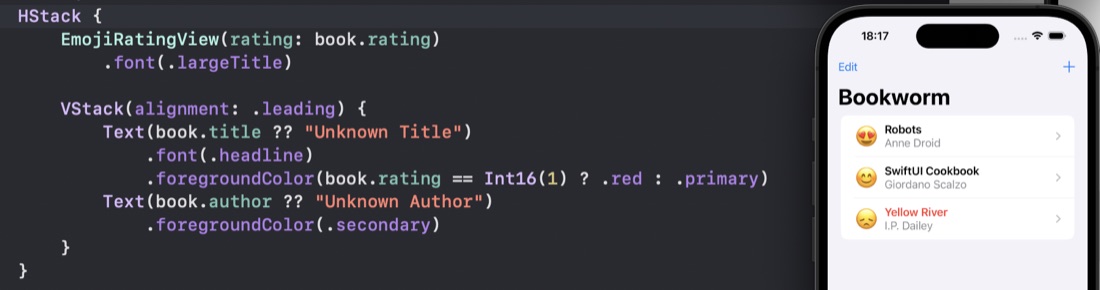
ContentViewso that books rated as 1 star are highlighted somehow, such as having their name shown in red.
Straightforward, with use of the ternary operator.

Add a new “date” attribute to the Book entity, assigning
Date.nowto it so it gets the current date and time, then format that nicely somewhere inDetailView.
- Add the date field to the datamodel
- Set it to current date in the Save of the AddView
- Showing it in the Detail View was a little more interesting - adding a test to ensure it was in the database - since we’ve now got two versions of these records.
Text(book.author ?? "Unknown author")
    .font(.title)
    .foregroundColor(.secondary)

let date = book.date ?? Date()
Text(date.formatted(.dateTime.day().month().year()))
    .foregroundColor(.secondary)
    .opacity(date == book.date ? 1 : 0)

Text(book.review ?? "No review")
    .padding()