Digital Ocean first impressions
19 Aug 2023
I’ve been thinking about the time it takes me to provision a guest VM in Proxmox. I seem to remember on BinaryLane it was seconds rather than minutes. This seemed to be a good excuse to use the free credit I’ve heard about for Linode or Digital Ocean hundreds of times in podcast adverts, so I claimed the $200 credit for being a Late Night Linux listener at Digital Ocean. They extracted $5 out of me in the process, so I guess they are in front on that transaction. $200 would run a little VM for a couple of years at their rates, but of course it’s limited to two months, at the end of which I will have an account sitting there, with my credit card already recorded - so all the friction is gone if I need an internet facing machine for some purpose - which is clearly their dastardly plan
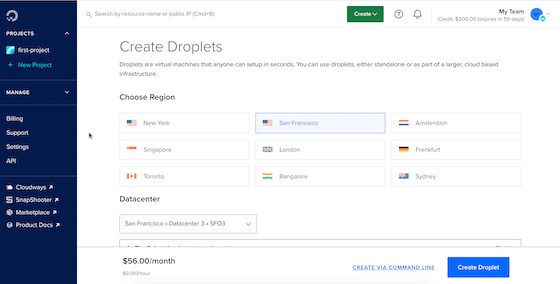
The process of creating a ‘droplet’ (that’s what they call their VM’s) was straightforward - select the datacentre, machine size etc You can upload your SSH key which is a nice touch.
When I got to the end of all that, I hit create and timed the boot up of the Debian 12 system I’d chosen - 42.13 seconds.
I could ping the public IP, so it existed, but couldn’t ssh in as root, and didn’t know my user name. After trawling through their Getting Started docs, I found one that said to use your email that you signed up with. That didn’t make sense or work. I watched a video , then searched further and found I should have gone into the advanced options and written a script to add a user - a sample one was provided.
I destroyed the first machine and created a second one with the sample user script (which I’ve since gone back and searched for but could not find) which basically adds the user and assigns the ssh key. Once that was booted I could ssh in, but not sudo since I didn’t know the password.
There is a ‘console’ so I used that to set a password for the user the script had created, then was able to both ssh in and use sudo. I guess the idea of the script is great if you know what you’re doing and going to be creating a lot of VM’s, but this was a painful start compared to BinaryLane or my homelab. I figured out afterwards, this was because I’d chosen Debian for the distro - you can’t ssh in as root. If I choose a more relaxed distro, I could do that, and create my user then patch up the root access.
The rest of the experience was fine - the web interface is clear enough apart from my initial grumble. I couldn’t paste into the web console, and I’ve noticed that in Proxmox as well so I guess that’s some sort of limitation. In any case, once you’ve set up your ssh user properly you never need use it again.