Don't Use Stupid Project Names
22 Sept 2022I’m up to Day 32 of 100 Days of Swift UI, and although the tutorial is named “Project 6” it’s not really a project that becomes a simple app, it’s really just a series of tutorials on animation that I assume the techniques, but none of the code, will be used later in apps.
I do find there’s some value in typing in the code (rather than cutting and pasting, or just passively watching) so I opened up Xcode to follow along. There not being an app name offered, I used “Project 6 - Animation”. XCode seemed happy enough with that, and created the directory and placeholder, but then refused to build it saying there was seven errors involving the __PACKAGE_NAME macro and a missing }
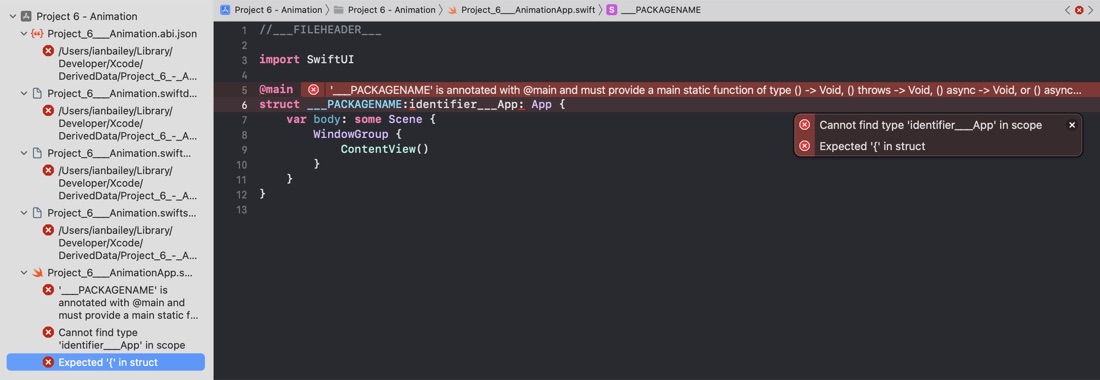
I did a do-over with a project name of “Animation” and it works just fine. When I updated to XCode 14 I didn’t keep the previous version, so I’ve no idea if letting the user do this is an introduced bug or not. The culprit is the ‘-’. Projects with just a space in the name work fine.
Since a google of the first error does not pull up any hits, I’ll paste it in here for future travelers giving their projects names with dashes.
'___PACKAGENAME' is annotated with @main and must provide a main static function of type () -> Void, () throws -> Void, () async -> Void, or () async throws -> Void
As far as I can make out, that is part of the boilerplate creation process and should have been replaced. Likely the dash and the spaces are all replaced with underscores to make a valid app name and the triple underscore has a magic meaning of some kind.