Download a Directory from a GitHub Repo
30 Aug 2022For Challenge 2 in the 100 days, I needed to download a directory of flag images from Paul’s GitHub. He has all the projects as sub-directories of a single “Hacking With Swift” repo. I didn’t need to whole thing, just the directory with the images.
Strangely, git does not have any simple way of doing this. Neither does GitHub - I assumed the web interface would have a “download as zip” option as it does for tags.
One of the popular solutions on StackOverflow was to use SVN, which GitHub supports and which does have this functionality. I much preferred Avinash Takur’s suggestion to use GitHub’s web based VSCode.
To access their VSCode, change the .com in the repo url to .dev. For example, instead of https://github.com/twostraws/HackingWithSwift/tree/main/SwiftUI/project2, go to https://github.dev/twostraws/HackingWithSwift/tree/main/SwiftUI/project2
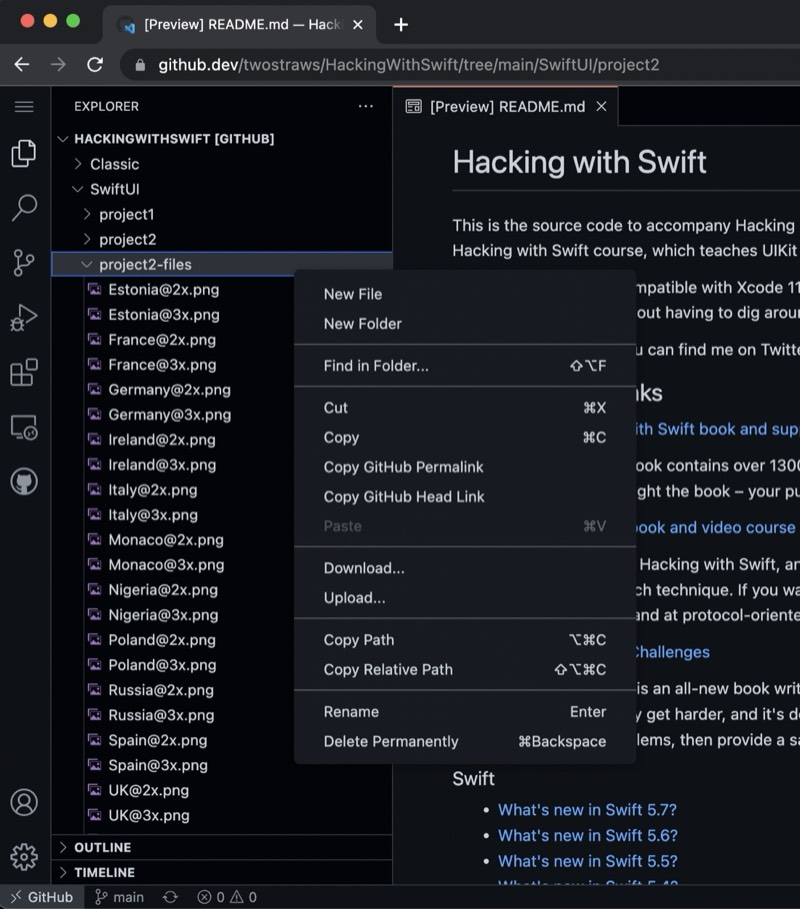
Once that’s done, right click on the directory to download it.