Express router for better code organisation
28 Apr 2025A Node/Express app I’m working on has been sprouting routes so much that the server.js file has swollen to 800 lines - way past my 200-250 comfort zone, so it’s time to organise the routes into their own files. That seems like a good topic for a beginner blog post, so let’s dive in.
Imagine we’ve written this little Node/Express app.
import express from "express";
import {
  dbCustomersGet,
  dbCustomersGetById,
  dbCustomersDelete,
  dbOrdersGet,
  dbOrdersGetById,
  dbOrdersGetByCustomerId,
  dbOrdersDelete,
} from "./db.js";

const app = express();
app.set("view engine", "ejs");
const port = 3002;

app.use(express.urlencoded({ extended: true }));

app.get("/", (req, res) => {
  res.redirect("/customers");
});

app.get("/customers", (req, res) => {
  const customers = dbCustomersGet();
  res.render("customers", { customers });
});

app.get("/customers/:id", (req, res) => {
  const customer = dbCustomersGetById(req.params.id);
  const orders = dbOrdersGetByCustomerId(req.params.id);
  res.render("customer", { customer, orders });
});

app.get("/customers/:id/delete", (req, res) => {
  dbCustomersDelete(req.params.id);
  res.redirect("/customers");
});

app.get("/orders", (req, res) => {
  const orders = dbOrdersGet();
  res.render("orders", { orders });
});

app.get("/orders/:id", (req, res) => {
  const order = dbOrdersGetById(req.params.id);
  const customer = dbCustomersGetById(order.customerId);
  res.render("order", { order, customer });
});

app.get("/orders/:id/delete", (req, res) => {
  dbOrdersDelete(req.params.id);
  res.redirect("/orders");
});

app.listen(port, () => {
  console.log(`Listening on http://127.0.0.1:${port}`);
});
Although concocted, this would seem familiar to anyone who’s built a CRUD business app.
One thing I’ve done better here than in the real app I’m fixing is that the routes are carefully named - all the ‘orders’ routes begin with /orders, all the ‘customers’ routes with /customers. As we’ll see, this is going to make separating them out much easier.
Express Router
Like almost everything in Express, the router is middleware. Let’s look at how our index.js has changed once we’ve moved the routes out into a customers.js and an orders.js.
import express from "express";
import customersRouter from "./routes/customers.js";
import ordersRouter from "./routes/orders.js";

const app = express();
app.set("view engine", "ejs");
const port = 3002;

app.use(express.urlencoded({ extended: true }));

// routers
app.use("/customers", customersRouter);
app.use("/orders", ordersRouter);

// root route redirect to customers
app.get("/", (req, res) => {
  res.redirect("/customers");
});

app.listen(port, () => {
  console.log(`Listening on http://127.0.0.1:${port}`);
});
So much neater!
First of all, the imports for all my database functions are gone - they’ll be in the files for our two routes.
There are a couple of new imports though - our two ‘routers’.
import customersRouter from "./routes/customers.js";
import ordersRouter from "./routes/orders.js";
Then further down, they are installed as middleware:
// routers
app.use("/customers", customersRouter);
app.use("/orders", ordersRouter);
You can pretty much see from this code how this works. Any routes that begin with “/customers” are sent off to the customersRouter which we’ve imported from "./routes/customers.js", and the routes for “/orders” go to the ordersRouter. Any route requests that don’t match those will be sought in the main file where the app is declared.
You might have noticed how we’re organising the routes - there’s a “routes” folder and they’re dropped in there. That’s not a requirement, but it’s a common convention.
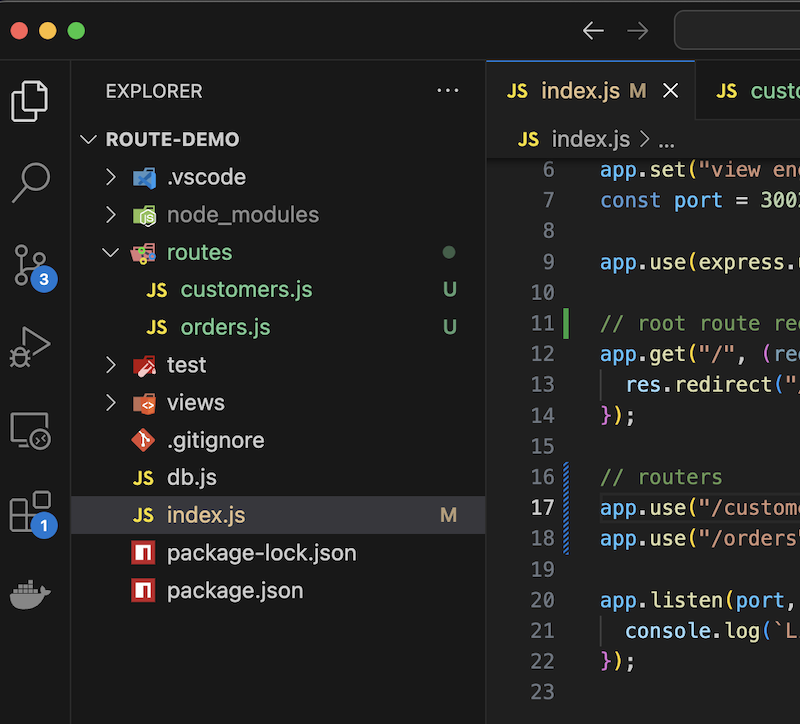
Let’s have a look at one of the route files:
import express from "express";
import {
  dbCustomersGet,
  dbCustomersGetById,
  dbCustomersDelete,
  dbOrdersGetByCustomerId,
} from "../db.js";

const router = express.Router();

// GET /customers
router.get("/", (req, res) => {
  const customers = dbCustomersGet();
  res.render("customers", { customers });
});

// GET /customers/:id
router.get("/:id", (req, res) => {
  const customer = dbCustomersGetById(req.params.id);
  const orders = dbOrdersGetByCustomerId(req.params.id);
  res.render("customer", { customer, orders });
});

// GET /customers/:id/delete
router.get("/:id/delete", (req, res) => {
  dbCustomersDelete(req.params.id);
  res.redirect("/customers");
});

export default router;
This is nice. We’re only importing the customer database functions, and we’ve got all the customer routes in one place in an easily comprehensible file.
There’s really only one gotcha here which we alluded to earlier. You’ll notice how I’ve added a comment over each route?
// GET /customers/:id
router.get("/:id", (req, res) => {
  const customer = dbCustomersGetById(req.params.id);
  const orders = dbOrdersGetByCustomerId(req.params.id);
  res.render("customer", { customer, orders });
});
This is because in the process of specifying that this file deals with all the “/customers” routes, that part of the request URL has been stripped off - so a call to http://127.0.0.1:3002/customers/5 arrives here as /5. It’s another common practice to put the route path in a comment as I’ve done here as a reminder to myself. I wish the Express team had just left the requests unaltered.
Conclusion
Really, that’s about all there is to using the Express Router to split your routes out into files; it’s quite straightforward. A good naming convention for your routes so that logical groups of routes all start with the same specifier will be a great help.