Git/GutHub - macOS - marking file as executable
30 Apr 2023
I’m working on the world’s shortest shell script - it’s called by cron to pull down a JSON weather report to a text file using curl so I can expose it on an Nginx endpoint. The purpose is to allow me to hammer that weather API from multiple machines I control without violating the TOS of my free API key.
Because I’m learning all the things, instead of just creating this on the VPS where it runs, it’s cloned from my GitHub repo for that machine. I’m creating and editing the file in VS Code on macOS, pushing to Github, then pulling the changes on the Ubuntu VPS. The intention is that this will eventually become automated with a Github action.
The problem I’ve run into is that I want the file permissions so show the file is executable so when it arrives on the VPS - so no chmod is required to make it usable.
Some googling suggested that the executable flag (but none of the other file permissions) is stored and handled by git, and furthermore, there’s a git command to set it:
git update-index --chmod=+x bin/fetchWeather.sh
So I wrote my (one line) script, applied the command above, committed and pushed, then pulled it down on the VPS and the bit wasn’t set. So somewhere in this chain there’s a problem.
At this stage, it’s helpful to know that if the executable bit is set for a file, GitHub shows this in the header of the file where it says how many lines etc.


In my case, it was showing that the file was not marked as executable in GitHub, so the problem was that the git update-index was not working for me for some reason.
A bit more investigation turned up that there’s a setting in the .git/config file called filemode that controls if the originating file system executable status is preserved. That sounded promising - I was expecting to find that is was set to false, and I could change it to true, and it would fix my problem. I had a quick look and, oh, it’s already set to true.
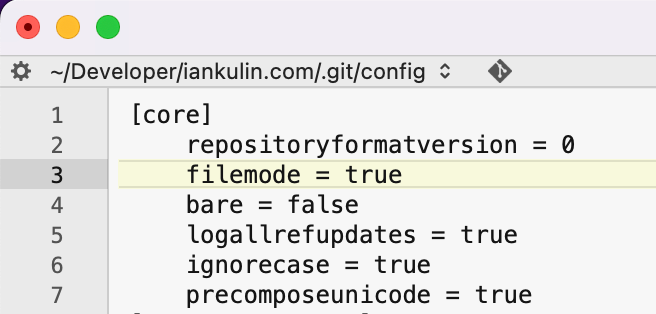
Seems like it’s involved though, so perhaps (my thinking went) I should change it to false and see if the problem goes away…. and it did. I changed this value to false, applied the executable bit with the git update-index command, committed, pushed it to GitHub (it was marked executable), pulled it down to the VPS, it was still marked executable!
My whole tech life, I’ve never been happy with solutions to problems where I don’t understand the underlying reasons. If things just start working when you’re fiddling around and you’re not clear on why, it feels like they could change back with just as easily and with no more reason.
A clue to what’s going on (many readers will already have figured this out) was given to me by ChatGPT. When I was asking it about this issue, it kept insisting I should chmod the file to be executable before I committed it. I had to be really clear with it that this wasn’t possible on macOS because it doesn’t have that sort of file permissions…

Of course, in fact, it does. macOS is based on FreeBSD (“without the good bits” goes the old joke told at Unix conferences). I’d just somehow forgotten this - I guess in Linux I’m used to explicitly seeing them every time I look at a directory contents, but never see it on Mac. Even if you go into “Get Info” for a file in Finder on the mac, you can see the read/write permissions, but not the executable bit status.
So how do you set and view the executable status on mac? Exactly the same as on any Unix.

I did that, and changed the /git/config filemode back to true. Committed and pushed the file up (without worrying about the git update-index) and it showed up in GitHub as executable, pulled it down, still executable.