Gitting up to date
27 Sept 2022I’ve started the habit of branching my code for each feature or batches of features. This is not really needed, I’ve developing solo, and the code on main is not in production. I could just go on committing, but part of my process is about becoming competent with git.
There are a couple of git commands (merge and rebase) that mush code between branches together in different ways. The video below (from Manuel Lorenz at Academind ) is a particularly clear look at these two commands.
The discussion that follows is essentially just a re-hash of the video above, so if you think you’ve got it, you can leave now!
Here’s the situation we start with. A “feature” branch was created at the point in time that the most recent commit on the master branch was “m2”. A couple of commits have been made to the feature branch, but meanwhile a further commit has been made on the master branch:
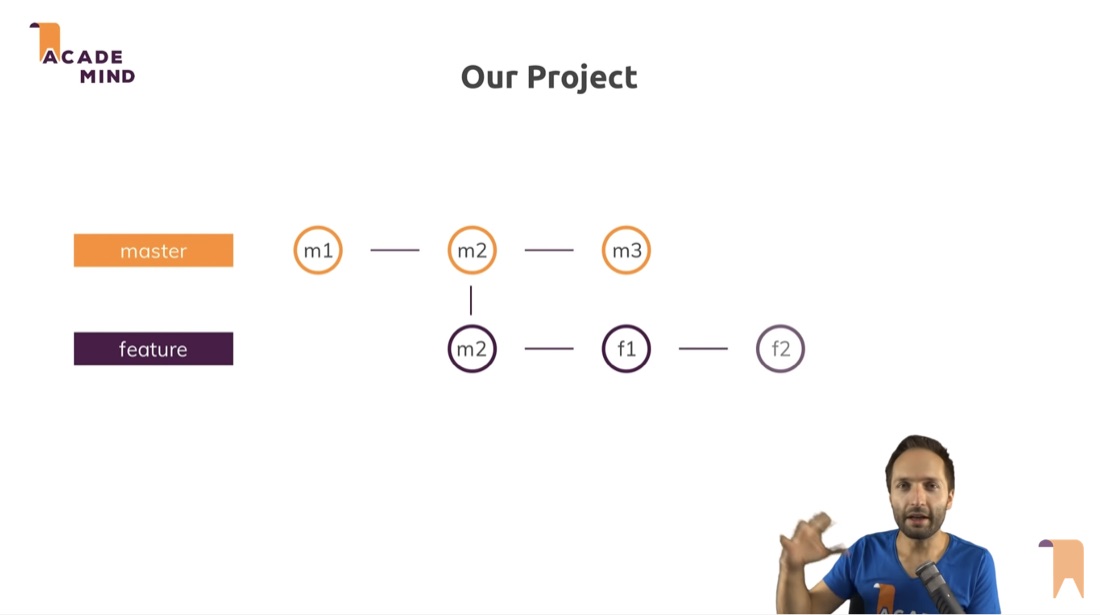
So, what are the options now? (this is just a rehash of the video above in my words, so if you already watched that, you may leave :- ) I’m going to use “master” in my discussions here since that’s what Manuel uses, but if you’re new to git and you’ve only ever seen “main” - they are just different names for the default branch, “main” is the current (and slightly better) preference for that name.
Merge
We could checkout the master branch, and merge feature into it with
git merge feature
That works, and our commit history for the master branch will look like this:
M1 - M2 - F1 - F2 - M3 - Merge
Squash
To bundle up the feature branch and bring it across to master, we can (from the master branch) do:
git merge --squash feature
That add all the feature changes to the current branch, but they’re not committed yet, so we’ll also:
git commit -m "add feature"
The history of the master branch now will be:
M1 - M2 - M3 - add feature
So this is sort of neater, instead of a chronological history in the commits, we’re conceptually saying the feature work was all done in a single commit after the M3 change. But… what if we wanted to keep the feature commit history?
Rebase
Just to recap, although our master branch is up to m3, the feature branch was based off m2. So if we had a look at the history of the feature branch (using git log) it looks like this:
M2 - F1 - F2
Rebasing it will look at the changes in feature then apply them to the current m3 commit in master. If we change to the feature branch and enter:
git rebase master
Now the feature history will be
M1 - M2 - M3 - F1 - F2
That’s sort of cool and all, basically the code in the feature branch is in the state that master would be after we’ve joined them back up, so we can go ahead and test and so on. But we haven’t actually joined up feature and master yet. To do that, we could to checkout the master branch, and rebase it from feature with:
git rebase feature
Then master will have the same history as feature: M1 - M2 - M3 - F1 - F2 That can just be committed and we’re good to go. Since the whole commit history is now in the master branch its fine to go ahead and delete the feature branch.
Gotcha
If you’re working in a team around a shared repository, it makes a lot of sense to rebase your local project from the current main/master in the shared repo. That way you can test for any problems your code might have with the current version, but, it’s bad form to rebase any commits that get pushed up. A good explanation for why this is can be found in the git docs - scroll down to “the perils of rebasing”.
Instead what we should have done in the example above if we were planning on pushing the master would have been to rebase our feature branch as we did, but then change to the master branch and merge the feature branch in with
git merge feature