htmx - A To Do Example
5 Jan 2024
HTMX is an interesting project to me, and I’ve used it a bit in my large collection of 70% completed side projects, but haven’t really discussed it here. The plan for this post is to talk briefly about what it is exactly, then convert a simple ‘conventional’ (HTML/CSS/Javascript) app to htmx and think about some the differences.
htmx
You could (I recommend you do) read the book about the concepts behind htmx . Carson Gross (the man behind htmx) calls it a book, but its quite the treatise, it could fairly be called a manifesto.
The book points out that the ‘hyper’ bit of hypertext markup language, is currently limited to a couple of tags - <a>, and <form>.
- The anchor tag sends a request to the server that says something like ‘fetch the HTML from this URL and completely replace the current view with it’
- The form tag with a
postmethod says to the server ‘do something with this data’, or with thegetmethod, ‘get me the thing I’m describing’.
So the first paradigm shift in htmx is ‘why don’t we give all html tags the superpower to make server calls?’
Of course, we can do this in JavaScript - call any endpoint with put, patch, get etc, then add listeners for the code to many parts of the DOM, but Carson has imagined (and then implemented) an alternative timeline where HTML kept being developed to have this capability without the developer having to leave their beloved HTML.
The other ‘big thing’ is what the server returns, and what we do with it. We’re used to just getting data (JSON these days, but XML in the days when senior devs had big beards) then the front-end JavaScript needing to know about the data and it’s format and the intent so it can present it, and the affordances (options for the user to do things with it) available. These things (the presented data and the affordances) combine to represent the application state.
This is an old concept from the birth of REST with a terrible acronym HATEOAS - “Hypermedia as the engine of application state”. Just passing some JSON (which is usually regarded as a REST practice) breaks this constraint. Instead, we’d pass back (in practical terms) HTML that contains the data and it’s affordances (the books sometimes calls this the hypermedia representation of the data). In my Todo app, this might be the to do items, in a list, with the button to mark them as done.
A key benefit of HATEOAS at it’s inception was that the server in this relationship could change business logic without any change to the client end. That argument can still be made to some extent, but a more important benefit of HATEOAS for htmx is that it means so little processing needs done in the client, we don’t need a programming language beyond what we’ve got in html/x. This is the second big thing in htmx:
Returning application state (data plus affordances) in HTML from the server means we don’t need an extra programming language to process it.
In practice
So what does this all mean in practice?
- In htmx, HTML tags get attributes if they need to talk to the server. The attributes say what endpoint they are hitting, with what method, and where to put the returned HTML.
- The server responds with chunks of HTML.
- The client slots that in where it’s supposed to go.
- You can write SPA type applications where a part of the page can be updated without a full refresh, without any Javascript*
This last point explains some of the keen interest of htmx from the non-JavaScript language people. If you’re a Python, Go or Ruby developer with low love for JS, this is an easy sell.
Traditional Version
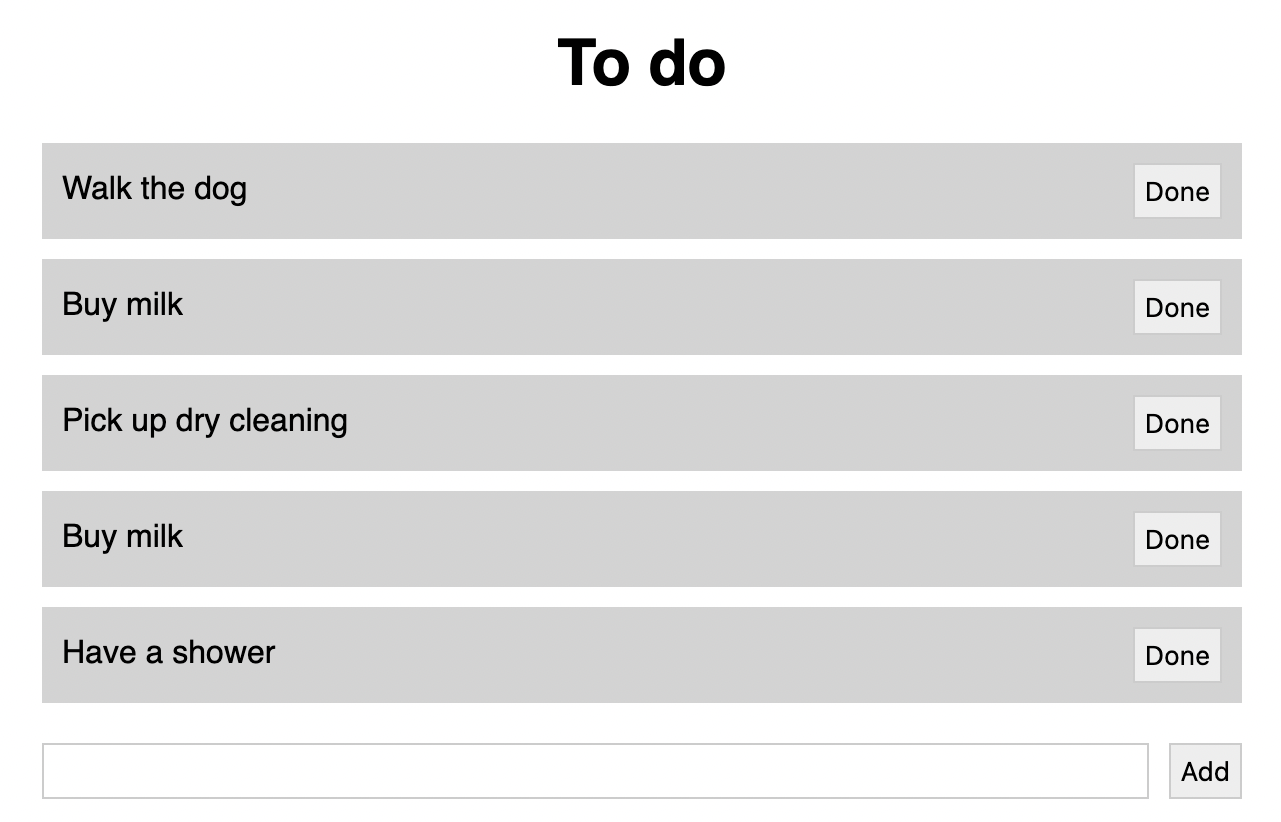
I want to show you a demo htmx app, but first let’s look at the Javascript version. It is the Todo app from day one of that coding Udemy you never finished. There’s a list of items to do, shown sequentially on the screen. Each one has a button to mark it as done, and at the bottom, a spot to enter a new one.
My ‘basic’ Javascript version is based around a Node/Express server. Express serves the .html, .css & .js statically, then runs an API for creating, reading and deleting the Todo items as JSON.
<!-- index.html for simple todo app that uses node endpoints to process json-->
<!DOCTYPE html>
<html lang="en">
<head>
    <meta charset="UTF-8">
    <meta name="viewport" content="width=device-width, initial-scale=1.0">
    <title>Todos</title>
    <link rel="stylesheet" href="./styles.css">
</head>
<body>

<!-- Main section-->
    <main>
        <h1>To do</h1>
        <ul id="todos_list"></ul>
        <!-- the list of todo items from the database gets inserted here-->

        <!-- form to add a todo -->
        <form action="/todos" method="POST">
            <input type="text" name="todo" id="todo" required>
            <button type="submit">Add</button>
        </form>
    </main>

    <script src="index.js"></script>
</body>
</html>
Nothing fancy there. The Todo items will go in the
- once we’ve got them. The endpoints won’t really surprise you either. We’re using SQLite for the persistence. There’s a
get /todos to get the whole list, a post to add one, and a delete to remove one.// Simple Express ToDo app using SQLite3
const express = require('express');
const app = express();
const port = 3000;
const sqlite3 = require('sqlite3').verbose();
const db = new sqlite3.Database('db/todos.sqlite');
app.use(express.json());
app.use(express.static('public'));
app.get('/todos', (req, res) => {
db.all('SELECT * FROM todos', (err, rows) => {
if (err) {
res.status(500).json({ error: err.message });
}
res.status(200).json(rows);
});
});
app.post('/todos', (req, res) => {
if (!req.body.todo_item) {
return res.status(400).json({ error: 'Missing todo_item field in request body' });
}
db.run('INSERT INTO todos (todo_item) VALUES (?)', req.body.todo_item, function(err) {
if (err) {
return res.status(500).json({ error: err.message });
}
// well behaved APIs return the newly created resource
db.get('SELECT * FROM todos WHERE id = ?', this.lastID, (err, row) => {
if (err) {
return res.status(500).json({ error: err.message });
}
res.status(201).json(row);
});
});
});
app.delete('/todos/:id', (req, res) => {
db.run('DELETE FROM todos WHERE id = ?', req.params.id, (err) => {
if (err) {
res.status(500).json({ error: err.message });
}
res.status(204).end();
});
});
// if it doesn't exist, create the table
db.run('CREATE TABLE IF NOT EXISTS todos (id INTEGER PRIMARY KEY AUTOINCREMENT, todo_item TEXT)');
// close the database gracefully on exit
process.on('SIGINT', () => {
db.close((err) => {
if (err) {
return console.error(err.message);
}
console.log('Database closed.');
});
process.exit(0);
});
// start the server on port 3000
app.listen(port, () => console.log(`Todo app listening on http://localhost:${port}`));
All the work of translating the data into a representation is being done in the Javascript.
// index.js - code for simple todo app
// json data served from node endpoint

function createTodoItem(todoItemText, id) {
    const li = document.createElement('li');
    const button = document.createElement('button');
    button.innerHTML = 'Done';
    button.addEventListener('click', () => handleDelete(id, li));

    // Create a text node with the todo text and append it to the li
    const todoTextNode = document.createTextNode(todoItemText);
    li.appendChild(todoTextNode);

    // Then append the delete button
    li.appendChild(button);

    return li;
}

function handleDelete(id, li) {
    fetch('/todos/' + id, {
        method: 'DELETE'
    })
        .then(() => {
            li.remove();
        });
}

// Fetch the todo items to build the list
fetch('/todos')
    .then(res => res.json())
    .then(todos => {
        // Loop through todos and add to list
        todos.forEach(todo => {
            const li = createTodoItem(todo.todo_item, todo.id);
            document.querySelector('#todos_list').appendChild(li);
        });
    });

// handler for adding a todo item
document.querySelector('form').addEventListener('submit', (e) => {
    e.preventDefault();
    const todo_item = document.querySelector('#todo').value;
    fetch('/todos', {
        method: 'POST',
        headers: {
            'Content-Type': 'application/json'
        },
        body: JSON.stringify({ todo_item })
    })
        .then(res => res.json())
        .then(data => {
            const li = createTodoItem(todo_item, data.id);
            document.querySelector('#todos_list').appendChild(li);
            document.querySelector('#todo').value = '';
        });
});
Again, there’s no startling innovation. When it loads, the API is called to get the list of todo items which are turned into list items with ‘Done’ buttons and appended to the
- . Then there’s some code for adding a new item. We’ll come back to some of this in more detail later when we look at the htmx.
htmx Version
index.html
<!DOCTYPE html><html lang="en"><head> <meta charset="UTF-8"> <meta name="viewport" content="width=device-width, initial-scale=1.0"> https://unpkg.com/htmx.org/dist/htmx.min.js <title>Todos</title> <link rel="stylesheet" href="./styles.css"></head><body><!-- Main section--> <main> <h1>To do</h1> <ul id="todos_list" hx-get="/todos" hx-trigger="load"></ul> <!-- the list of todo items from the database gets inserted here--> <!-- form to add a todo --> <form hx-post="/todos" hx-target="#todos_list" hx-swap="beforeend" hx-on::after-request="this.reset()"> <input type="text" name="todo_item" id="todo" required> <button type="submit">Add</button> </form> </main> </body></html>
The script tag at the top pulls in html (which is actually just 14K of gzipped Javascript) from a CDN. You can alternatively download it and serve it statically with your other assets. It’s worth noting, that’s all the tooling involved - no build tools etc.
<ul id="todos_list" hx-get="/todos" hx-trigger="load"></ul>
This is the unordered list I want the todo items to go into. When the page is loaded (hx-trigger) we’ll hit the app.get("/todos") endpoint (hx-get). I don’t need to specify where the returned html goes to - by default it’s the innerHTML of the calling tag.
<form hx-post="/todos" hx-target="#todos_list" hx-swap="beforeend" hx-on::after-request="this.reset()">
This is the form for adding a new todo item. It’s going to hit the app.post("/todos") endpoint (hx-post), and the returned HTML (which will be the the new list item to add to the list) needs to go onto the unordered list we talked about earlier (hx-target). The hx-swap=“beforeend” part means the returned list item will be inserted just before the end of the
- - ie as the last item in the list.
- with it’s ‘Done’ button to delete it.
function htmlForTodoItem(uid, item_text) { let html = `<li>${item_text}`; html += `<button hx-delete="todos/${uid}" hx-target="closest li" `; html += 'hx-swap="outerHTML">Done</button></li>'; return html;}It’s my habit to name these little fragments like this - htmlForXXXX - and group them at the top of the file. I used to use EJS templates, and that’s a valid approach, but the functions seem less complicated somehow.
The remaining code is our endpoints:
app.get('/todos'- called when the page loads. Calls the htmlForTodoItem() for each todo item in the database, the returns all of that to be inserted into theapp.post('/todos'- for adding a single new todo item. It saves it in the database, then returns the new item as an- to be inserted at the end of the list.
app.delete('/todos/:id’ - this is the route called by the ‘Done’ button on each todo item. It deletes the item from the database and pointedly returns nothing with thatres.status(200).end();- this is important, because the way the- is being deleted from the page is that it’s being replaced with what is returned - ie nothing.
These match up to the original versions, with the only significant difference being that instead of returning raw JSON, the HTML is being returned.
Reflections
As far as I can see, these two apps are identical to the user. The htmx version is going to be a bit larger over the wire with that initial pull down of 14K, but we’re only saving 1.6K of Javascript by eliminating our index.js. That 14K is a big deal in a tiny app like this, but probably not for any serious app.
In regard to the developer experience; Is the htmx version easier to live with and maintain? For me, I think the answer is yes - I’d rather think at the level of ‘add this html to the end of the list’ rather than ‘document query selector appendtochild’ then programmatically build a list item from the JSON i’m interpreting , so it’s a useful abstraction. I acknowledge this is going to be a highly subjective thing.
The killer usecase for htmx is going to be for people who want a bunch of cool modern stuff in their web apps, but who don’t want to write frontend Javascript. So for Go, Rust, PHP, Ruby etc people it’s probably a no-brainer. This is probably also my situation, I’m a strong server-side Javascript programmer, but have little interest in learning all the cool stuff around the DOM.
htmx might appeal to developers with a small-web flavour to their dev-politics. If you like semantic html, accessibility, reducing bandwidth and power consumption of your apps, and being a good guardian of your users’ data on the servers you control, you’ll probably like htmx. If you like AWS lambda functions, Angular, Next, Vercel and outsourcing your auth to Octa, htmx may not be your thing.
The type of app is going to be a major consideration when deciding if htmx is an appropriate choice. If you are writing the next Google Sheets, htmx is not going to be able to do that, you need the raw power of JS. If your bread and butter is commercial CRUD apps and you want to make them quicker, avoid page flashes, and have modern UI magic such as search results that update as you type, then htmx is going to be your jam.
It’s not an unrealistic dream that the functionality in htmx becomes part of the HTML specification. The book sets out some good arguments for it, and the htmx implementation of that shows how possible and appealing it is. Whether it does or doesn’t, I expect to be using a lot in the future.
After the user has hit return or the ‘Add’ button to save their todo item, I don’t want the text they just entered to be sitting there, so a tiny Javascript snippet needs to be run. There are a heap of html hooks for these sorts of jobs (hx-on::afterrequest).
The final change is that we’ve removed the script tag at the bottom that referred to our own Javascript code. None of that is needed now - the application state is delivered as complete HTML by the server.
server.js
Now our node/express server. I’ll dump the whole file here, then talk about each part.
// Simple Express ToDo app using SQLite3 & HTMX

const express = require('express');
const app = express();
const port = 3000;

const sqlite3 = require('sqlite3').verbose();
const db = new sqlite3.Database('db/todos.sqlite');

app.use(express.static('public'));
app.use(express.urlencoded({ extended: true }));

function htmlForTodoItem(uid, item_text) {
  let html = `<li>${item_text}`;
  html += `<button hx-delete="todos/${uid}" hx-target="closest li" `;
  html += 'hx-swap="outerHTML">Done</button></li>';
  return html;
}

app.get('/todos', (req, res) => {
  db.all('SELECT * FROM todos', (err, rows) => {
    if (err) {
      console.log(err.message);
      return res.status(500).send('<li>database error</li>');
    }
    // loop through the rows and create a list item for each
    let list = '';
    rows.forEach(row => {
      list += htmlForTodoItem(row.id, row.todo_item);
    });
    res.status(200).send(list);
  });
});

app.post('/todos', (req, res) => {
  if (!req.body.todo_item) {
    return res.status(400).send('Missing todo_item field in request body');
  }
  db.run('INSERT INTO todos (todo_item) VALUES (?)', req.body.todo_item, function (err) {
    if (err) {
      console.log(err.message);
      return res.status(500).send('<li>database error</li>');
    }
    // return just this item for HTMX to insert at the list end
    res.status(200).send(htmlForTodoItem(this.lastID, req.body.todo_item));
  });
});

app.delete('/todos/:id', (req, res) => {
  db.run('DELETE FROM todos WHERE id = ?', req.params.id, (err) => {
    if (err) {
      console.log(err.message);
      return res.status(500).send('<li>database error</li>');
    }
    res.status(200).end();
  });
});

// if it doesn't exist, create the table
db.run('CREATE TABLE IF NOT EXISTS todos (id INTEGER PRIMARY KEY AUTOINCREMENT, todo_item TEXT)');

// close the database gracefully on exit
process.on('SIGINT', () => {
  db.close((err) => {
    if (err) {
      return console.error(err.message);
    }
    console.log('Database closed.');
  });
  process.exit(0);
});

// start the server on port 3000
app.listen(port, () => console.log(`Todo app listening on http://localhost:${port}`));
The first change in the top of the file is that we’ve removed the middleware for JSON request bodies and switched to URLEncoded which is what htmx will be sending us by default. Then we dive into this function which builds the HTML for each of the Todo items encapsulated in an