ISO wrangling - Etcher and Ventoy
1 May 2023
If you fiddle around with computers, and especially with Linux drives, you’ll often find yourself with an ISO file you need to boot a device from. These can’t just be copied onto an existing USB or SD card - they need to be bootable, so you’ll need a special program to write the ISO to the storage device.
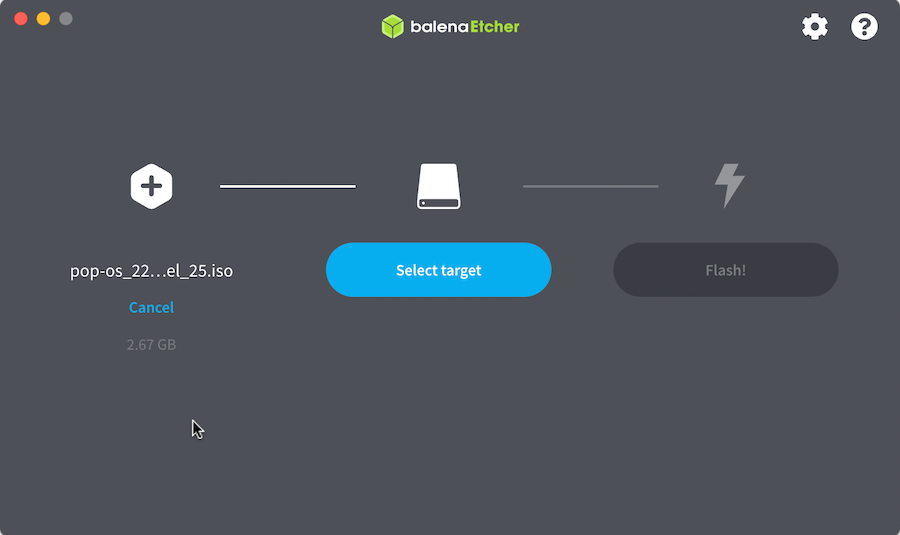
Previously I’ve been a big fan of Balena Etcher . It couldn’t be much more simple - you chose the ISO file you’ve downloaded from somewhere, chose your removable drive (it intelligently hides the non-removable drives to prevent you from accidentally wiping your hard disk), then tell it to do it’s thing.
When you want to try a different ISO file, you go through that whole process again. At least that’s what I did till I heard about Ventoy .
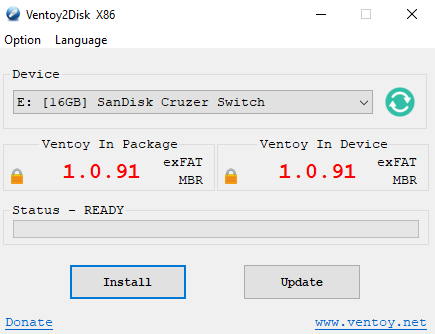
This installs onto the USB in a similar way - although with it’s own program Ventoy2Disk (no macOS version). Once it’s on there, the USB drive just appears as an ordinary empty ExFat drive if you plug it in.
You just copy any (multiples allowed) ISO’s you might use in the future onto the drive. The if the USB is used to boot from, it starts a GRUB like program that lets you choose one of the ISO’s, then will go on to boot from that ISO. It’s saved me a lot of time by not having to re-etch ISO files - they are often quite large so is was a time consuming process.