Manually adding SSL certs in Nginx Proxy Manager
31 Mar 2025A large part of the reason for my use of Nginx Proxy manager over vanilla NGINX, is that it has built-in Let’s Encrypt certificate requesting and renewing. This works perfectly for all my public facing services, and until recently, my homelab services. Before I dive into how I’ve fixed the problem I ran into, I better explain how my homelab domain is set up, and before I do that, an over-simplified description of how the SSL system works is required
SSL
SSL (Secure Socket Layer) on a web site (the little padlock you see in the browser when you visit an https:// site) does three things:
- It tells you that this web site you’ve visited is controlled by the same people who own the domain name. This is important to prevent someone hijacking your request to “mysecurebank.com” and sending it to their password stealing website.
- It encrypts the traffic between the web-browser and the website so it can’t be spied on.
- It detects is someone has tried to tamper with the traffic between the web-browser and the website.
For all this to work, there needs to be some way of assuring the certificate issuer that the entity claiming a certificate for the domain, has control of the website that the domain is pointing to. The simplest way to do this is for the certificate issuer to give you a token, you install that in a secret directory on the web server, then the certificate issuer can check it exists. This proves to them that you own the website, and they can issue you the certificate.
This process is essentially what happens when you use Certbot to obtain a Let’s Encrypt SSL certificate. It works great as long as your website is public to the internet so it can be contacted by the certificate issuer. But, that’s not the case for my homelab services. They are on an internal network, deliberately not contactable from the wild internet.
SSL on an internal network
There is less need for SSL on an internal network. You probably assume there’s no one to spy on your traffic, or to fiddle with it, and you know you have control of your apps. Apart from not trusting that, there’s a couple of other benefits - you often can’t save your passwords for unsecured sites, you can get annoying warning messages, and some apps just straight up won’t let you use some functionality without it. This is the case for my Forgejo instance that wants working SSL to allow me to git push to it.
Homelab SSL
There is a way around this - basically we need to assure the certificate issuer that we’re in control, but instead of exposing a token on the (unreachable) web server, we add it as a record in the DNS of the domain (called DNS Challenge). The logic of this is that if you control the DNS you control where it points and therefore the web server. This is the first part of the Homelab SSL setup - obtaining the certificate with DNS challenge. The second part is using the DNS to point the domain at an internal website address. My domain and DNS are public - you could enter the domain name in a browser, but it resolves to an address inside my network. This is all much better explained by Wolfgang than me.
The problem I’ve run into
This all worked perfectly when I first set it up. Nginx Proxy Manager (NPM) has a plugin for my domain provider (porkbun ) which uses their API to save the token into my DNS settings. The UX for this is that I tell Nginx Proxy Manager that I want to use “DNS Challenge” for a certificate request, and (by using an API key I’ve setup on Porkbun and given to NPM) it does all the fiddling around to obtain the certificate then installs them.
I must of had that running for a year or so, with the certificates magically being renewed every couple of months with no input from my until just recently. I’m not exactly sure what’s happened - the error messages that I’m not smart enough to sort out suggest that the plugin’s operations to install the token at the domain provider is not working. I don’t know if it’s an API problem, or there’s been an NPM update that’s broken the plugin, or just something else has changed in my setup. What ever it is, turning everything off and on again, updating everything, and trying manually have not worked. So time for plan B.
Manual Certificates
Porkbun (and for all I know other domain sellers) provide a facility to download a ‘certificate bundle’ directly from them - they are just doing that Let’s Encrypt dance directly - missing the NPM and Porkbun API step from the above.
The certificate bundle contains:
- public.key.pem
- private.key.pem
- domain.cert.pem
And when you go to add a custom certificate in NPM you have these options:
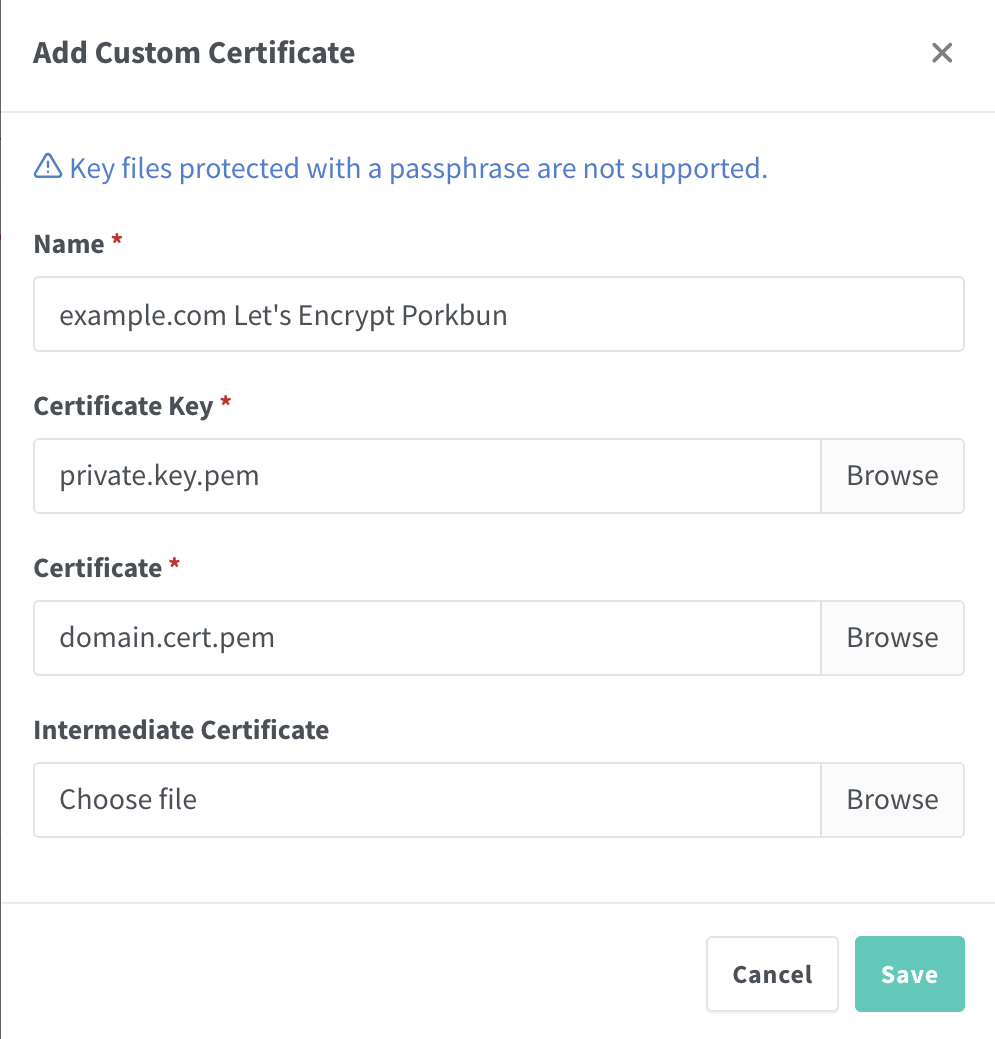
As you can see your certificate (domain.cert.pem) goes in the certificate slot, and the Certificate Key it’s asking for is your private key (private.key.pem). You don’t need the intermediate key - this is the same for all Let’s Encrypt certificates.
Doing the certificates this way is less good than having them automatically renewed. Currently Let’s Encrypt certificates are good for 90 days, so every three months my monitoring system will let me know they only have a couple of weeks left and I’ll have to repeat this manual process. There has been talk of shortening this time which would make that process even more annoying, so hopefully I can sort out the issue in NPM, or find out if Traefik or Caddy have the necessary plugins to do DNS challenge certificates.
But in the meantime, my internal web apps are all up and secure.
This is not free
Let’s Encrypt, and to a lesser extent Certbot have changed the web substantially. Obtaining and installing certificates used to be a difficult and costly process, but these two ‘free’ services have turned that around. If you run a website and use these services I highly recommend you support the non-profits that keep them in existence as I do.
- Let’s Encrypt - have a donation page
- Certbot - is provided by the EFF who do other work can be donated to here .