Mounting NFS shares into LXC containers
21 Apr 2023
I’m playing with Syncthing with the idea that it might be a good replacement for Dropbox. There wasn’t a Docker container listed in the install options, so I thought this might be a good app to run in an LXC.
I’m going to use a share from the NAS, and I’m assuming I’ll need it mount it into the container for Syncthing to access. I’m experienced enough to know that I’m going to want a privileged container, and I thought I’d done all the NFS sharing correctly, but when I tried to mount the NFS share, I was getting an error.
root@ct356-syncthing:~# showmount -e 192.168.100.32

Export list for 192.168.100.32:
/volume1/syncthing 192.168.100.37
/volume1/proxmox   192.168.100.24,192.168.100.31,192.168.100.28,192.168.100.23

root@ct356-syncthing:~# mount -t nfs 192.168.100.32:/volume1/syncthing /mnt/syncthing

mount.nfs: access denied by server while mounting 192.168.100.32:/volume1/syncthing
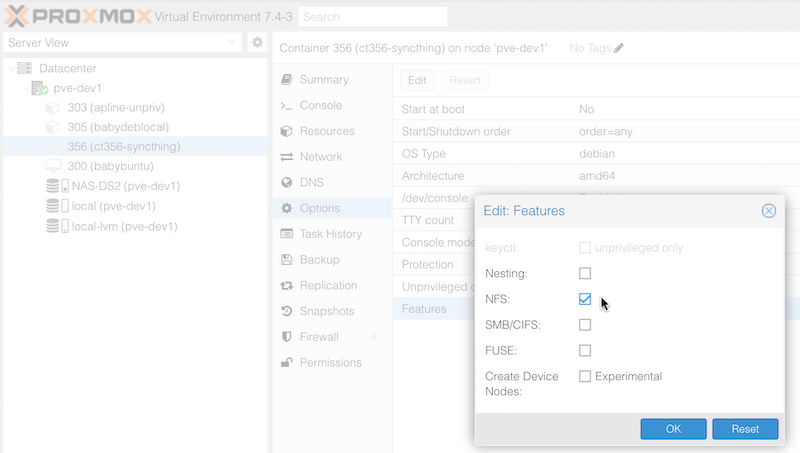
This is just part of the security nature of the LXC containter getting in our way. We can edit the .conf for the container, or just change it in the container options via the web GUI and restart the container.

I learned this from [theorangeone](https://theorangeone.net/posts/mount-nfs-inside-lxc/).