Outputting to the console, in Docker, from a cron job
8 July 2024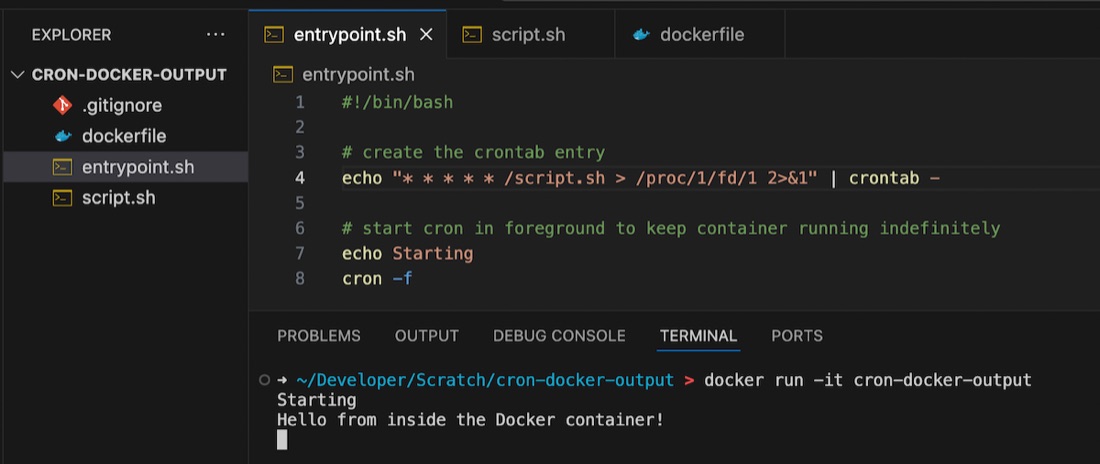
If you’re googling this exact title, you’re probably bumping your head against the same things I was today. I was debugging a completely different project, and needed to print to the console, from a cron job, in a Docker container. Turns out this isn’t as straightforward as I thought.
Foreground cron
Before you even get to the problem space, here’s a tip. If you want to have a cron job running in a container, start cron in the foreground. If you do not, Docker realises nothing is going on, and exits. If you want to keep the container active so your cron jobs get a chance to execute, then start it in the foreground.
stdout
I always think about stdout as being the console, but I guess at one time it was probably a teletype printer, and for cron, apparently it’s an email to the user . So me directing the output of the command I’m running in crontab to stdout is not helpful. It turns out you need something like this:
* * * * * /script.sh > /proc/1/fd/1 2>&1
There’s some good Linuxy reason for this - /proc/1/fd/1 is the standard output of a particular process which happens to be the process for the entry point of the container or some such thing,
If you are not familiar with cron, there are going to be much better explanations than this, but it’s a mechanism for running jobs at various times. It uses a file, called the crontab to define these. Each of the asterisks above are spots where we can define the minute, hour, day, etc that the job runs by entering a number. If they are all asterisks then we are saying ‘run this every minute’. Following that is just the command, which in this case is run /script.sh and send the output and error output to this proc file which happens to be the console.
Other gotchas when working with cron is which user it’s running as (so permission problems) and where it’s running from (don’t use relative file paths).