Jan. 10, 2026
Remote-SSH
One of the things I’ve done a bit in Visual Studio Code is using it’s ability to work on a different machine over SSH. I have a couple of LXCs on a server set up for different languages - one for C++ and another for Rust. They are things I don’t work in often, and I didn’t want to set them up on my laptop, but thought I might want them again sometime in the future.
Jul. 28, 2025
Ghostty is a terminal application that I don’t really need (it’s listed features either already exist in the MacOS terminal, or seem so esoteric or marginal that I can’t imagine any real benefit from them in my normal use), but I wanted to be one of the cool kids, so I thought I’d give it a try.
After fiddling around with the themes for a bit I renamed it to ’term-ghosty.app’ so I’d remember to use it (ie when I pop up spotlight and type ’term’ it will come up) and got on with my day. Ten minutes later I’d run into a problem.
Jul. 7, 2025
I’ve been meaning to write this for a couple of weeks, so let’s get to it - things are moving to fast to reflect too long; which is it’s own risk.
In March, I wrote about how I was using AI in coding , which was Codeium (now Windsurf) in VS Code for completions, and ChatGPT and Claude online for architecture questions and code gen that was more than half a function.
Jun. 22, 2025
Web pages are mostly just a collection of HTML, CSS, and JavaScript, so if we had some way of adding some of these into a web page, perhaps from our browser we could add new behaviour to a web page, right?
Yes; users have long used tools like Greasemonkey (or similar userscript managers) to inject scripts into pages. Better still, modern browsers expose JavaScript APIs that let us interact directly with the browser itself. Enter: browser extensions.
May. 12, 2025
When you’ve made a change to your web-app, do you run it then click around the new bits to check it works? Good start, but instead of doing that yourself, do it in a faster, more comprehensive and automated way with an end-to-end (E2E) testing setup using Cypress . Here’s how.
E2E
End to End testing is testing your app as a user might - by clicking links, entering data, looking at the screen and checking everything is okay, but it’s scripted like a unit test and the results are checked with assertions. Like unit testing this allows you to build up a collection of comprehensive tests that easily detect for unexpected behaviours - not just in the results of functions in your app, but in the user experience of the app.
Apr. 28, 2025
A Node/Express app I’m working on has been sprouting routes so much that the server.js file has swollen to 800 lines - way past my 200-250 comfort zone, so it’s time to organise the routes into their own files. That seems like a good topic for a beginner blog post, so let’s dive in.
Imagine we’ve written this little Node/Express app.
import express from "express";
import {
  dbCustomersGet,
  dbCustomersGetById,
  dbCustomersDelete,
  dbOrdersGet,
  dbOrdersGetById,
  dbOrdersGetByCustomerId,
  dbOrdersDelete,
} from "./db.js";

const app = express();
app.set("view engine", "ejs");
const port = 3002;

app.use(express.urlencoded({ extended: true }));

app.get("/", (req, res) => {
  res.redirect("/customers");
});

app.get("/customers", (req, res) => {
  const customers = dbCustomersGet();
  res.render("customers", { customers });
});

app.get("/customers/:id", (req, res) => {
  const customer = dbCustomersGetById(req.params.id);
  const orders = dbOrdersGetByCustomerId(req.params.id);
  res.render("customer", { customer, orders });
});

app.get("/customers/:id/delete", (req, res) => {
  dbCustomersDelete(req.params.id);
  res.redirect("/customers");
});

app.get("/orders", (req, res) => {
  const orders = dbOrdersGet();
  res.render("orders", { orders });
});

app.get("/orders/:id", (req, res) => {
  const order = dbOrdersGetById(req.params.id);
  const customer = dbCustomersGetById(order.customerId);
  res.render("order", { order, customer });
});

app.get("/orders/:id/delete", (req, res) => {
  dbOrdersDelete(req.params.id);
  res.redirect("/orders");
});

app.listen(port, () => {
  console.log(`Listening on http://127.0.0.1:${port}`);
});
Although concocted, this would seem familiar to anyone who’s built a CRUD business app.
Apr. 14, 2025
I’ve been whipping up a little mock-database unit that has a few access functions but actually stores the data as arrays for a demo project for a post I’m writing. In the process I wrote this gem:
export function dbOrdersAdd(order) {
  const orderCopy = { ...order };
  // since id is a stringified number, finding the max is a bit of a mess
  const maxId = orders.reduce((max, o) => Math.max(max, parseInt(o.id)), 0);
  orderCopy.id = String(maxId + 1);
  orders.push(orderCopy);
  return { ...orderCopy };
}
In the comment I’m claiming the code is a bit of a mess (and from a readability point that’s true) but actually I love the elegance of using the reduce() method here.
Mar. 31, 2025
A large part of the reason for my use of Nginx Proxy manager over vanilla NGINX, is that it has built-in Let’s Encrypt certificate requesting and renewing. This works perfectly for all my public facing services, and until recently, my homelab services. Before I dive into how I’ve fixed the problem I ran into, I better explain how my homelab domain is set up, and before I do that, an over-simplified description of how the SSL system works is required
Mar. 17, 2025
For the longest time, I’ve been using Mocha (test runner) and Chai (assertion library) for my JS testing. They are reliable old friends.
One of the effects of the existence of Bun and Deno has been to spur Node onto adding some new features, so after appearing as an experimental feature in 18, the Node test runner dropped in Node 20.
I’m not sure if the familiar unit test layout of Mocha and Node is inherited from Jest, or comes from older testing frameworks of which JUnit and NUnit were the first ones I’d ever used. Before that I just used to write tests as lumps of assertions in regular code - which worked but wasn’t as pleasant to use as a proper unit test setup. Regardless, the system of bundling a few tests together and having them all run and spit out green ticks is not a new one.
Mar. 3, 2025
There’s still plenty of controversy about LLMs for coding, and not without reason. But I thought I’d run through what I’ve tried, and where I’ve landed for using AI. Also what the pitfalls are, where it’s useful and how it’s changed my practice.
Issues
Training data
The training data for large language models generally is problematic. There’s no doubt that they have been trained on copyright material. With code it’s slightly less murky since there is a high availability of good quality open source data with attached licenses to train models on. No doubt this include code written by people who don’t approve of it being used by AI, but I think the popular reading of most open source licenses is that using it for training is fine.
Feb. 17, 2025
I had an idea for a little holiday project that required a list of episodes from The Rest Is History podcast. On their ‘Episodes’ page, they have a player, and a list of post entries for the most recent eighteen podcasts. There is a ‘show all’ button, but it doesn’t work.

The player does contain the full list of episodes (about 600) including a number of duplicates, so I expected if I inspected the network calls that I’d see a JSON package arriving with what I wanted. This is what I almost always find these days so I’ve had very little call to do any real web scraping - it’s normally just a matter of locating the endpoint and perhaps extracting an API key from a header.
Feb. 3, 2025
NTFY is a great open-source push notification service that’s self-hostable or free to use (although I suggest you pay for it as I do). I’ve written before how I use it with UptimeKuma for my uptime monitoring, but another common use is just when I’m initiating long-running commands and backgrounding them.
This magic is possible since we can just curl to send a NTFY notification. For example:
curl -d "😀 demo push message via NTFY" ntfy.sh/blog_demo
Since I’m subscribed to the “blog_demo” topic in NTFY, this message will be pushed to my phone and watch:
Jan. 27, 2025
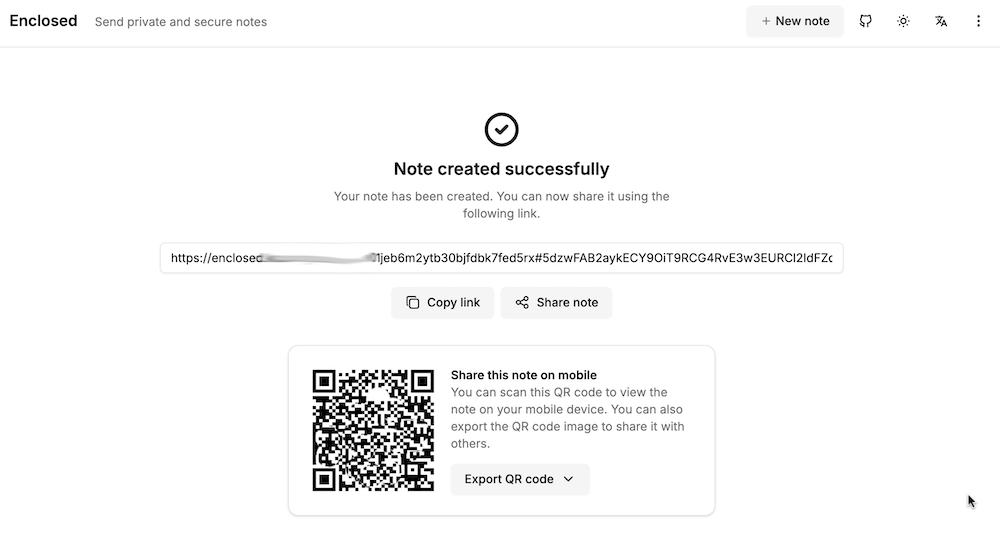
My accountant works for one of those giant firms, and it bugs me that I’m emailing him password protected zip files of my accounts rather than to a secure upload facility at his firm. I can fix this with the power of self hosting, by running my own secure file dropping app on a VPS.
There’s a number of applications that do this sort of thing - allow you to upload a file, get a link in return which you can then share to people to download the file. For this to be more secure than emailing, the file needs to be encrypted on the server, and we want to be able to set a password, impose limits on downloads, and limit how long the link lives for. I’ve previously looked at Sharry which adds the ability for unauthenticated users to upload files to you securely, but for this slightly simpler job, I chose Enclosed by Corentin Thomasset .
Jan. 20, 2025
I’m having a super annoying problem at the moment, I can’t pull down containers from DockerHub. If I hotspot my laptop off my phone it works fine, so it’s some drama with the home internet connection that rebooting the router does not fix.
I’ve had a couple of different errors including Error response from daemon: Get "https://registry-1.docker.io/v2/": net/http: request canceled while waiting for connection (Client.Timeout exceeded while awaiting headers) and Error response from daemon: Get "https://registry-1.docker.io/v2/": dial tcp: lookup registry-1.docker.io. I can’t actually ping registry-1.docker.io or hub.docker.com, although I can open hub.docker.com in a browser, so it works for ports 80 and 443, but not some other udp ports.
Jan. 6, 2025
I’ve been containerising my websites, with their servers to make deployment simple and robust, and to move to a CI/CD workflow. Since an install of a production web server is large, I would be running about ten of these containers, and there’s already a good server facing the net and doing the reverse-proxying (NGINX Proxy Manager), I chose to bundle the Busy-Box httpd server with my sites inside the Docker containers.
Dec. 30, 2024
I love the convenience of a hosted blog on wordpress.com, but one of the justifications for my ‘investment’ in homelab hardware and learning time was that I’d reduce my spend on hosted platforms by self-hosting them. I’ve already quit Evernote and dropped back to the free plan on Dropbox by building systems to replace them for less money and more data sovereignty. And now, the recent Wordpress drama has made me uneasy about Matt having control of domains I’ve got registered with wordpress.
Dec. 16, 2024

I’ve had my external UptimeKuma chugging away on fly.io , for free, for months now, and the container image it was based on was a bit out of date, so I wanted to update it. I hadn’t looked at fly.io for months, and couldn’t really recall what I’d done to create it.
The way this works is that that you create a fly.toml file that sets out the details of your app. From memory I think I used the one from the docs and gave it a unique name, the name of the Docker image, the port, the datacentre location, and the directory for the persisted data. The you run fly deploy from the directory with the toml file (having already installed the CLI tool and logged in) and you’re in business.
Dec. 9, 2024
When I’m spinning up side projects, I frequently ignore auth, and just rely on NGINX basic auth - one of the side benefits of reverse-proxying everything.
Regular NGINX
This article in the docs explains how to set up basic auth to protect different paths. To make it work in my node apps, I need the successful user name passed in so I check it against the user table to work out access rights etc.
Dec. 2, 2024
A very common scenario when running services in Docker containers is that one service is going to depend on another. The most common example is going to be if you have a service that needs a database - you’re going to want the container running the database to be ready for business before the service that needs it starts. And conversely, when you shut things down, you want to stop the service before you kill the database or you may lose some data.
Nov. 25, 2024
I’ve been containerising my static websites with BusyBox (because it’s small), and in an earlier post showed how to even get the container to update parts of the site by reaching out with wget to download resources from elsewhere and saving them inside the container where we are serving the ‘static’ site from. I’d done this by including a bash script in the container with the wget in a loop with a sleep. Then started the script and the httpd server in the CMD line of the dockerfile.