May. 7, 2023

There’s a few things that really strike me as significant improvements to life since I was commercially developing 20 years ago:
- Accessing information - the first time I bought the development stack to write commercial software against the Windows SDK it came in a huge carton with, I guess, fifteen or so 2" thick books. That was how you looked things up in those days. Fast forward to an internet connected world of websites, stack exchange, Discord and ChatGPT. So much better.
- Open Source - is an actual useful thing that the entire connected world runs on - not just a weird hippy idea. It’s almost routine to open source your code now and everyone benefits from that.
- Containers - “getting things working” used to be a thing. Most times now I want to spin something up to play with it, it just works because all the dependencies are bundled with it, and it doesn’t mutate the environment in any way I don’t know about. There’s no friction to run a giant app, and no hangover for the OS when I nuke it.
I love this great explanation from Coderized about containers - I wish I’d seen it five months ago.
May. 5, 2023

I’ve gotten interested in Plain Text Accounting , and I’m looking at using BeanCount for small business & personal finances. If you haven’t heard of this, it’s a command line program that uses text files with a human comprehensible syntax to define transactions, then acts on them to create the needed reports etc. A side benefit for developers is that it’s then easily version controlled using GIT, and of course there’s VS Code plugins for it.
May. 3, 2023
I’m interested in collecting some internal temperature data from my servers to look at the effect of adding an NMVe drive. Last week we had a couple of warm days immediately followed by a couple of cool ones. I imagine a 20° ambient temperature change could effect the server temperatures, so I thought it would be good to add that to my temperature logs.
I don’t have a weather station or other automated system for collecting the temperature, but there are several commercial sources for this data which, while probably not as good as a sensor in the server room, will be fine for our purposes.
May. 2, 2023
When I installed the backup NAS and a media server at the remote site, one of the jobs on my list was to reserve the IP addresses for the NAS, node, and the VM in the local router. I carefully did that, but when I got home (200 km later) and opened my laptop, the browser page was open on the DHCP settings with a table of mac addresses I’d added, and the reserved IP’s, and at the bottom of the page, a large blue “Apply Changes” button. Had I pressed that button to save my changes correctly? I’m not sure.
May. 1, 2023

If you fiddle around with computers, and especially with Linux drives, you’ll often find yourself with an ISO file you need to boot a device from. These can’t just be copied onto an existing USB or SD card - they need to be bootable, so you’ll need a special program to write the ISO to the storage device.
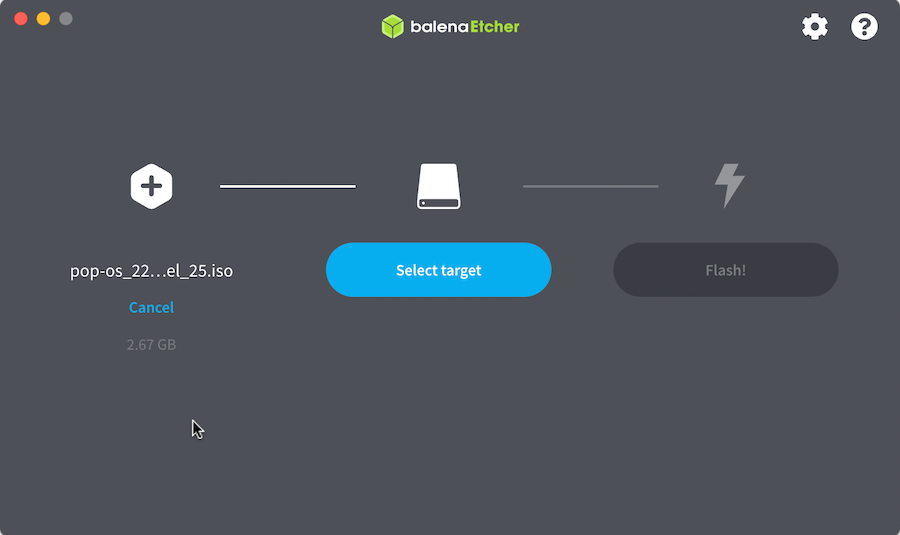
Previously I’ve been a big fan of Balena Etcher . It couldn’t be much more simple - you chose the ISO file you’ve downloaded from somewhere, chose your removable drive (it intelligently hides the non-removable drives to prevent you from accidentally wiping your hard disk), then tell it to do it’s thing.
Apr. 30, 2023

I’m working on the world’s shortest shell script - it’s called by cron to pull down a JSON weather report to a text file using curl so I can expose it on an Nginx endpoint. The purpose is to allow me to hammer that weather API from multiple machines I control without violating the TOS of my free API key.
Because I’m learning all the things, instead of just creating this on the VPS where it runs, it’s cloned from my GitHub repo for that machine. I’m creating and editing the file in VS Code on macOS, pushing to Github, then pulling the changes on the Ubuntu VPS. The intention is that this will eventually become automated with a Github action.
Apr. 29, 2023

When you’ve successfully got Nginx running in a Docker container, AND got your domain correctly pointing at your nascent website, you’re then going to want to set it up for encrypted, and therefore trusted, browsing with SSL.
Certificates
A couple of posts ago, I mentioned that it was simpler to let Porkbun be the authoritative nameserver for a domain. Part of the reason for that is that if we do that, Porkbun had a button you can press which connects to LetsEncrypt and generates the certificates for you. This usually takes an hour or so, then you’ll be able to download the bundle from that same page.
Apr. 28, 2023
I’ve had a small BinaryLane VPS for a while that I use for homelab type stuff, but now need to serve a tiny amount of JSON from it. A longer term plan is to use it as a Wireguard tunnel back to my cluster at home to expose the services that need to be internet facing. I’ve also had a domain name I bought from Porkbun sitting round for a bit, so it’s probably a good time to join them up.
Apr. 27, 2023

A potential solution to my concern about the either perfect, or nearly dead, SSD would be to add a NVMe disk to the M.2 slot in the HP Elitedesk 800 G2’s. I’d use those to boot from and run Proxmox, then the existing SSD’s on each node in the cluster would just be part of the CephFS pool that has some redundancy built into it and hosts the VMs that are not using the NAS for their storage.
Apr. 25, 2023

I didn’t understand why the default Proxmox install sets up the storage the way it does - with the available disk split up into an LVM and an LVM thin storage - so I’ve been reading this excellent Proxmox Storage Guide by Programster (spoiler - the LVM thin makes VM snapshots easier).
At one point in the post they mention that you can see the “Wearout” percentage for any SSD drives in the Proxmox GUI, so of course, since I now own five second hand HP Elitedesk 800 G1/G2’s all with SSD drives, I dived in to have a look at each drive and found this.
Apr. 23, 2023

In Linux (and MS-DOS I guess) the period signifies the current directory, so if I have a file in the current directory called test.txt, I can refer to it as test.txt or ./test.txt
ian@enrico-rider:~$ cat test.txt
test
ian@enrico-rider:~$ cat ./test.txt
test
I mostly see this in references to files in HTML and have often wondered why. Here it is being used in a Udemy course I’m following.
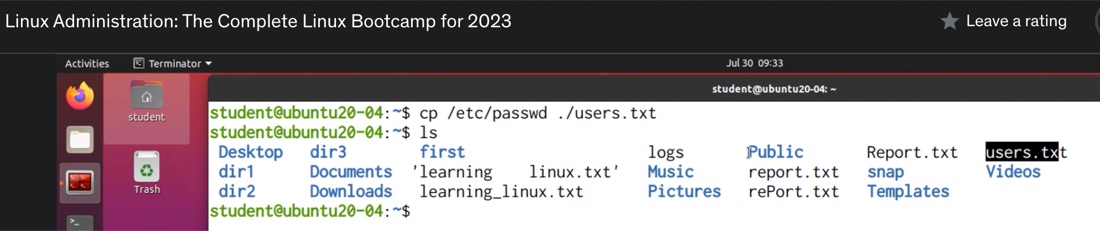
It’s one of those things that’s difficult to Google, so these days my reflex is to ask ChatGPT such questions.
Apr. 21, 2023
I’m playing with Syncthing with the idea that it might be a good replacement for Dropbox. There wasn’t a Docker container listed in the install options, so I thought this might be a good app to run in an LXC.
I’m going to use a share from the NAS, and I’m assuming I’ll need it mount it into the container for Syncthing to access. I’m experienced enough to know that I’m going to want a privileged container, and I thought I’d done all the NFS sharing correctly, but when I tried to mount the NFS share, I was getting an error.
Apr. 19, 2023

Since I’m constantly standing up Linux virtual machines and containers - almost always of the apt variety, I’m constantly typing in:
apt update
apt upgrade
Then hitting enter again to allow whatever installation is needed to proceed. I’ve noticed in some of the commands I’ve been pasting in from installation instructions or StackExchange solutions have been separated by characters that look like it allows several commands to be run one after the other. To cut a long story short, the commands above could be entered like this with double ampersands:
Apr. 17, 2023
I’ve been furthering my Linux education by playing with some desktop distros in VMs, but it’s not a great experience accessing them through the Proxmox web GUI. The alternative to this is to use a good SPICE client on the remote desktop, but there is not a simple good solution for this for MacOS.
I’ve been playing with the idea of picking up an old i3/i5 Thinkpad - these are around the AUD130 mark on eBay, to run a Linux distro with the main idea being to use it to SPICE into my VMs.
Apr. 14, 2023

I’ve been using this rsync command to backup files from my NAS to a USB drive. The –excludes are to avoid copying over some junk hidden files - some created by MacOS and some by Synology.
sudo rsync -rvit --exclude '*@eaDir*' --exclude '.DS_Store' /volume1/media/ /volumeUSB1/usbshare1-2/media --del
The .DS_Store files seem to be dropped by MacOS every time I view a directory on the NAS from my MacBook. They’re not doing any harm, and they presumably do something handy for the Mac - remembering the view settings for that folder or some such. Nevertheless, they annoy me. It makes sense to not back them up - they don’t serve any useful purpose in that context.
Apr. 12, 2023

I was doing updates on all my nodes and VM’s today, and backing up the VMs that aren’t already on a backup schedule. On my dev machine I have a Debian LXC container that I mostly just use for trying out Linux commands and playing around. I used to have a backup of it that I used a lot - after playing around I like to set it back to a fresh install plus my ssh keys - but I lost it somehow when moving the VM to new metal.
Apr. 10, 2023

A few weeks ago , I was very excited to be able to take a snapshot of a virtual machine, copy it across the network from that Proxmox node, copy it back across the network to a different Proxmox node, start it there, and have it up and running, without it noticing it was actually on different hardware.
Backing up a VM is pretty simple, you just click on the node, choose Backup and click the Backup Now button. The ease, and completeness of backing up a VM is one of the main reasons I’m using Proxmox for my systems.
Apr. 8, 2023

I’m still loving the Docker “just works” magic, despite their terrible PR skills , but sometimes I start a container, then the docker ps -a shows it exited almost immediately. Clearly I’ve made a mistake, but there’s no stdout error message to tell me what I’ve done wrong, where is it.
Let’s look at an example from today. I’m testing Filebrowser on a dev machine before I deploy it to the remote backup machine I’m assembling. And instead of following the official instructions , I’m following a blog post which has a few more details, but unfortunately also a small error.
Apr. 6, 2023
I’ve discussed before , that when you first install Proxmox, it grabs an IP address from your DHCP server (this usually runs in your ISP modem if you haven’t created a better setup), but then it stores it as a static ip. This is a sort of compromise that makes sense and works for most circumstances.
As soon as I’ve provisioned a new Proxmox server, I then usually tell the DHCP server, to always serve that address to the MAC address of the new Proxmox server. Since Proxmox does not use the DHCP server on subsequent boots, all that really does is prevent the DHCP server give the same IP address out to another device - which had happened to me prompting the earlier post. The DHCP server had given the address to a wifi lightbulb while the server was off, then when the Proxmox server booted up, the netwrok access was all messed up.
Apr. 4, 2023
I’m in the process of shuffling disks around as I move towards my 3-2-1 storage arrangements. I thought after my extensive rsync adventures I’d mirrored everything everywhere, but then realised, with a sinking (no pun) feeling, after I’d repurposed a drive out of the 2 drive Synology as a USB caddy drive and wiped it, that I’d forgotten my audio book directory. All my rsync fiddling around had been on the video subdirectory of the media folder, not the whole media directory that included my audiobooks.