Feb. 18, 2023

Many modern Linux distros will auto-mount USB drives - they just pop up in the graphical file manager as users would expect. When you’re running server, older, or smaller versions, that’s probably not going to be the case, and you’ll have to do it old school.
Let’s look at some basics. [lsblk](https://man7.org/linux/man-pages/man8/lsblk.8.html) will list the ‘block’ devices. Your output will almost certainly be a bit different than this.
root@pve:~# lsblk
NAME                         MAJ:MIN RM   SIZE RO TYPE MOUNTPOINT
sda                            8:0    0 119.2G  0 disk
├─sda1                         8:1    0  1007K  0 part
├─sda2                         8:2    0   512M  0 part /boot/efi
└─sda3                         8:3    0 118.7G  0 part
  ├─pve-swap                 253:0    0   7.7G  0 lvm  [SWAP]
  ├─pve-root                 253:1    0  39.8G  0 lvm  /
  ├─pve-data_tmeta           253:2    0     1G  0 lvm
  │ └─pve-data-tpool         253:4    0  54.6G  0 lvm
  │   ├─pve-data             253:5    0  54.6G  1 lvm
  │   ├─pve-vm--100--disk--0 253:6    0    10G  0 lvm
  │   ├─pve-vm--101--disk--0 253:7    0    10G  0 lvm
  │   ├─pve-vm--300--disk--0 253:8    0     8G  0 lvm
  │   ├─pve-vm--102--disk--0 253:9    0     4M  0 lvm
  │   └─pve-vm--102--disk--1 253:10   0    32G  0 lvm
  └─pve-data_tdata           253:3    0  54.6G  0 lvm
    └─pve-data-tpool         253:4    0  54.6G  0 lvm
      ├─pve-data             253:5    0  54.6G  1 lvm
      ├─pve-vm--100--disk--0 253:6    0    10G  0 lvm
      ├─pve-vm--101--disk--0 253:7    0    10G  0 lvm
      ├─pve-vm--300--disk--0 253:8    0     8G  0 lvm
      ├─pve-vm--102--disk--0 253:9    0     4M  0 lvm
      └─pve-vm--102--disk--1 253:10   0    32G  0 lvm
If you look at the type column, you can see this machine has one disk, with three partitions, and the last partition has a heap of logical volumes. Let’s plug the thumb drive in:
Feb. 16, 2023
I installed Proxmox on my second server last night, and tonight when I ran apt update I ran into the error you get when you haven’t bought a license.
Err:5 https://enterprise.proxmox.com/debian/pve bullseye InRelease
  401  Unauthorized [IP: 103.67.14.50 443]
Reading package lists... Done
E: Failed to fetch https://enterprise.proxmox.com/debian/pve/dists/bullseye/InRelease  401  Unauthorized [IP: 103.67.14.50 443]
E: The repository 'https://enterprise.proxmox.com/debian/pve bullseye InRelease' is not signed.
N: Updating from such a repository can't be done securely, and is therefore disabled by default.
N: See apt-secure(8) manpage for repository creation and user configuration details.
Even though I guess it was only a month ago (let that sink in people who think the raspberry Pi they just bought is going to be the last homelab hardware they buy 😊) since I set up my first Proxmox server, I’d already forgotten there’s a step to enable it to get updates without a subscription.
Feb. 16, 2023

So, the very small datacentre has undergone a major hardware upgrade today. The HP 800 G1 is joined by an HP 800 G2. Four core i7 vs the old two core i5. Double the RAM to 16GB, four times the disk. The old machine will become a dev/play machine - still virtualised, and the new machine will run the production apps, mostly in Docker containers.
Since everything is containerised, I did consider running Unbuntu Server on the bare metal of the new machine, but running it on Proxmox will give me some flexibility, and since we’ve stepped up the underlying hardware resource so substantially, performance will be well in front anyway. Plus it will give me some flexibility if needed in the future.
Feb. 15, 2023
Uptime Kuma is a monitoring tool suitable for self-hosting, and as well as being a good tool for monitoring the status of your network and applications, it’s a nice smallish app to get started on Docker containers.
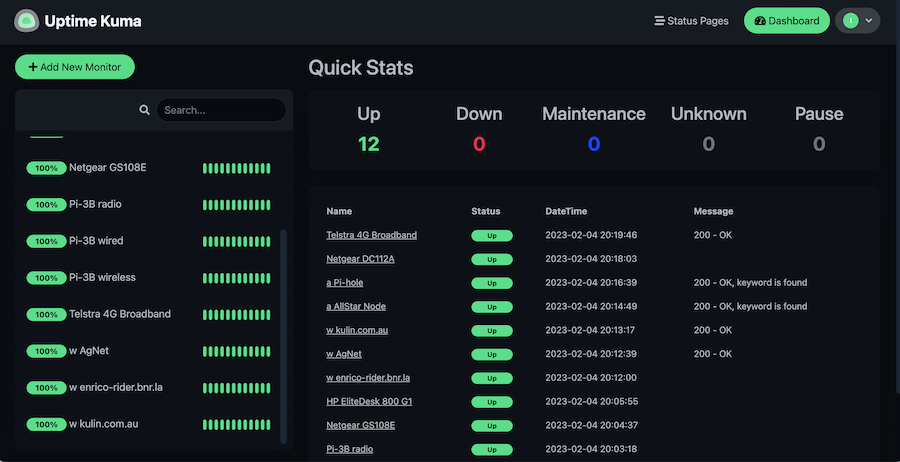
Since it’s in a container, you need to create a volume for it and pass it in to persist your settings. Then it’s just a matter of adding each item you want to monitor. There’s a heap of fancy options for this, the only three I’ve used are ping - just pings an address, http(s) - requests a page and checks the header for a 200, and http(s) keyword - looks at the returned page for a keyword in the html.
Feb. 14, 2023
I had a weird issue today that I wouldn’t have known about if I didn’t have an over-engineered home network monitoring system.
I’ve got a new GS108E managed switch , purchased in anticipation of connecting a NAS to the homelab - I want to have a solid 1Gb connection between the NAS and the servers, and also in anticipation of moving to VLANs before I start to expose self-hosted services to the internet.
Feb. 13, 2023
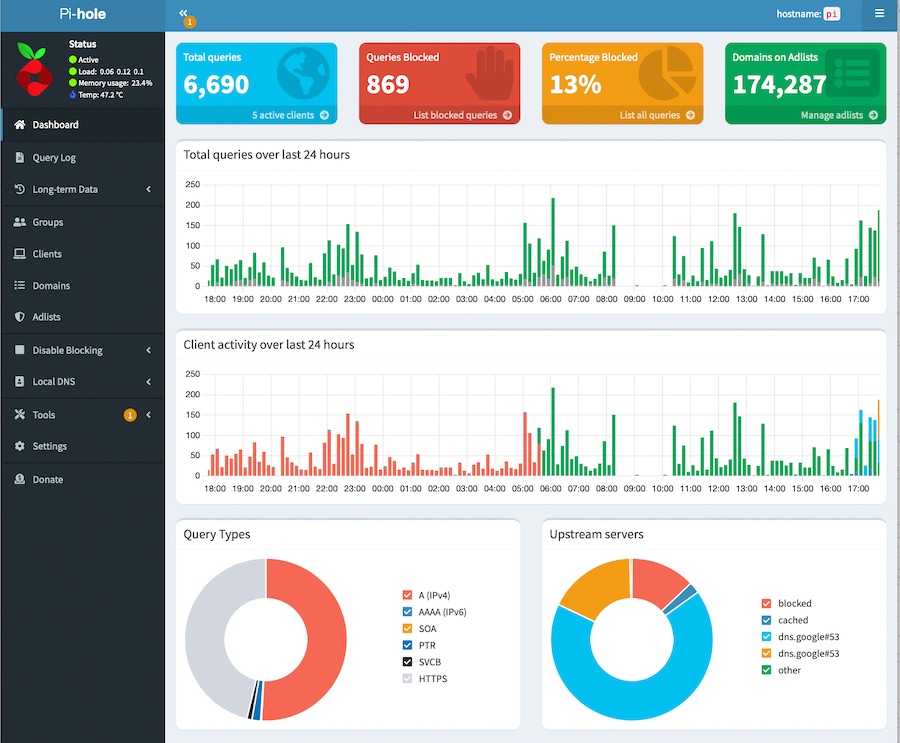
I run an instance of Pi-hole as a network-wide advert and surveillance blocker. It also has a setting to block individual domain which I use to force myself to really consider if 30 minutes of Reddit is a good idea when I should probably just be going to bed.
As I’ve increased the number of real and virtual devices on my network, it’s getting to be a pain remembering all of their IP addresses. So I’d like to have DNS entries for them, for example I’d much rather:
Feb. 12, 2023

Due to potential brute force attacks , it’s a good idea to turn off password access via shh and instead rely on ssh keys. In this post, I’ll run through that process.
Generating your key
On a mac (or actually most *ix systems), your ssh keys live in the .ssh directory inside the users home directory. Since it starts with a period, it’s a ‘hidden’ directory. To see it in Finder press
Feb. 11, 2023
When I installed Proxmox, I’d used a secure, and therefore absurdly long and complicated root password. I do use a password manager, but don’t have it integrated into Chrome, so it was buggging me having to find it and paste it in each time - why wasn’t Chrome offering to save it for me?
Well, you’d guess it was something to do with this. I feel like Chrome is trying to tell me something here:
Feb. 10, 2023

Literally an hour after I wrote the post about installing the qemu guest agent in a VM and explaining how it can be used to inject root level commands into a VM, I had use of it due to a mistake.
I’d decided to add myself to the sudoers file. Since the last line in that file is a directive to include all the files in the /etc/sudoers.d directory, the accepted way to do that for local changes is to create a file in that directory with the necessary commands.
Feb. 9, 2023

One of the strengths of having virtual machines (VMs) running inside a hypervisor like Proxmox is how they are isolated from each other and their host. This is a strength - if there is a problem with a particular VM nothing else should be affected by it.
But this can also be a pain if the hypervisor needs access to a VM to control or monitor it in some way that’s only possible from inside the VM. Proxmox can use the Qemu Guest Agent for this purpose. To over simplify, this is a deamon that runs in the VM and opens a unix socket/virtual serial port to the hypervisor, and listens for commands on it. With Proxmox, the main use of this is to aid in orderly shutdowns and backups, but it also allows us to run commands in the VM from Proxmox - an obvious security compromise. You definitely would not want to install this daemon on a hosted VPS.
Feb. 8, 2023
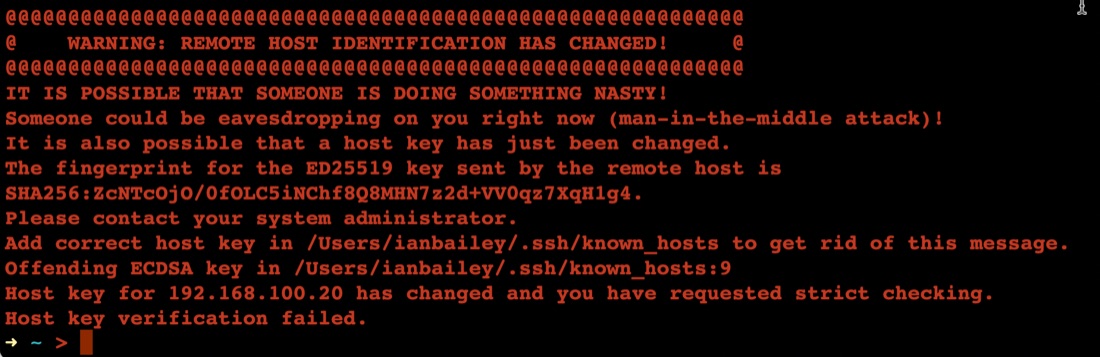
The first time you connect to a new server with ssh, it asks you something like:
➜ ~ > ssh ian@192.168.100.20
The authenticity of host '192.168.100.20 (192.168.100.20)' can't be established.
ED25519 key fingerprint is SHA256:ZcNTcOjO/0fOLC5iNChf8Q8MHN7z2d+VV0qz7XqH1g4.
This key is not known by any other names
Are you sure you want to continue connecting (yes/no/[fingerprint])? yes
Warning: Permanently added '192.168.100.20' (ED25519) to the list of known hosts.
Once you’ve said yes, it adds the server ‘fingerprint’ to the known hosts file, then next time you ssh there, it feels safe - we know this server.
Feb. 7, 2023
Installing your first virtual machine (VM) in the Proxmox hypervisor is pretty straightforward. This post runs through those steps using Proxmox 7.3.
You need an operating system for your virtual machine, I’m going to use Ubuntu server in this example, but it could just as easily be Windows server , or regular windows, or one of the desktop Linux distributions. Whichever you decide, you’ll need to find and download the ISO for it. The ISO is a (usually quite large) file needed to install the operating system.
Feb. 6, 2023
A smart thing to do after setting up a server on the internet, is to set up SSH keys and then turn passwords off for SSH. The reason for this is that scanning for open port 22 on IP addresses, then brute forcing password files on them is pretty much hacker 101. So if you have passwords turned on, and especially if you have a weak password you are really inviting someone to take over your server as root and add it to their botnet army for liking Putin’s twitter posts or whatever.
Feb. 5, 2023
Listening to podcasts, I’ve been jealous of US developers who seem to have masses of $5/month VPS (Virtual Private Server) options. When I looked for similar Australian offerings a few months ago, they all seem to start at around $35 which is outside of my ‘have a play with something’ budget range.
I could of course use one of the international options, but one of the main apps on my app ideas list needs to be hosted in Australia and work under Australian data privacy rules. That might be the case for Digital Ocean (or other US companies) if you select an AU server, but I’m not a lawyer. For the imaginary clients of my imaginary app, me being able to say that the hosting is with an Australian company in Australia would be a plus.
Feb. 4, 2023
Even though it’s my server, I still have a pang of guilt when this happens.
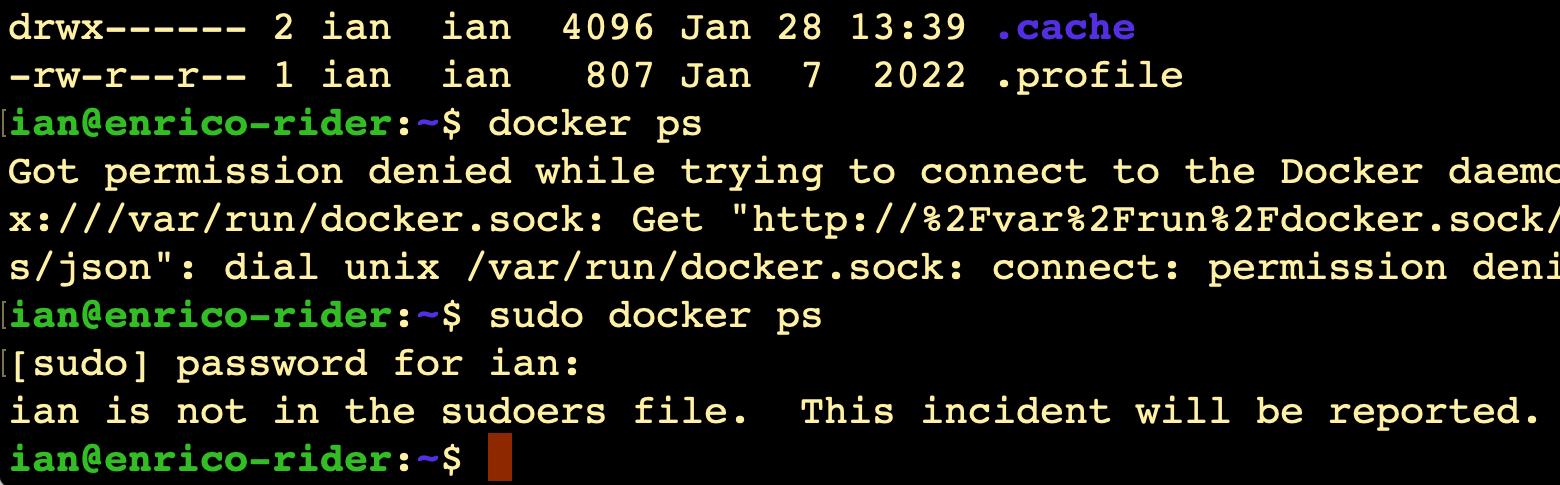
I always imagine Richard Stallman (or someone with a similar 2000’s database administrator beard) looking at me disappointedly and shaking his head slowly.
It does raise the question though - since it’s my server, shouldn’t I be getting a text message from CERN or something?
Where is this report?
(Relevant xkcd )
Like everything, the answer is ‘it’s logged’. We can use the journalctl command to look at the logs, on this server that’s been running less than 20 hours, there’s already several thousand lines to look through if you just enter journalctl, so I’m going to just send all the high priority logs to a file:
Feb. 3, 2023
Once you’ve got Proxmox installed, you can point your web browser at the IP for the physical server, and use the port 8006. Log in as root using the password you entered during the install. If you just accepted all the defaults during the install it will look something like this:
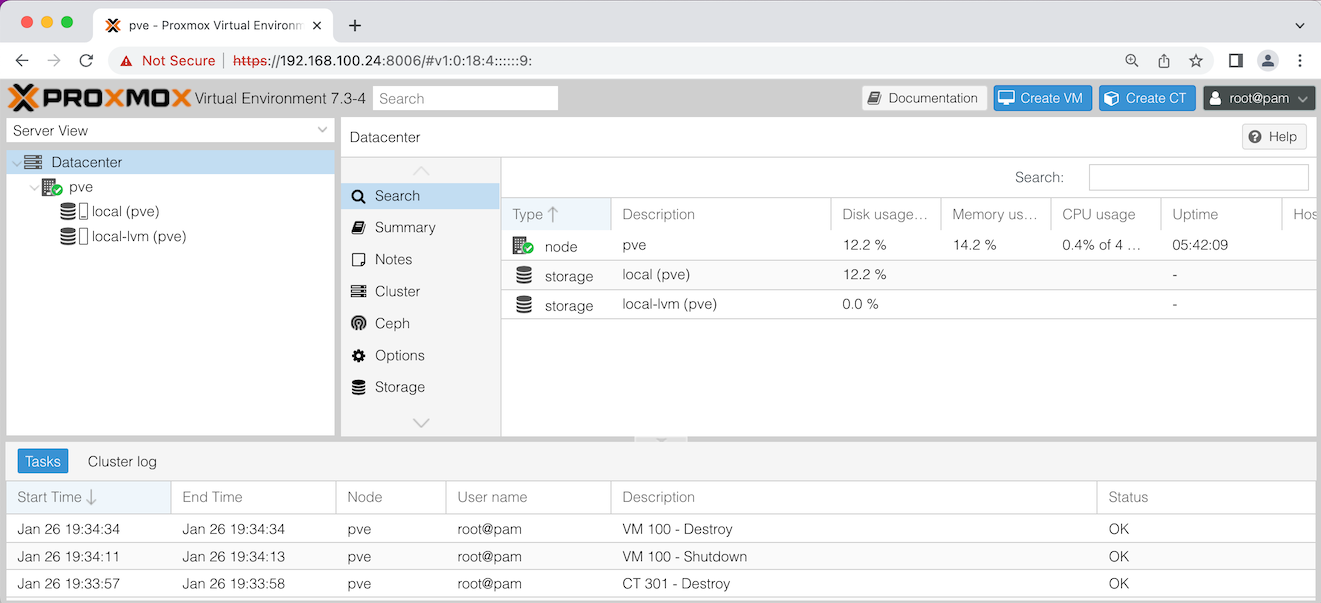
Let’s discuss what you’re seeing in that ‘Server View’ on the left there. pve is the name of my node - this installation of Proxmox on my physical server. If you named your server something different during the install, it will be show that name here.
Feb. 2, 2023
Now that I’ve seen I can easily stand up VM’s on this baby server, it’s apparent the first limitation I’ll run into is RAM. It has two laptop sized memory slots that can take up to 8GB apiece. So it could easily be doubled, but at a cost of around $70.
While I’m looking on eBay for RAM, the algorithm thinks I might be interested in this.
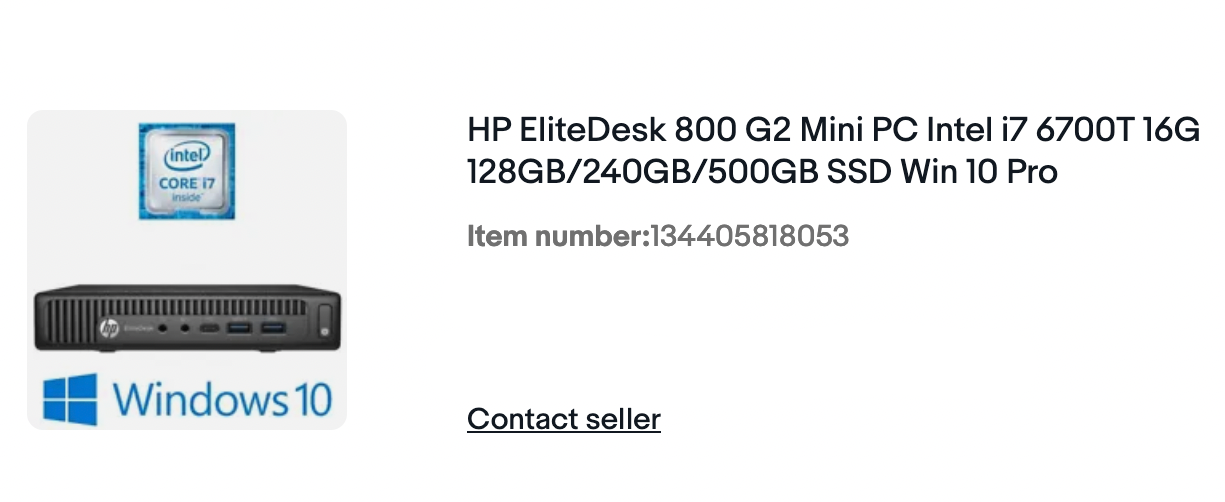

While I’m looking at the specs (4 cores - the current one has 2, double the RAM, bigger disk), eBay is like “Hey, how about this 20% off discount code - is thAt soMetHing ThAt miGHt HeLp yoU deCiDe?”
Feb. 1, 2023
I mentioned a while ago that the price of the Raspberry Pi4 was getting such that it’s smarter to purchase one of the little business workstations instead. Depsite having little need for such a thing, I went ahead and bought an HP Elitedesk 800 G1 “mini” PC. It has 8GB RAM (which is the max for the Pi4) as well as a 128GB SDD, the processor is an Intel i5.
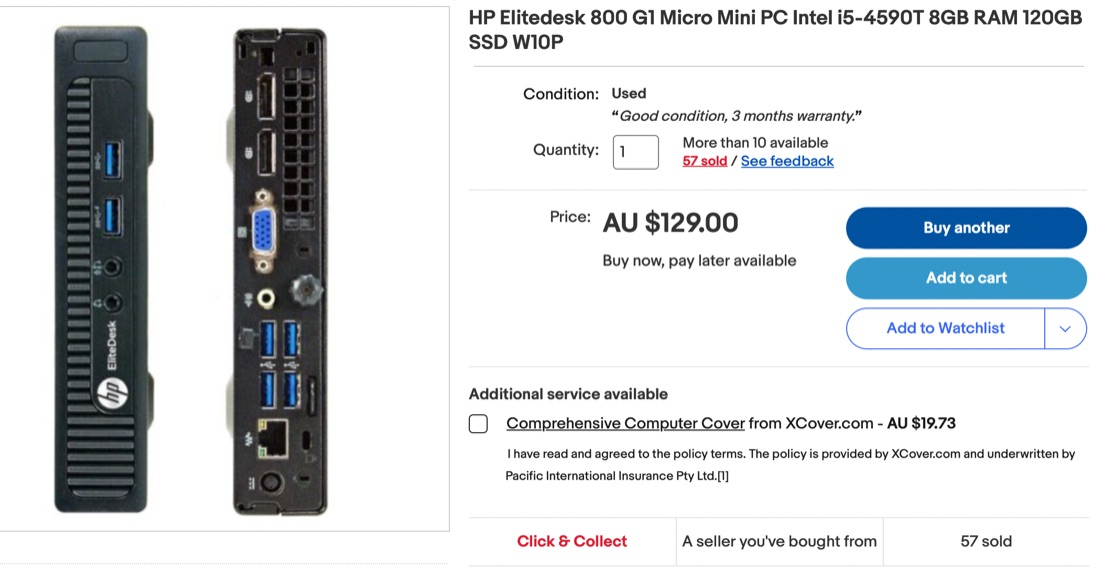
This compares pretty well with the 8GB Pi4 which only has a fraction of the storage (on an SD card) at around $400. One area where the Pi would have an edge might be in power consumption - I expect it would be a bit less. One possible catch for young players is that the HP has a ‘display port’ rather than HDMI for the screen connection, so pick up a $5 adapter if you’re getting one. The metal case and nice finishing on the HP actually looks really great in my office compared with my Pi 3b+ dev server that’s sort of hanging on the end of a cat5 cable.
Jan. 31, 2023
Following on from the previous post…
I went the nuclear route - deleted the node_modules folder, package-lock.json and installed the packages from packages.json. I still had some errors, but the react app at least ran correctly. Also, the messages are a bit more intelligible, and all of them cascade from this one.
# npm audit report

nth-check  <2.0.1
Severity: high
Inefficient Regular Expression Complexity in nth-check - https://github.com/advisories/GHSA-rp65-9cf3-cjxr
fix available via `npm audit fix --force`
Will install react-scripts@2.1.3, which is a breaking change
node_modules/svgo/node_modules/nth-check
From my, admittedly ignorant, viewpoint, there’s a couple of weird things going on here.
Jan. 30, 2023

At several points in the Complete Web Developer course, deprecated packages have been used, with the slide before the video explaining what’s happening, and giving a work around, or sometimes - as is the case for the bit I’m just starting - exhorting the benefits of dropping you into a non-working mess and having you figure it out yourself.
While this argument can be reasonably made - that figuring things out on your own is a valuable skill - it’s also a useful fig leaf to cover up the fact that they haven’t bothered to fix the course to make it work out of the box.