Proxmox LXC backup to NFS share failing
12 Apr 2023
I was doing updates on all my nodes and VM’s today, and backing up the VMs that aren’t already on a backup schedule. On my dev machine I have a Debian LXC container that I mostly just use for trying out Linux commands and playing around. I used to have a backup of it that I used a lot - after playing around I like to set it back to a fresh install plus my ssh keys - but I lost it somehow when moving the VM to new metal.
When I tried to back it up today, I got this drama.
INFO: starting new backup job: vzdump 200 --node pve-dev1 --mode snapshot --remove 0 --notes-template '{{vmid}}-{{guestname}} ({{node}}) - after timezone fix' --storage NAS-DS2 --compress zstd
INFO: Starting Backup of VM 200 (lxc)
INFO: Backup started at 2023-04-07 17:11:08
INFO: status = running
INFO: CT Name: babydeb
INFO: including mount point rootfs ('/') in backup
INFO: backup mode: snapshot
INFO: ionice priority: 7
INFO: create storage snapshot 'vzdump'
  Logical volume "snap_vm-200-disk-0_vzdump" created.
INFO: creating vzdump archive '/mnt/pve/NAS-DS2/dump/vzdump-lxc-200-2023_04_07-17_11_08.tar.zst'
INFO: tar: /mnt/pve/NAS-DS2/dump/vzdump-lxc-200-2023_04_07-17_11_08.tmp: Cannot open: Permission denied
INFO: tar: Error is not recoverable: exiting now
INFO: cleanup temporary 'vzdump' snapshot
  Logical volume "snap_vm-200-disk-0_vzdump" successfully removed
ERROR: Backup of VM 200 failed - command 'set -o pipefail && lxc-usernsexec -m u:0:100000:65536 -m g:0:100000:65536 -- tar cpf - --totals --one-file-system -p --sparse --numeric-owner --acls --xattrs '--xattrs-include=user.*' '--xattrs-include=security.capability' '--warning=no-file-ignored' '--warning=no-xattr-write' --one-file-system '--warning=no-file-ignored' '--directory=/mnt/pve/NAS-DS2/dump/vzdump-lxc-200-2023_04_07-17_11_08.tmp' ./etc/vzdump/pct.conf ./etc/vzdump/pct.fw '--directory=/mnt/vzsnap0' --no-anchored '--exclude=lost+found' --anchored '--exclude=./tmp/?*' '--exclude=./var/tmp/?*' '--exclude=./var/run/?*.pid' ./ | zstd --rsyncable '--threads=1' >/mnt/pve/NAS-DS2/dump/vzdump-lxc-200-2023_04_07-17_11_08.tar.dat' failed: exit code 2
INFO: Failed at 2023-04-07 17:11:09
INFO: Backup job finished with errors
TASK ERROR: job errors
Permissions ! I was puzzled - the line before (creating the backup file) is working, but not creating the temp file on the same share and directory? Very odd. Backing up a real VM on the same node and to the same share was working fine. Luckily it’s a simple, and fast, matter to create a heap of LXCs with different settings and see if the error can be reproduced, so I was soon confidently able to say the problem only existed for unprivileged LXC containers backing up to the share - I didn’t have the problem if I used the local disk.
If I dropped to the console for the node, I could create an identically named file in the same directory with no problems.
During all that testing, I saw some output that led to more helpful thinking.
INFO: starting new backup job: vzdump 303 --storage NAS-DS2 --compress zstd --notes-template '{{guestname}}' --remove 0 --node pve-dev1 --mode snapshot
INFO: Starting Backup of VM 303 (lxc)
INFO: Backup started at 2023-04-07 18:43:44
INFO: status = running
INFO: CT Name: apline-unpriv
INFO: including mount point rootfs ('/') in backup
INFO: mode failure - some volumes do not support snapshots
INFO: trying 'suspend' mode instead
INFO: backup mode: suspend
INFO: ionice priority: 7
INFO: CT Name: apline-unpriv
INFO: including mount point rootfs ('/') in backup
INFO: temporary directory is on NFS, disabling xattr and acl support, consider configuring a local tmpdir via /etc/vzdump.conf
INFO: starting first sync /proc/39778/root/ to /mnt/pve/NAS-DS2/dump/vzdump-lxc-303-2023_04_07-18_43_44.tmp
INFO: first sync finished - transferred 9.35M bytes in 2s
INFO: suspending guest
INFO: starting final sync /proc/39778/root/ to /mnt/pve/NAS-DS2/dump/vzdump-lxc-303-2023_04_07-18_43_44.tmp
INFO: final sync finished - transferred 0 bytes in 0s
INFO: resuming guest
INFO: guest is online again after <1 seconds
INFO: creating vzdump archive '/mnt/pve/NAS-DS2/dump/vzdump-lxc-303-2023_04_07-18_43_44.tar.zst'
INFO: tar: /mnt/pve/NAS-DS2/dump/vzdump-lxc-303-2023_04_07-18_43_44.tmp: Cannot open: Permission denied
INFO: tar: Error is not recoverable: exiting now
ERROR: Backup of VM 303 failed - command 'set -o pipefail && lxc-usernsexec -m u:0:100000:65536 -m g:0:100000:65536 -- tar cpf - --totals --one-file-system -p --sparse --numeric-owner --acls --xattrs '--xattrs-include=user.*' '--xattrs-include=security.capability' '--warning=no-file-ignored' '--warning=no-xattr-write' --one-file-system '--warning=no-file-ignored' '--directory=/mnt/pve/NAS-DS2/dump/vzdump-lxc-303-2023_04_07-18_43_44.tmp' ./etc/vzdump/pct.conf ./etc/vzdump/pct.fw '--directory=/mnt/pve/NAS-DS2/dump/vzdump-lxc-303-2023_04_07-18_43_44.tmp' --no-anchored '--exclude=lost+found' --anchored '--exclude=./tmp/?*' '--exclude=./var/tmp/?*' '--exclude=./var/run/?*.pid' . | zstd --rsyncable '--threads=1' >/mnt/pve/NAS-DS2/dump/vzdump-lxc-303-2023_04_07-18_43_44.tar.dat' failed: exit code 2
INFO: Failed at 2023-04-07 18:43:47
INFO: Backup job finished with errors
TASK ERROR: job errors
And sure enough, there is a helpful /etc/vzdump.conf file. Uncommenting the tmpdir line and pointing it to /tmp fixed all my problems.
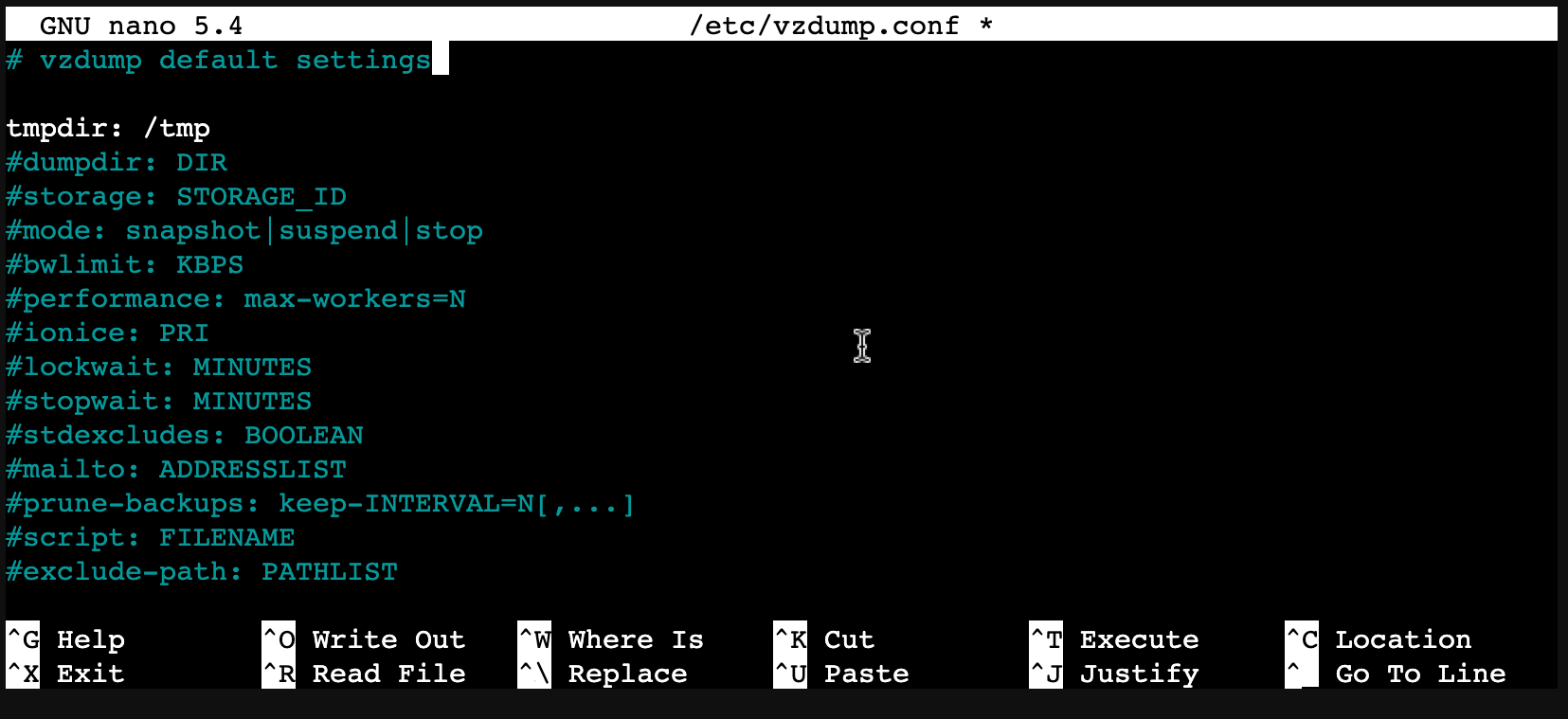
So what’s going on? I did some googling and found some discussions 1 /2 /3 in the Proxmox forums . They are saying it’s because the unprivileged containers (they don’t run as root, which seems like good practice) don’t have permissions for the NFS share directory. I feel there’s a few problems with this theory:
- It seems to do fine creating the other files
- Why would the LXC container be doing this work? Surely the process is being run at the Proxmox level.
- Actually the LXC container should not have access to the NAS at all, even if it’s privileged - it’s not mounted in there, the LXC knows nothing about it.
Nevertheless, I’m sure they know better than me. If I was shipping this product, I’d probably engineer around this problem. Maybe by detecting it and switching to /var/tmp or even just by making that the default in the config file.