Purple warning - "Publishing changes"
21 Oct 2022It’s a pretty safe bet that if Xcode is saying there’s an error in my code, that it’s correct, and I am in error - not Xcode. Today I came across a situation where that might not be true.
I think the purple warnings are problems detected at runtime - I’ve heard of thread problems causing purple warnings. The error I was getting was “Publishing changes from within view updates is not allowed, this will cause undefined behavior.”
The error was on two lines in my model where I’d called a method to update the model from a button press in a sub-view function.
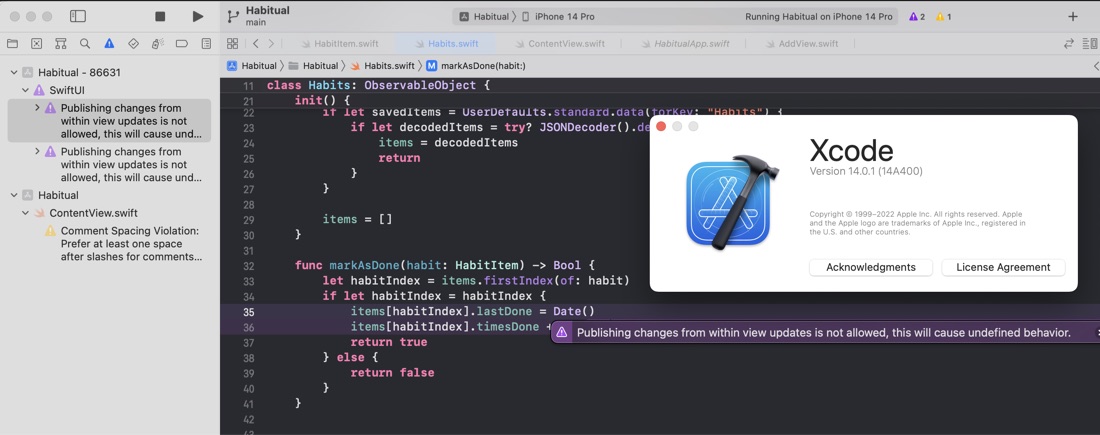
After poking around to try and work it out, I found this clear blog post from Donny Wals and it turns out it’s possibly a bug in XCode 14. My situation fitted the description - calling the method from a button in a list, and the temporary workaround of adding a modifier to the button eliminated the warning.
I’m on Xcode 14.0, and I gather from Donny’s post that the problem might have been fixed in newer versions.
Here’s the calling code - a button in a list, with the “fix” on line 25.
    func habitView(habitItem: HabitItem, habitsCollection: Habits) -> some View {
        HStack {
            VStack(alignment: .leading) {
                Text(habitItem.name)
                    .font(.headline)
                Text(habitItem.lastDone.formatted(date: .abbreviated, time: .omitted))
            }
            Text(" (\(habitItem.timesDone))")
                .font(.largeTitle)
            Spacer()
            Button {
                if !habitsCollection.markAsDone(habit: habitItem) {
                    print("Unexpected error - habit not found in collection:\(habitItem.name)")
                }
            } label: {
                if habitItem.due {
                    Image(systemName: "rectangle")
                        .font(.system(size: 40))
                } else {
                    Image(systemName: "checkmark.rectangle")
                        .font(.system(size: 40))
                }

            }
            .buttonStyle(.bordered)
        }
    }