SDD Wearout numbers
25 Apr 2023
I didn’t understand why the default Proxmox install sets up the storage the way it does - with the available disk split up into an LVM and an LVM thin storage - so I’ve been reading this excellent Proxmox Storage Guide by Programster (spoiler - the LVM thin makes VM snapshots easier).
At one point in the post they mention that you can see the “Wearout” percentage for any SSD drives in the Proxmox GUI, so of course, since I now own five second hand HP Elitedesk 800 G1/G2’s all with SSD drives, I dived in to have a look at each drive and found this.
| Server | GB | Model | SMART | Wearout |
|---|---|---|---|---|
| pve-prod1 | 512 | Micron_1100 SATA | Pass | 6% |
| pve-prod2 | 120 | SSD2S120SF1200SA2 | Pass | 100% |
| pve-dev1 | 256 | TOSHIBA_THNSNK256GCS8 | Pass | 2% |
| pve-kr01 | 120 | KINGSTON_SA400S37120G | Pass | 0% |
I’m no expert, but 100% “wearout” sounds bad, or maybe these figures go the other way, and that drive is 100% good and the others are just about dead. Either way, I’m suddenly interested in this number and what it means.
There’s a button to look at the S.M.A.R.T (Self-Monitoring, Analysis and Reporting Technology backronym) attributes, so let’s have a look at this suspicious no-name drive.
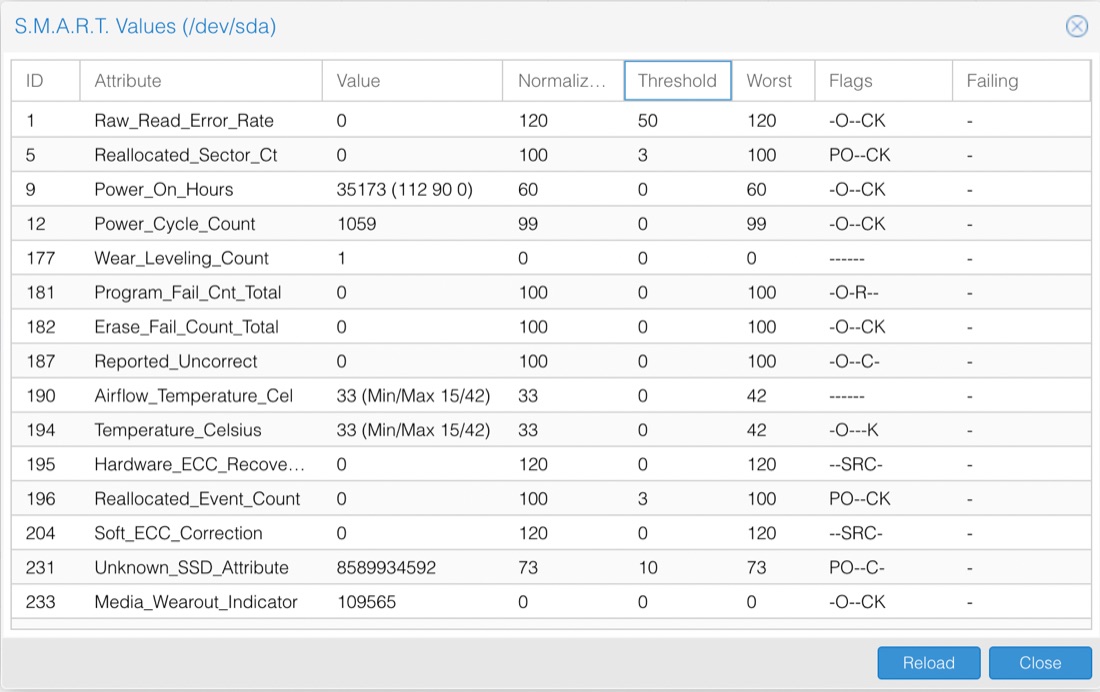
Well, some of this is comprehensible. The Power_On_Hours is saying it’s been on for about one and a half years worth of hours. Since it’s been power cycled over a thousand times, that all sort of matches a corporate desk machine that’s been in use for five or six years. These values look like the sort of data you get from running the smartctl -a /dev/sda command. I’ve snipped this output because it is huge, but the middle part is very similar to the table above, and there was nothing scary it it,
...

SMART overall-health self-assessment test result: PASSED

...


ID# ATTRIBUTE_NAME          FLAG     VALUE WORST THRESH TYPE      UPDATED  WHEN_FAILED RAW_VALUE
  1 Raw_Read_Error_Rate     0x0032   120   120   050    Old_age   Always       -       0
  5 Reallocated_Sector_Ct   0x0033   100   100   003    Pre-fail  Always       -       0
  9 Power_On_Hours          0x0032   060   060   000    Old_age   Always       -       35173 (2 96 0)
 12 Power_Cycle_Count       0x0032   099   099   000    Old_age   Always       -       1059
171 Unknown_Attribute       0x000a   100   100   000    Old_age   Always       -       0
172 Unknown_Attribute       0x0032   100   100   000    Old_age   Always       -       0

...

No self-tests have been logged.  [To run self-tests, use: smartctl -t]
That’s a lot, but it clearly says that it’s “passed” the test.
I tried to run the short SMART test a couple of times with the command: smartctl --test=short /dev/sda but each time (after I’d waited a couple of minutes) when I ran smartctl -l selftest /dev/sda to look at the results, it claimed the test had been aborted by the host. Presumably I need to shut down Proxmox to run the test properly.
For the moment, I’m just hoping that different manufacturers report that wearout figure differently, but I’ll show an increased interest in these drives health for a while.
The reason I have three nodes locally is that I’m anticipating going to HA (high availability) as I move more services out of the paid cloud onto self-hosted. When I do that some of the VM’s (with low disk speed needs) will have their storage on the NAS, and the others in a Ceph or ZFS pool to facilitate quick migration on failure. To support that, I’m probably looking at provisioning new high quality 512GB SSDs to these machines anyway, so if I do get to that stage, that’s a strong (although expensive) possibility, and I’d certainly rather buy two than three.