ssh key login on VPS
12 Feb 2023
Due to potential brute force attacks , it’s a good idea to turn off password access via shh and instead rely on ssh keys. In this post, I’ll run through that process.
Generating your key
On a mac (or actually most *ix systems), your ssh keys live in the .ssh directory inside the users home directory. Since it starts with a period, it’s a ‘hidden’ directory. To see it in Finder press
Shift|Command|.
(that command includes the full stop). Here’s mine:
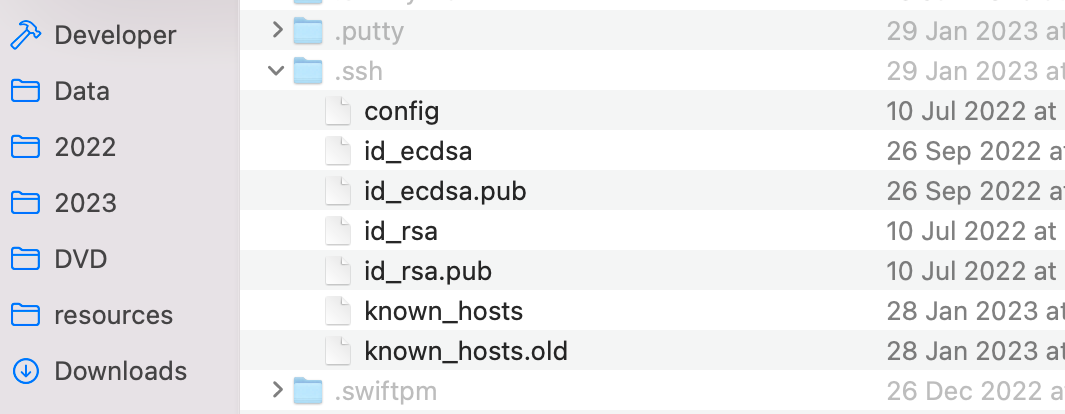
The keys are in pairs, there are two pairs of keys above: id_ecdsa and id_rsa. Each pair of keys includes a public key and a private key. It’s the public key we want to put on the server. The private key is precious - it should not be anywhere that others can access it. The public key can safely be provided to a server that can use it to securely authenticate the holder of the private key by doing some complicated stuff.
If you don’t already have a key pair, we need to create one. On Mac or Linux that is a straightforward process in a terminal , on Windows I think the recommendation is usually to use PuTTY .
Installing your key on the target system
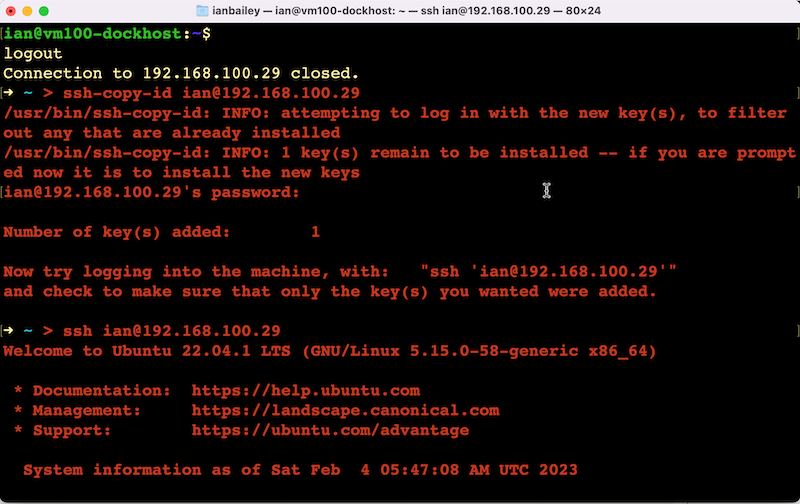
It’s possible to create a file on the system we want to ssh onto and to paste the public key into in, but from a Mac or Linux machine, we can use the ssh-copy-id command which will do all that for us in an error-free way. It has the format:
ssh-copy-id <username>@<host>
Turning off password access
Although it’s convenient to ssh in without a password (because we’re using keys), the main reason for doing this is to turn off passwords to make brute-force password attacks impotent. For that, we need to turn off passwords for ssh.
Note that I’m running on Unbuntu server 22.x so your mileage may vary. Certainly when I was reading around about this I found many slightly different approaches, but this is what I’ve done and tested so that ssh refuses to accept passwords.
The configuration files for ssh on Ubuntu are at /etc/ssh/
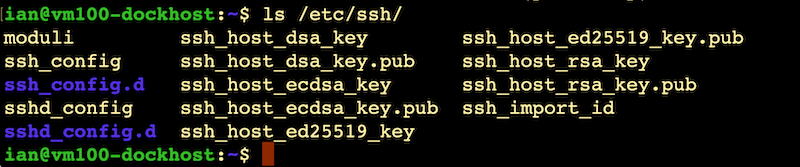
It’s the sshd_config we’re interested in (ssh_config is for the client, we’re wanting to change the ssh server - daemon). You’ll also notice there’s a sshd_config.d directory. The reason for this is that the config file has a line in it at the top that includes all the config files in that directory. This is a common pattern in Unbuntu - the main config file pulls in other config files. When you see that, you really shouldn’t edit the main config file as it’s possible that a future update will change it, you edit, or add to the files in the directory below.
The way it words is that the commands in the files in the sub-directory will have priority over the defaults in the main config file (which is slightly counter-intuitive for me).
The VPS I am using is on binarylane , and they already have a config file in the subdirectory, so I’ll edit that.

With a standard Unbuntu install, there are no files in there, so you’ll need to create one with touch, then add the line PasswordAuthentication no
Many of the articles on the internet also talk about turning off ChallengeResponseAuthentication and UsePAM, but I found with my VPS and local Unbuntu servers, all that was needed was PasswordAuthentication if my intention was to prevent these attacks.
Note that once this config is activated, you won’t be able to log in via ssh with a password, so it would be foolhardy to do it without having set up and tested your login with keys.
This config won’t be active until the ssh daemon is restarted.
sudo systemctl reload ssh
Now if someone attempts to ssh in they’ll see this:

Not that turning off passwords like this is only for ssh. You’ll still be able to log in via the console if you’ve stuffed something up.