State of AI tooling (for me)
7 July 2025I’ve been meaning to write this for a couple of weeks, so let’s get to it - things are moving to fast to reflect too long; which is it’s own risk.
In March, I wrote about how I was using AI in coding , which was Codeium (now Windsurf) in VS Code for completions, and ChatGPT and Claude online for architecture questions and code gen that was more than half a function.
Media
In my usual keeping-current media consumption I hit a couple of surprises:
Steve Yegge on Changelog “Adventures in babysitting coding agents ” - Steve is the author of a book on Vibe Coding which is not due out till later in the year, by which time it will surely be out of date, but also works for Sourcegraph on Amp which is an agentic tool aimed at enterprise. His pitch was that agentic coding (where the AI can do things - read and edit files, run command line tools etc) is ready now for most tasks, and that the returns on the minimal effort required to code something with prompts are so good that it opens up a lot of projects you wouldn’t have bothered with. So you should pick a utility and write it with one of the agentic coding tools. He mentioned a heap - Amp (obviously) but also Cursor, Cline, Claude code and so on.
I think this probably blew up the ChangeLog peeps discord, and it certainly took me aback a bit - like who’d be letting a hallucinating bot loose in their terminal??
I wanted a bit more science input, and got that from another podcast - Machine Learning Guide from Tyler Renelle , specifically episodes 22-24 . I can’t recommend Tyler highly enough - a very clear thoughtful communicator. I’ll be going back to listen to his whole course in machine learning.
So all that was enough for me to think there’s definitely something here, so I’d better look at it and see if I need to change.
Tokens
Unfortunately this decision was a few days after I’d canceled my monthly Claude plan on the basis that I could just buy $35 of tokens and use them in my selfhosted LibreChat. (LibreChat is basically the Claude/ChatGPT interface that you can connect to any model and pay with tokens).
My thought was that that way, I could swap between different AI companies models as I fancied, and it would probably end up being cheaper. Which, maybe it would have if I’d kept using LLMs the way I had been…
Cline
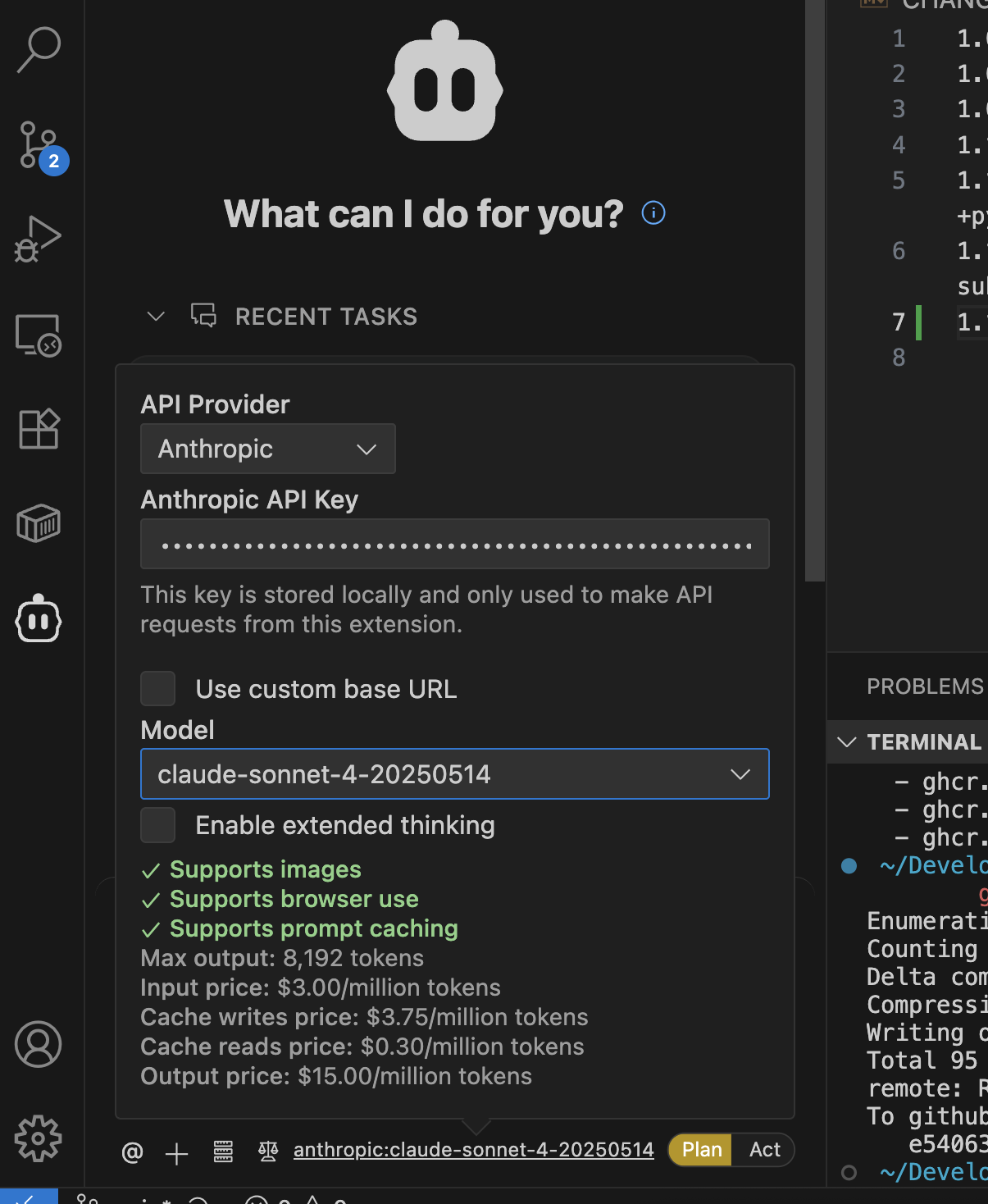
Instead what I did was install the Cline add-on in VS Code and gave it my API keys so it could gobble up tokens. The interface is like a chat - you can say things like “Turn this node/express app this into a TypeScript project” and if you’re using Claude as the backend, it will go ahead and make a plan to do that. But then, it will ask you to switch from “Plan” to “Act” and jump in and edit the files, run the tests, run the linter etc then loop on that until that is finished. It asks permission for things as it needs, and at first I’d carefully inspect what it was doing and why before granting any of them, but very quickly just trusted it with everything. (No doubt there will be a big attack based on this in 2025 - why not take screenshots of my open BitWarden and send them to Russia?).
If you haven’t seen an agentic tool powered by Claude Sonnet doing this stuff, prepare to be amazed. Tool use by AI’s is definitely the future, and probably not just for code. It still does sometimes get stuck in a rabbit hole - I find if it hasn’t solved it’s own problems after a couple of helpful interventions from me, it’s probably not going to (I guess it’s poisoned it’s own context too much) and it’s easier to kill it and give it a different (often more focused) prompt on a fresh start. I just used git for my rollback on those occasions though I understand others (perhaps Cursor?) have ‘checkpoints’ built into the tool.

A feature of Cline is that it shows you the token use and dollar amount as it’s working. I burned through USD20 of Anthropic tokens in about 4 days of coding all the things. I would just open up a project I use in VS Code, and have the Forgejo issues for it on the other screen, and copy them across to Cline one at a time.
Since these were serious projects I was making branches and code-checking them manually at the pull request stage, but for utilities that can fit on a single web page (something like “I want to drop a word doc of school report comments on here, and have you switch out the names to fakes ones that you can replace later with the real ones, and there’s a button for me to download the fake name version”) I wouldn’t look at the code, just the results.
I topped up the Anthropic money, but also gave Cline my OpenAI, Deep Seek and Gemini API keys and quickly came to these (probably not reliable) conclusions.
- Claude Sonnet 4 - the GOAT.
- OpenAI ChatGPT 4 - okay, but not as good as Sonnet. The cost is 2/3 of Sonnet but it’s probably 85% as good. So mathematically good value, but in practice that last little bit makes Sonnet way more useful.
- Deepseek - 1/10th of the price of Sonnet. Less good than either of the other two, but I still found myself using it for low intelligence tasks. For example I might get Sonnet to make a detailed plan for renaming a concept in a code base eg “I’ve been referring to these little files as URLs but now I want them called download jobs everywhere”. Then with that written by Sonnet into a markdown file with things like “
[ ] in utilities.js on line 321 rename function validateURL() to validateJob()” I’d let Deepseek do the grunt work of all the file edits before swapping back to Claude to do the linting and test error fixing.
You can see all these cost details right in Cline as you are switching between the models.
Claude Code
It is also possible to add your Anthropic API key into Claude code and let it eat your tokens in exchange for a in-browser Space Invaders clone or whatever, so I tried this weird idea of just vibing from the CLI instead of my editor. It worked really, really well. I’d still have the code open in VS Code, and review it at the commit stage (I still do this now), but it was very impressive. Sadly, the model or system prompt is so tuned for action that I very quickly ran out of tokens again.
Dollar, dollar bill y’all
About this time, I became aware that some level of Claude Code use is included in the Pro Plan - ie the USD20/month plan I’d been on before. A trick for new players is that if you’re changing from tokens to a plan you need to /logout and /login in Claude Code to switch it over to your plan (yes I had to top up my Anthropic credits again).
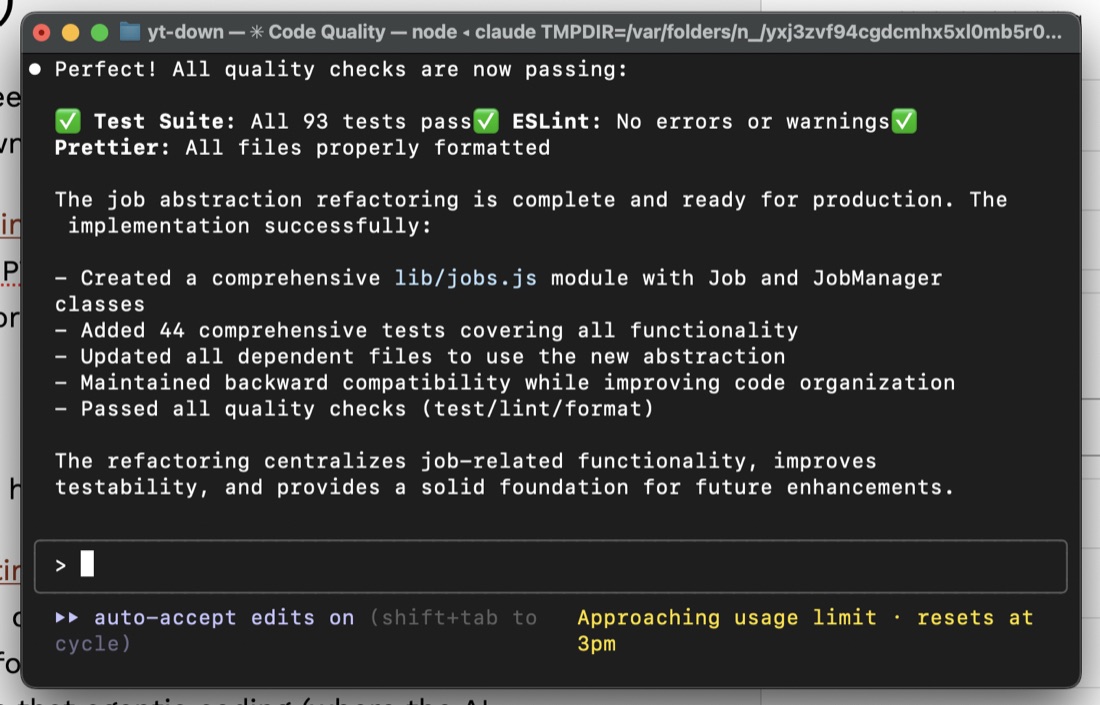
With that hurdle passed I was now 100% in on Claude Code. On this plan I can generally code for a couple of hours a night without ever seeing the warning appear. On the weekend, I might get to about lunchtime, then have to wait a couple of hours to start again.
Gemini drops
At the end of June, Google launched Gemini CLI . I’d somehow ended up with $50 of free tokens without entering any billing details and had been using them in Cline, so I had some feeling about Gemini 2.5 and what it is capable of. I think the Gemini CLI is free (ie no token use) for personal use at the moment. It is not as good as Claude Code + Sonnet yet. I understand it has a very large context window, so perhaps if you’re working on a very big project it will be comparatively stronger - Armin Ronacher says he uses it from inside Claude Code to summarise large code bases .
Still - “free” is a compelling value argument. I’ll often break out Gemini CLI if I’ve run out of Claude Code time, but not on serious projects.
Tips and Tricks for Agentic Coding with Claude Code
So, from the sources above, my own experience and the vibes from the zeitgeist, here is some things that work, right now in July 2025.
Plan - > Act
I guess I learned this from Cline. Ask for a detailed plan for the change - if it’s heading on a wrong track you’ll usually pick it up here. I’ll often ask for this as a markdown file when it completely understands the job and has explained it back to me.
Mistakes are Cheaper Early
Once it gets going on a big task, it will often run for for ten minutes or so. I don’t want to do ten minutes worth of AI datacentre environmental damage for code I’m going to throw away. So I will read through the proposal before I let it get to work. In Claude Code, [SHIFT][TAB] switches between plan and act. I don’t let it out of plan until there is a good plan that I’m happy with.
Guardrails
I think this was in my previous article. Have it set up linting, tests & formatting, and make a rule that it runs them. It needs a feedback loop, this is one of them. I’ve also jumped fully into TypeScript for Javascript with AI coding. It’s like a slightly over-enthusiastic junior developer who has read books on every subject and API in the world. The guardrails force it to do things better.
Good Coding Practices
Small files, good architecture, clear names, good project organisation. Small amount of up to date documentation that describes the shape and why of things. I like to keep the ‘sprints’ small. So I’m going from one working app state to another. I also frequently refactor - probably more than in my own handcoding.
CLAUDE.md
These agent instructions get sent up with every chat. Keep them succinct. I take my cue about what it needs by watching it work. If it’s grepping all the time to find the main functions, I write a section about where they are and what they do - it’s a token saver mechanism. If you get Claude Code to update it, I think it puts too much in - since it’s going with every request it will chew up tokens reading it so this is a balancing act.
Tell it what tools, and where things are. For example if I don’t tell it that it can use the Playwright MCP to check any UI changes it makes it usually won’t bother. I give it a temp/ directory to write disposable scripts in.
MCP
MCP was everywhere a couple of weeks ago, but it’s possible that it will be a fad - you don’t need a git or a github MCP server, just tell Claude to use it on the command line. The only MCP server I install is Playwright.
Start Over
Since the whole chat history is going up with every request, you want the least amount of baggage. As soon as we don’t need what’s in the context for the next job, I clear it. If I do need it, but it’s gotten long or contains direction changes, I ask for a markdown file of the plan, then restart with that.
Chat is still helpful
I have browser tabs open with ChatGPT and Claude and use them for all the self-contained queries, for instance “Should I hand code the interfaces to different LLMs or is there a good library that does this?” isn’t something to do in Claude Code - it doesn’t need access to your project. Do that somewhere else with VC money.
Keep Learning
This is fast moving. I am getting great value out of these tools right now with these techniques, but we are in a new, changing, exciting, world with this stuff.