Jul. 1, 2024

This post looks at the context for some of my thinking about AI for supporting software development, and where I’ve landed on it for the time being.
The landscape
I briefly wrote about ChatGPT’s coding ability at the end of 2022. The wide availability of this tool marked the beginning of what I think can fairly be described as a revolution. The controversies that have crystalised since have not dampened my amazement of this step forward in what compute can do, especially around natural language processing.
Jan. 15, 2024

I’ve paid for a month of Mosh to do his React 18 course , and one of the things he makes a big deal about is not to go too deep with nested objects for your state. As soon as you start to update them it becomes apparent why.
Because of the way state works in React, if we need to update part of an object it has to be deep copied, the changes applied to this copy, then that new copy passed back to React to replace the previous version. So, how we copy objects becomes a matter of particular interest.
Dec. 12, 2023

In the long ago times, I’d done several years of commercial programming before I ever had to worry about dealing with multiple things happening at the same time. Perhaps because of the rarity of this problem, doing it in traditional languages was not always elegant.
In the modern world of everything happening on the network, and systems being build out of micro-services and APIs, the beginning programmer probably has to deal with this stuff in Programming 102. Luckily, modern languages have these considerations built in, and one language with a particular reputation for that is Go.
Dec. 9, 2022

I’ve been listening to the latest episode of the Empower Apps podcast, this one with Jill Scott talking about “Humane” development - in the sense of being humane to whoever (probably you) is going to be reading this code in the future. It helped me clarify my thoughts about a couple of things.
None of these ideas are particularly new or groundbreaking, and although I think of them as my personal style, they are very common, and in Swift could be regarded as part of the culture. Some of these concepts support each other, some represent a trade off between two opposing ideas that require us to make a choice.
Dec. 8, 2022
ImageRenderer () is a SwiftUI class that creates an image from a view. You just initialize it with the view, then extract a cgImage (Core Graphics) or uiImage that can be cast to a SwiftUI Image.
I’ll need a view to work with, so here it is; a crude version of my behaviour ticket.
struct TicketView: View {
    var body: some View {
        ZStack {
            Color(.cyan)
                .frame(width: 300, height: 350)
            VStack {
                Text("Fred Bloggs")
                    .font(.largeTitle)
                Text("")
                HStack {
                    Text("Putting rubbish in the bin")
                    Image(systemName: "trash")
                }
                .foregroundColor(.purple)
                Text("")
                Text("Green Faction")
                Text("")
                Text("")
                Text("\(Date().formatted())")
            }
        }
    }
}
Here it is, with a couple of buttons underneath:
Dec. 5, 2022

A couple of days ago I was lauding the learning benefits of writing your own projects over completing tutorial projects - since your own projects push your boundaries further. Of course, its also the case that the project requirements might so completely exceed your current ability that it grinds to a halt. That’s the case with my behaviour ticket app .
The part of the app for collecting the data is pretty much done and how I imagined it, but the output needs to be pretty tickets that can be printed on paper. I managed to write the ticket data to a CSV file and export that to the files app with a .fileExporter, but really what I wanted is to have one of those share screens where you can chose to AirDrop, Print etc, and for the tickets to have been rendered to a PDF or series of images to be shared. That will have to wait. I’m just up to a bit in the #100Days about writing images so I’ll push on with that for a bit and come back to my app.
Nov. 26, 2022
As usual after a challenge, I compare my efforts to Paul’s model solution. Just to quickly recap the app, it sucks up some data (Users who have multiple friends) and displays it. The change in this challenge was to convert it to add that data to a Core Data store so that if a future network error prevented accessing new data, it could still display the old.
Merge Policy
The first difference is that Paul adds a merge policy. A Merge policy tells Core how to deal with any constraints defined in the data model. In this app, I’d defined the CachedUser.id as a constraint. The purpose of this is that under normal conditions the app would be picking up mostly the same data each time it started up. We don’t want scabs of duplicate data, so constraining users based on their unique id is smart.
Nov. 25, 2022

I think I’ve finally completed the minimum work for Day 61 of #100DaysOfSwiftUI . The task was to suck up some data in JSON, decode it. back it up into a Core Data graph then display the data from the Core Data.
I got stuck on dealing with the one:many relationship and had to revisit that from a different source to get my head around it, after that it was straightforward. Other small problem I ran into was that I created the id in the CachedUser as a UUID from (newly formed) habit. Then when I went to copy it in from the JSON version, it wouldn’t let me. When I realised my mistake and changed it in the data model, I still could not figure out why it wasn’t working - but of course I hadn’t regenerated the code for the ManagedObject. I just had to change the property type in the already generated code from UUID to string and I was back in business.
Nov. 23, 2022
Yesterday I roughed out a master/detail app with a list of gardens, and for each garden a detail screen including some plants. It used arrays of structs for the data. Today I’m going to convert that app to use Core Data, and explain my understanding of each step. This won’t be the entire app - I’m going to include the plants in my data structure, but not actually use them in this version. I’ll save that 1:many relationship stuff for another post.
Nov. 22, 2022
To help me get clear on the Core Data basics (so I can master one of the #100Days challenges ), I’ll write a simple master/detail app with arrays of structs, then convert it to Core Data listing out of the steps. Almost everything I know about Core Data, I learned from Paul Hudson’s 100 Days of SwiftUI course - of which I’m up to day 61. So shout out to him. I highly recommend that course, and most of the code you’ll see in this post is either inspired by, or directly copied from 100 Days, except of course the errors - those are mine. This post - Part One - just describes the app and shows the struct/array version.
Nov. 15, 2022
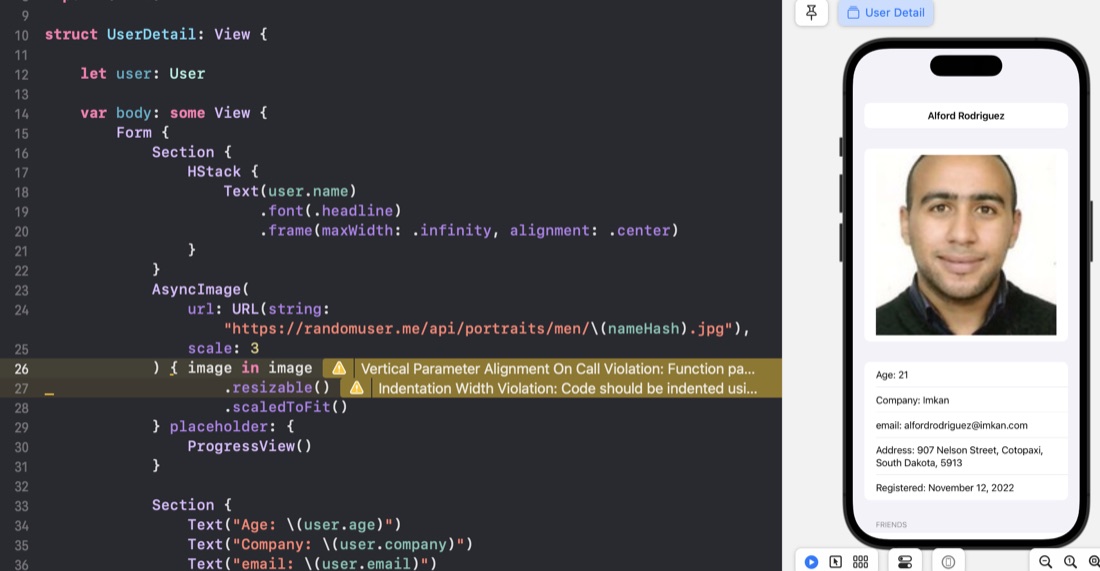
After each app, I use my HackingWithSwift+ membership to view Paul’s version of the app as a way to judge my performance. Yesterday’s app was “FriendFace ” - download some JSON of a number of people (including their friends) and display it.
UUID
In my struct, I’d just specified the User.id as a string, Paul uses UUID - this makes no difference to the app as it stands, but is much better if we ever needed to add users.
Nov. 14, 2022
The Day 60 Milestone is a demo app that vacuums up some JSON and displays it in a list in a NavigationView that links to a details page. Nothing super strenuous, the steps were something like this:
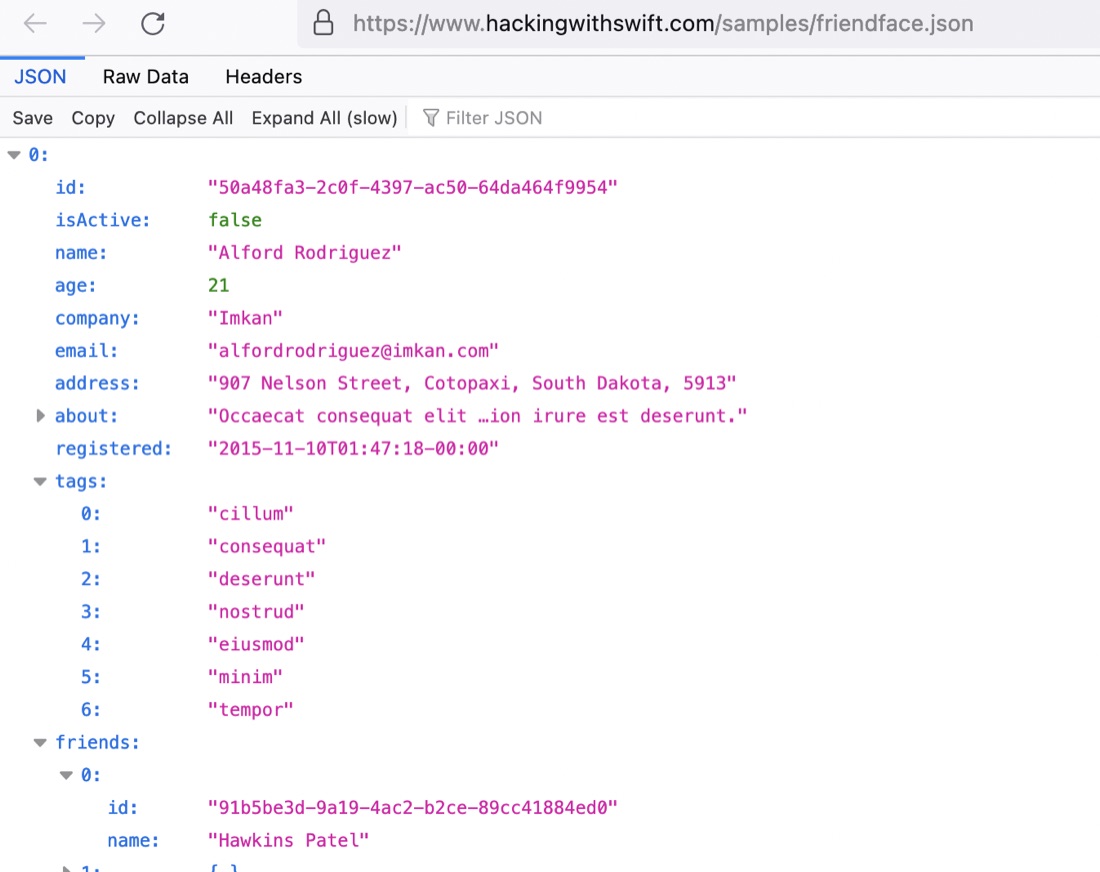
- Download the JSON and have a look at the structure. Firefox has a simple JSON viewer built in, so it was straightforward to see this is an array of users, which along with some (mostly string) properties contains an array of tag strings, and another array of friends.
Nov. 10, 2022

Project 12 was a series of code tutorials around developing CoreData concepts rather than a real app, but the challenges are based on a very small app that uses a subview to allow dynamic (ie changeable at runtime) filtering of a list of data. The reason this would be tricky is that the @FetchRequest is a property of a view - and therefore mutable. The trick is to have a subview to build that part of the view, and to pass parameters into it which build the fetchrequest using an underscore.
Nov. 6, 2022
Another set of challenges for a #100DaysofSwiftUI tutorial app. Project 11 was a book tracking app - the big new thing was using CoreData. Here’s the challenges for it .
Right now it’s possible to select no title, author, or genre for books, which causes a problem for the detail view. Please fix this, either by forcing defaults, validating the form, or showing a default picture for unknown genres – you can choose.
Nov. 5, 2022
In C world, if we want to pass a parameter down into a functional call, and allow the receiving function to change it’s value, we’d pass a pointer to the variable. Something like this:
#include <stdio.h>
#include <stdlib.h>

void increment(int* b) {
    *b=*b+1;
}

int main() {
    int a = 5;
    increment(&a);
    printf("%d", a);
    return 0;
}

// prints '6'
For youngsters, what’s happening is that we’ve set the value of a to 5, then passed the memory address of a into the increment() function. That’s what the @a means.
Oct. 30, 2022
If we mark a type with the protocol Codable, we’re specifying that this type has the capability of having it’s properties encoded to some format, and decoded back again.
So far in the #100Days this has been used to write and read data in UserDefaults, and to encode an object to send it as a URLRequest, then receive data back and create a new object from it. It’s a handy, powerful feature baked into Swift that just requires the developer to ensure any types that need this functionality comply with the Encodable and Decodable protocols that make up the Codable.
Oct. 27, 2022

I’ve been mucking around with the Habits app too long - it’s started to look like procrastination. It already meets the specification , so I’m calling it an MVP and moving on.

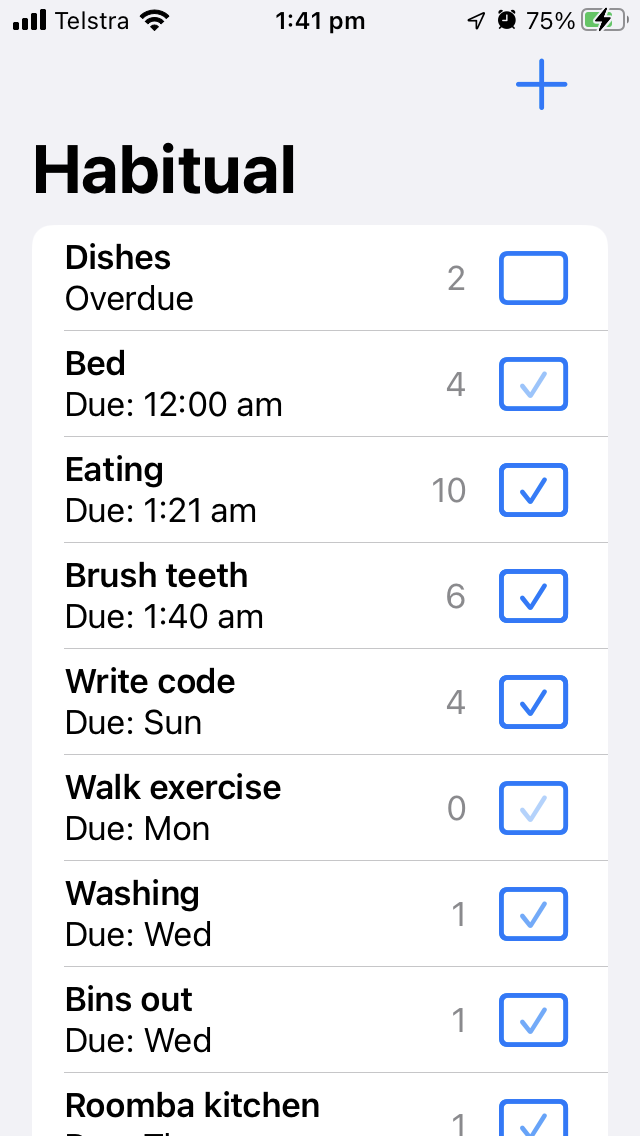
This is the first app of mine I’ve loaded onto my phone and started using, and there are a couple of things I’d like to do with it. It currently just lets you specify how many days between an activity repeating - so if you say you should go to the gym every second day, and you complete that activity on Monday, “Gym” will make it’s way to the top of the list on Wednesday. While it’s waiting in the list for Wednesday to come around, it will show the “Due” time as being exactly 48 hours after you last pressed “done” on it. But if the habit you want is to go to the gym after work at 6:00pm that’s when you want it to be due. I’d like that.
Oct. 25, 2022

I mentioned yesterday “I could use a renamed old version of my struct to load the existing data, and convert it across to the new model.”. Since I’ve been testing the app on my phone, and using plausible data, it was going to be painful enough to lose it that I thought I should go through those steps.
First, I make a copy of the old struct, and renamed it with the app version number that used it. No need to bring all the computed properties into this struct, just the bits that get encoded into the JSON.
Oct. 24, 2022
As usual, I’m spending way more time on the apps written from scratch in the 100Days series . The Habit tracking app I’m working on has been good practice, especially of the architecture of the simple list based app .
My version has a couple of refinements I quite like. I’m using a checkmark in a rectangle as the button to mark that activity as done, and I’ve added a nice fade to the checkmark as time goes on to represent the percentage of time from when it is done until it becomes due again.
Oct. 23, 2022

SwiftUI does some property wrapper magic to (very efficiently) refresh your views, but what if you want to force a refresh for some reason? Here’s the techniques I’m currently using to do that.
The tricks are below, but just so you can see them in context, here’s the sample app we’re working on. It’s a list of cars so you can keep track of how many of each kind you own. Here’s our data: