Oct. 22, 2022

I’m writing the Habits list based app from #100Days and had a working MVP, then for some reason, decided to refactor by changing the subview I’d written as a function, into a struct. Some time later, I discovered that my list items were not updating correctly, so detective time.
I talked a little bit about the architecture yesterday - the item is a struct, and there’s a class containing an array of the items. Something like this:
Oct. 19, 2022

Here’s the summary of my learning from comparing my efforts with Paul’s solutions to the Project Nine challenges from Day 46 of his 100 Days of SwiftUI course .
Create an Arrow shape – having it point straight up is fine. This could be a rectangle/triangle-style arrow, or perhaps three lines, or maybe something else depending on what kind of arrow you want to draw.
Oct. 18, 2022
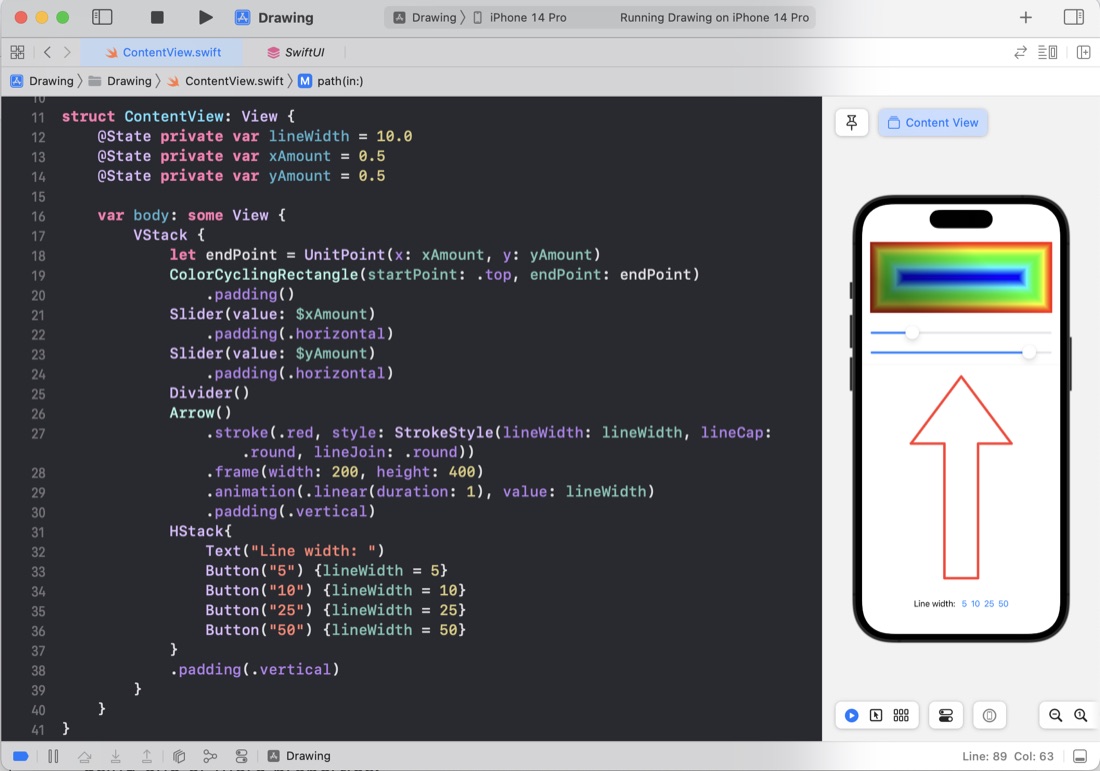
These few days of #100DaysOfSwiftUI we made some pretty shapes by playing around with some of the SwiftUI systems for drawing on the screen, including paths, shapes, transformations, ImagePaint, drawingGroup() to use Metal rendering, blurs, blend modes and using animatableData for animating - which I think is the solution to an animation problem in my TimesTable app I hadn’t been able to solve yet.
Oct. 15, 2022

I’ve watched Paul’s solution to the Moonshot challenges (the solutions are one of the perks of being a Hacking With Swift subscriber). When I’m solo learning like this its one of the few ways I can get any feedback on my coding, so I highly value it, and usually write one of these posts as a way to ensure I reflect on it.
Oct. 14, 2022
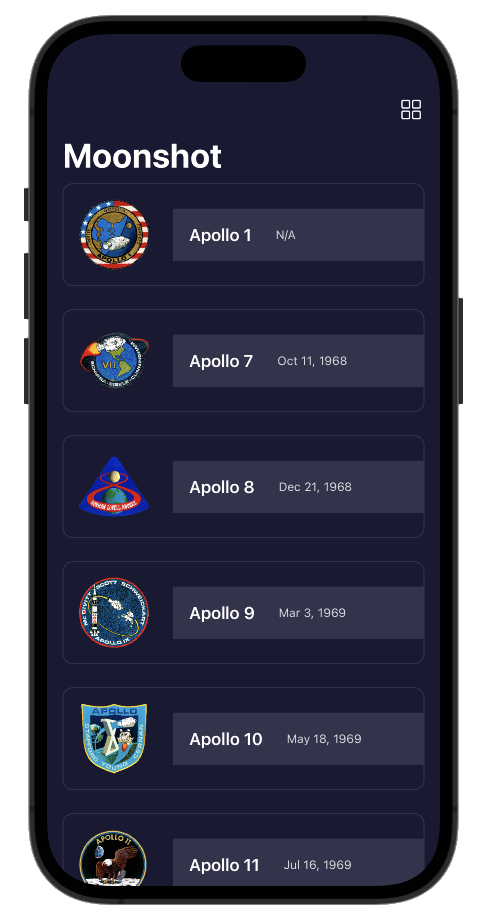
Another few coding challenges at the end of a tutorial app in the 100 Days of SwiftUI course. The app is a sort of information app - composed of navigation views going down into more detail about the Apollo space missions. The most exciting revelation for me was how straightforward it is to pull JSON into your apps data structures.
Challenge 1
Add the launch date to MissionView, below the mission badge. You might choose to format this differently given that more space is available, but it’s down to you.
Oct. 13, 2022
In Day 39’ s Moonshot tutorial app, Paul uses .map on an array without much comment about what’s going on. I assume this might be a common concept in modern languages, but it was new to me.
First, here’s Paul’s code
    init(mission: Mission, astronauts: [String: Astronaut]) {
        self.mission = mission

        self.crew = mission.crew.map { member in
            if let astronaut = astronauts[member.name] {
                return CrewMember(role: member.role, astronaut: astronaut)
            } else {
                fatalError("Missing \(member.name)")
            }
        }
    }
Mission here contains an array of crew which is a struct with two strings, one of them being name, but self.crew (which belongs to the view we’re in) is an array of CrewMember which is a struct with a role: String and another struct astronaut. That sounds confusing, but essentially, an array of one type is being processed to return an array of another type where there’s a 1:1 relationship between the elements of each array.
Oct. 12, 2022
I finally got around to looking at Paul’s solutions for the iExpense challenges .
Use the user’s preferred currency, rather than always using US dollars.
Same approach as me,
.currency(code: Locale.current.currency?.identifier ?? "USD")
except that he does the work in a local variable which is a bit neater. Since it appears in two places - the display view and the view for adding an expense, this would mean duplicating it, making it global (not rare for user default type settings) or passing it down through the view hierarchy. I feel either of the first two options are fine for this project, but Paul is thorough and extends the FormatStyle protocol, only for currency, to have a new computed property .localcurrency - which is a great solution.
Oct. 6, 2022
I was listening to the StackTrace app this morning (episode 169 - “Choosing What Bugs to Ship” ) and one of the ideas discussed was taking the time to automate some of your development processes, partially to save time, but also because if you make a process simple and quick, you’ll be more likely to do it multiple times to improve quality.
Coincidentally, I’d been thinking about how often I paste some code from Xcode in order to display it in one of these blog posts. If it’s from the middle of a method, it will generally be indented a long way in, and there’s no point in displaying it like that (especially for a mobile reader) so I usually manually delete a heap of spaces from each line to left align it whilst keeping the needed indentation.
Oct. 5, 2022
So, I’ve been working on translating the UI design created by the external designer into SwiftUI, and have done all of the easy bits:
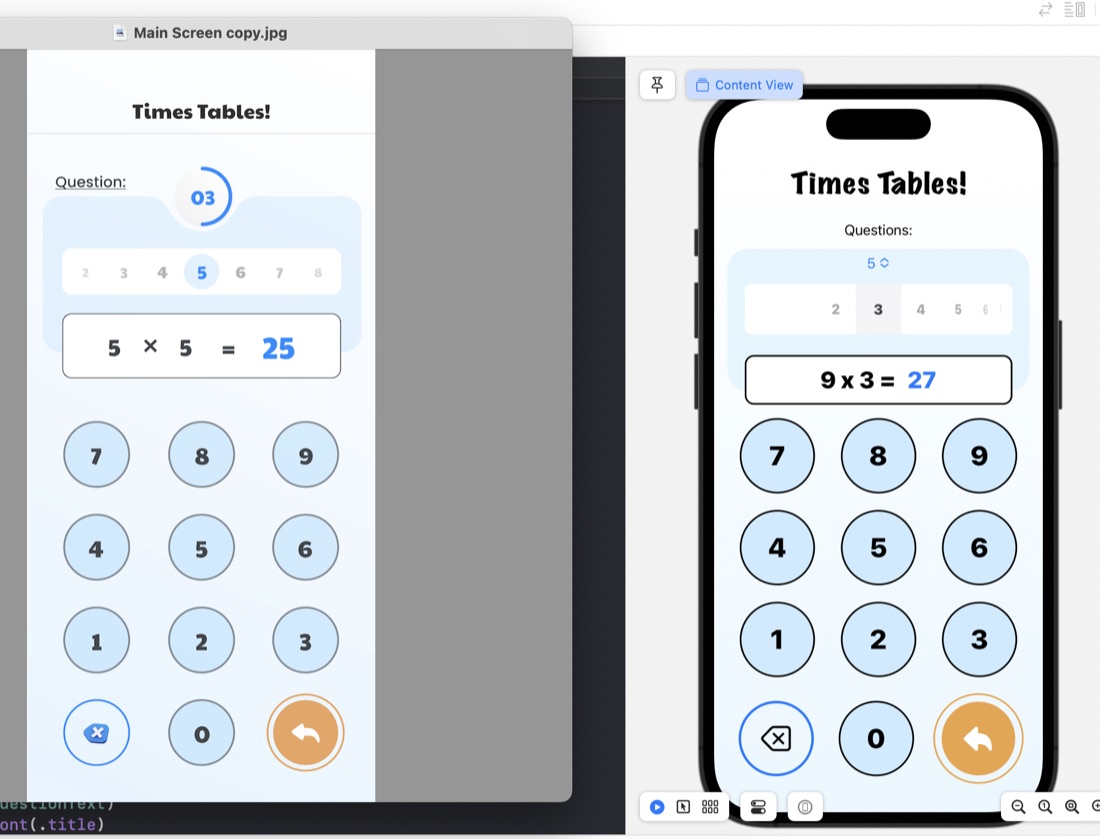
The rounded rectangles for things like the question display/number input are just ZStacks of roundedrects filled, then stroked:
ZStack {
    RoundedRectangle(cornerRadius: 10)
        .fill(.white)
        .padding(.horizontal)
    RoundedRectangle(cornerRadius: 10)
        .stroke(.black, lineWidth: 2)
        .padding(.horizontal)
    HStack {
        Text(questionText)
            .font(.title)
            .fontWeight(.heavy)
        Text(calculatorDisplay)
            .font(.title)
            .fontWeight(.heavy)
            .foregroundColor(.blue)
     }
}
.frame(maxWidth: 350)
.offset(y: 15)
Something I have learned in the process is the .offset modifer. This is what’s used to move a view from where SwiftUI would have placed it, and is what I’ve done to create that overlapped style where the question display/number input is sitting halfway over the bottom of the blue rounded rectangle. This is in the last line of the code above: .offset(y: 15) This is moving the whole ZStack down by 15. A trick to watch with this is that since you’ve messed with SwiftUI’s arrangement, it doesn’t then shuffle everything else around this - you need to manually deal with making some space below it.
Oct. 2, 2022
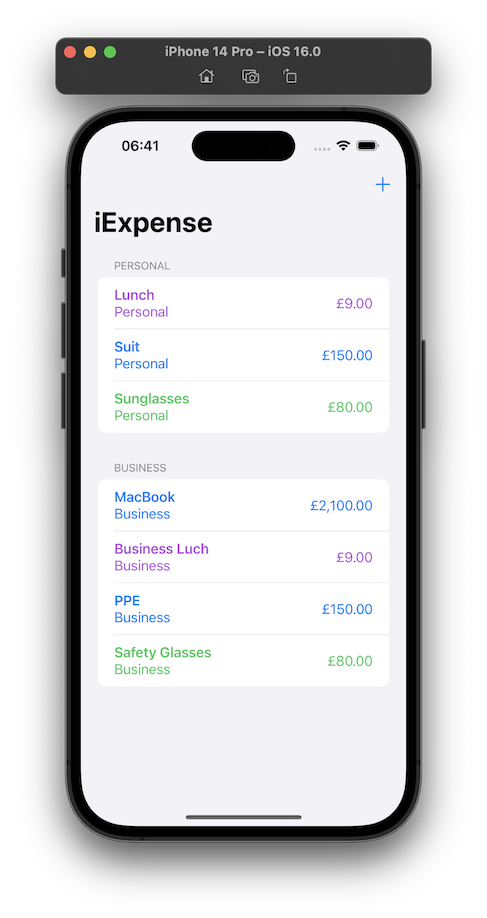
Day 38 is three challenges on the iExpense app - a simple expense tracking app that uses UseDefaults for storing it’s data.
Locale
Use the user’s preferred currency, rather than always using US dollars.
One of the joys of modern programming (as opposed to mid-1990’s programming) is the ability of the internet to give you answers. I knew the answer to this would be lurking in the locale environment variable, but instead of looking it up , just googled, and found a viable looking solution on Reddit .
Sep. 24, 2022
The challenges for Project 6 of 100 Days of SwiftUI was to add some animations to the Guess the Flag app from a little while ago. The animations themselves were not particularly tricky, my main issue was that I was creating the views for the three flags in a ForEach, so the animations were applied to all three flags, but we wanted different animations for the flag the user had clicked versus those they had not.
Sep. 23, 2022
It’s a very Apple-thinking thing to be learning about making beautiful and intuitive user experiences this early in a programing tutorial as I am with the 100 Days of Swift UI series. Here’s a quick look at three different ways of doing animation in SwiftUI Views.
Implicit animation
An implicit animation in SwiftUI is when you add a .animation() modifier to a view. It needs to be bound to the value that’s changing so the framework knows to animate when that value changes, and the nature of the change.
Sep. 19, 2022
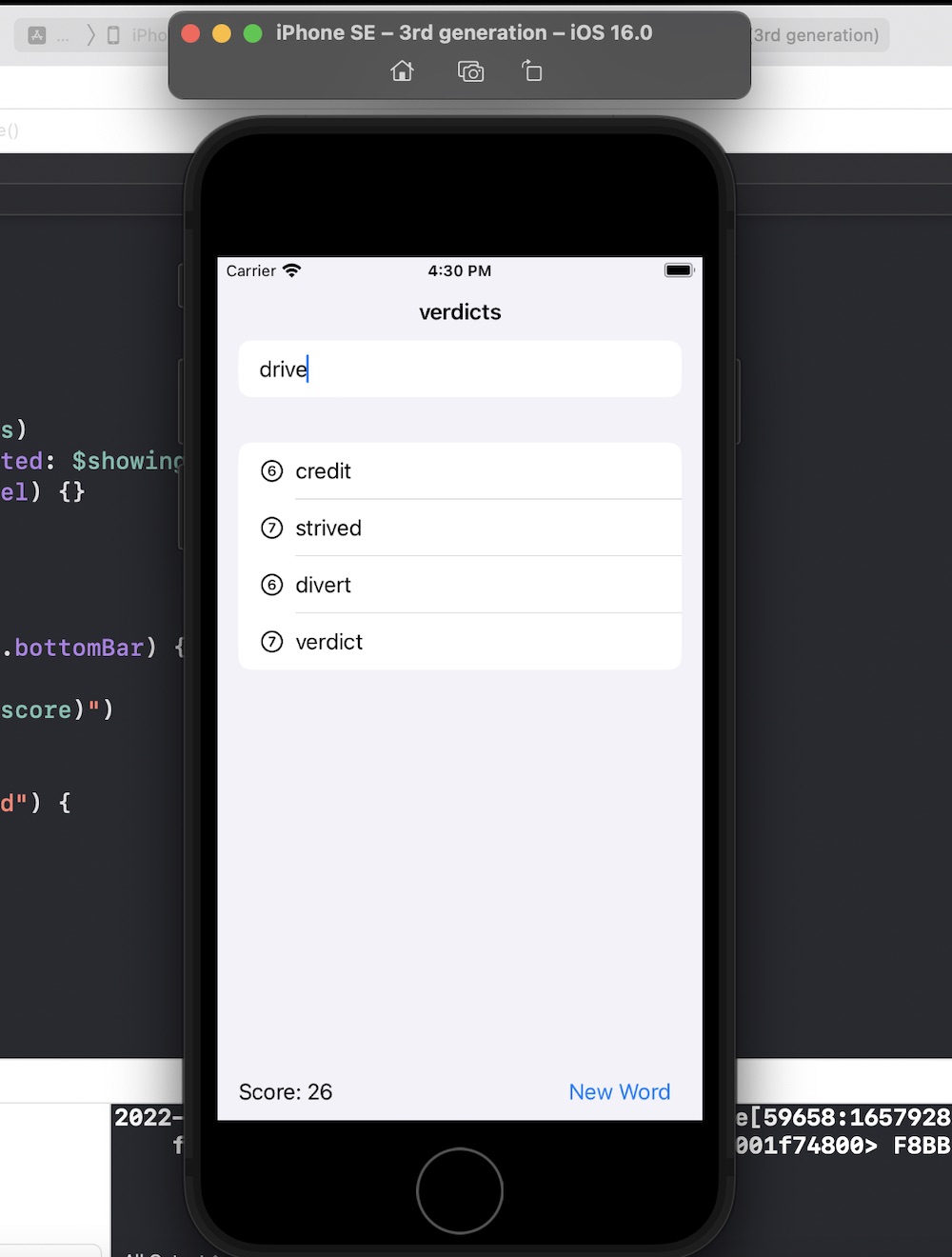
Another 100 Days of Swift UI project wrapped up - this time a scrabble like word game. New techniques included saving a large text file in the app bundle and loading it (via a string) into an array on launch of the view. Also a short adventure into UIKit to use a UITextChecker.
Source .
Sep. 19, 2022
As is my practice now, after completing the challenges for Project 5 , I reviewed Paul’s solution (which is only available to subscribers) to see what he’d done better so I could learn from it.
Most of the differences where not of much significance, but there was a couple of things I picked up:
When the user had pressed the reset button, to empty the array of word guesses from the previous turn, I had
Sep. 16, 2022
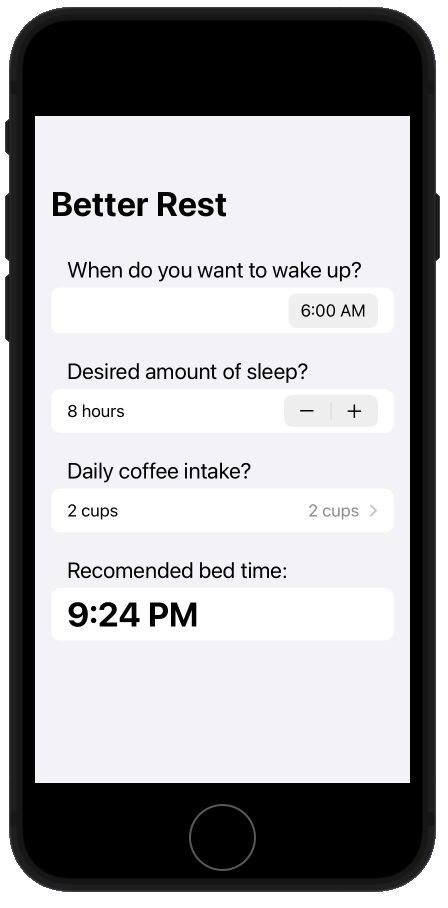
I’ve completed the Project 4 challenges (source) of the 100 Days of SwiftUI, no biggie - the increase in difficulty between each step of Paul’s bootcamp is small enough that it’s never too stressful, but large enough you feel like you’re progressing all the time.
Since I’ve paid to be a member of Hacking with Swift, one of the perks is to see Paul’s video solutions. I’ve not worries about it before, but I should - looking at them and comparing to my efforts is probably good feedback. So here’s the differences in our answers to the challenges.
Sep. 10, 2022
As I mentioned yesterday, I needed to make some progress to blog about, and I had a half working version of a Rock, Paper, Scissors for Day 25 so I pushed myself to get that working.
There’s lots in the code below I don’t love.
- The rock paper scissors could be some better data structure than an array and some ints.
- I don’t love the try to win, try to lose aspect, but the client specified it
- Having the didUserWin and didComputerWin funcs is a cop out - that should probably be a single function returning a win/lose/draw type
- I also am unhappy with nesting them in the view namespace to use my #consts
- duplicating the last part of the view but making the elements .hidden() to keep the same spacing seems like a kludge
- when I added the link to the Hacking With SwiftUI page with the app brief just now, I noticed I haven’t done the scoring the way it was asked for
source on github
Sep. 7, 2022
I’m on Day 25 of Hacking With SwiftUI, and Paul is making a point about how SwiftUI can loop over an array to build a view. He starts with this:
let agents = ["Cyril", "Lana", "Pam", "Sterling"]
VStack {
    ForEach(0..<agents.count) {
        Text(agents[$0])
    }
}
But then proposes an alternative:
let agents = ["Cyril", "Lana", "Pam", "Sterling"]
VStack {
    ForEach(agents, id: \.self) {
        Text($0)
    }
}
He explains the use of \.self here by saying
Sep. 5, 2022
This one’s not really a project, just a couple of little updates to earlier work, and a code snippet.
Challenge 1
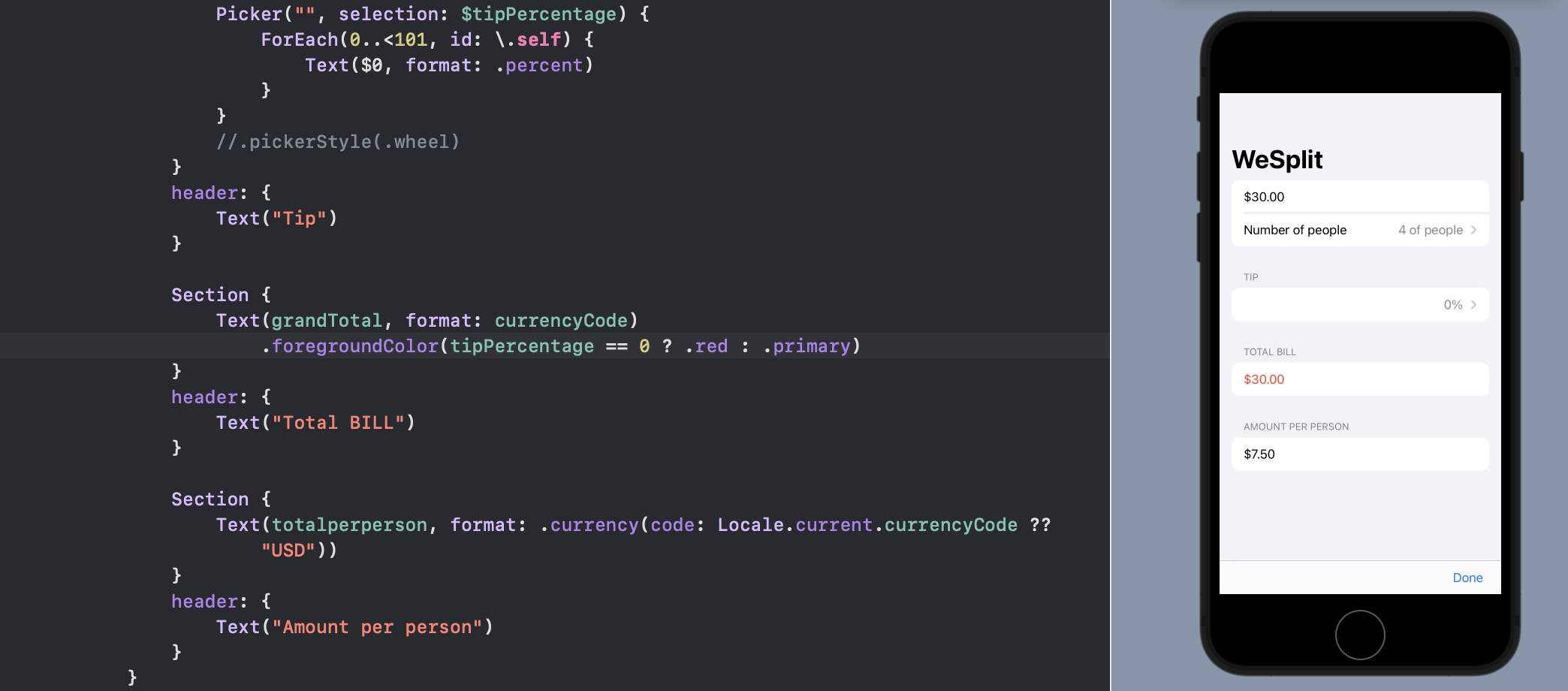
Go back to project 1 and use a conditional modifier to change the total amount text view to red if the user selects a 0% tip.
The first one is pretty simple - a ternary condition to make the total red if the tip is set to zero.
Sep. 3, 2022
Then the last trick for for decomposing the views, is to remember we can pass values when we init a struct. So something like this:
struct ContentView: View {
var body: some View {
    VStack{
        GreenPaddedText(text: "Hello")
        GreenPaddedText(text: "world")
    }
}


struct GreenPaddedText: View {
    var text: String

    var body: some View {
        Text(text)
            .foregroundColor(.green)
            .padding()
    }
}
}
Sep. 2, 2022
The next part of day 23 started to make my brain hurt a bit. It’s easy to imagine that when presenting a complex screen - perhaps some data from a source as a mixture of images and text loaded from a database into a scroll-able view, that the view may start to get complex. Then it becomes good practice to decompose the views to make the code clearer, less error prone, and to avoid any unnecessary repetition.