I found this one of the trickier days, so I’ll write it out to clear up my thinking.
To draw to to screen in SwiftUI, we don’t call a command to draw on a canvas or window. Rather, a view is defined as an immutable struct of type some View. Here’s the simple one from the default Xcode project.
struct ContentView: View {
var body: some View {
Text(“Hello, world!”)
.padding()
}
}
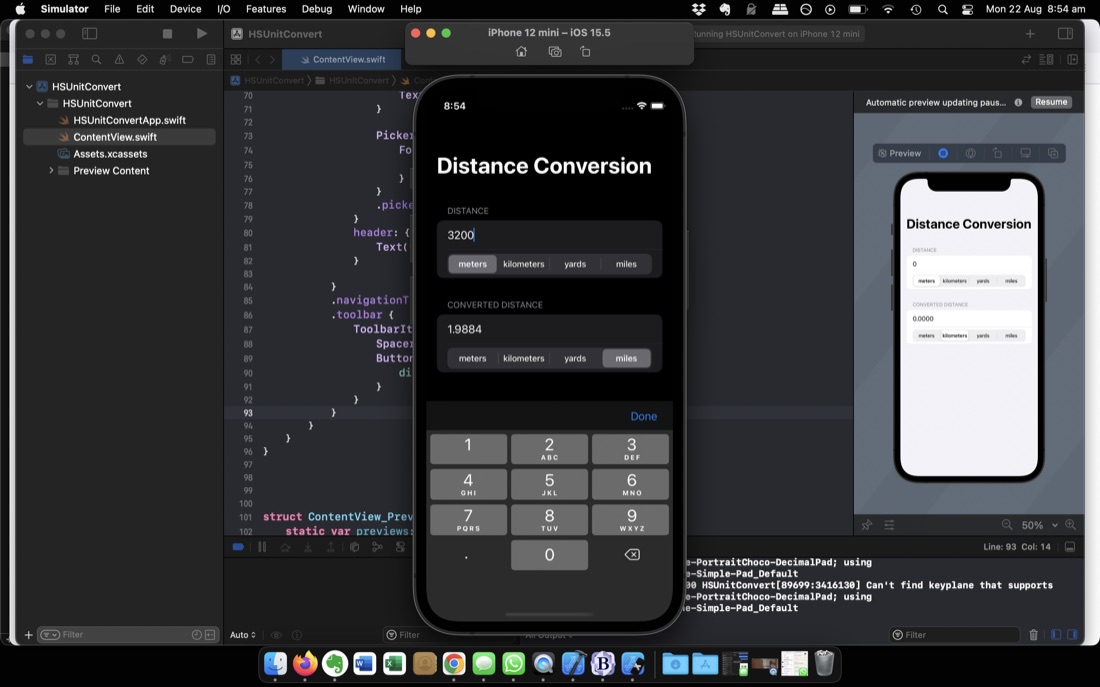
I’m up to Challenge 1 of 100 Days of SwiftUI (Day 19 ) which is to make your own simple (no MVVM) version of the app built in the previous three days. It’s about as simple as can be whilst still feeling like a real app. Something I hadn’t done before was limiting the keyboard to numbers or adding a toolbar to close it, so that was nice.
Something that’s not nice, is that when you touch into the text field to change the number, it’s not selected ready to type over (the way they always are in browser url fields) so you need to backspace over the previous entry. That’s the sort of anoying behaviour I don’t like. It seems (after some googling) there’s no straightforward way of addressing this in SwiftUI, with the best solution involving importing a package. I will come back to that because it is bugging me.
codewars.com is a “coding practice” website. You chose a language and a skill level, then it offers up a task (or kata) for you to write a suitable function. The first one it gave me was seemed too hard, so I changed my level to beginner and skipped to the next one. This was my task:
 Given an array of integers, find the one that appears an odd number of times.

 There will always be only one integer that appears an odd number of times.

 Examples
 [7] should return 7, because it occurs 1 time (which is odd).
 [0] should return 0, because it occurs 1 time (which is odd).
 [1,1,2] should return 2, because it occurs 1 time (which is odd).
 [0,1,0,1,0] should return 0, because it occurs 3 times (which is odd).
 [1,2,2,3,3,3,4,3,3,3,2,2,1] should return 4, because it appears 1 time (which is odd).
I know there’s a cool “Set” container type in Swift, so my plan was to iterate through the array, then for each number if there’s no entry in the set, then add one, but if there is, remove it. That way whatever is left in the set at the end must be in the original array an odd number of times. I was pretty pleased with myself. Here’s the code I Playground’d up:
Here’s a neat thing I haven’t seen before. Other languages I’ve worked in haven’t had a neat way to break out of a set of nested loops to a particular loop. It’s not an issue that comes up a lot, but when it has I’ve solved it by creating a continue flag and having that as the first condition of each loop.
/*
Your challenge is this: write a function that accepts an
optional array of integers, and returns one randomly.
If the array is missing or empty, return a random number
in the range 1 through 100.
If that sounds easy, it’s because I haven’t explained
the catch yet: I want you to write your function in a
single line of code. No, that doesn’t mean you should
just write lots of code then remove all the line breaks
– you should be able to write this whole thing in one
line of code.
/*
Your challenge is this: make a protocol that describes a
building, adding various properties and methods, then
create two structs, House and Office, that conform to it.
Your protocol should require the following:
A property storing how many rooms it has.
A property storing the cost as an integer
(e.g. 500,000 for a building costing $500,000.)
A property storing the name of the estate agent
responsible for selling the building.
A method for printing the sales summary of the building,
describing what it is along with its other properties.
The evolution of structs into class-like things that can hold properties and methods in Swift raised in my mind “what about inheritance?” - but no: structs in Swift can not use inheritance.
Swift classes implement inheritance, but only from one class; there’s no multiple inheritance. Protocols neatly address both these concerns to a large extent, but perhaps before we look at how they work, we should have a brief diversion into inheritance in C++.
/*
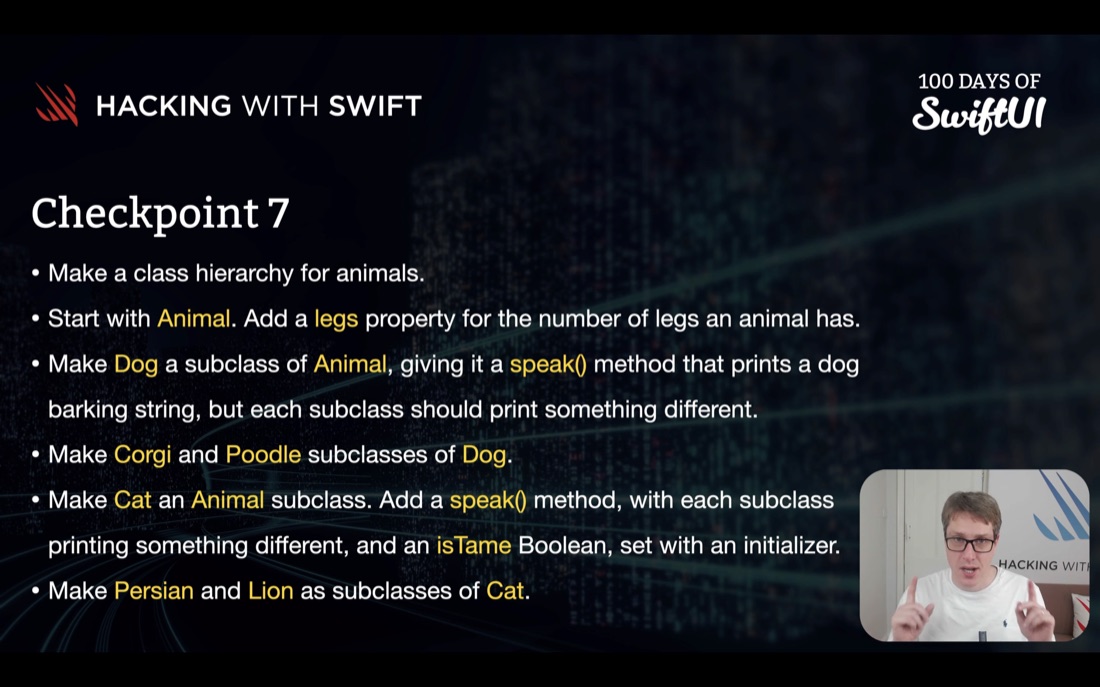
Your challenge is this: make a class hierarchy
for animals, starting with Animal at the top,
then Dog and Cat as subclasses, then Corgi and
Poodle as subclasses of Dog, and Persian and Lion
as subclasses of Cat.
But there’s more:
The Animal class should have a legs integer
property that tracks how many legs the animal has.
The Dog class should have a speak() method that
prints a generic dog barking string, but each of
the subclasses should print something slightly
different.
The Cat class should have a matching speak() method,
again with each subclass printing something
different.
The Cat class should have an isTame Boolean property,
provided using an initializer.
MVVM (Model-View-View Model) is an architectural pattern for apps that separates the data (Model) from the user interface (View). The communication between these two parts is facilitated by a View Model.
Model <-> View Model <-> View
Model
The Model is platform independent - we should be able to pluck it out and add it to a different application running on a different platform without any trouble. Any business rules will be part of the Model along with the data. For example, if it’s a rule that every customer has a sales contact, this can be enforced in the Model.
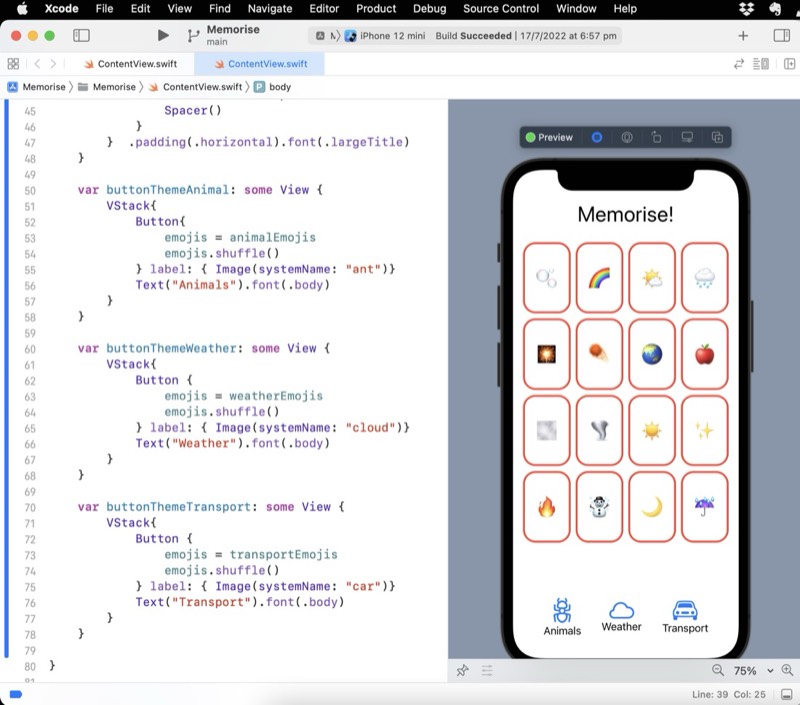
A small milestone achieved - I’ve completed the first assignment from the CS193p lecture series - some minor changes to the app being built in the lectures. There was a couple of things I was unhappy with:
The text under the SF Symbols you can see in the preview above not being vertically aligned.
Having duplicated code in my emoji arrays:
    let animalEmojis = ["🐠", "🐢", "🦋", "🐥", "🐣", "🐰", "🐝", "🦄", "🐵", "🐛"]
    let weatherEmojis = ["🌪", "🌝", "🌈", "🔥", "🌧", "🌙", "🌬", "☃️", "☔️", "🌫"]
    let transportEmojis = ["🚗", "🚕", "🚲", "🚚", "🛵", "🚜", "🛴", "🛺", "🚃", "🚡"]

    // I'm not happy with this duplication //TODO
    @State var emojis = ["🐠", "🐢", "🦋", "🐥", "🐣", "🐰", "🐝", "🦄", "🐵", "🐛"]
/*
create a struct to store information about a car, including its model, number of seats, and current gear, then add a method to change gears up or down. Have a think about variables and access control: what data should be a variable rather than a constant, and what data should be exposed publicly? Should the gear-changing method validate its input somehow?
*/

struct Car {
    static let maxGear = 10
    static let minGear = 1
    var model = "no model"
    var seats = 4
    private (set) var currentGear = Car.minGear

    init (model: String, seats: Int) {
        self.model = model
        self.seats = seats
    }

    mutating func gearUp() {
        if currentGear < Car.maxGear{
            currentGear += 1
        }
    }

    mutating func gearDown() {
        if currentGear > Car.minGear{
            currentGear -= 1
        }
    }

}

var myUte = Car(model: "Rodeo", seats:2)
print("My \(myUte.model) has \(myUte.seats) seats and is in gear: \(myUte.currentGear)")
myUte.gearDown()
print("My \(myUte.model) has \(myUte.seats) seats and is in gear: \(myUte.currentGear)")
myUte.gearUp()
print("My \(myUte.model) has \(myUte.seats) seats and is in gear: \(myUte.currentGear)")
/*
 Your input is this:

 let luckyNumbers = [7, 4, 38, 21, 16, 15, 12, 33, 31, 49]

 Your job is to:

 Filter out any numbers that are even
 Sort the array in ascending order
 Map them to strings in the format “7 is a lucky number”
 Print the resulting array, one item per line

 So, your output should be as follows:

 7 is a lucky number
 15 is a lucky number
 21 is a lucky number
 31 is a lucky number
 33 is a lucky number
 49 is a lucky number
 */

let luckyNumbers = [7, 4, 38, 21, 16, 15, 12, 33, 31, 49]

func isNumberOdd(number:Int) -> Bool {
    return number%2 == 1
}

let filteredNumbers = luckyNumbers.filter(isNumberOdd)

// this closure effectively does nothing
let sortedNumbers = filteredNumbers.sorted(by: {$0<$1})

let mappedNumbers = sortedNumbers.map({ String($0)+" is a lucky number" })

for i in 0..<mappedNumbers.count {
    print(mappedNumbers[i])
}
In order to have something to put up on GitHub (as part of working all that out) I went back to re-write the Checkpoint 2 code that I’d written, but not saved, three or four days ago.
The task was to count the unique elements in an array. The teaching had been about the complex data types, so clearly the hint was to cast the array to a set. Although the idea of sets is new to me this year, I’ve come across them twice. Once in the 100 days course (the same day as having to write this code) and once from a few days earlier from a podcast episode . This is high quality learning - getting the same topic a couple of different ways a few days apart, then having to use the information for real.
/*
 The challenge is this: write a function that accepts an integer from 1 through 10,000, and returns the integer square root of that number. That sounds easy, but there are some catches:

 You can’t use Swift’s built-in sqrt() function or similar – you need to find the square root yourself.
 If the number is less than 1 or greater than 10,000 you should throw an “out of bounds” error.
 You should only consider integer square roots – don’t worry about the square root of 3 being 1.732, for example.
 If you can’t find the square root, throw a “no root” error.
 */

enum IntSqrtError: Error {
    case low, high, noIntRoot
}

func calculateIntSqrt(_ number:Int) throws -> Int  {
    let lowerBound = 1
    let upperBound = 10_000
    if number < lowerBound {throw IntSqrtError.low}
    if number > upperBound {throw IntSqrtError.high}
    // brute force sqrt finder
    for i in lowerBound...number {
        if i*i == number {
            return i
        }
    }
    // none found or we would have returned by now
    throw IntSqrtError.noIntRoot
}

do {
    try print(calculateIntSqrt(5929))
} catch IntSqrtError.low {
    print("Lower bound error")
} catch IntSqrtError.high {
    print("Upper bound error")
} catch IntSqrtError.noIntRoot {
    print("No integer root")
} catch {
    assert(false)
    print("Unknown error")
}
func calculateIntSqrt(_ number:Int) throws -> Int  {
    let lowerBound = 1
    let upperBound = 10_000
    if number < lowerBound {throw IntSqrtError.low}
    if number > upperBound {throw IntSqrtError.high}
    // brute force sqrt finder
    for i in lowerBound...number {
        if i*i == number {
            return i
        }
    }
    // none found or we would have returned by now
    throw IntSqrtError.noIntRoot
}
Although not coded for speed, there are a couple of subtle optimisations here; the first is that it gives up once it gets to the number instead of going up to the end (it assumes the square root of a number can’t be greater than the number), and the second is that it counts up from the bottom rather than down from the top - I’m assuming the bottom of the range is richer in square roots than the top.
 /*
 If it’s a multiple of 3, print “Fizz”
 If it’s a multiple of 5, print “Buzz”
 If it’s a multiple of 3 and 5, print “FizzBuzz”
 Otherwise, just print the number.
 */

for i in 1...100 {

    let isMultOfThree = (i % 3 == 0)
    let isMultOfFive = (i % 5 == 0)

    if (isMultOfFive && isMultOfThree) {
        print("FizzBuzz")
    } else if isMultOfThree {
        print("Fizz")
    } else if isMultOfFive {
        print("Buzz")
    } else {
        print(i)
    }
}