Feb. 16, 2024

Since I’m using Tailscale to painlessly manage all my networking on the homeserver here and my remotes, I’ve had the luxury of being a bit casual about the security of my internal apps and self hosted dev tools. I’m currently iterating on a web app that requires public access, and is therefore up on a VPS and exposed to all the evils of the open internet.
I am in no way a security expert, but here’s a few of the (reasonably simple) steps I’ve taken to secure my node app.
Feb. 2, 2024

I’ve been aware since I set up Uptime Kuma for my monitoring, that having an instance on my local network monitoring my VPS websites wasn’t ideal. The main reason being that the flakiest part of my infrastructure is my 4G home internet, so if that goes down I have no website monitoring, and even if I did, the notifications couldn’t get out.
Of course, it would also be a simple matter to run an instance on the VPS that I host the sites on, but that has a similar problem in that if the VPS goes down, so does my monitoring of the VPS. What I really need is a third, independent space to run an instance.
Jan. 26, 2024

One of the many cool things about GitHub is GitHub Pages - the free web hosting Microsoft gives you while they vacuum up your code for CoPilot training. Each repository you keep there can have pages at <your-github-username>.github.io/<repo-name>
GitHub
To enable this, you need to go into the settings for the repository - look down the left for “Pages”.
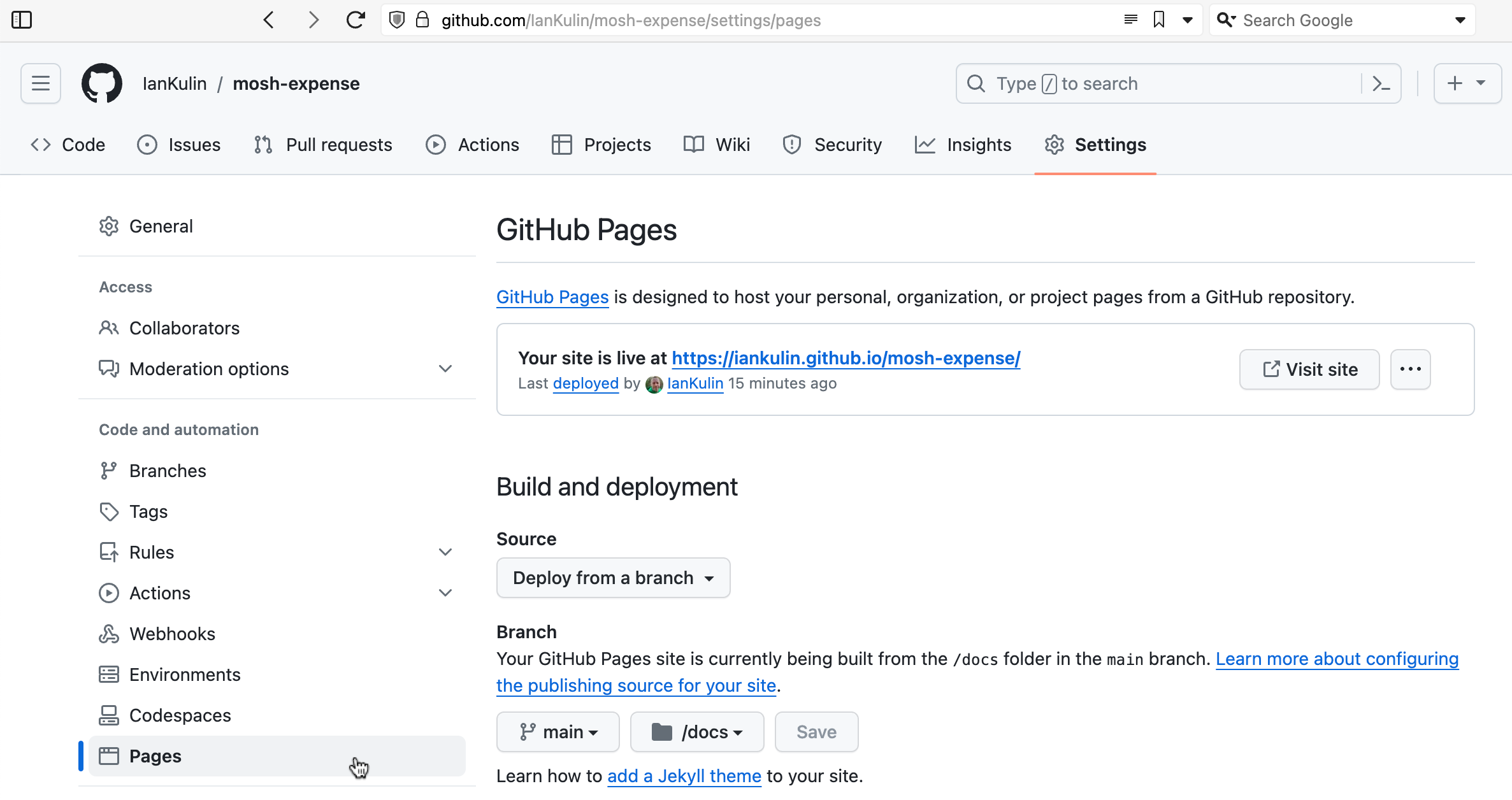
It’s possible to have it based on a complicated GitHub action (where your build step happens on GitHub when you push your code), but the easiest thing is just to have it deployed from a branch. To do this you choose which branch (usually main) and whereabouts in the main branch your HTML is. The choices are in the root of your project, or in the /docs directory. I’ve chosen the /docs directory in the screenshot above, since my messy React project is in the root.
Dec. 24, 2023

I wrote a couple of weeks ago about a standard workflow I use to spin up a web service in an LXC container to add to my self-hosted collection of services. It went a bit like: do this, and then this, then this other thing. Whenever you find yourself repeating a set of steps like this, it’s usually a sign that you should be automating it. Not just to save time (although this is a key benefit) but also to improve repeatability and to avoid introducing errors.
Dec. 18, 2023
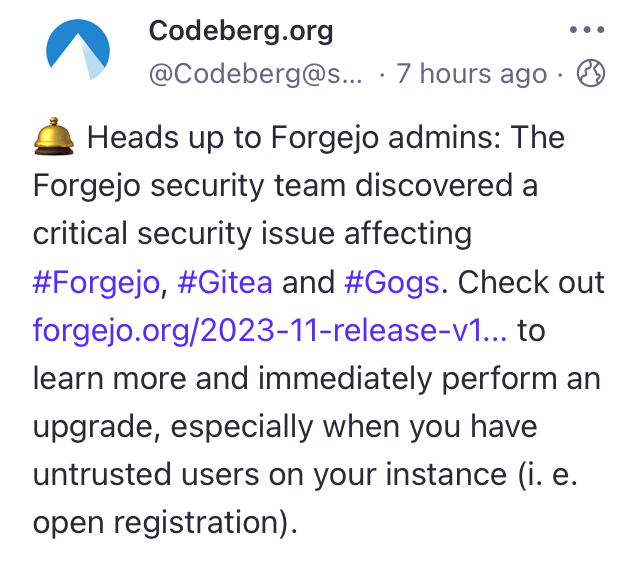
I’ve been really pleased with Gogs - it’s lightweight, was simple to spin up, and has worked perfectly. But then this morning on Mastodon, there’s a post from @Codeberg.org describing a security vulnerability in their Git hosting project Forgejo. This issue also apparently affects Gitea and Gogs - what’s up with that?
I actually already did spend a bit of time comparing Gogs and Gitea before deciding on Gogs, since I’d heard of people running Gitea over the past year or so, but only seen that Gogs seemed to be popular with self-hosters in a Lemmy post I’d read. My first impression was that Gitea was more focused on CI/CD and seemed to have a more complicated install process.
Dec. 15, 2023

I am loving running a local Gogs instance - it’s nice pushing my git repos to a totally private hub that I know is backed up with all my other self-hosted infrastructure.
Of course, there’s good reasons to have code in GitHub as well - my build-in-public philosophy, the vague possibility that some of it might be useful to someone, my contribution to our future AI overlords, and when I need to make some code linkable - for example from one of these posts. And of course there’s this bit of social-engineering which I assume was inspired by the bathroom decor in Veronica Mars .
Dec. 3, 2023

I’ve developed a bit of a workflow for setting up a new service of some type on the homelab. Installing it is the obvious thing, but I also have a few quality of life things I do to make it a full production-quality part of my installation. I thought it might be helpful to run through those things using a recent example of adding audiobookshelf .
audiobookshelf
audiobookshelf is a web based system for viewing, playing, downloading and/or generally managing your audio books. I’ve been an Audible user/subscriber, but recently got grumpy at them about something - I think I had paused my subscription, and my downloaded books were still available on my phone. I was halfway through one, upgraded the app, and then wasn’t able to play the book without re-subscribing. That might not be exactly right, but it was some type of frustrating carry on like that.
Nov. 30, 2023

Ansible is a system for automating server tasks, and these tasks are written in a special yaml file called a playbook. I had need to call one playbook from another today and learned a couple of things.
Plays vs Tasks
In Ansible we run tasks. A group of tasks run against one particular sets of hosts is called a play. Here is a playbook with one play, and two tasks:
Nov. 20, 2023

My little mdserver app has been a good way for me to start experimenting with the the devops side of things, especially building for Docker. Since I wanted to make the Docker image available for ARM Linux & x86 Linux I had a janky shell script that looked like this:
#!/bin/bash

# Extract the version number from package.json using jq
VERSION=$(jq -r .version package.json)

docker build --platform linux/amd64 -t iankulin/mdserver:$VERSION -t iankulin/mdserver:latest .
docker build --platform linux/arm64 -t iankulin/mdserver:arm64-$VERSION -t iankulin/mdserver:arm64-latest .

docker push iankulin/mdserver:arm64-$VERSION
docker push iankulin/mdserver:arm64-latest

docker push iankulin/mdserver:$VERSION
docker push iankulin/mdserver:latest
So I’d build two different versions, and use the tags to separate them. In the registry it’d look like this:
Nov. 17, 2023

When I set up my first Docker container (I think for Uptime Kuma ), I had read around and understood there were two choices for persistent; bind mounts (where the data inside the container is effectively a symlink to a location on the local file system) or name volumes where Docker abstracted that away a bit, so you didn’t have to worry where it was - I sort of understood Docker ‘managed’ it.
Nov. 5, 2023

In my last post , I talked about tagging guests in a Proxmox node so I could easily see which VMs and LXCs I needed to manually start before I ran an Ansible script to run all my apt updates. It would have been reasonable to wonder why I didn’t just add things to my playbook to magically do that.
The answer would be, I haven’t gotten around to it yet, so here goes:
Nov. 2, 2023

Each weekend I run an Ansible script that updates all my apt based VMs and containers. For the production machines, that’s everything, but my dev Proxmox is full of half-finished projects. Some of these have IP addresses reserved and are in the Ansible hosts file (because whatever service they are running is almost ready to move to the production server) others do not.
Long story short, the dev server has some containers and VM’s that need turned on before I run the updates, and some that don’t. I could just start them all up, for the ten minutes the updates usually take, but that seems wasteful somehow. If there was only some way to mark the ones I need to turn on in the Proxmox webgui! Well, there is. We can add tags to machines in Proxmox.
Oct. 30, 2023

I have an ansible script that runs each weekend which basically does an apt update && apt upgrade -Y on every Debian based instance. This weekend it failed on one Ubuntu host. When I went it to try it manually, this was the output:
Hit:1 http://au.archive.ubuntu.com/ubuntu jammy InRelease
Hit:2 https://download.docker.com/linux/ubuntu jammy InRelease
Hit:3 http://au.archive.ubuntu.com/ubuntu jammy-backports InRelease
Hit:4 http://au.archive.ubuntu.com/ubuntu jammy-security InRelease
Get:5 http://au.archive.ubuntu.com/ubuntu jammy-updates InRelease [119 kB]
Err:5 http://au.archive.ubuntu.com/ubuntu jammy-updates InRelease
  The following signatures were invalid: BADSIG 871920D1991BC93C Ubuntu Archive Automatic Signing Key (2018) <ftpmaster@ubuntu.com>
Get:6 https://pkgs.tailscale.com/stable/ubuntu jammy InRelease
Fetched 125 kB in 1s (125 kB/s)
Reading package lists... Done
Building dependency tree... Done
Reading state information... Done
11 packages can be upgraded. Run 'apt list --upgradable' to see them.
W: An error occurred during the signature verification. The repository is not updated and the previous index files will be used. GPG error: http://au.archive.ubuntu.com/ubuntu jammy-updates InRelease: The following signatures were invalid: BADSIG 871920D1991BC93C Ubuntu Archive Automatic Signing Key (2018) <ftpmaster@ubuntu.com>
W: Failed to fetch http://au.archive.ubuntu.com/ubuntu/dists/jammy-updates/InRelease  The following signatures were invalid: BADSIG 871920D1991BC93C Ubuntu Archive Automatic Signing Key (2018) <ftpmaster@ubuntu.com>
W: Some index files failed to download. They have been ignored, or old ones used instead.
Solved
The first google result mentions apt-cache - which I also run , so a first level debug step is to delete the /etc/apt/apt.conf.d/00aptproxy file that redirects apt requests to the cache I run in an LXC container. After that, if I re-run the apt update it works perfectly. Seems like a problem with the cache then. I’m not sure why it would only affect this host though - I have other Ubuntu VM’s in the fleet that are not getting the original error.
Oct. 15, 2023

I’ve got a domain that’s not currently used, so I’m going to set it up as a virtual host under NGINX. This server is already serving two domains set up with Certbot for SSL. Is it going to be possible to add another site and have Certbot manage the certificates for it after I’ve run Certbot once?
When I googled around to find out, I didn’t find anything - which is usually a sign I’m either asking a wrong question, or it’s so little drama that no one ever mentions it. I decided just to move the site, check it was all working for the http version, then run Certbot and see what it said.
Oct. 12, 2023

I’ve been managing SSL certificates for my domains purchased from PorkBun by going there every 90 days downloading the certificates, joining them together to make the fullchain.pem then scp-ing them to my servers. That’s been sort of manageable, but less than ideal.
It also doesn’t work for my Australian domains. Since there’s strict rules about who can own a domain in the .au space (you have to have some sort of right to the name - a random person can’t obtain the coke.com.au domain unless that’s a trading name, a trademark, or something similar), they have to be managed by one of about eight organisations, and the offerings are much simpler.
Oct. 6, 2023
I’ve picked up an new TP-Link WAP with Omada, so I wanted to spin up an Ubuntu 20.04 LXC to run the controller software in, and ended up spending a couple of hours figuring out why things where not working.
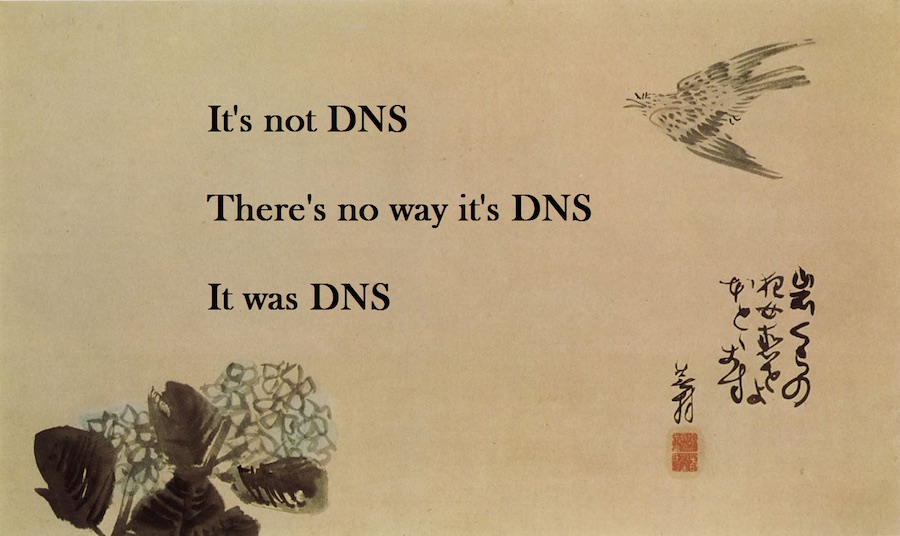
The initial problem was I was having connectivity issues pulling down the updates for all the packages required. I went down a bit of a tangent because I installed an apt cache the other day, so I was looking for problems there. Eventually I narrowed it down to DNS not working and started A/B testing like this:
Oct. 3, 2023

It’s bothered me for a while that all these VM’s are pulling down a lot of the same updates. As well as needlessly using some bandwidth, I’m hammering the update servers (that I don’t pay for) with the same requests over and over. I did briefly consider running my own mirror, but that’s not simple, plus I’d then be mirroring a heap of files in a complete repository that I’d never use. What I really needed was some sort of cache so once I’ll pulled down an update, it would hang around for a few days being available to other machines on the local network. Luckily, that exact thing exists - APT Cacher NG .
Sep. 30, 2023

Having written my little monitoring endpoint in Go, it needs pushed out to all my servers and VM’s. Clearly this is a job for Ansible which I’ve already dabbled my toes in . Before we get onto doing that though, we need to have a think about how to make it a service.
Linux Services
A service in Linux is just a program, but one that’s usually required to be running all the time to provide some piece of functionality. The “program” can be any executable, but to allow systemd to manage it, we need to tell it a bit about what we want in a .service file. This file is used by systemd to know how to manage the service. They can get quite complex, but here’s the simple one for vitals-glimpse - my little monitoring API endpoint.
Sep. 27, 2023

I’d like a small, quick, low load endpoint on all my nodes and VM’s that exposes a text keyword indicating if that machine is okay for RAM and disk space. I’m currently using Uptime Kuma to monitor if these machines are pingable, but I’d love a tiny bit more information from them so I’d get a Ntfy buzz on my phone if a machine is in trouble.
I mentioned a couple of weeks ago that the benefit of doing it in C rather than Node.js was probably not worth the trouble, but then being a fickle developer, decided to write it in Go.
Sep. 24, 2023
If you create an unprivileged LXC container on Proxmox, then try to back it up to an NFS share, for example on a NAS, you’ll get an error when it tries to build the temporary file.
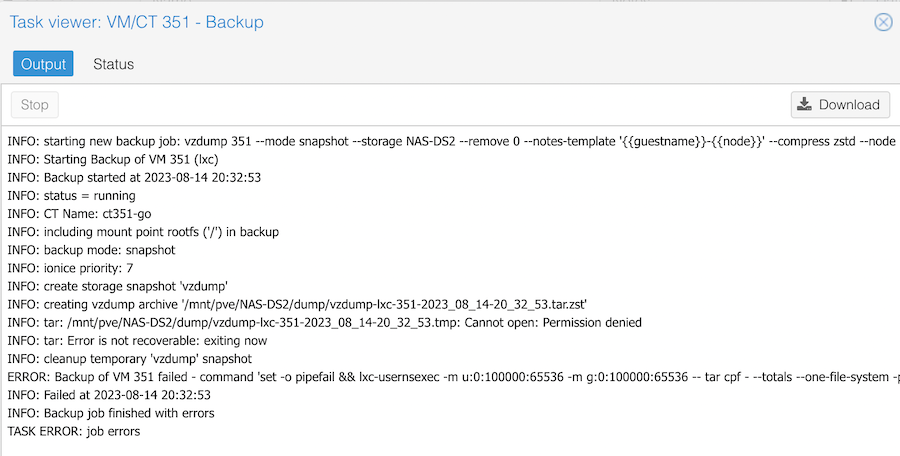
The clue is in the Permission denied line. It is trying to create a temporary file on my NAS, and failing because of a permissions problem. If I try the same backup to the local storage, it works fine.