Aug. 31, 2023
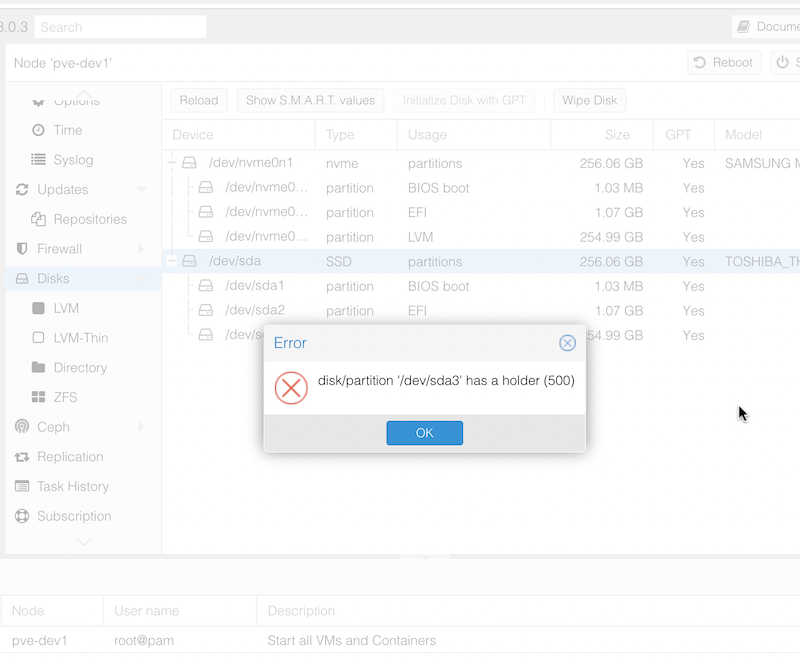
When I popped in an NVME drive and freshly installed Proxmox to it, I assumed I’d just be able to wipe the SDD that had previously been the boot drive to set it up as a ZFS pool. However, when I tried to do the wipe, I was greeted with the error:
disk/partition '/dev/sda3' has a holder (500)
I assume this means there’s a flag set on one of the Proxmox partitions to prevent accidental deletion or Proxmox thought that’s where it was running from. It’s likely that it’s related to this message I had during installation that I haven’t seen before:
Aug. 22, 2023

Before I write a fancy Ansible playbook to automatically set up the Nginx/Node combo on my web servers, it might be worth going through how to deploy a Node app so it can run on a server without you being logged in.
Until now, I’ve been running my tests on my laptop, or in a server logged in as myself - sometimes detaching from tmux. But we need a bit more professional set up than that. The process will look something like this:
Aug. 19, 2023

I’ve been thinking about the time it takes me to provision a guest VM in Proxmox. I seem to remember on BinaryLane it was seconds rather than minutes. This seemed to be a good excuse to use the free credit I’ve heard about for Linode or Digital Ocean hundreds of times in podcast adverts, so I claimed the $200 credit for being a Late Night Linux listener at Digital Ocean. They extracted $5 out of me in the process, so I guess they are in front on that transaction. $200 would run a little VM for a couple of years at their rates, but of course it’s limited to two months, at the end of which I will have an account sitting there, with my credit card already recorded - so all the friction is gone if I need an internet facing machine for some purpose - which is clearly their dastardly plan
Aug. 13, 2023

We wrote a nice little Ansible playbook the other day to install nginx on our web servers and ensure it was running. We were able to store the usernames in the hosts inventory file using the ansible_ssh_user variable. Then, we ran the playbook with the command:
ansible-playbook web_installs.yaml --ask-become-pass
This asked us the password to use with the usernames in the hosts file. Luckily that day, it was the same username/password combo to use for sudo on every server. What happens if that’s not the case? Here’s our new hosts file for today. There’s a cool new sysadmin in town - Jane.
Aug. 7, 2023

Having successfully set up and tested my node.js api handling app behind nginx on a development VM in the homelab, I decided to move it to my VPS so I could start using it for real. I had a bit of trouble finding the nginx.conf files on the VPS, until I remembered I was running nginx in a docker container on this machine!
I got everything set up, I could hit the domain in a web browser and get served the static page, and I could <domain_name>:3000/api/gnp_temp.txt and get the file delivered by the node script, but if I tried <domain_name>/api/gnp_temp.txt - “Bad Gateway”.
Aug. 4, 2023

NGINX is a great webserver and reverse proxy - as in it can hand off requests to other web-servers. That’s the situation I want to have set up on my VPS. I want NGINX to handle incoming requests - some of them will just be sorted out by returning static HTML, others (like the weather api I’ve been playing with) need to be handed off to other services to respond to.
Jul. 26, 2023

In the previous post , we looked at getting up and running with Ansible, including using the ad-hoc mode to send commands to our servers. We had a inventory file called hosts that had groups of server IP addresses and a simple ansible.cfg file that pointed to our inventory file.
Playbooks
Ansible playbooks are used to collect together a description of the state we want in a server. When the playbook is executed, Ansible figures out what things need need changed, and changes them. If you’re used to the procedural nature of a bash script, where things proceed from one step to the next, and there might be decision branches, this requires an adjustment in your thinking. This is similar to the adjustment I had getting my head around SwiftUI , and moving from JS to React .
Jul. 23, 2023

I’m normally a x.1 release type of sysadmin, but the increasing temptation of installing Proxmox 8.0 while I’ve got some time off, and the fact that I’ve got a cluster, so I can just move the VM’s around all adds up to thinking I’ll do that today.
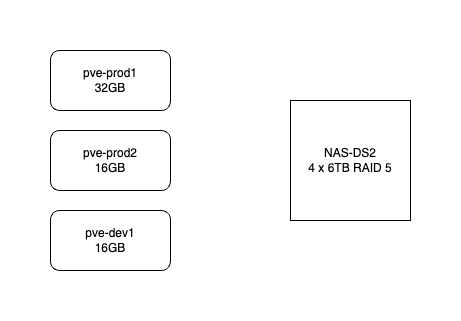
Here’s how my system works. It consists of three HP-800 mini G2’s. pve-prod1 is a bit fancier - i7 6700T and 32GB, the other two are i5 6500T and 16GB. The production VM’s use the local SSD but backups go to the NAS. All the machines are currently running Proxmox 7.4. They are not clustered in the proper sense - I don’t need high availability, and I don’t want to run them all the time. pve-prod1 runs 24/7 and I just power up pve-dev1 when I’m working on something.
Jul. 19, 2023

Ansible is a system for executing commands on remote systems. It allows a declarative approach - so if you run a playbook (the system configuration files are called playbooks) that says a system has a Docker container running Jellyfin, Ansible will check if that’s true, and if not, make it so. Ansible is best used when you have a large number of systems to maintain, but even with a small number, it serves to document systems as well as to automate their creation.
Jul. 16, 2023

Imagine if, lets say hypothetically, you’d set up an application months ago with a docker run command. Then you’d heard there had been an update to the app because of a security update. So you need to stop/remove the container, pull a new image and restart it, trouble is, you don’t remember the exact run command you used to start it.
This didn’t happen to me, since all my vm setups are in git as markdown (I’m pre-Ansible), but I did google how to do this thinking that there would be an easy way before I bothered to look through my config files.
Jul. 12, 2023

When I first installed my SSL certificates, I mentioned it’s a process I need to automate before they came up for expiry, but here we are ten days out, and I haven’t done that yet, but I have been keeping an eye on it though the excellent display and notifications set up in Uptime Kuma .
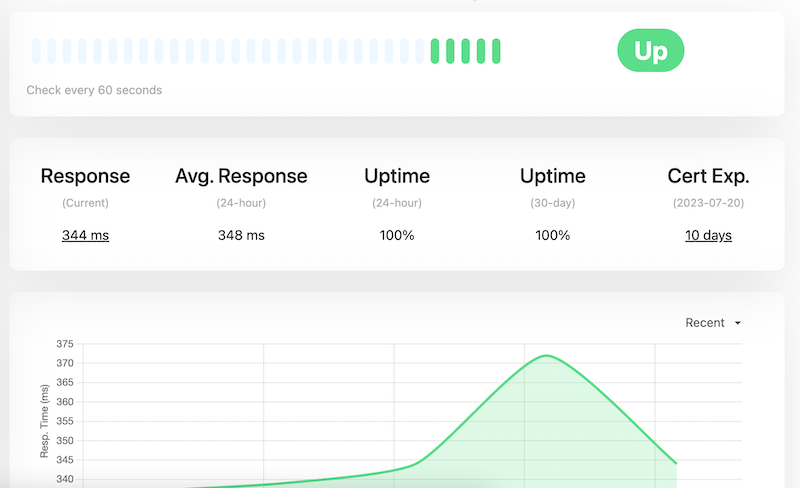
Updating the certificates is easy. When I went into the site at PorkBun (where I purchased the domain and who do the primary DNS for the site, the next certificates were sitting there to be downloaded. My existing certificates were due to expire on 30th July, and these had been generated on 3rd July.
Jul. 5, 2023

This is one of those things that is simple once you know it. I had my tiny Node service working on my MacBook, but how do I run it on the server?
Native or Container
Obviously I need Node.js installed on the server, should I have it in a Docker container, or native on the machine. There’s no clear answer here - in a container set up with Docker Compose might be more in line with my ideology of treating machines as disposable, but a native install is simpler, and I probably want to make life simpler at this stage when I’m learning everything.
May. 7, 2023

There’s a few things that really strike me as significant improvements to life since I was commercially developing 20 years ago:
- Accessing information - the first time I bought the development stack to write commercial software against the Windows SDK it came in a huge carton with, I guess, fifteen or so 2" thick books. That was how you looked things up in those days. Fast forward to an internet connected world of websites, stack exchange, Discord and ChatGPT. So much better.
- Open Source - is an actual useful thing that the entire connected world runs on - not just a weird hippy idea. It’s almost routine to open source your code now and everyone benefits from that.
- Containers - “getting things working” used to be a thing. Most times now I want to spin something up to play with it, it just works because all the dependencies are bundled with it, and it doesn’t mutate the environment in any way I don’t know about. There’s no friction to run a giant app, and no hangover for the OS when I nuke it.
I love this great explanation from Coderized about containers - I wish I’d seen it five months ago.
Apr. 30, 2023

I’m working on the world’s shortest shell script - it’s called by cron to pull down a JSON weather report to a text file using curl so I can expose it on an Nginx endpoint. The purpose is to allow me to hammer that weather API from multiple machines I control without violating the TOS of my free API key.
Because I’m learning all the things, instead of just creating this on the VPS where it runs, it’s cloned from my GitHub repo for that machine. I’m creating and editing the file in VS Code on macOS, pushing to Github, then pulling the changes on the Ubuntu VPS. The intention is that this will eventually become automated with a Github action.
Apr. 29, 2023

When you’ve successfully got Nginx running in a Docker container, AND got your domain correctly pointing at your nascent website, you’re then going to want to set it up for encrypted, and therefore trusted, browsing with SSL.
Certificates
A couple of posts ago, I mentioned that it was simpler to let Porkbun be the authoritative nameserver for a domain. Part of the reason for that is that if we do that, Porkbun had a button you can press which connects to LetsEncrypt and generates the certificates for you. This usually takes an hour or so, then you’ll be able to download the bundle from that same page.
Apr. 28, 2023
I’ve had a small BinaryLane VPS for a while that I use for homelab type stuff, but now need to serve a tiny amount of JSON from it. A longer term plan is to use it as a Wireguard tunnel back to my cluster at home to expose the services that need to be internet facing. I’ve also had a domain name I bought from Porkbun sitting round for a bit, so it’s probably a good time to join them up.
Apr. 10, 2023

A few weeks ago , I was very excited to be able to take a snapshot of a virtual machine, copy it across the network from that Proxmox node, copy it back across the network to a different Proxmox node, start it there, and have it up and running, without it noticing it was actually on different hardware.
Backing up a VM is pretty simple, you just click on the node, choose Backup and click the Backup Now button. The ease, and completeness of backing up a VM is one of the main reasons I’m using Proxmox for my systems.
Mar. 19, 2023

I ordered some RAM this week for my production server - it’s quickly becoming clear that memory is the limiting factor when running lots of services and VM’s that don’t get much use - rather than processing power. I’m not really a hardware guy, so figuring out exactly what RAM I need is a slightly fraught process - I won’t be fully confident I’ve ordered the right thing until I install it, boot up, and see my G2 800 come to life maxed out at 32GB.
Feb. 20, 2023

I picked up a Synology DS216j NAS from eBay to use for storage for the rapidly growing home lab. The eventual plan is that as well as my VM backups, it will host the media library, and eventually (when this has all proved itself reasonably bullet-proof) my current DropBox contents. That won’t all fit on the 2x2TB drives that the DS216j came with, and I have a pair of 8TBs on hand, but I wanted to set it up and checked it all worked.
Feb. 16, 2023
I installed Proxmox on my second server last night, and tonight when I ran apt update I ran into the error you get when you haven’t bought a license.
Err:5 https://enterprise.proxmox.com/debian/pve bullseye InRelease
  401  Unauthorized [IP: 103.67.14.50 443]
Reading package lists... Done
E: Failed to fetch https://enterprise.proxmox.com/debian/pve/dists/bullseye/InRelease  401  Unauthorized [IP: 103.67.14.50 443]
E: The repository 'https://enterprise.proxmox.com/debian/pve bullseye InRelease' is not signed.
N: Updating from such a repository can't be done securely, and is therefore disabled by default.
N: See apt-secure(8) manpage for repository creation and user configuration details.
Even though I guess it was only a month ago (let that sink in people who think the raspberry Pi they just bought is going to be the last homelab hardware they buy 😊) since I set up my first Proxmox server, I’d already forgotten there’s a step to enable it to get updates without a subscription.