Jan. 10, 2026
Remote-SSH
One of the things I’ve done a bit in Visual Studio Code is using it’s ability to work on a different machine over SSH. I have a couple of LXCs on a server set up for different languages - one for C++ and another for Rust. They are things I don’t work in often, and I didn’t want to set them up on my laptop, but thought I might want them again sometime in the future.
Jan. 20, 2025
I’m having a super annoying problem at the moment, I can’t pull down containers from DockerHub. If I hotspot my laptop off my phone it works fine, so it’s some drama with the home internet connection that rebooting the router does not fix.
I’ve had a couple of different errors including Error response from daemon: Get "https://registry-1.docker.io/v2/": net/http: request canceled while waiting for connection (Client.Timeout exceeded while awaiting headers) and Error response from daemon: Get "https://registry-1.docker.io/v2/": dial tcp: lookup registry-1.docker.io. I can’t actually ping registry-1.docker.io or hub.docker.com, although I can open hub.docker.com in a browser, so it works for ports 80 and 443, but not some other udp ports.
Jan. 6, 2025
I’ve been containerising my websites, with their servers to make deployment simple and robust, and to move to a CI/CD workflow. Since an install of a production web server is large, I would be running about ten of these containers, and there’s already a good server facing the net and doing the reverse-proxying (NGINX Proxy Manager), I chose to bundle the Busy-Box httpd server with my sites inside the Docker containers.
Dec. 2, 2024
A very common scenario when running services in Docker containers is that one service is going to depend on another. The most common example is going to be if you have a service that needs a database - you’re going to want the container running the database to be ready for business before the service that needs it starts. And conversely, when you shut things down, you want to stop the service before you kill the database or you may lose some data.
Nov. 25, 2024
I’ve been containerising my static websites with BusyBox (because it’s small), and in an earlier post showed how to even get the container to update parts of the site by reaching out with wget to download resources from elsewhere and saving them inside the container where we are serving the ‘static’ site from. I’d done this by including a bash script in the container with the wget in a loop with a sleep. Then started the script and the httpd server in the CMD line of the dockerfile.
Nov. 18, 2024
The previous post went over how to bundle a static website into a Docker container. That’s a neat little trick - keeping the entire website and making it trivial to install on a VPS behind Nginx Proxy Manager. It worked great for most of my little websites.
But…
A couple of my websites had very minor ‘dynamic’ content. One was pulling down the local temperature from OpenWeather, then exposing a cut-down version of that as a REST endpoint so all my servers could grab it without me being rate-limited by OpenWeather for abusing my free API key. Another one re-hosted an image that changes a couple of times a day from an unreliable service.
Nov. 11, 2024
Having figured out how to use the GitHub package registry, I was a bit inspired by this blog post from Florin Lipan to deliver all my little static websites as Docker containers. I’m not as focused as he is about making them tiny, but I did steal the idea of using BusyBox httpd for serving them, resulting in about 4MB containers. That’s small enough for me, and since they are all very similar, there’s a fair bit of layer reuse going on.
Nov. 4, 2024
As the number of little projects I’m running on VPSs grows, I need to have a regimented system for managing all that. I could be using something like Coolify , but, at least for the moment, I’d rather build my own system.
Currently my system is Nginx Proxy Manager (dockerised) in front of each app. If it’s a static website, that’s another dockerised Nginx, started with a compose file and with www and conf sub-directories that I’ve git pulled from the project. It’s not pretty.
Sep. 16, 2024
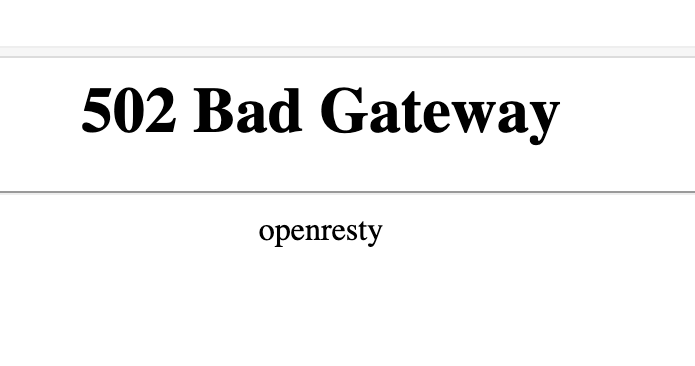
If you’re used to running NGINX Proxy Manager in front of your web apps, and switch to running it in a container, you’re going to need to learn a little about Docker networks to get everything connected. If you just do your regular setup, and direct the proxy for an address to 127.0.0.1:<some port>, it won’t exist, and you’ll visit your page to find the “502 Bad Gateway openresty” message.
Aug. 5, 2024

When I started with Docker, the docs seemed to suggest that using Docker volumes was a good thing. With a Docker volume, you just create the volume and Docker manages the rest. You don’t have to worry about where it is, or really ever think about it.
Here’s a docker-compose for Uptime Kuma using a volume.
services:
  uptime-kuma:
    image: louislam/uptime-kuma:1
    container_name: uptime-kuma
    volumes:
      - kuma_data:/app/data
    ports:
      - 80:3001
    restart: unless-stopped

volumes:
  kuma_data:
This is telling Docker we want to create a volume called “kuma_data” and then map it into the container file system at /app/data
Jul. 29, 2024
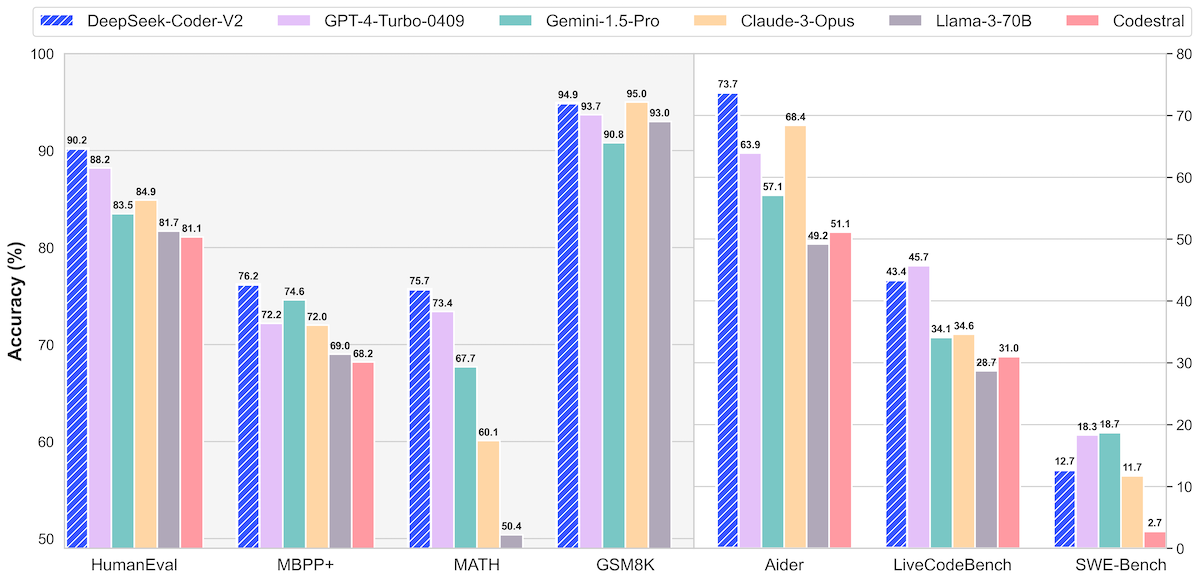
Now Ollama has made it simple enough for anyone who can use a terminal to run large language models locally, naturally I’ve gone overboard downloading too many to play with. I’m increasingly feeling they definitely have a place in the devops/coding arsenal of tools, but which model is best?
If you go on HuggingFace to look at a new model you’re interested, they often have great comparisons like this.
Jul. 22, 2024
There are two entries we often have at the end of a dockerfile (which is the file that tells Docker how an image is to be built).
They are similar in that when the container is launched from an image, these commands will be executed. For example, both of the dockerfiles below will print “Hello World” when run.
doc-entry:
FROM debian:stable-slim
ENTRYPOINT ["echo", "Hello World from ENTRYPOINT"]
doc-cmd:
FROM debian:stable-slim
CMD ["echo", "Hello World"]

Jul. 15, 2024
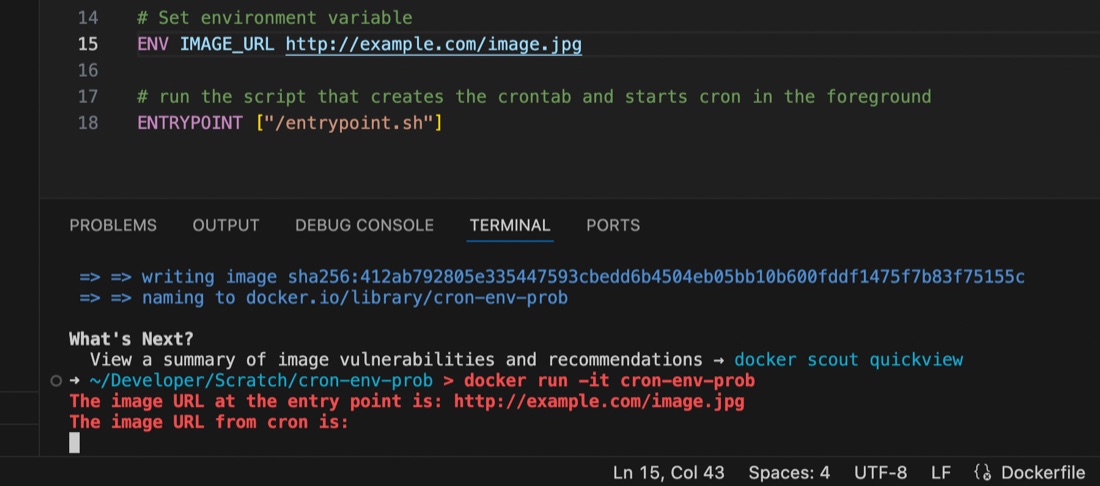
I’m used to using the docker-compose.yaml or dockerfile to set environment variables for containers running my apps, but ran into an issue recently where the variable seemed to be set some of the time, but at others it didn’t appear to exist.
I had a script set to run by cron inside the container, and it turns out that the environment variables set for the container are available in the user space, but not in cron, even if running with that user’s permissions. This is probably old news to established Linux users but it threw me for a while. I’d exec into the container and the script would work perfectly, then wait another minute for cron to run it and it would fail 🤦♀️ It was exasperated by my discovery that I didn’t know how to console.log debug from inside a container cron job as well - the subject of an earlier post.
Jul. 8, 2024
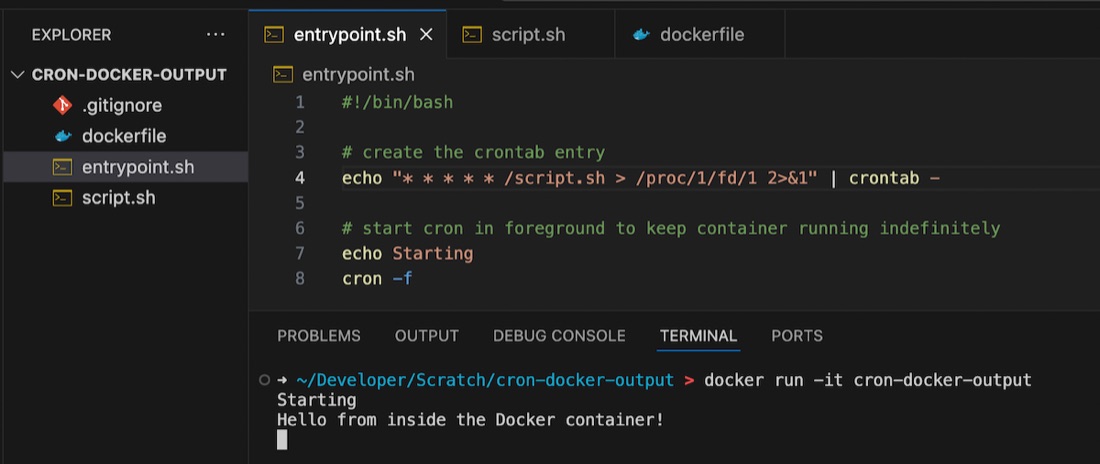
If you’re googling this exact title, you’re probably bumping your head against the same things I was today. I was debugging a completely different project, and needed to print to the console, from a cron job, in a Docker container. Turns out this isn’t as straightforward as I thought.
Foreground cron
Before you even get to the problem space, here’s a tip. If you want to have a cron job running in a container, start cron in the foreground. If you do not, Docker realises nothing is going on, and exits. If you want to keep the container active so your cron jobs get a chance to execute, then start it in the foreground.
May. 6, 2024
It’s not that long ago that I wrote about doing routine upgrades on containerised web apps using Forgejo as an example as I upgraded Forgejo (my git repository manager) between patch versions of 1.21, then a few days later, they dropped 7.0.0
They say the major version jump is due to it being an LTS (long term support) release, and changing to semantic versioning 2.0.0 , but that doesn’t quite explain it to me, and I assume this is partly signifying the fork’s drift away from the gitea codebase. In any case, the upgrade to 7.0.0 it does involve some breaking changes, and signifies to me that a lot has been on, which makes me keen to wait for a patch release (I’m always keen for other people to debug these things) which has now landed.
Apr. 29, 2024
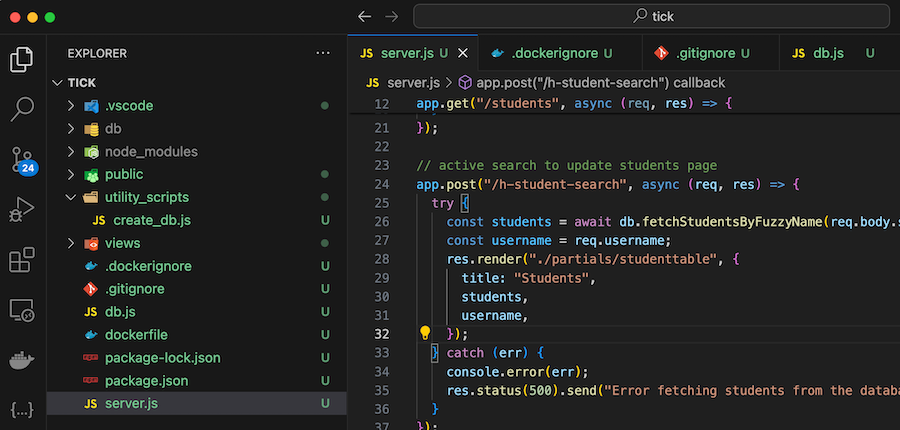
A ‘dockerfile’ contains all the instructions to build a Docker image. Here’s my first draft for a project I’m working on:
FROM node:20
WORKDIR /usr/src/app
COPY package*.json ./
RUN npm install
COPY . .
EXPOSE 3000
CMD ["node", "server.js"]
COPY . . is copying all of the files in my project into the working directory of the image so they can be run. Of course we don’t need them all for the app - for example the node_modules directory will be created when we npm install so no need to copy that, and I don’t need all my dot files in the container.
Apr. 22, 2024
I’ve been running NGINX Proxy Manager (NPM) in my homelab for a bit, and I’ve been meaning to clean up the VPS that runs most of my websites and public facing servers, so I’m considering running NGINX Proxy Manager on that VPS. While NGINX Proxy Manager wraps up the configs in a beautiful GUI, in the process you lose some of NGINXs capabilities. In particular there’s no GUI way to serve static virtual hosts from NGINX Proxy Manager.
Apr. 8, 2024
 Photo by Brett Jordan on Unsplash
I need a survey tool, and a quick search turned up LimeSurvey , there’s a ‘community edition’ so naturally I plan to self-host it. I scrolled down to the ‘installation’ section of the manual which has a big list of PHP dependencies.
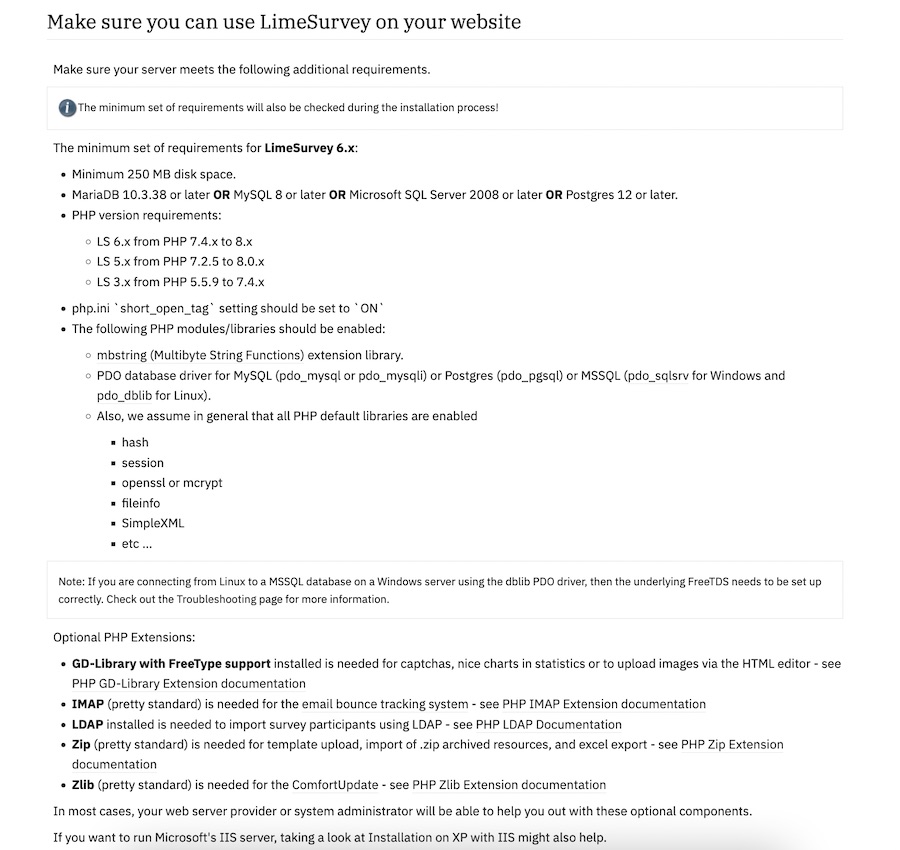
Ain’t nobody got the time for that in 2024, I scroll further looking for the docker-compose but there isn’t one. Huh. No official Docker image.
Mar. 31, 2024
When I wrote the install instructions for mdserver (little Markdown server Node app) on it’s github page it was something like:
- Have node.js installed and working
- Clone the repo
- Start with
npm start
Which is great if you know how to do those things (they are bread and butter to a web dev) but not if you’re a self-hoster who just wants a web server that converts markdown to HTML on the fly. For any situation where you just want to use the app, what you probably want is a Docker image of the app.
Mar. 25, 2024

The Docker Personal (ie free tier) plan currently allows one private repository, but even if you want to pay for the next level where you can have unlimited repositories, you may still want to host your own private registry - it’s going to be quicker inside your network, and you won’t run up against Docker’s pull/push limits if you are hammering it with your CI/CD system.
