Nov. 27, 2023
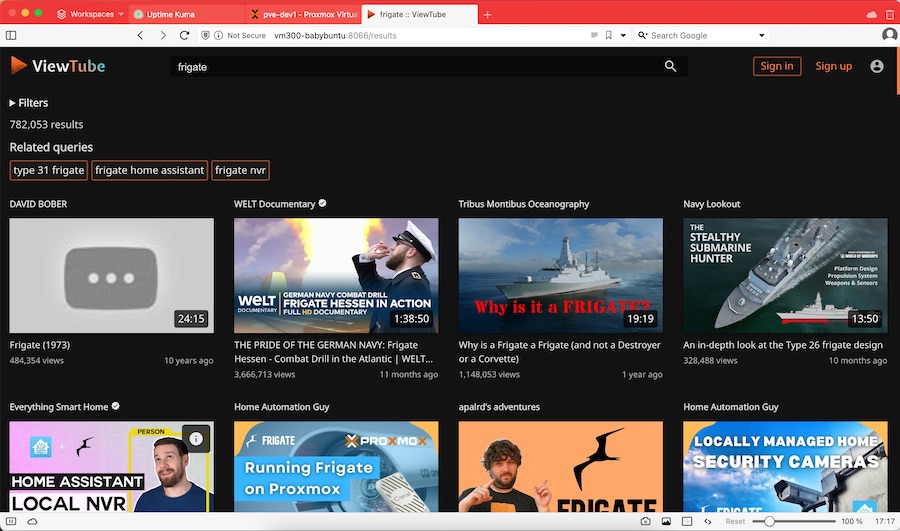
Whenever I encounter one of those “What are you self-hosting?” threads, I know I’m about to waste an hour looking at, and often trying out, software I probably don’t really need, and that was the case with this post on the lemmy.world Selfhosted community.
The basic idea of ViewTube is that it’s a self-hosted front end for YouTube, which just happens to strip out all the advertising and tracking. You can create your own local accounts which allows you to subscribe to channels and which keeps your progress so you don’t start over if you go back to a video - although I couldn’t see a history list. Forgetting your history might be a feature in an app designed to prevent tracking.
Nov. 20, 2023

My little mdserver app has been a good way for me to start experimenting with the the devops side of things, especially building for Docker. Since I wanted to make the Docker image available for ARM Linux & x86 Linux I had a janky shell script that looked like this:
#!/bin/bash

# Extract the version number from package.json using jq
VERSION=$(jq -r .version package.json)

docker build --platform linux/amd64 -t iankulin/mdserver:$VERSION -t iankulin/mdserver:latest .
docker build --platform linux/arm64 -t iankulin/mdserver:arm64-$VERSION -t iankulin/mdserver:arm64-latest .

docker push iankulin/mdserver:arm64-$VERSION
docker push iankulin/mdserver:arm64-latest

docker push iankulin/mdserver:$VERSION
docker push iankulin/mdserver:latest
So I’d build two different versions, and use the tags to separate them. In the registry it’d look like this:
Nov. 17, 2023

When I set up my first Docker container (I think for Uptime Kuma ), I had read around and understood there were two choices for persistent; bind mounts (where the data inside the container is effectively a symlink to a location on the local file system) or name volumes where Docker abstracted that away a bit, so you didn’t have to worry where it was - I sort of understood Docker ‘managed’ it.
Aug. 7, 2023

Having successfully set up and tested my node.js api handling app behind nginx on a development VM in the homelab, I decided to move it to my VPS so I could start using it for real. I had a bit of trouble finding the nginx.conf files on the VPS, until I remembered I was running nginx in a docker container on this machine!
I got everything set up, I could hit the domain in a web browser and get served the static page, and I could <domain_name>:3000/api/gnp_temp.txt and get the file delivered by the node script, but if I tried <domain_name>/api/gnp_temp.txt - “Bad Gateway”.
Jul. 16, 2023

Imagine if, lets say hypothetically, you’d set up an application months ago with a docker run command. Then you’d heard there had been an update to the app because of a security update. So you need to stop/remove the container, pull a new image and restart it, trouble is, you don’t remember the exact run command you used to start it.
This didn’t happen to me, since all my vm setups are in git as markdown (I’m pre-Ansible), but I did google how to do this thinking that there would be an easy way before I bothered to look through my config files.
Apr. 29, 2023

When you’ve successfully got Nginx running in a Docker container, AND got your domain correctly pointing at your nascent website, you’re then going to want to set it up for encrypted, and therefore trusted, browsing with SSL.
Certificates
A couple of posts ago, I mentioned that it was simpler to let Porkbun be the authoritative nameserver for a domain. Part of the reason for that is that if we do that, Porkbun had a button you can press which connects to LetsEncrypt and generates the certificates for you. This usually takes an hour or so, then you’ll be able to download the bundle from that same page.
Apr. 8, 2023

I’m still loving the Docker “just works” magic, despite their terrible PR skills , but sometimes I start a container, then the docker ps -a shows it exited almost immediately. Clearly I’ve made a mistake, but there’s no stdout error message to tell me what I’ve done wrong, where is it.
Let’s look at an example from today. I’m testing Filebrowser on a dev machine before I deploy it to the remote backup machine I’m assembling. And instead of following the official instructions , I’m following a blog post which has a few more details, but unfortunately also a small error.