Dec. 6, 2023

(edit: - I’ve had a rethink about my source hosting)
Once you’re familiar with coding tools, like the excellent VS Code , and git , it’s immediately apparent that these tools can be applicable for other purposes. A great example is that I now do my financial accounting in plain text (using beancount ). I have a python script that converts by bank account data in to the beancount format text files, I edit them in VS Code with a plugin that does the syntax highlighting and checks everything balances.
Dec. 3, 2023

I’ve developed a bit of a workflow for setting up a new service of some type on the homelab. Installing it is the obvious thing, but I also have a few quality of life things I do to make it a full production-quality part of my installation. I thought it might be helpful to run through those things using a recent example of adding audiobookshelf .
audiobookshelf
audiobookshelf is a web based system for viewing, playing, downloading and/or generally managing your audio books. I’ve been an Audible user/subscriber, but recently got grumpy at them about something - I think I had paused my subscription, and my downloaded books were still available on my phone. I was halfway through one, upgraded the app, and then wasn’t able to play the book without re-subscribing. That might not be exactly right, but it was some type of frustrating carry on like that.
Nov. 27, 2023

Whenever I encounter one of those “What are you self-hosting?” threads, I know I’m about to waste an hour looking at, and often trying out, software I probably don’t really need, and that was the case with this post on the lemmy.world Selfhosted community.
The basic idea of ViewTube is that it’s a self-hosted front end for YouTube, which just happens to strip out all the advertising and tracking. You can create your own local accounts which allows you to subscribe to channels and which keeps your progress so you don’t start over if you go back to a video - although I couldn’t see a history list. Forgetting your history might be a feature in an app designed to prevent tracking.
Nov. 17, 2023

When I set up my first Docker container (I think for Uptime Kuma ), I had read around and understood there were two choices for persistent; bind mounts (where the data inside the container is effectively a symlink to a location on the local file system) or name volumes where Docker abstracted that away a bit, so you didn’t have to worry where it was - I sort of understood Docker ‘managed’ it.
Nov. 5, 2023

In my last post , I talked about tagging guests in a Proxmox node so I could easily see which VMs and LXCs I needed to manually start before I ran an Ansible script to run all my apt updates. It would have been reasonable to wonder why I didn’t just add things to my playbook to magically do that.
The answer would be, I haven’t gotten around to it yet, so here goes:
Nov. 2, 2023

Each weekend I run an Ansible script that updates all my apt based VMs and containers. For the production machines, that’s everything, but my dev Proxmox is full of half-finished projects. Some of these have IP addresses reserved and are in the Ansible hosts file (because whatever service they are running is almost ready to move to the production server) others do not.
Long story short, the dev server has some containers and VM’s that need turned on before I run the updates, and some that don’t. I could just start them all up, for the ten minutes the updates usually take, but that seems wasteful somehow. If there was only some way to mark the ones I need to turn on in the Proxmox webgui! Well, there is. We can add tags to machines in Proxmox.
Oct. 30, 2023

I have an ansible script that runs each weekend which basically does an apt update && apt upgrade -Y on every Debian based instance. This weekend it failed on one Ubuntu host. When I went it to try it manually, this was the output:
Hit:1 http://au.archive.ubuntu.com/ubuntu jammy InRelease
Hit:2 https://download.docker.com/linux/ubuntu jammy InRelease
Hit:3 http://au.archive.ubuntu.com/ubuntu jammy-backports InRelease
Hit:4 http://au.archive.ubuntu.com/ubuntu jammy-security InRelease
Get:5 http://au.archive.ubuntu.com/ubuntu jammy-updates InRelease [119 kB]
Err:5 http://au.archive.ubuntu.com/ubuntu jammy-updates InRelease
  The following signatures were invalid: BADSIG 871920D1991BC93C Ubuntu Archive Automatic Signing Key (2018) <ftpmaster@ubuntu.com>
Get:6 https://pkgs.tailscale.com/stable/ubuntu jammy InRelease
Fetched 125 kB in 1s (125 kB/s)
Reading package lists... Done
Building dependency tree... Done
Reading state information... Done
11 packages can be upgraded. Run 'apt list --upgradable' to see them.
W: An error occurred during the signature verification. The repository is not updated and the previous index files will be used. GPG error: http://au.archive.ubuntu.com/ubuntu jammy-updates InRelease: The following signatures were invalid: BADSIG 871920D1991BC93C Ubuntu Archive Automatic Signing Key (2018) <ftpmaster@ubuntu.com>
W: Failed to fetch http://au.archive.ubuntu.com/ubuntu/dists/jammy-updates/InRelease  The following signatures were invalid: BADSIG 871920D1991BC93C Ubuntu Archive Automatic Signing Key (2018) <ftpmaster@ubuntu.com>
W: Some index files failed to download. They have been ignored, or old ones used instead.
Solved
The first google result mentions apt-cache - which I also run , so a first level debug step is to delete the /etc/apt/apt.conf.d/00aptproxy file that redirects apt requests to the cache I run in an LXC container. After that, if I re-run the apt update it works perfectly. Seems like a problem with the cache then. I’m not sure why it would only affect this host though - I have other Ubuntu VM’s in the fleet that are not getting the original error.
Oct. 24, 2023

I have an Ansible playbook I run each weekend to do all the apt updates. As well as keeping everything up to date, it’s a good check-in that everything’s alive and working as expected. I have Uptime Kuma checking the services are alive, and that no one is running out of disk or memory so there shouldn’t be any drama right?
This weekend, three instances (two remote, one local) timed out with “unreachable”.
Oct. 18, 2023

I’ve taken to running lots of my services in LXC containers under Proxmox. I like the feeling of installing in a VM, but it’s lightweight. I like the backups, I like things being isolated from each other, I like moving them around between machines easily. I’m just a big LXC lover at the moment.
I’m also a Tailscale lover, and the generous number of nodes in the free tier means I now just routinely install them in my VMs and containers without a thought.
Oct. 15, 2023

I’ve got a domain that’s not currently used, so I’m going to set it up as a virtual host under NGINX. This server is already serving two domains set up with Certbot for SSL. Is it going to be possible to add another site and have Certbot manage the certificates for it after I’ve run Certbot once?
When I googled around to find out, I didn’t find anything - which is usually a sign I’m either asking a wrong question, or it’s so little drama that no one ever mentions it. I decided just to move the site, check it was all working for the http version, then run Certbot and see what it said.
Oct. 9, 2023

Years ago, I was very keen on the SETI@home project that used a distributed computing model whereby packets of digitized received radio data were farmed out to individuals’ computers to be processed to look for any unusual signals that could potentially be from an intelligent extra-terrestrial source.
That’s long since defunct, but the idea lives on with BOINC - a system run out of Berkley that allows different science organisations to offer projects to run on individuals’ computers.
Oct. 6, 2023
I’ve picked up an new TP-Link WAP with Omada, so I wanted to spin up an Ubuntu 20.04 LXC to run the controller software in, and ended up spending a couple of hours figuring out why things where not working.
The initial problem was I was having connectivity issues pulling down the updates for all the packages required. I went down a bit of a tangent because I installed an apt cache the other day, so I was looking for problems there. Eventually I narrowed it down to DNS not working and started A/B testing like this:
Oct. 3, 2023

It’s bothered me for a while that all these VM’s are pulling down a lot of the same updates. As well as needlessly using some bandwidth, I’m hammering the update servers (that I don’t pay for) with the same requests over and over. I did briefly consider running my own mirror, but that’s not simple, plus I’d then be mirroring a heap of files in a complete repository that I’d never use. What I really needed was some sort of cache so once I’ll pulled down an update, it would hang around for a few days being available to other machines on the local network. Luckily, that exact thing exists - APT Cacher NG .
Sep. 30, 2023

Having written my little monitoring endpoint in Go, it needs pushed out to all my servers and VM’s. Clearly this is a job for Ansible which I’ve already dabbled my toes in . Before we get onto doing that though, we need to have a think about how to make it a service.
Linux Services
A service in Linux is just a program, but one that’s usually required to be running all the time to provide some piece of functionality. The “program” can be any executable, but to allow systemd to manage it, we need to tell it a bit about what we want in a .service file. This file is used by systemd to know how to manage the service. They can get quite complex, but here’s the simple one for vitals-glimpse - my little monitoring API endpoint.
Sep. 27, 2023

I’d like a small, quick, low load endpoint on all my nodes and VM’s that exposes a text keyword indicating if that machine is okay for RAM and disk space. I’m currently using Uptime Kuma to monitor if these machines are pingable, but I’d love a tiny bit more information from them so I’d get a Ntfy buzz on my phone if a machine is in trouble.
I mentioned a couple of weeks ago that the benefit of doing it in C rather than Node.js was probably not worth the trouble, but then being a fickle developer, decided to write it in Go.
Sep. 24, 2023
If you create an unprivileged LXC container on Proxmox, then try to back it up to an NFS share, for example on a NAS, you’ll get an error when it tries to build the temporary file.
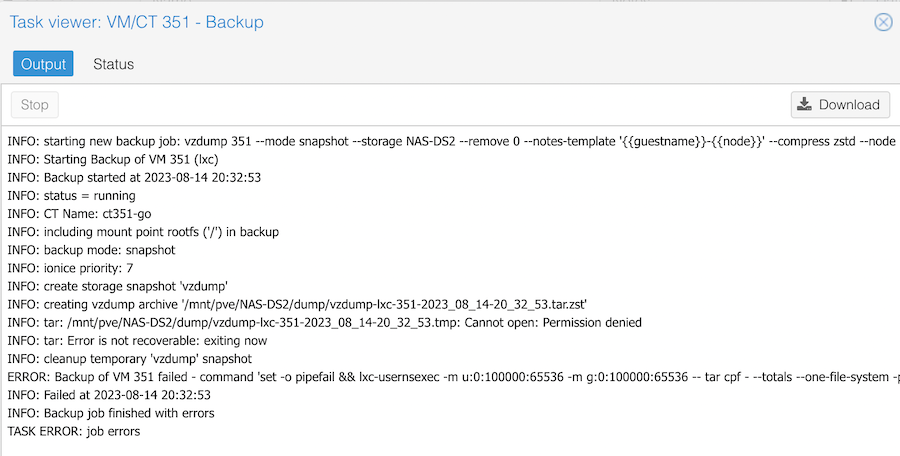
The clue is in the Permission denied line. It is trying to create a temporary file on my NAS, and failing because of a permissions problem. If I try the same backup to the local storage, it works fine.
Sep. 21, 2023

If you’ve got a script, or some code to work on, and it’s on a VM somewhere, you can always ssh in and use nano or vim to make your edits. Like a caveman. With an archaic editor, no intellisense, and no spell checking.
Or….
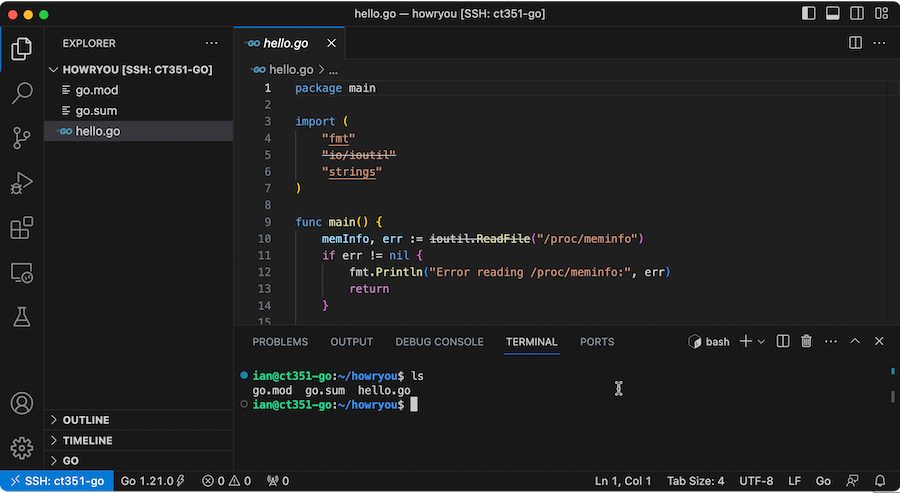
This magic - of editing a files on a remote server over SSH is achieved by using a Microsoft plugin for VS Code - “Remote - SSH ”
Sep. 18, 2023
This always makes me laugh:
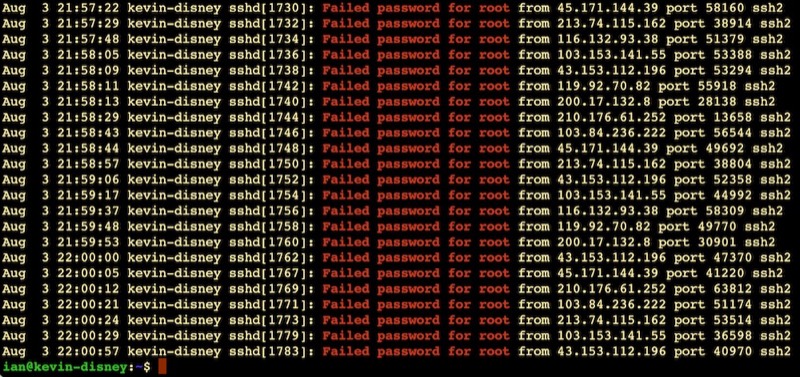
It’s like half the traffic on the internet is bots trying random passwords on root accounts over ssh. This is on an Ubuntu VPS on BinaryLane that had only been spun up five minutes or so. Looks like about one attempt every 10 seconds.
This is why the number three thing on my new install list is to disable root access via ssh. Here’s my system - possibly just for Ubuntu and related systems:
Sep. 15, 2023

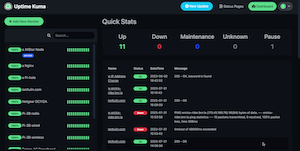
I’ve been using the excellent Uptime Kuma for my monitoring, but a couple of recent incidents - an external USB mount disappeared on a remote machine, an NVME drive filled up on a different node and stopped backups working because of a configuration error - have made me start to think about more robust monitoring.
The are many great tools for this - Nagios , Prometheus etc. but they are pretty substantial time investments for the excellent power. They can save time series data and display them beautifully. However, all I really want is to add some extra ability to Uptime Kuma.
Sep. 3, 2023

Now I’ve added NVME drives to my nodes, plus added an external NMVE RAID, I’ve got quite the collection of storage options. For one of my nodes, it looks like this:
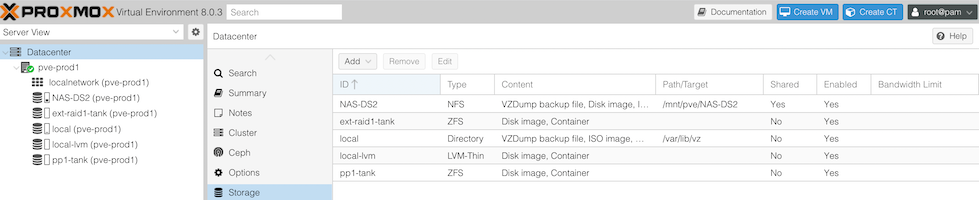
- The 256GB NVME the OS is installed to
- The 512GB SSD, currently running ZFS
- The Synology NAS - 4 x 6TB drives in RAID 5 on a 1GB switch
- A pair of 256GB NVME sticks in an external USB3 enclosure set up as a mirrored ZFS pool.
For my dev VM’s I often set them up to have their storage on the NAS - it’s just super easy to move them around then. The production VM’s currently have their storage on the SSD (that machine hasn’t had the NVME upgrade yet), but obviously with all these options, it’d be interesting to think about what goes where.