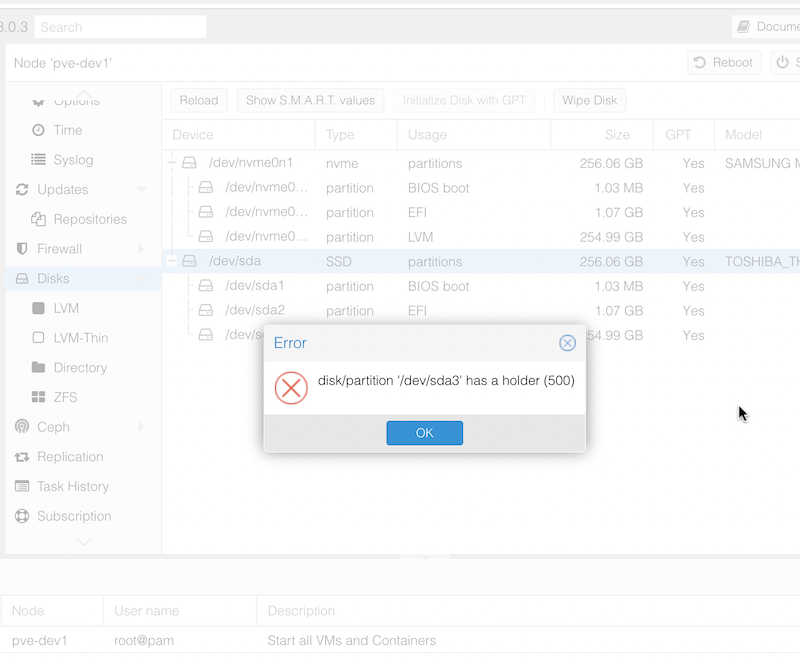
When I popped in an NVME drive and freshly installed Proxmox to it, I assumed I’d just be able to wipe the SDD that had previously been the boot drive to set it up as a ZFS pool. However, when I tried to do the wipe, I was greeted with the error:
disk/partition '/dev/sda3' has a holder (500)
I assume this means there’s a flag set on one of the Proxmox partitions to prevent accidental deletion or Proxmox thought that’s where it was running from. It’s likely that it’s related to this message I had during installation that I haven’t seen before:
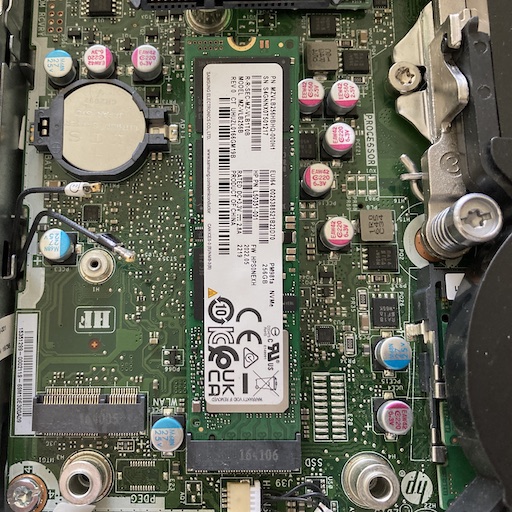
As part of my strategy to not worry about the slightly dodgy SMART reporting on the SDD’s in my HP Elitedesk G2 800 Mini Proxmox nodes, I’d decided to make use of the full sized M.2 slot to install 256GB NVME drives. That way I can boot from those, and have the SSD’s running ZFS which allows scrubbingto check the integrity of all the data. My VM disks can live on this drive.
Before I write a fancy Ansible playbook to automatically set up the Nginx/Node combo on my web servers, it might be worth going through how to deploy a Node app so it can run on a server without you being logged in.
Until now, I’ve been running my tests on my laptop, or in a server logged in as myself - sometimes detaching from tmux. But we need a bit more professional set up than that. The process will look something like this:
We wrote a nice little Ansible playbook the other day to install nginx on our web servers and ensure it was running. We were able to store the usernames in the hosts inventory file using the ansible_ssh_user variable. Then, we ran the playbook with the command:
This asked us the password to use with the usernames in the hosts file. Luckily that day, it was the same username/password combo to use for sudo on every server. What happens if that’s not the case? Here’s our new hosts file for today. There’s a cool new sysadmin in town - Jane.
Vim is a highly configurable text editor built to make creating and changing any kind of text very efficient. It is included as “vi” with most UNIX systems and with Apple OS X.
You will encounter vi/vim as the incomprehensible text editor that pops up by default when you need to edit something in your sysadmin journey. Perhaps you issued the command to edit your Ansible vault, perhaps you forgot to add a message to a commit. It’s going to be unavoidable.
Having successfully set up and tested my node.js api handling app behind nginx on a development VM in the homelab, I decided to move it to my VPS so I could start using it for real. I had a bit of trouble finding the nginx.conf files on the VPS, until I remembered I was running nginx in a docker container on this machine!
I got everything set up, I could hit the domain in a web browser and get served the static page, and I could <domain_name>:3000/api/gnp_temp.txt and get the file delivered by the node script, but if I tried <domain_name>/api/gnp_temp.txt - “Bad Gateway”.
NGINX is a great webserver and reverse proxy - as in it can hand off requests to other web-servers. That’s the situation I want to have set up on my VPS. I want NGINX to handle incoming requests - some of them will just be sorted out by returning static HTML, others (like the weather api I’ve been playing with) need to be handed off to other services to respond to.
A big chunk of my mindless doomscrolling used to go to Reddit, but also, Reddit posts from the various communities were frequently the useful results when googling error messages. I lurked in many a sub-reddit, but only posted in a couple - usually r/self-hosted or r/Homelab.
The problematic treatment of the communities in the leadup to their IPO has been well publicised, and the short blackout by some subreddits seemed to have zero effect on the company’s approach to it’s users (which is in fact what they have to sell). Those subreddits, and many others are still working, but (and perhaps I’m imagining this) seem somehow thinner. Additionally, I feel like it’s a fragile arrangement - the company has shown how they will deal with their communities, so depending on them in the long term does not seem wise, or even, somehow, ethical - like I’m crossing a picket line.
I’m a keen listener of the 2.5 Admins podcast in which there’s frequent enumeration of the advantages of ZFS as a file system. So much so, that I’ve had occasional twinges or regret about the money I spent on the Synology - although it has been boringly reliable and does everything I need.
Proxmox has some built in support for ZFS, including through the web GUI. So I’ve been itching to give it a try.
In the previous post , we looked at getting up and running with Ansible, including using the ad-hoc mode to send commands to our servers. We had a inventory file called hosts that had groups of server IP addresses and a simple ansible.cfg file that pointed to our inventory file.
Playbooks
Ansible playbooks are used to collect together a description of the state we want in a server. When the playbook is executed, Ansible figures out what things need need changed, and changes them. If you’re used to the procedural nature of a bash script, where things proceed from one step to the next, and there might be decision branches, this requires an adjustment in your thinking. This is similar to the adjustment I had getting my head around SwiftUI , and moving from JS to React .
I’m normally a x.1 release type of sysadmin, but the increasing temptation of installing Proxmox 8.0 while I’ve got some time off, and the fact that I’ve got a cluster, so I can just move the VM’s around all adds up to thinking I’ll do that today.
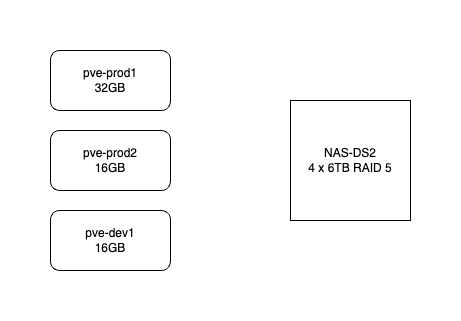
Here’s how my system works. It consists of three HP-800 mini G2’s. pve-prod1 is a bit fancier - i7 6700T and 32GB, the other two are i5 6500T and 16GB. The production VM’s use the local SSD but backups go to the NAS. All the machines are currently running Proxmox 7.4. They are not clustered in the proper sense - I don’t need high availability, and I don’t want to run them all the time. pve-prod1 runs 24/7 and I just power up pve-dev1 when I’m working on something.
Ansible is a system for executing commands on remote systems. It allows a declarative approach - so if you run a playbook (the system configuration files are called playbooks) that says a system has a Docker container running Jellyfin, Ansible will check if that’s true, and if not, make it so. Ansible is best used when you have a large number of systems to maintain, but even with a small number, it serves to document systems as well as to automate their creation.
Imagine if, lets say hypothetically, you’d set up an application months ago with a docker run command. Then you’d heard there had been an update to the app because of a security update. So you need to stop/remove the container, pull a new image and restart it, trouble is, you don’t remember the exact run command you used to start it.
This didn’t happen to me, since all my vm setups are in git as markdown (I’m pre-Ansible), but I did google how to do this thinking that there would be an easy way before I bothered to look through my config files.
This is one of those things that is simple once you know it. I had my tiny Node service working on my MacBook, but how do I run it on the server?
Native or Container
Obviously I need Node.js installed on the server, should I have it in a Docker container, or native on the machine. There’s no clear answer here - in a container set up with Docker Compose might be more in line with my ideology of treating machines as disposable, but a native install is simpler, and I probably want to make life simpler at this stage when I’m learning everything.
I’ve been slammed with other work, so my web dev learning has fallen well behind. Luckily, the YouTube procrastination algorithm noticed this and suggested I watch a video from CodeWithCon titled Learn Backend in 10 MINUTES .
Since I was watching a video of a guy learning to land a C152 at St Baths (a skill I do not need) at the time, it was hard to argue with myself that I didn’t have ten minutes to learn all of backend programming.
I’m interested in collecting some internal temperature data from my servers to look at the effect of adding an NMVe drive. Last week we had a couple of warm days immediately followed by a couple of cool ones. I imagine a 20° ambient temperature change could effect the server temperatures, so I thought it would be good to add that to my temperature logs.
I don’t have a weather station or other automated system for collecting the temperature, but there are several commercial sources for this data which, while probably not as good as a sensor in the server room, will be fine for our purposes.
When I installed the backup NAS and a media server at the remote site, one of the jobs on my list was to reserve the IP addresses for the NAS, node, and the VM in the local router. I carefully did that, but when I got home (200 km later) and opened my laptop, the browser page was open on the DHCP settings with a table of mac addresses I’d added, and the reserved IP’s, and at the bottom of the page, a large blue “Apply Changes” button. Had I pressed that button to save my changes correctly? I’m not sure.
If you fiddle around with computers, and especially with Linux drives, you’ll often find yourself with an ISO file you need to boot a device from. These can’t just be copied onto an existing USB or SD card - they need to be bootable, so you’ll need a special program to write the ISO to the storage device.
Previously I’ve been a big fan of Balena Etcher . It couldn’t be much more simple - you chose the ISO file you’ve downloaded from somewhere, chose your removable drive (it intelligently hides the non-removable drives to prevent you from accidentally wiping your hard disk), then tell it to do it’s thing.
A potential solution to my concern about the either perfect, or nearly dead, SSD would be to add a NVMe disk to the M.2 slot in the HP Elitedesk 800 G2’s. I’d use those to boot from and run Proxmox, then the existing SSD’s on each node in the cluster would just be part of the CephFS pool that has some redundancy built into it and hosts the VMs that are not using the NAS for their storage.
I didn’t understand why the default Proxmox install sets up the storage the way it does - with the available disk split up into an LVM and an LVM thin storage - so I’ve been reading this excellent Proxmox Storage Guide by Programster (spoiler - the LVM thin makes VM snapshots easier).
At one point in the post they mention that you can see the “Wearout” percentage for any SSD drives in the Proxmox GUI, so of course, since I now own five second hand HP Elitedesk 800 G1/G2’s all with SSD drives, I dived in to have a look at each drive and found this.