Apr. 23, 2023

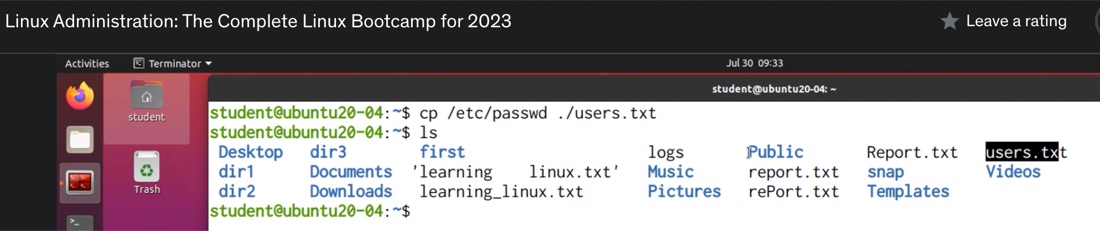
In Linux (and MS-DOS I guess) the period signifies the current directory, so if I have a file in the current directory called test.txt, I can refer to it as test.txt or ./test.txt
ian@enrico-rider:~$ cat test.txt
test
ian@enrico-rider:~$ cat ./test.txt
test
I mostly see this in references to files in HTML and have often wondered why. Here it is being used in a Udemy course I’m following.
It’s one of those things that’s difficult to Google, so these days my reflex is to ask ChatGPT such questions.
Apr. 21, 2023
I’m playing with Syncthing with the idea that it might be a good replacement for Dropbox. There wasn’t a Docker container listed in the install options, so I thought this might be a good app to run in an LXC.
I’m going to use a share from the NAS, and I’m assuming I’ll need it mount it into the container for Syncthing to access. I’m experienced enough to know that I’m going to want a privileged container, and I thought I’d done all the NFS sharing correctly, but when I tried to mount the NFS share, I was getting an error.
Apr. 19, 2023

Since I’m constantly standing up Linux virtual machines and containers - almost always of the apt variety, I’m constantly typing in:
apt update
apt upgrade
Then hitting enter again to allow whatever installation is needed to proceed. I’ve noticed in some of the commands I’ve been pasting in from installation instructions or StackExchange solutions have been separated by characters that look like it allows several commands to be run one after the other. To cut a long story short, the commands above could be entered like this with double ampersands:
Apr. 17, 2023
I’ve been furthering my Linux education by playing with some desktop distros in VMs, but it’s not a great experience accessing them through the Proxmox web GUI. The alternative to this is to use a good SPICE client on the remote desktop, but there is not a simple good solution for this for MacOS.
I’ve been playing with the idea of picking up an old i3/i5 Thinkpad - these are around the AUD130 mark on eBay, to run a Linux distro with the main idea being to use it to SPICE into my VMs.
Apr. 14, 2023

I’ve been using this rsync command to backup files from my NAS to a USB drive. The –excludes are to avoid copying over some junk hidden files - some created by MacOS and some by Synology.
sudo rsync -rvit --exclude '*@eaDir*' --exclude '.DS_Store' /volume1/media/ /volumeUSB1/usbshare1-2/media --del
The .DS_Store files seem to be dropped by MacOS every time I view a directory on the NAS from my MacBook. They’re not doing any harm, and they presumably do something handy for the Mac - remembering the view settings for that folder or some such. Nevertheless, they annoy me. It makes sense to not back them up - they don’t serve any useful purpose in that context.
Apr. 12, 2023

I was doing updates on all my nodes and VM’s today, and backing up the VMs that aren’t already on a backup schedule. On my dev machine I have a Debian LXC container that I mostly just use for trying out Linux commands and playing around. I used to have a backup of it that I used a lot - after playing around I like to set it back to a fresh install plus my ssh keys - but I lost it somehow when moving the VM to new metal.
Apr. 10, 2023

A few weeks ago , I was very excited to be able to take a snapshot of a virtual machine, copy it across the network from that Proxmox node, copy it back across the network to a different Proxmox node, start it there, and have it up and running, without it noticing it was actually on different hardware.
Backing up a VM is pretty simple, you just click on the node, choose Backup and click the Backup Now button. The ease, and completeness of backing up a VM is one of the main reasons I’m using Proxmox for my systems.
Apr. 8, 2023

I’m still loving the Docker “just works” magic, despite their terrible PR skills , but sometimes I start a container, then the docker ps -a shows it exited almost immediately. Clearly I’ve made a mistake, but there’s no stdout error message to tell me what I’ve done wrong, where is it.
Let’s look at an example from today. I’m testing Filebrowser on a dev machine before I deploy it to the remote backup machine I’m assembling. And instead of following the official instructions , I’m following a blog post which has a few more details, but unfortunately also a small error.
Apr. 6, 2023
I’ve discussed before , that when you first install Proxmox, it grabs an IP address from your DHCP server (this usually runs in your ISP modem if you haven’t created a better setup), but then it stores it as a static ip. This is a sort of compromise that makes sense and works for most circumstances.
As soon as I’ve provisioned a new Proxmox server, I then usually tell the DHCP server, to always serve that address to the MAC address of the new Proxmox server. Since Proxmox does not use the DHCP server on subsequent boots, all that really does is prevent the DHCP server give the same IP address out to another device - which had happened to me prompting the earlier post. The DHCP server had given the address to a wifi lightbulb while the server was off, then when the Proxmox server booted up, the netwrok access was all messed up.
Apr. 4, 2023
I’m in the process of shuffling disks around as I move towards my 3-2-1 storage arrangements. I thought after my extensive rsync adventures I’d mirrored everything everywhere, but then realised, with a sinking (no pun) feeling, after I’d repurposed a drive out of the 2 drive Synology as a USB caddy drive and wiped it, that I’d forgotten my audio book directory. All my rsync fiddling around had been on the video subdirectory of the media folder, not the whole media directory that included my audiobooks.
Apr. 2, 2023

The hardware engineering of these corporate world mini-PCs is really nice. I swapped out the RAM today to bump my main machine up to 32GB from 16GB. It was a straightforward task - no screwdrivers, no drama.
To open the machine up, there is a single large screw on the back that can be undone with your fingers - it’s a captive screw, as in it doesn’t fall out - just another nice engineering thought.
Mar. 31, 2023
I’ve got some extra RAM to drop into the HP 800 G2 mini that I use as my production server. I feel like that’s a low risk change, but since it’s easy to take VM snapshots I shutdown the VM’s and did that, and wanted to just copy them off the local storage.
I’m moving towards having these backups (and the ISOs) on the NAS rather than locally, but have not implemented that. So to get my backups I need to SSH in and find them.
Mar. 30, 2023

With all those earlier rsync bumps out of the way, I was ready to try my first rsync backup at the command line to sync my movies directory on the NAS to a (NTFS formatted) USB drive plugged into the same NAS. This is to be one of the simplest since there’s no remote server involved, just copying from mount point directory to another - so no drama with remote permissions.
Mar. 28, 2023

The reason I’ve been figuring out rsync is to setup my backup strategy. Eventually this will partly be managed with scheduled tasks (ie cron jobs) running rsync. I wanted the SSH in and try this out, since I didn’t know some basic things like the mount points of the shares.
Mount points
My first issue was to find the paths to all my data. This turned out not to be a drama. Each of the volumes you create when the NAS is set up are just in the root directory. This includes any USB drives plugged in.
Mar. 27, 2023
The Synology operating system DSM (I’m on DSM 7.1.1) is Linux, but its highly customised for the purpose of making running a complicated Linux NAS doable for less technical users.
Due to that, some things that are routine in a regular distro, require a few more steps to jump through to get them to work. SSH-ing in to a Synology with keys is one of those things.
Should you?
Before you do start fiddling around, it’s probably worth mentioning that almost all the things you might want to do on the Synology can be accomplished through their web interface, or by installing a ‘package’ from the Package Center. For example, if you need to run a cron job, that’s done through the Control Panel ‘Task Scheduler’. If you need TailScale installed to easily access it over Wireguard, there’s a TailScale package. In general it’s probably easier and safer to do things their way.
Mar. 26, 2023

I’ve started down the path of improved storage management, including embracing the 3-2-1 mantra. I’ve settled on a RAID6 NAS for local, mirrored to an off-site NAS, and an offline local USB drive.
While I’ve been setting those up, my services have been live, so files have been changing on my main storage, which I’ve then switched to the bigger NAS, and I’ve been trying to keep data in sync by remembering what changes have been made where, and manually replicating them. That’s not sustainable and not the plan.
Mar. 24, 2023

When I was a young whipper-snapper, working at the “data processing” centre, you could see if one CPU was better than another one by the CPU name/number. No one wanted an 8086 once the 286’s came out. Then a 386 was what you wanted for the latest multitasking support, but only till the 486 was available, then you wanted that for the gargantuan memory addressing.
With that idea firmly in mind, I’ wanted an i5 to be better than an i3, and an i7 better than all of them, but it’s apparently not that simple . I do come across people in forums talking about ‘generations’ of Intel processors - so all this is probably decodable, but I’m not exactly sure how.
Mar. 23, 2023
Since the HP EliteDesk 800 G1 I’m using as a dev/homelab machine is going to be re-purposed as a media/backup server elsewhere, I’ve grabbed another G2 to use as a second box. The homelab machine serves as a backup device for the production server that runs my self-hosted services, but also is the machine I play with - testing my software, but also trying out any new self-hosted software I’m having a look out or configurarions I’m thinking about for the ‘production’ server.
Mar. 21, 2023
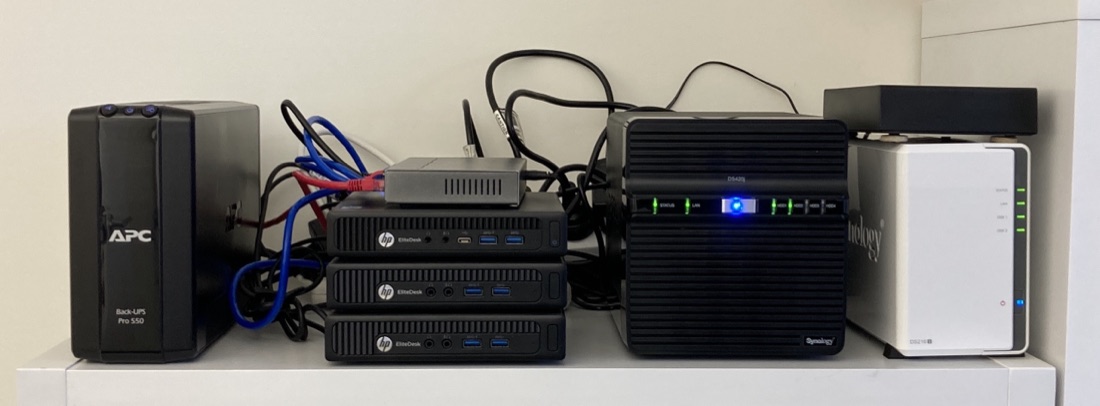
I went over mounting a Synology NAS share on a Mac or Linux host a while ago . Now I’ve populated a new NAS, and I want to copy my data over to it. I could mount them both to my laptop, and the data flow would look like this:
NAS1 - switch - wifi - laptop - wifi - switch - NAS2
Since I’m copying 4TB, it will take a few hours, and if I forget what’s going on and close the laptop, or take it outside of my wifi the transfer will die, and I won’t be sure which files are patent. What might be better would be something like this:
Mar. 19, 2023
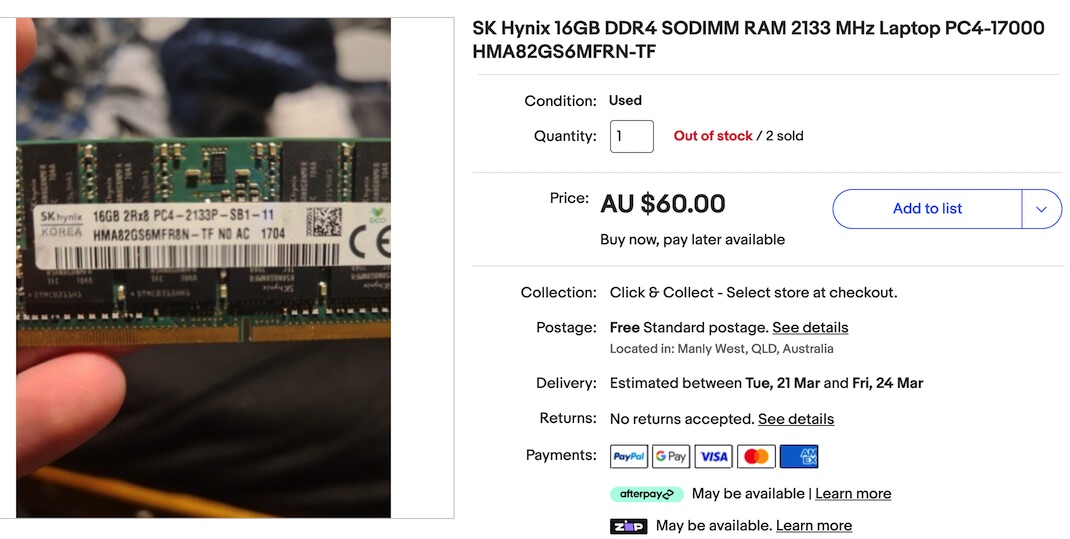
I ordered some RAM this week for my production server - it’s quickly becoming clear that memory is the limiting factor when running lots of services and VM’s that don’t get much use - rather than processing power. I’m not really a hardware guy, so figuring out exactly what RAM I need is a slightly fraught process - I won’t be fully confident I’ve ordered the right thing until I install it, boot up, and see my G2 800 come to life maxed out at 32GB.