Mar. 17, 2023

I had some more network weirdness setting up this new Proxmox machine. When I went to run the updates it couldn’t resolve any of the addresses:
root@pve-kr01:~# apt update
Err:1 http://ftp.au.debian.org/debian bullseye InRelease
  Temporary failure resolving 'ftp.au.debian.org'
Err:2 http://download.proxmox.com/debian/pve bullseye InRelease
  Temporary failure resolving 'download.proxmox.com'
Err:3 http://security.debian.org bullseye-security InRelease
  Temporary failure resolving 'security.debian.org'
Err:4 https://enterprise.proxmox.com/debian/pve bullseye InRelease
  Temporary failure resolving 'enterprise.proxmox.com'
Err:5 http://ftp.au.debian.org/debian bullseye-updates InRelease
  Temporary failure resolving 'ftp.au.debian.org'
Reading package lists... Done
Building dependency tree... Done
Reading state information... Done
All packages are up to date.
W: Failed to fetch http://ftp.au.debian.org/debian/dists/bullseye/InRelease  Temporary failure resolving 'ftp.au.debian.org'
W: Failed to fetch http://ftp.au.debian.org/debian/dists/bullseye-updates/InRelease  Temporary failure resolving 'ftp.au.debian.org'
W: Failed to fetch http://download.proxmox.com/debian/pve/dists/bullseye/InRelease  Temporary failure resolving 'download.proxmox.com'
W: Failed to fetch http://security.debian.org/dists/bullseye-security/InRelease  Temporary failure resolving 'security.debian.org'
W: Failed to fetch https://enterprise.proxmox.com/debian/pve/dists/bullseye/InRelease  Temporary failure resolving 'enterprise.proxmox.com'
W: Some index files failed to download. They have been ignored, or old ones used instead.
So some sort of DNS problem. The entry for the DNS is in /etc/resolv.conf when I looked in there, it said:
Mar. 16, 2023
I ran into a little hiccup today. I’m building out a Jellyfin media server in a little HP G2 Mini PC. The config was going to be a Debian server inside Proxmox (because I love VM snapshots for backups) running Jellyfin in a container. There’ll be an external USB3 hard drive for the media storage.
I was intending to build it all out and test it, then ship it to it’s final home.
Mar. 11, 2023
I’ve been really happy with my two bay Synology NAS - a DS216j. The Synology’s seem to have great reputation for just pushing on. Mine is loaded up with two 8TB Seagate Barracudas in RAID 1 leaving me with a one drive failure redundancy.
I guess a more hard-core host-er than me would be building their own array and using Unraid or ZFS or something. I’m pretty comfortable with the Synology off the shelf system; it’s a good match for my (low) level of expertise, and more robust than my previous storage system of a USB external drive.
Mar. 8, 2023

I’ve spent a few hours over the weekend migrating a media library from an external USB drive to the NAS, and in the process reorganised it, and in many cases bulk changed file names. I’ve also added a heap of metadata.
I’d like to check that I haven’t missed any files, but a side by side listing of each data source won’t do the trick, so I’ll probably end up pulling the data into a spreadsheet, but I’d like to get as close as possible with Linux-fu first.
Feb. 27, 2023
A couple of weeks ago, I posted about the sudoers’ file , and how there was a special tool for editing it since breaking it is a bad idea, and that in fact I needn’t bother, since I can just add my user to the sudoers’ group with:
usermod -a -G sudo ian
That worked (on Unbuntu) since /etc/sudoers contained a line saying:
# Allow members of group sudo to execute any command
%sudo	ALL=(ALL:ALL) ALL
I tried the same trick on a fresh Debian install today, and no dice:
Feb. 22, 2023
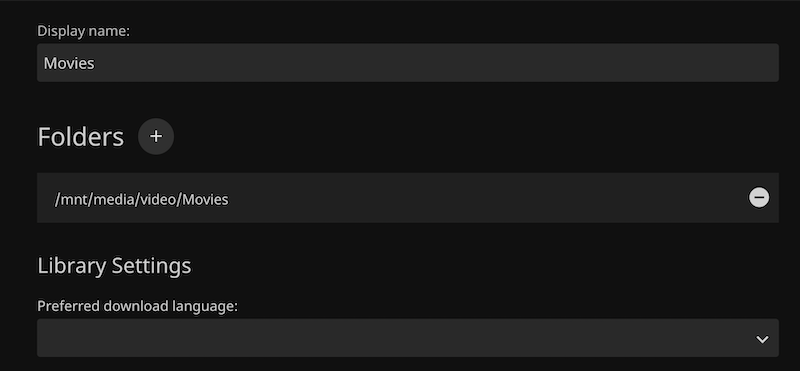
After being so blase about the file permissions when mounting the share to the Linux file system, and testing that root could read and write to the share, I ran into problems immediately when trying to add the media folder as a library in Jellyfin - getting the error “The path could not be found. Please ensure the path is valid and try again.”
I definitely had the path correct - I could copy it from the dialog and cd to it at the CLI. So I suspected it was a permissions thing. The app might not have read permissions for the directory.
Feb. 20, 2023

I picked up a Synology DS216j NAS from eBay to use for storage for the rapidly growing home lab. The eventual plan is that as well as my VM backups, it will host the media library, and eventually (when this has all proved itself reasonably bullet-proof) my current DropBox contents. That won’t all fit on the 2x2TB drives that the DS216j came with, and I have a pair of 8TBs on hand, but I wanted to set it up and checked it all worked.
Feb. 16, 2023
I installed Proxmox on my second server last night, and tonight when I ran apt update I ran into the error you get when you haven’t bought a license.
Err:5 https://enterprise.proxmox.com/debian/pve bullseye InRelease
  401  Unauthorized [IP: 103.67.14.50 443]
Reading package lists... Done
E: Failed to fetch https://enterprise.proxmox.com/debian/pve/dists/bullseye/InRelease  401  Unauthorized [IP: 103.67.14.50 443]
E: The repository 'https://enterprise.proxmox.com/debian/pve bullseye InRelease' is not signed.
N: Updating from such a repository can't be done securely, and is therefore disabled by default.
N: See apt-secure(8) manpage for repository creation and user configuration details.
Even though I guess it was only a month ago (let that sink in people who think the raspberry Pi they just bought is going to be the last homelab hardware they buy 😊) since I set up my first Proxmox server, I’d already forgotten there’s a step to enable it to get updates without a subscription.
Feb. 16, 2023

So, the very small datacentre has undergone a major hardware upgrade today. The HP 800 G1 is joined by an HP 800 G2. Four core i7 vs the old two core i5. Double the RAM to 16GB, four times the disk. The old machine will become a dev/play machine - still virtualised, and the new machine will run the production apps, mostly in Docker containers.
Since everything is containerised, I did consider running Unbuntu Server on the bare metal of the new machine, but running it on Proxmox will give me some flexibility, and since we’ve stepped up the underlying hardware resource so substantially, performance will be well in front anyway. Plus it will give me some flexibility if needed in the future.
Feb. 15, 2023
Uptime Kuma is a monitoring tool suitable for self-hosting, and as well as being a good tool for monitoring the status of your network and applications, it’s a nice smallish app to get started on Docker containers.
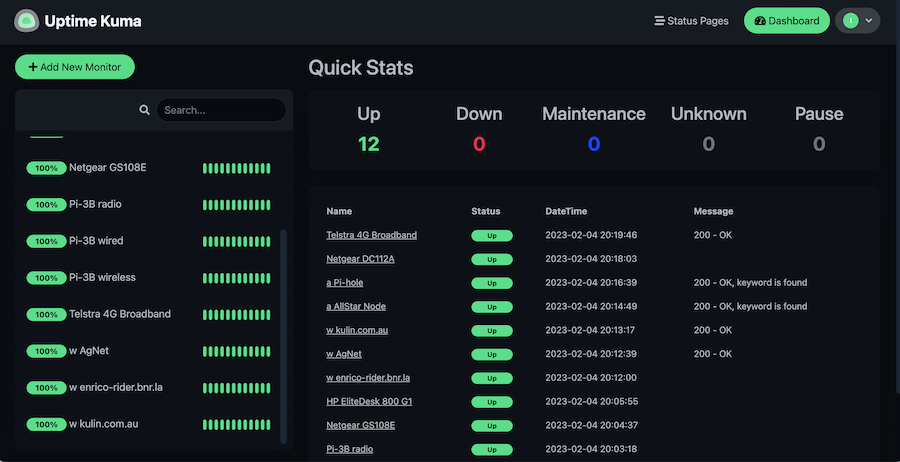
Since it’s in a container, you need to create a volume for it and pass it in to persist your settings. Then it’s just a matter of adding each item you want to monitor. There’s a heap of fancy options for this, the only three I’ve used are ping - just pings an address, http(s) - requests a page and checks the header for a 200, and http(s) keyword - looks at the returned page for a keyword in the html.
Feb. 14, 2023
I had a weird issue today that I wouldn’t have known about if I didn’t have an over-engineered home network monitoring system.
I’ve got a new GS108E managed switch , purchased in anticipation of connecting a NAS to the homelab - I want to have a solid 1Gb connection between the NAS and the servers, and also in anticipation of moving to VLANs before I start to expose self-hosted services to the internet.
Feb. 13, 2023
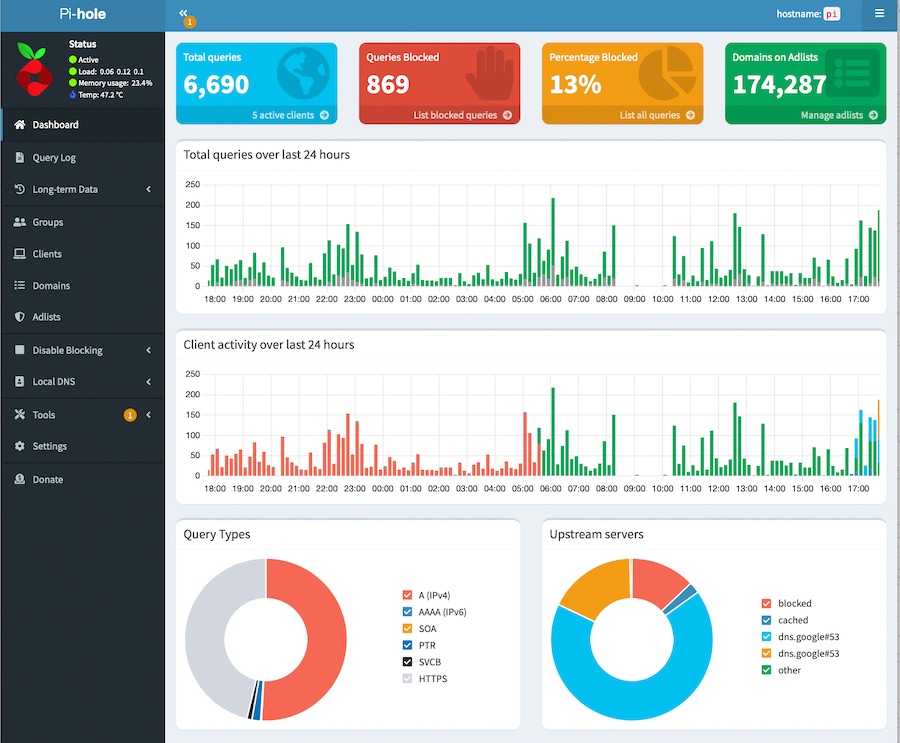
I run an instance of Pi-hole as a network-wide advert and surveillance blocker. It also has a setting to block individual domain which I use to force myself to really consider if 30 minutes of Reddit is a good idea when I should probably just be going to bed.
As I’ve increased the number of real and virtual devices on my network, it’s getting to be a pain remembering all of their IP addresses. So I’d like to have DNS entries for them, for example I’d much rather:
Feb. 12, 2023

Due to potential brute force attacks , it’s a good idea to turn off password access via shh and instead rely on ssh keys. In this post, I’ll run through that process.
Generating your key
On a mac (or actually most *ix systems), your ssh keys live in the .ssh directory inside the users home directory. Since it starts with a period, it’s a ‘hidden’ directory. To see it in Finder press
Feb. 11, 2023
When I installed Proxmox, I’d used a secure, and therefore absurdly long and complicated root password. I do use a password manager, but don’t have it integrated into Chrome, so it was buggging me having to find it and paste it in each time - why wasn’t Chrome offering to save it for me?
Well, you’d guess it was something to do with this. I feel like Chrome is trying to tell me something here:
Feb. 10, 2023

Literally an hour after I wrote the post about installing the qemu guest agent in a VM and explaining how it can be used to inject root level commands into a VM, I had use of it due to a mistake.
I’d decided to add myself to the sudoers file. Since the last line in that file is a directive to include all the files in the /etc/sudoers.d directory, the accepted way to do that for local changes is to create a file in that directory with the necessary commands.
Feb. 9, 2023

One of the strengths of having virtual machines (VMs) running inside a hypervisor like Proxmox is how they are isolated from each other and their host. This is a strength - if there is a problem with a particular VM nothing else should be affected by it.
But this can also be a pain if the hypervisor needs access to a VM to control or monitor it in some way that’s only possible from inside the VM. Proxmox can use the Qemu Guest Agent for this purpose. To over simplify, this is a deamon that runs in the VM and opens a unix socket/virtual serial port to the hypervisor, and listens for commands on it. With Proxmox, the main use of this is to aid in orderly shutdowns and backups, but it also allows us to run commands in the VM from Proxmox - an obvious security compromise. You definitely would not want to install this daemon on a hosted VPS.
Feb. 8, 2023
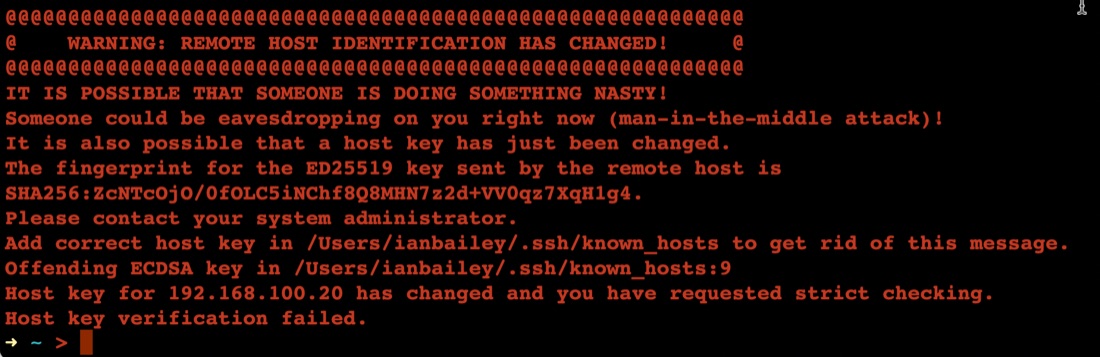
The first time you connect to a new server with ssh, it asks you something like:
➜ ~ > ssh ian@192.168.100.20
The authenticity of host '192.168.100.20 (192.168.100.20)' can't be established.
ED25519 key fingerprint is SHA256:ZcNTcOjO/0fOLC5iNChf8Q8MHN7z2d+VV0qz7XqH1g4.
This key is not known by any other names
Are you sure you want to continue connecting (yes/no/[fingerprint])? yes
Warning: Permanently added '192.168.100.20' (ED25519) to the list of known hosts.
Once you’ve said yes, it adds the server ‘fingerprint’ to the known hosts file, then next time you ssh there, it feels safe - we know this server.
Feb. 7, 2023
Installing your first virtual machine (VM) in the Proxmox hypervisor is pretty straightforward. This post runs through those steps using Proxmox 7.3.
You need an operating system for your virtual machine, I’m going to use Ubuntu server in this example, but it could just as easily be Windows server , or regular windows, or one of the desktop Linux distributions. Whichever you decide, you’ll need to find and download the ISO for it. The ISO is a (usually quite large) file needed to install the operating system.
Feb. 6, 2023
A smart thing to do after setting up a server on the internet, is to set up SSH keys and then turn passwords off for SSH. The reason for this is that scanning for open port 22 on IP addresses, then brute forcing password files on them is pretty much hacker 101. So if you have passwords turned on, and especially if you have a weak password you are really inviting someone to take over your server as root and add it to their botnet army for liking Putin’s twitter posts or whatever.
Feb. 5, 2023
Listening to podcasts, I’ve been jealous of US developers who seem to have masses of $5/month VPS (Virtual Private Server) options. When I looked for similar Australian offerings a few months ago, they all seem to start at around $35 which is outside of my ‘have a play with something’ budget range.
I could of course use one of the international options, but one of the main apps on my app ideas list needs to be hosted in Australia and work under Australian data privacy rules. That might be the case for Digital Ocean (or other US companies) if you select an AU server, but I’m not a lawyer. For the imaginary clients of my imaginary app, me being able to say that the hosting is with an Australian company in Australia would be a plus.