Js


Mar. 17, 2025

Node.js built in test runner

For the longest time, I’ve been using Mocha (test runner) and Chai (assertion library) for my JS testing. They are reliable old friends.

One of the effects of the existence of Bun and Deno has been to spur Node onto adding some new features, so after appearing as an experimental feature in 18, the Node test runner dropped in Node 20.

I’m not sure if the familiar unit test layout of Mocha and Node is inherited from Jest, or comes from older testing frameworks of which JUnit and NUnit were the first ones I’d ever used. Before that I just used to write tests as lumps of assertions in regular code - which worked but wasn’t as pleasant to use as a proper unit test setup. Regardless, the system of bundling a few tests together and having them all run and spit out green ticks is not a new one.


Feb. 17, 2025

A bit of web-scraping with Cheerio

I had an idea for a little holiday project that required a list of episodes from The Rest Is History podcast. On their ‘Episodes’ page, they have a player, and a list of post entries for the most recent eighteen podcasts. There is a ‘show all’ button, but it doesn’t work.

The player does contain the full list of episodes (about 600) including a number of duplicates, so I expected if I inspected the network calls that I’d see a JSON package arriving with what I wanted. This is what I almost always find these days so I’ve had very little call to do any real web scraping - it’s normally just a matter of locating the endpoint and perhaps extracting an API key from a header.

Jan. 22, 2023

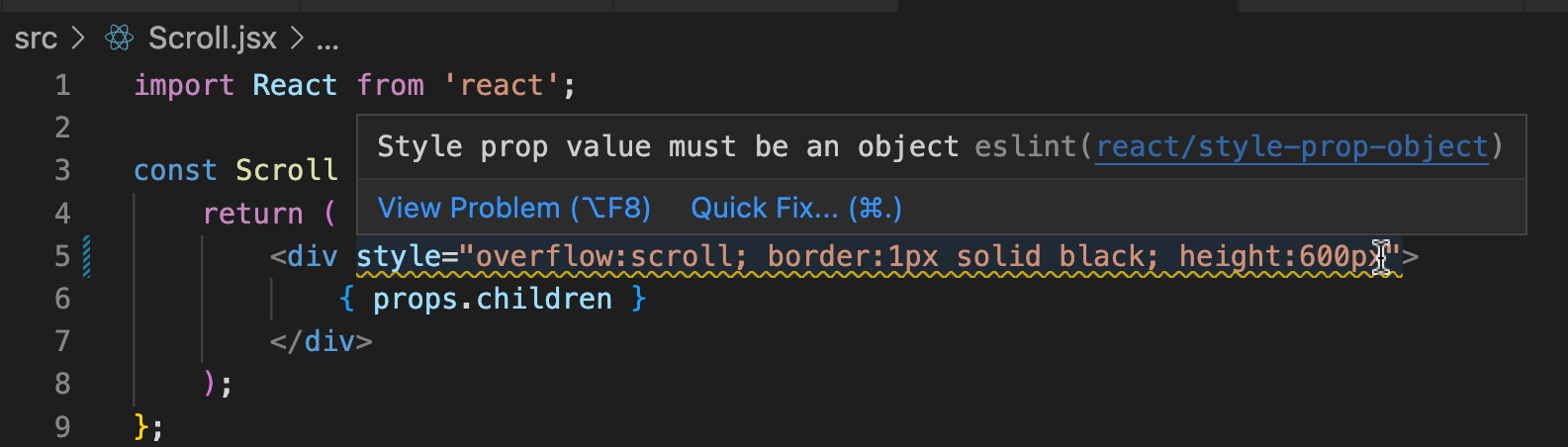
React code is not HTML

The React atom logo fighting with some HTML  - midjourney, edited

I was looking at this ugly code in a React app:

<div style={{overflow: 'scroll', border: '1px solid black', height: '600px' }}>
  { props.children }
</div>

Since I don’t need any of those CSS properties to change at any stage, I could just convert it to pure HTML/CSS right? Well no:

The newbie trap I’ve fallen for here is that although that <div style= tag looks like HTML, it’s actually not. It’s not a template that will be filled out in the build step, it’s React code that will be used to mutate the virtual DOM.

Jan. 20, 2023

De-structuring objects in JS

robot repair shop wth several humanoid robots in state of disrepair, cinematic lighting, dust in the air - midjourney

I’ve worked through my first React tutorial app, and obviously that’s a lot - I’m struct by how messy mixing HTML, JS and React is.

One language feature that’s being used quite a bit, and that is apparently a JS ability I’d never seen is ‘destructuring’ object properties. It’s very cool and obviously useful. It’s a way of extracting just the properties you need from an object and then using them without accesing them via the object. An example will make it clearer.

Jan. 16, 2023

Calculator

I’ve been doing a bit of driving during the holidays, which means a lot of podcast listening. An episode of JavaScript Jabber about JS features you should never use sparked my interest in [eval()](https://developer.mozilla.org/en-US/docs/Web/JavaScript/Reference/Global_Objects/eval). eval() takes whatever you pass it in a string and executes it in the JS engine. This is a crazy concept if you’ve come from complied languages, and has obvious security implications. As with dynamic typing, I’m trying to force myself out of my comfort zone to embrace JS’s unique talents so I was keen to try eval().

Jan. 14, 2023

CWD - 185 - Problem solving

C-3PO from Star Wars on Tatooine, playing Tic-tac-toe on the side of a crashed spaceship - MidJourney

/* 
Question 1: Clean the room function: given an input of [1,2,4,591,392,391,2,5,10,2,1,1,1,20,20], 
make a function that organizes these into individual array that is ordered. For example 
answer(ArrayFromAbove) should return: [[1,1,1,1],[2,2,2], 4,5,10,[20,20], 391, 392,591]. 
*/

function ctrFunction1(inputArray) {
    //  copy the array since we're mutating it
    const array = [...inputArray];
    array.sort();

    const numberObject = {};
    for (const number of array) {
        if (numberObject[number] === undefined) {
            // this property does not exist, so add it
            numberObject[number] = [];
        }
        numberObject[number].push(number);
    }

    // object now contains arrays for each number, but the ones with a
    // single element need degloved
    for (property in numberObject) {
        if (numberObject[property].length === 1) {
            numberObject[property] = numberObject[property][0];
        }
    }

    // now turn back to array 
    return Object.values(numberObject);
}

const array1 = [1, 2, 4, 591, 392, 391, 2, 5, 10, '2', 1, 1, 1, 20, 20];
const transformedArray1 = ctrFunction1(array1);
console.log(transformedArray1);
// [1, 1, 1, 1], [2, 2, '2'], 4, 5, 10, [20, 20], 391, 392, 591]

Line 10

When I’m looking at a function, I’d prefer not to also have to hold global state in my head - so I’m all for functional programming as far as that goes. I’m less concerned about side effects, so I wouldn’t always bother to copy a parameter like this, but the argument is stronger for an array than an object since in other languages an array might be a value type.