Jul. 28, 2025
Ghostty is a terminal application that I don’t really need (it’s listed features either already exist in the MacOS terminal, or seem so esoteric or marginal that I can’t imagine any real benefit from them in my normal use), but I wanted to be one of the cool kids, so I thought I’d give it a try.
After fiddling around with the themes for a bit I renamed it to ’term-ghosty.app’ so I’d remember to use it (ie when I pop up spotlight and type ’term’ it will come up) and got on with my day. Ten minutes later I’d run into a problem.
Feb. 3, 2025
NTFY is a great open-source push notification service that’s self-hostable or free to use (although I suggest you pay for it as I do). I’ve written before how I use it with UptimeKuma for my uptime monitoring, but another common use is just when I’m initiating long-running commands and backgrounding them.
This magic is possible since we can just curl to send a NTFY notification. For example:
curl -d "😀 demo push message via NTFY" ntfy.sh/blog_demo
Since I’m subscribed to the “blog_demo” topic in NTFY, this message will be pushed to my phone and watch:
Sep. 30, 2024
A while ago, I devised a complicated system where I could drop files in a web interface running on an LXD container and the files would then magically appear in a directory on a remote NAS in the morning. It turned out to not be very robust, and I gave up on it after a while.
Also, really there should be no need for it - underneath, it was just using rsync to move the files, so why not just do that direct from one NAS to another? Well, mainly because my NASs are all Synology - which I love, and they’ve been great, but in an effort to make them usable by muggles, Synology tend to somewhat complicate things for Linux command line wizards.
Jul. 15, 2024
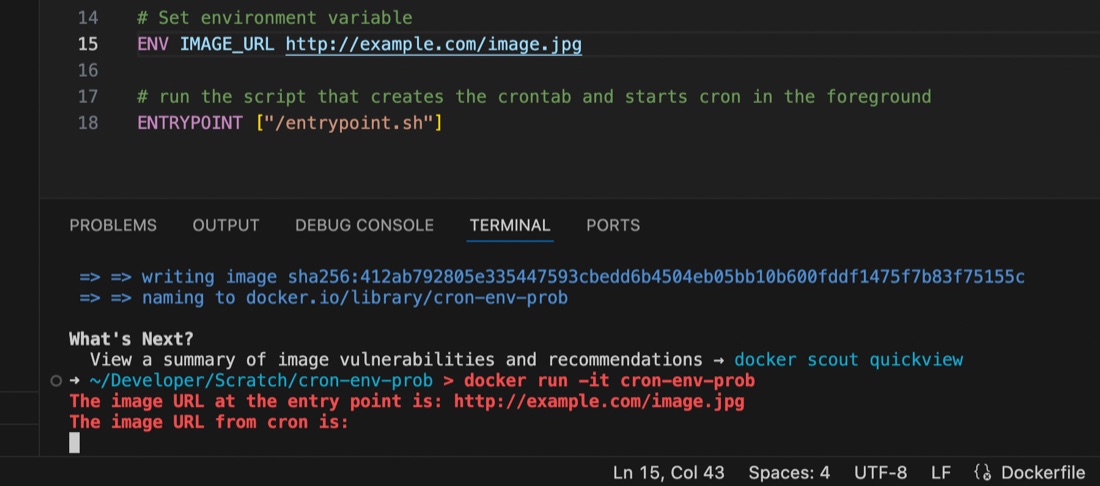
I’m used to using the docker-compose.yaml or dockerfile to set environment variables for containers running my apps, but ran into an issue recently where the variable seemed to be set some of the time, but at others it didn’t appear to exist.
I had a script set to run by cron inside the container, and it turns out that the environment variables set for the container are available in the user space, but not in cron, even if running with that user’s permissions. This is probably old news to established Linux users but it threw me for a while. I’d exec into the container and the script would work perfectly, then wait another minute for cron to run it and it would fail 🤦♀️ It was exasperated by my discovery that I didn’t know how to console.log debug from inside a container cron job as well - the subject of an earlier post.
Feb. 16, 2024

Since I’m using Tailscale to painlessly manage all my networking on the homeserver here and my remotes, I’ve had the luxury of being a bit casual about the security of my internal apps and self hosted dev tools. I’m currently iterating on a web app that requires public access, and is therefore up on a VPS and exposed to all the evils of the open internet.
I am in no way a security expert, but here’s a few of the (reasonably simple) steps I’ve taken to secure my node app.
Nov. 17, 2023

When I set up my first Docker container (I think for Uptime Kuma ), I had read around and understood there were two choices for persistent; bind mounts (where the data inside the container is effectively a symlink to a location on the local file system) or name volumes where Docker abstracted that away a bit, so you didn’t have to worry where it was - I sort of understood Docker ‘managed’ it.
Oct. 30, 2023

I have an ansible script that runs each weekend which basically does an apt update && apt upgrade -Y on every Debian based instance. This weekend it failed on one Ubuntu host. When I went it to try it manually, this was the output:
Hit:1 http://au.archive.ubuntu.com/ubuntu jammy InRelease
Hit:2 https://download.docker.com/linux/ubuntu jammy InRelease
Hit:3 http://au.archive.ubuntu.com/ubuntu jammy-backports InRelease
Hit:4 http://au.archive.ubuntu.com/ubuntu jammy-security InRelease
Get:5 http://au.archive.ubuntu.com/ubuntu jammy-updates InRelease [119 kB]
Err:5 http://au.archive.ubuntu.com/ubuntu jammy-updates InRelease
  The following signatures were invalid: BADSIG 871920D1991BC93C Ubuntu Archive Automatic Signing Key (2018) <ftpmaster@ubuntu.com>
Get:6 https://pkgs.tailscale.com/stable/ubuntu jammy InRelease
Fetched 125 kB in 1s (125 kB/s)
Reading package lists... Done
Building dependency tree... Done
Reading state information... Done
11 packages can be upgraded. Run 'apt list --upgradable' to see them.
W: An error occurred during the signature verification. The repository is not updated and the previous index files will be used. GPG error: http://au.archive.ubuntu.com/ubuntu jammy-updates InRelease: The following signatures were invalid: BADSIG 871920D1991BC93C Ubuntu Archive Automatic Signing Key (2018) <ftpmaster@ubuntu.com>
W: Failed to fetch http://au.archive.ubuntu.com/ubuntu/dists/jammy-updates/InRelease  The following signatures were invalid: BADSIG 871920D1991BC93C Ubuntu Archive Automatic Signing Key (2018) <ftpmaster@ubuntu.com>
W: Some index files failed to download. They have been ignored, or old ones used instead.
Solved
The first google result mentions apt-cache - which I also run , so a first level debug step is to delete the /etc/apt/apt.conf.d/00aptproxy file that redirects apt requests to the cache I run in an LXC container. After that, if I re-run the apt update it works perfectly. Seems like a problem with the cache then. I’m not sure why it would only affect this host though - I have other Ubuntu VM’s in the fleet that are not getting the original error.
Oct. 3, 2023

It’s bothered me for a while that all these VM’s are pulling down a lot of the same updates. As well as needlessly using some bandwidth, I’m hammering the update servers (that I don’t pay for) with the same requests over and over. I did briefly consider running my own mirror, but that’s not simple, plus I’d then be mirroring a heap of files in a complete repository that I’d never use. What I really needed was some sort of cache so once I’ll pulled down an update, it would hang around for a few days being available to other machines on the local network. Luckily, that exact thing exists - APT Cacher NG .
Sep. 30, 2023

Having written my little monitoring endpoint in Go, it needs pushed out to all my servers and VM’s. Clearly this is a job for Ansible which I’ve already dabbled my toes in . Before we get onto doing that though, we need to have a think about how to make it a service.
Linux Services
A service in Linux is just a program, but one that’s usually required to be running all the time to provide some piece of functionality. The “program” can be any executable, but to allow systemd to manage it, we need to tell it a bit about what we want in a .service file. This file is used by systemd to know how to manage the service. They can get quite complex, but here’s the simple one for vitals-glimpse - my little monitoring API endpoint.
Sep. 18, 2023
This always makes me laugh:
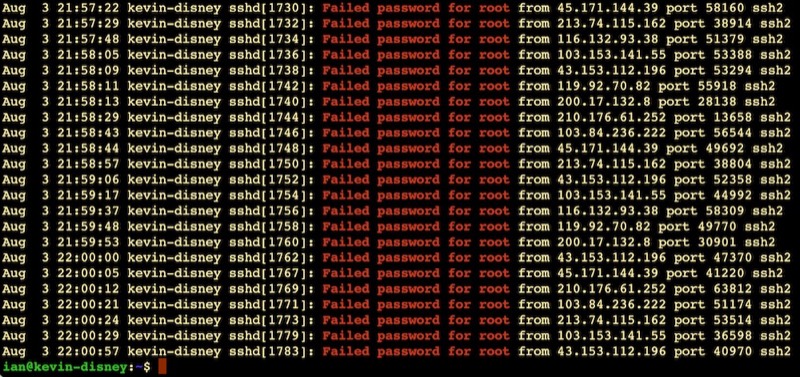
It’s like half the traffic on the internet is bots trying random passwords on root accounts over ssh. This is on an Ubuntu VPS on BinaryLane that had only been spun up five minutes or so. Looks like about one attempt every 10 seconds.
This is why the number three thing on my new install list is to disable root access via ssh. Here’s my system - possibly just for Ubuntu and related systems:
Aug. 31, 2023
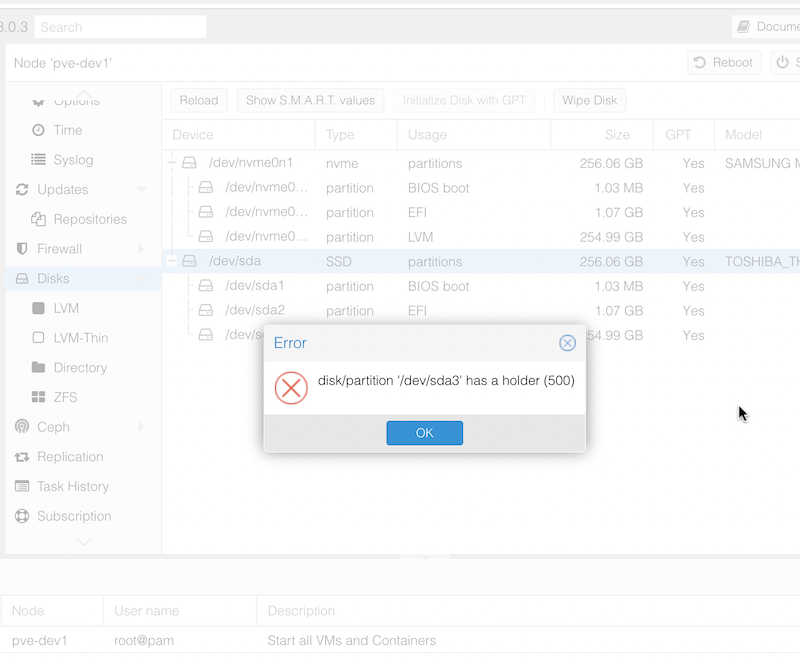
When I popped in an NVME drive and freshly installed Proxmox to it, I assumed I’d just be able to wipe the SDD that had previously been the boot drive to set it up as a ZFS pool. However, when I tried to do the wipe, I was greeted with the error:
disk/partition '/dev/sda3' has a holder (500)
I assume this means there’s a flag set on one of the Proxmox partitions to prevent accidental deletion or Proxmox thought that’s where it was running from. It’s likely that it’s related to this message I had during installation that I haven’t seen before:
Aug. 10, 2023

Vim is a highly configurable text editor built to make creating and changing any kind of text very efficient. It is included as “vi” with most UNIX systems and with Apple OS X.
vim.org
You will encounter vi/vim as the incomprehensible text editor that pops up by default when you need to edit something in your sysadmin journey. Perhaps you issued the command to edit your Ansible vault, perhaps you forgot to add a message to a commit. It’s going to be unavoidable.
Aug. 7, 2023

Having successfully set up and tested my node.js api handling app behind nginx on a development VM in the homelab, I decided to move it to my VPS so I could start using it for real. I had a bit of trouble finding the nginx.conf files on the VPS, until I remembered I was running nginx in a docker container on this machine!
I got everything set up, I could hit the domain in a web browser and get served the static page, and I could <domain_name>:3000/api/gnp_temp.txt and get the file delivered by the node script, but if I tried <domain_name>/api/gnp_temp.txt - “Bad Gateway”.
Aug. 4, 2023

NGINX is a great webserver and reverse proxy - as in it can hand off requests to other web-servers. That’s the situation I want to have set up on my VPS. I want NGINX to handle incoming requests - some of them will just be sorted out by returning static HTML, others (like the weather api I’ve been playing with) need to be handed off to other services to respond to.
Jul. 29, 2023

I’m a keen listener of the 2.5 Admins podcast in which there’s frequent enumeration of the advantages of ZFS as a file system. So much so, that I’ve had occasional twinges or regret about the money I spent on the Synology - although it has been boringly reliable and does everything I need.
Proxmox has some built in support for ZFS, including through the web GUI. So I’ve been itching to give it a try.
May. 3, 2023

I’m interested in collecting some internal temperature data from my servers to look at the effect of adding an NMVe drive. Last week we had a couple of warm days immediately followed by a couple of cool ones. I imagine a 20° ambient temperature change could effect the server temperatures, so I thought it would be good to add that to my temperature logs.
I don’t have a weather station or other automated system for collecting the temperature, but there are several commercial sources for this data which, while probably not as good as a sensor in the server room, will be fine for our purposes.
Apr. 30, 2023

I’m working on the world’s shortest shell script - it’s called by cron to pull down a JSON weather report to a text file using curl so I can expose it on an Nginx endpoint. The purpose is to allow me to hammer that weather API from multiple machines I control without violating the TOS of my free API key.
Because I’m learning all the things, instead of just creating this on the VPS where it runs, it’s cloned from my GitHub repo for that machine. I’m creating and editing the file in VS Code on macOS, pushing to Github, then pulling the changes on the Ubuntu VPS. The intention is that this will eventually become automated with a Github action.
Apr. 27, 2023

A potential solution to my concern about the either perfect, or nearly dead, SSD would be to add a NVMe disk to the M.2 slot in the HP Elitedesk 800 G2’s. I’d use those to boot from and run Proxmox, then the existing SSD’s on each node in the cluster would just be part of the CephFS pool that has some redundancy built into it and hosts the VMs that are not using the NAS for their storage.
Apr. 23, 2023

In Linux (and MS-DOS I guess) the period signifies the current directory, so if I have a file in the current directory called test.txt, I can refer to it as test.txt or ./test.txt
ian@enrico-rider:~$ cat test.txt
test
ian@enrico-rider:~$ cat ./test.txt
test
I mostly see this in references to files in HTML and have often wondered why. Here it is being used in a Udemy course I’m following.
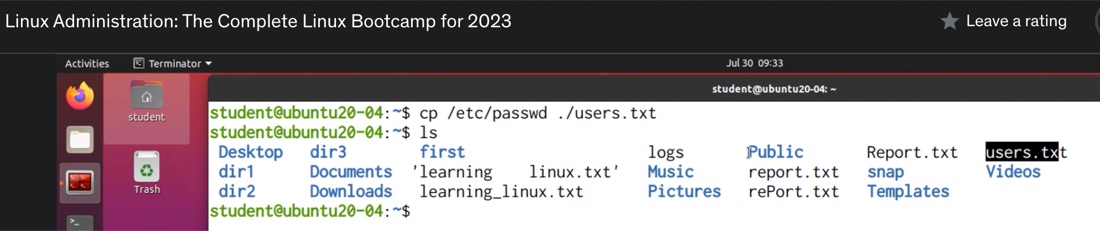
It’s one of those things that’s difficult to Google, so these days my reflex is to ask ChatGPT such questions.
Apr. 21, 2023

I’m playing with Syncthing with the idea that it might be a good replacement for Dropbox. There wasn’t a Docker container listed in the install options, so I thought this might be a good app to run in an LXC.
I’m going to use a share from the NAS, and I’m assuming I’ll need it mount it into the container for Syncthing to access. I’m experienced enough to know that I’m going to want a privileged container, and I thought I’d done all the NFS sharing correctly, but when I tried to mount the NFS share, I was getting an error.