Apr. 1, 2024
I’ve settled on a very standard, reproducible setup for services in my homelab. This post looks at that, then runs through the update I did today to Forgejo which only took a few minutes and felt relatively risk free.
Standard Setups
My system is based around Proxmox. I have three physical machines - one for production apps, a production spare, and a development/testbed machine. A Synology NAS serves for backups. Moving a VM or LXC between the machines is trivial; but it’s done manually - the machines are not clustered for high availability.
Dec. 24, 2023

I wrote a couple of weeks ago about a standard workflow I use to spin up a web service in an LXC container to add to my self-hosted collection of services. It went a bit like: do this, and then this, then this other thing. Whenever you find yourself repeating a set of steps like this, it’s usually a sign that you should be automating it. Not just to save time (although this is a key benefit) but also to improve repeatability and to avoid introducing errors.
Dec. 21, 2023
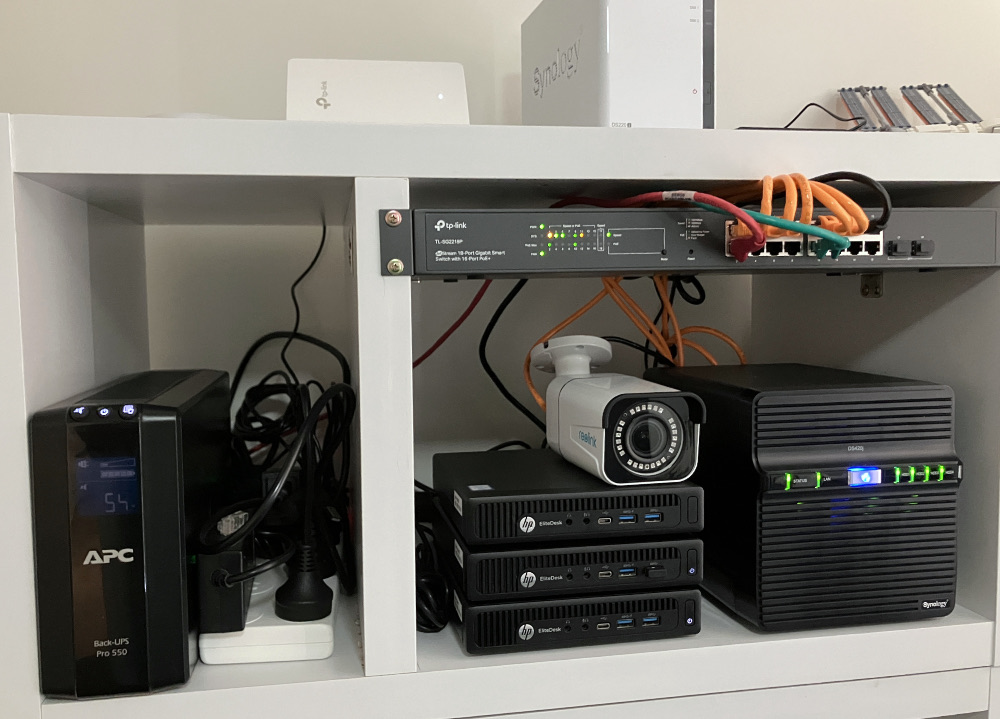
My homelab set up is a production node, (pve-prod1) a backup production node (pve-prod2) and a development machine (pve-dev1). They are all G2 800 minis, but pve-prod1 has a i7 6700T and 32GB RAM, where as the other two are i5 6500T with 16GB. My thinking is that the older two can easily share the workload of the main production machine for disaster recovery. Everything is virtualised on top of Proxmox, so sharing up the VM’s and containers is trivial.
Dec. 3, 2023

I’ve developed a bit of a workflow for setting up a new service of some type on the homelab. Installing it is the obvious thing, but I also have a few quality of life things I do to make it a full production-quality part of my installation. I thought it might be helpful to run through those things using a recent example of adding audiobookshelf .
audiobookshelf
audiobookshelf is a web based system for viewing, playing, downloading and/or generally managing your audio books. I’ve been an Audible user/subscriber, but recently got grumpy at them about something - I think I had paused my subscription, and my downloaded books were still available on my phone. I was halfway through one, upgraded the app, and then wasn’t able to play the book without re-subscribing. That might not be exactly right, but it was some type of frustrating carry on like that.
Nov. 5, 2023

In my last post , I talked about tagging guests in a Proxmox node so I could easily see which VMs and LXCs I needed to manually start before I ran an Ansible script to run all my apt updates. It would have been reasonable to wonder why I didn’t just add things to my playbook to magically do that.
The answer would be, I haven’t gotten around to it yet, so here goes:
Nov. 2, 2023

Each weekend I run an Ansible script that updates all my apt based VMs and containers. For the production machines, that’s everything, but my dev Proxmox is full of half-finished projects. Some of these have IP addresses reserved and are in the Ansible hosts file (because whatever service they are running is almost ready to move to the production server) others do not.
Long story short, the dev server has some containers and VM’s that need turned on before I run the updates, and some that don’t. I could just start them all up, for the ten minutes the updates usually take, but that seems wasteful somehow. If there was only some way to mark the ones I need to turn on in the Proxmox webgui! Well, there is. We can add tags to machines in Proxmox.
Oct. 18, 2023

I’ve taken to running lots of my services in LXC containers under Proxmox. I like the feeling of installing in a VM, but it’s lightweight. I like the backups, I like things being isolated from each other, I like moving them around between machines easily. I’m just a big LXC lover at the moment.
I’m also a Tailscale lover, and the generous number of nodes in the free tier means I now just routinely install them in my VMs and containers without a thought.
Oct. 6, 2023
I’ve picked up an new TP-Link WAP with Omada, so I wanted to spin up an Ubuntu 20.04 LXC to run the controller software in, and ended up spending a couple of hours figuring out why things where not working.
The initial problem was I was having connectivity issues pulling down the updates for all the packages required. I went down a bit of a tangent because I installed an apt cache the other day, so I was looking for problems there. Eventually I narrowed it down to DNS not working and started A/B testing like this:
Sep. 24, 2023
If you create an unprivileged LXC container on Proxmox, then try to back it up to an NFS share, for example on a NAS, you’ll get an error when it tries to build the temporary file.
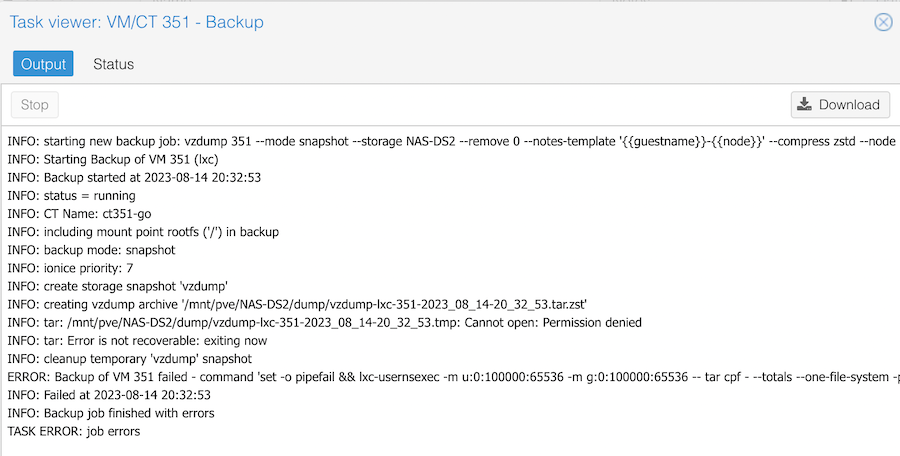
The clue is in the Permission denied line. It is trying to create a temporary file on my NAS, and failing because of a permissions problem. If I try the same backup to the local storage, it works fine.
Aug. 31, 2023
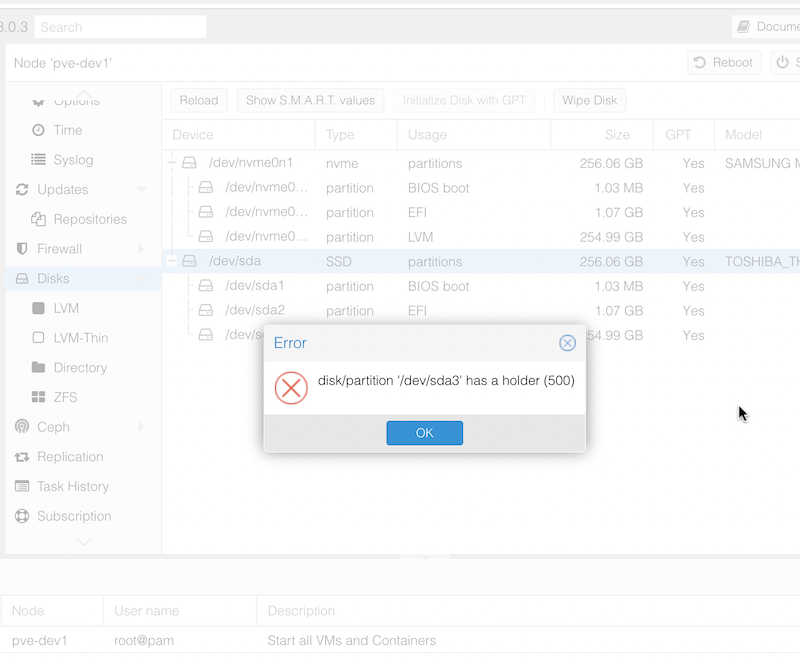
When I popped in an NVME drive and freshly installed Proxmox to it, I assumed I’d just be able to wipe the SDD that had previously been the boot drive to set it up as a ZFS pool. However, when I tried to do the wipe, I was greeted with the error:
disk/partition '/dev/sda3' has a holder (500)
I assume this means there’s a flag set on one of the Proxmox partitions to prevent accidental deletion or Proxmox thought that’s where it was running from. It’s likely that it’s related to this message I had during installation that I haven’t seen before:
Jul. 29, 2023

I’m a keen listener of the 2.5 Admins podcast in which there’s frequent enumeration of the advantages of ZFS as a file system. So much so, that I’ve had occasional twinges or regret about the money I spent on the Synology - although it has been boringly reliable and does everything I need.
Proxmox has some built in support for ZFS, including through the web GUI. So I’ve been itching to give it a try.
Jul. 23, 2023

I’m normally a x.1 release type of sysadmin, but the increasing temptation of installing Proxmox 8.0 while I’ve got some time off, and the fact that I’ve got a cluster, so I can just move the VM’s around all adds up to thinking I’ll do that today.
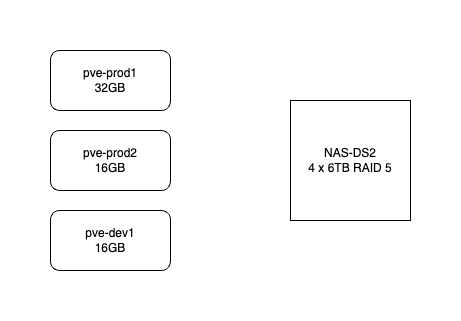
Here’s how my system works. It consists of three HP-800 mini G2’s. pve-prod1 is a bit fancier - i7 6700T and 32GB, the other two are i5 6500T and 16GB. The production VM’s use the local SSD but backups go to the NAS. All the machines are currently running Proxmox 7.4. They are not clustered in the proper sense - I don’t need high availability, and I don’t want to run them all the time. pve-prod1 runs 24/7 and I just power up pve-dev1 when I’m working on something.
Apr. 12, 2023

I was doing updates on all my nodes and VM’s today, and backing up the VMs that aren’t already on a backup schedule. On my dev machine I have a Debian LXC container that I mostly just use for trying out Linux commands and playing around. I used to have a backup of it that I used a lot - after playing around I like to set it back to a fresh install plus my ssh keys - but I lost it somehow when moving the VM to new metal.
Apr. 10, 2023

A few weeks ago , I was very excited to be able to take a snapshot of a virtual machine, copy it across the network from that Proxmox node, copy it back across the network to a different Proxmox node, start it there, and have it up and running, without it noticing it was actually on different hardware.
Backing up a VM is pretty simple, you just click on the node, choose Backup and click the Backup Now button. The ease, and completeness of backing up a VM is one of the main reasons I’m using Proxmox for my systems.
Apr. 6, 2023
I’ve discussed before , that when you first install Proxmox, it grabs an IP address from your DHCP server (this usually runs in your ISP modem if you haven’t created a better setup), but then it stores it as a static ip. This is a sort of compromise that makes sense and works for most circumstances.
As soon as I’ve provisioned a new Proxmox server, I then usually tell the DHCP server, to always serve that address to the MAC address of the new Proxmox server. Since Proxmox does not use the DHCP server on subsequent boots, all that really does is prevent the DHCP server give the same IP address out to another device - which had happened to me prompting the earlier post. The DHCP server had given the address to a wifi lightbulb while the server was off, then when the Proxmox server booted up, the netwrok access was all messed up.
Mar. 31, 2023
I’ve got some extra RAM to drop into the HP 800 G2 mini that I use as my production server. I feel like that’s a low risk change, but since it’s easy to take VM snapshots I shutdown the VM’s and did that, and wanted to just copy them off the local storage.
I’m moving towards having these backups (and the ISOs) on the NAS rather than locally, but have not implemented that. So to get my backups I need to SSH in and find them.
Mar. 19, 2023

I ordered some RAM this week for my production server - it’s quickly becoming clear that memory is the limiting factor when running lots of services and VM’s that don’t get much use - rather than processing power. I’m not really a hardware guy, so figuring out exactly what RAM I need is a slightly fraught process - I won’t be fully confident I’ve ordered the right thing until I install it, boot up, and see my G2 800 come to life maxed out at 32GB.
Mar. 17, 2023

I had some more network weirdness setting up this new Proxmox machine. When I went to run the updates it couldn’t resolve any of the addresses:
root@pve-kr01:~# apt update
Err:1 http://ftp.au.debian.org/debian bullseye InRelease
  Temporary failure resolving 'ftp.au.debian.org'
Err:2 http://download.proxmox.com/debian/pve bullseye InRelease
  Temporary failure resolving 'download.proxmox.com'
Err:3 http://security.debian.org bullseye-security InRelease
  Temporary failure resolving 'security.debian.org'
Err:4 https://enterprise.proxmox.com/debian/pve bullseye InRelease
  Temporary failure resolving 'enterprise.proxmox.com'
Err:5 http://ftp.au.debian.org/debian bullseye-updates InRelease
  Temporary failure resolving 'ftp.au.debian.org'
Reading package lists... Done
Building dependency tree... Done
Reading state information... Done
All packages are up to date.
W: Failed to fetch http://ftp.au.debian.org/debian/dists/bullseye/InRelease  Temporary failure resolving 'ftp.au.debian.org'
W: Failed to fetch http://ftp.au.debian.org/debian/dists/bullseye-updates/InRelease  Temporary failure resolving 'ftp.au.debian.org'
W: Failed to fetch http://download.proxmox.com/debian/pve/dists/bullseye/InRelease  Temporary failure resolving 'download.proxmox.com'
W: Failed to fetch http://security.debian.org/dists/bullseye-security/InRelease  Temporary failure resolving 'security.debian.org'
W: Failed to fetch https://enterprise.proxmox.com/debian/pve/dists/bullseye/InRelease  Temporary failure resolving 'enterprise.proxmox.com'
W: Some index files failed to download. They have been ignored, or old ones used instead.
So some sort of DNS problem. The entry for the DNS is in /etc/resolv.conf when I looked in there, it said:
Mar. 16, 2023
I ran into a little hiccup today. I’m building out a Jellyfin media server in a little HP G2 Mini PC. The config was going to be a Debian server inside Proxmox (because I love VM snapshots for backups) running Jellyfin in a container. There’ll be an external USB3 hard drive for the media storage.
I was intending to build it all out and test it, then ship it to it’s final home.
Feb. 16, 2023
I installed Proxmox on my second server last night, and tonight when I ran apt update I ran into the error you get when you haven’t bought a license.
Err:5 https://enterprise.proxmox.com/debian/pve bullseye InRelease
  401  Unauthorized [IP: 103.67.14.50 443]
Reading package lists... Done
E: Failed to fetch https://enterprise.proxmox.com/debian/pve/dists/bullseye/InRelease  401  Unauthorized [IP: 103.67.14.50 443]
E: The repository 'https://enterprise.proxmox.com/debian/pve bullseye InRelease' is not signed.
N: Updating from such a repository can't be done securely, and is therefore disabled by default.
N: See apt-secure(8) manpage for repository creation and user configuration details.
Even though I guess it was only a month ago (let that sink in people who think the raspberry Pi they just bought is going to be the last homelab hardware they buy 😊) since I set up my first Proxmox server, I’d already forgotten there’s a step to enable it to get updates without a subscription.