Jan. 10, 2026
Remote-SSH
One of the things I’ve done a bit in Visual Studio Code is using it’s ability to work on a different machine over SSH. I have a couple of LXCs on a server set up for different languages - one for C++ and another for Rust. They are things I don’t work in often, and I didn’t want to set them up on my laptop, but thought I might want them again sometime in the future.
May. 13, 2024

My VPS’s are usually locked down so just ports 80 & 443 (for web server) and 22 (for ssh) are open. That’s great for reducing the attack surface, but having ssh open is a potentially disastrous vulnerability. For this reason I often close that at the cloud firewall level as well, but it has to be open when I’m making changes or running the weekly ansible update/cleanup playbooks.
Sep. 18, 2023
This always makes me laugh:
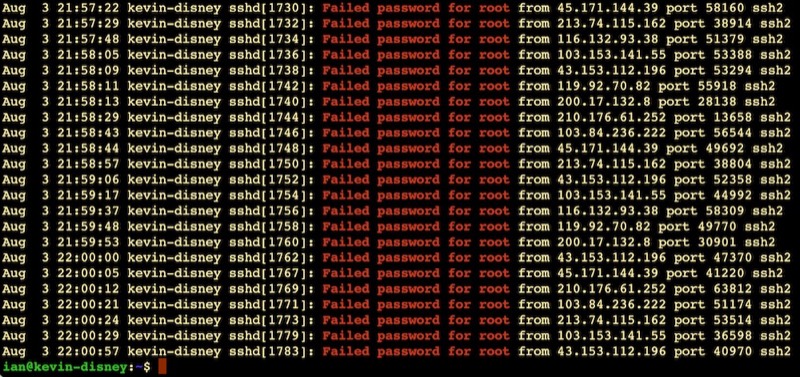
It’s like half the traffic on the internet is bots trying random passwords on root accounts over ssh. This is on an Ubuntu VPS on BinaryLane that had only been spun up five minutes or so. Looks like about one attempt every 10 seconds.
This is why the number three thing on my new install list is to disable root access via ssh. Here’s my system - possibly just for Ubuntu and related systems:
Aug. 13, 2023

We wrote a nice little Ansible playbook the other day to install nginx on our web servers and ensure it was running. We were able to store the usernames in the hosts inventory file using the ansible_ssh_user variable. Then, we ran the playbook with the command:
ansible-playbook web_installs.yaml --ask-become-pass
This asked us the password to use with the usernames in the hosts file. Luckily that day, it was the same username/password combo to use for sudo on every server. What happens if that’s not the case? Here’s our new hosts file for today. There’s a cool new sysadmin in town - Jane.
Mar. 27, 2023

The Synology operating system DSM (I’m on DSM 7.1.1) is Linux, but its highly customised for the purpose of making running a complicated Linux NAS doable for less technical users.
Due to that, some things that are routine in a regular distro, require a few more steps to jump through to get them to work. SSH-ing in to a Synology with keys is one of those things.
Should you?
Before you do start fiddling around, it’s probably worth mentioning that almost all the things you might want to do on the Synology can be accomplished through their web interface, or by installing a ‘package’ from the Package Center. For example, if you need to run a cron job, that’s done through the Control Panel ‘Task Scheduler’. If you need TailScale installed to easily access it over Wireguard, there’s a TailScale package. In general it’s probably easier and safer to do things their way.
Feb. 12, 2023

Due to potential brute force attacks , it’s a good idea to turn off password access via shh and instead rely on ssh keys. In this post, I’ll run through that process.
Generating your key
On a mac (or actually most *ix systems), your ssh keys live in the .ssh directory inside the users home directory. Since it starts with a period, it’s a ‘hidden’ directory. To see it in Finder press
Feb. 8, 2023
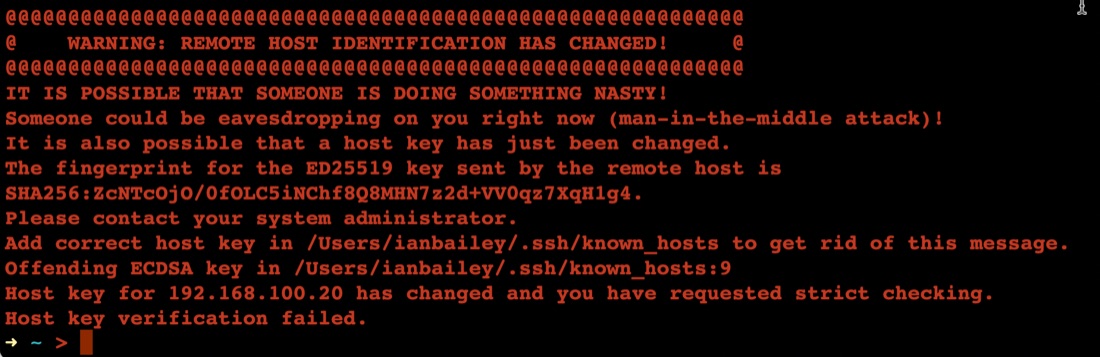
The first time you connect to a new server with ssh, it asks you something like:
➜ ~ > ssh ian@192.168.100.20
The authenticity of host '192.168.100.20 (192.168.100.20)' can't be established.
ED25519 key fingerprint is SHA256:ZcNTcOjO/0fOLC5iNChf8Q8MHN7z2d+VV0qz7XqH1g4.
This key is not known by any other names
Are you sure you want to continue connecting (yes/no/[fingerprint])? yes
Warning: Permanently added '192.168.100.20' (ED25519) to the list of known hosts.
Once you’ve said yes, it adds the server ‘fingerprint’ to the known hosts file, then next time you ssh there, it feels safe - we know this server.
Feb. 6, 2023
A smart thing to do after setting up a server on the internet, is to set up SSH keys and then turn passwords off for SSH. The reason for this is that scanning for open port 22 on IP addresses, then brute forcing password files on them is pretty much hacker 101. So if you have passwords turned on, and especially if you have a weak password you are really inviting someone to take over your server as root and add it to their botnet army for liking Putin’s twitter posts or whatever.