Tailscale keys expire
24 Oct 2023
I have an Ansible playbook I run each weekend to do all the apt updates. As well as keeping everything up to date, it’s a good check-in that everything’s alive and working as expected. I have Uptime Kuma checking the services are alive, and that no one is running out of disk or memory so there shouldn’t be any drama right?
This weekend, three instances (two remote, one local) timed out with “unreachable”.
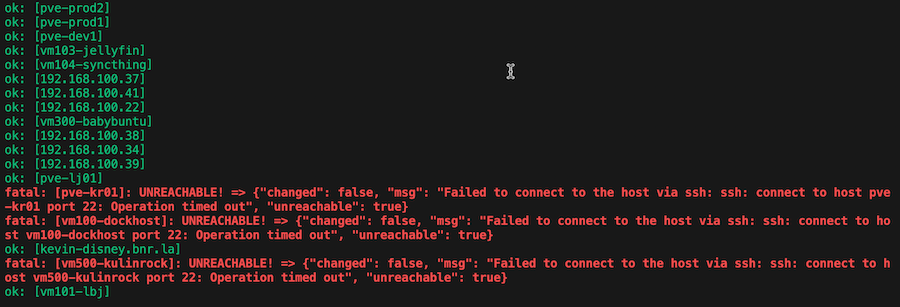
Since Ansible is effectively ssh-ing in, I guess try that from the terminal.

vm100-dockhost is the “magic DNS” name for this machine. One of the cool things Tailscale does is to allow these sorts of names. I use them so much, I’ve forgotten all their IP addressees. When I look it up and try with the local IP address for this machine, it works fine.

Since it seems like a Tailscale problem, I tried turning it off and on again with sudo tailscale down and sudo tailscale up. When it came up, it printed the URL to re-authenticate - so something’s happened…
It turns out that Tailscale keys expire for security reasons - by default every 180 days. Once the key is expired, you can’t access that machine via the Tailnet. Obviously, this is going to make an issue if you have a remote site and the key expires. So how can we prevent it from happening?
My first idea was to use the Tailscale CLI to do the re-authentication on each machine before it expires. And handily, there is a command for this:
tailscale up --force-reauth
But, small catch (mentioned in the docs , or in the CLI if you try it) if you are ssh’d in over Tailscale, when you run this, it actually drops the ssh link. So you’ll never see the URL you need to re-authorise, so now you’ve lost access to that machine.
If a key has expired, it is possible to remotely reauthorise it from your machines admin page for a short period it to allow someone with local access to reauthorise it properly. If you don’t have local access to it, you’re in trouble if you discover this after it’s expired. I guess it would be possible to write a script to run the tailscale up on the remote machine, capture the output and send it to me, but that’s starting to sound like more work than I want to do.
Avoiding the problem
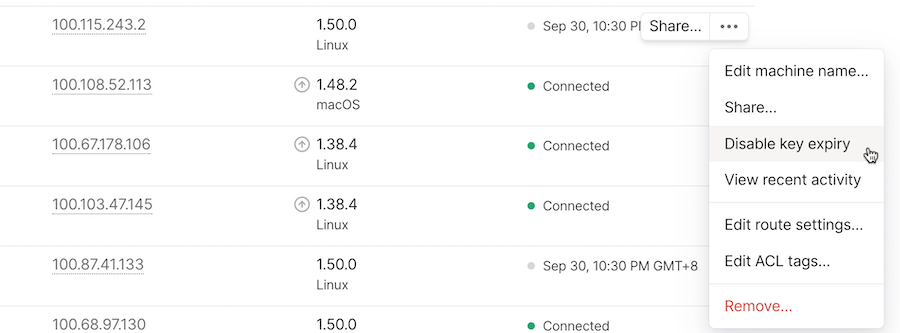
If you want to avoid the problem of Tailscale keys expiring on remote systems, it’s possible to turn it off so they never expire. This option is in the menu for each machine on the machines admin page .
I guess another way of avoiding this problem, if it’s possible, would be to visit your remote sites every six months and do the force update to reset the expiry. For my setup of the remote backup sites that’s a reasonable plan.
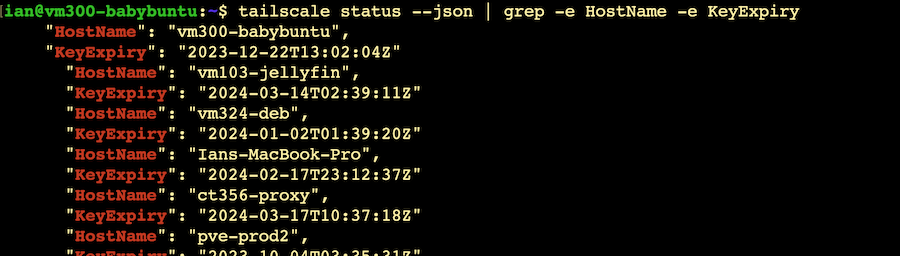
One slightly annoying thing is that it’s not easy to see the expiry date of each Tailscale instance. I would have thought it would appear on that machines admin page, or in the CLI with tailscale status. When I was searching for an answer, I see that there is an open github issue for it, and there’s been an update to the JSON version of the tailscale status command that includes the key expiry date.