Testing Node.js apps - Mocha, Chai, and Supertest
1 Jan 2024
Bruno is a great open source Postman/Insomnia replacement, and I’ve been using it for basic tests of my node servers using the built in asserts and loving it. This is pretty great, and I gather it’s also possible to go beyond this and write tests in JS in Bruno . I believe it also has the hooks needed to build it into your CI/CD systems.
Any large project is probably going to benefit from a more comprehensive suit of testing tools, and while I’ll still be using Bruno, my serious tests will be managed with these other tools.
I admit I’ve probably put this off a bit longer than I should have - I didn’t really want to install four dependencies and learn four different things just to test my endpoints. It turns out that using the tools together is seamless, and setting it all up was trivial.
Speaking of trivial, here’s my brilliant Node app. It has two endpoints, both of which do a bit of maths.
const express = require('express');const app = express();const port = 3000;app.use(express.json());// endpoint that takes two numbers and returns their sumapp.post('/sum', (req, res) => { const { a, b } = req.body; res.json({ sum: a + b });});// endpoint that takes two numbers and multiplies themapp.post('/multiply', (req, res) => { const { a, b } = req.body; res.json({ product: a * b });});// start the serverapp.listen(port, () => { console.log(`Maths server is running at http://localhost:${port}`);});
Setting up your project for testing
Install the tools
npm install --save-dev mocha chai supertest
The --save-dev bit installs them as a development dependencies - they will go in your package.json and everyone who clones the repo will be working with the same version. Additionally, they won’t needlessly be installed when deployed to production.
Export the app
The testing system needs to be able to control the app a little bit - start it, stop it, and hook into it. To do that, we’ll complicate our app.listen code a bit so that we’ve also got a server variable, then we’ll export the app and server so out test files can import them. It will end up looking something like this:
let server;if (process.env.NODE_ENV !== 'test') { server = app.listen(3000, () => console.log(`Maths server is running at http://localhost:${port}`));}module.exports = { app, server };
This stops the server being started here if we’re in test mode, but exports the bits the test framework needs to manage things.
Create the test files
Our JS test code is all going in a test/ directory in our project, and they will all be named <something>.test.js I usually use the file name of the file I’m testing. So today I’m writing tests for app.js my tests will be in apps.test.js
Each test file will need to pull in our tools (supertest and chai) and the server and app variables.
That’s followed by one or more test suites; each test suite contains one or more test cases. This might be easier to explain if we look at a real file:
const supertest = require('supertest');const chai = require('chai');const { app, server } = require('../app');const expect = chai.expect;describe('POST / add', () => { it('should return the correct sum', () => { return supertest(app) .post('/sum') .send({ a: 5, b: 5 }) .expect(200) .then(res => { expect(res.body.sum).to.equal(10); }); }); it('should return the correct sum with negative numbers', () => { return supertest(app) .post('/sum') .send({ a: -5, b: -5 }) .expect(200) .then(res => { expect(res.body.sum).to.equal(-10); }); });});describe('POST / multiply', () => { it('should return the correct product', () => { return supertest(app) .post('/multiply') .send({ a: 5, b: 5 }) .expect(200) .then(res => { expect(res.body.product).to.equal(25); }); });});server.close();
This file contains two test suites - ‘POST/add’ and ‘POST/multiply’. POST/add contains two test cases (each begins with it<statement of what the test subject should do>).
There’s no end to the tests you can write. I normally do basic functionality as I’m writing code, and I also add in tests for anything that emerges as a bug. If you get into the rhythm of bug -> write failing test -> fix bug -> test passes you can have your day punctuated by little doses of dopamine. I often write a timed test - that an endpoint should respond in 10ms. These don’t help you when you are developing, but sure will later. You should also check that all of the wrong inputs users will eventually try have been handled. If an API expects a number, check for errors being thrown for strings, for negative numbers, for huge numbers, for decimals, for booleans, for objects etc etc.
Another thing I will do is use a code coverage tool to check my test covers all the branches and error conditions. I plan to talk about that another day. First I need to show you how to run the tests.
Add test script
If we had installed mocha globally, we could just call it from the command line with something like:
mocha ./test/app.test.js
But we didn’t do that, so we need npm to start it up for us. I know this seems like another time wasting step, but it’s one of those do it once, benefit from it thousands of times things.
In the package.json file, we can add a section called scripts. If you started you project with npm init you may already have this section, if not, just add it in. It’s common to have a run and a test script, and I often have one or two others. Here’s the sort of thing you want.
{ "name": "test-demo", "version": "0.1.0", "description": "Simple Maths API", "main": "app.js", "scripts": { "start": "node app.js", "test": "mocha './test/*.test.js'" }, "dependencies": { "express": "^4.18.2" }, "devDependencies": { "chai": "^4.3.10", "mocha": "^10.2.0", "nyc": "^15.1.0", "supertest": "^6.3.3" }}
npm does the magic to make the correct version of the library available when this script is run. The end effect of these is that you can type npm test at the command line, and mocha will run your tests. Let’s try it would our tests.
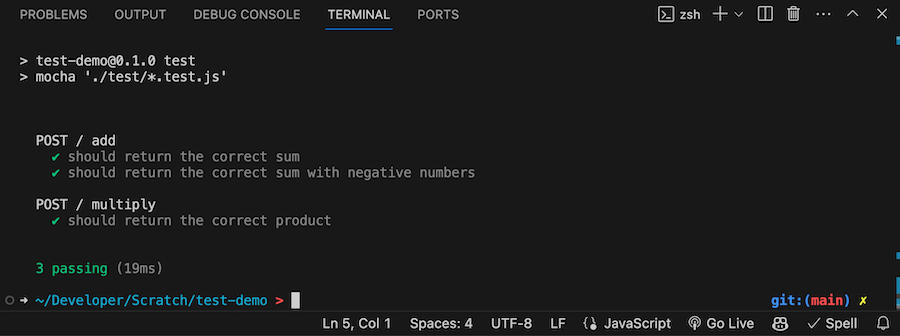
That’s what we like to see, passing tests. I’ll make one fail by telling it to expect 5x5=26.
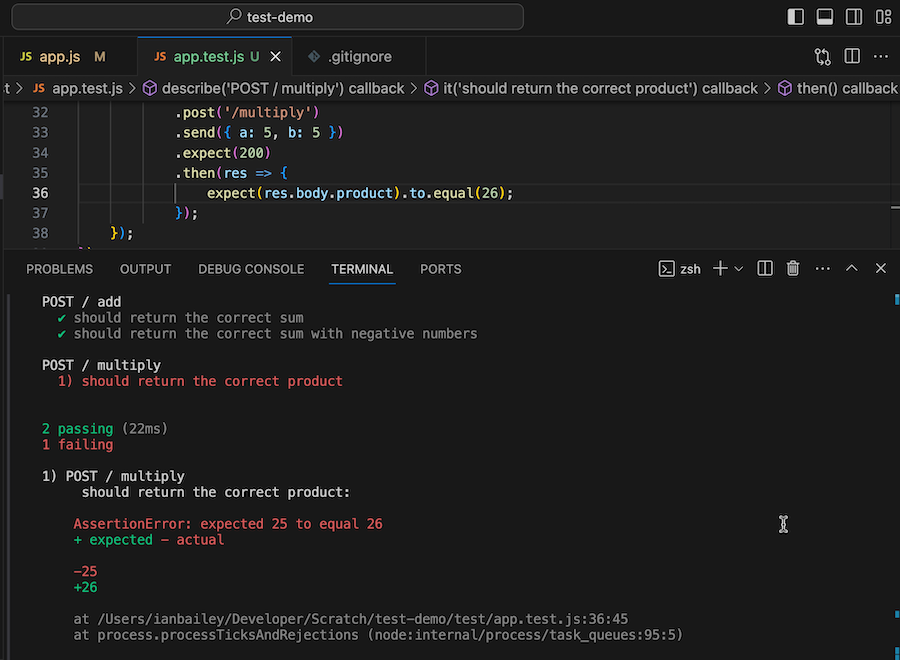
And that’s it, you’re all set up to write tests against your node apps.
What do the different bits do?
There’s a lot of moving parts here, lets tease those out a little.
mocha - this is the test framework. As we’ve discussed, it’s the command line tool that runs the tests and produces the output.
supertest - manages the connections between the test runner/framework and the code being tested. When I’m pressing a button in Bruno, it’s actually hitting localhost:3000 to exercise the server which I’ve previously started. supertest is doing magic to make that connection without going through the network layers.
chai - it provides the assert()s, expect()s and should()s that we use in the test cases. You could, in theory make do with the assert() library built into node - especially for our toy demo app - but it’s no where near as nice, and in particular chai has a massive set of plugins that both extend it’s use generally, but also into working at a detailed level with other vendor packages.