Updating a deployment on fly.io
16 Dec 2024
I’ve had my external UptimeKuma chugging away on fly.io , for free, for months now, and the container image it was based on was a bit out of date, so I wanted to update it. I hadn’t looked at fly.io for months, and couldn’t really recall what I’d done to create it.
The way this works is that that you create a fly.toml file that sets out the details of your app. From memory I think I used the one from the docs and gave it a unique name, the name of the Docker image, the port, the datacentre location, and the directory for the persisted data. The you run fly deploy from the directory with the toml file (having already installed the CLI tool and logged in) and you’re in business.
Fly doesn’t actually run your container, it deconstructs it and uses the layer information to launch a firecracker instance, but of course, none of this matters to the user - it’s just as if your containerised app is magically live on the internet with hardly any effort or money (so far I’ve paid $0.00 for eight months of good service).
I was sort of dreading the upgrade, I guessed I’d need to kill the old instance, start the new one and connect it back to my persistent storage, but here’s what I actually did.
- Went to the folder with my fly.toml file
- Typed
fly deploy
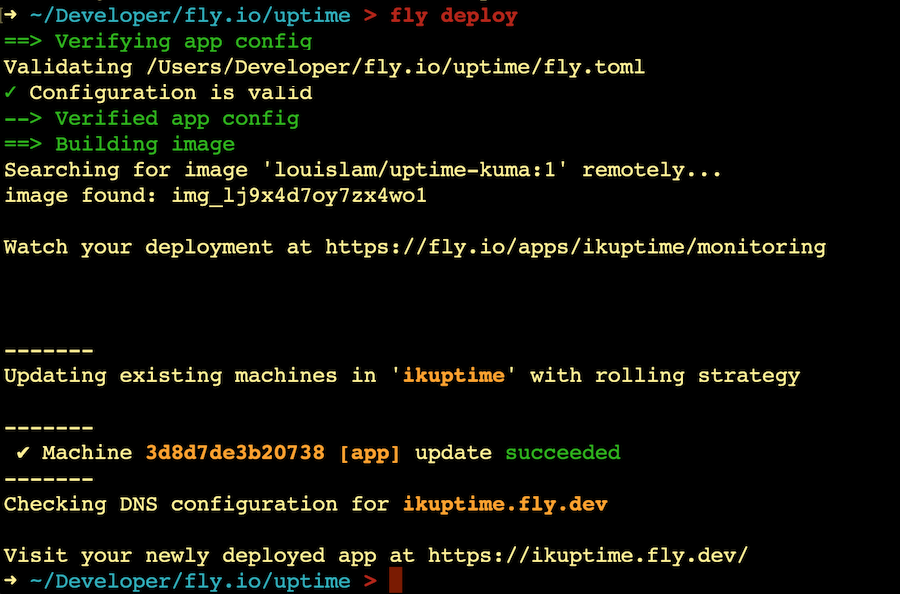
Fly.io is such a great way to deploy stuff. If I wasn’t such a committed self-hoster I would use it a lot more. They used to be hosted on Heroku (which is on AWS) but I understand they have moved to their own worldwide data centers. Their secret sauce is the dev experience. So good.
Edit: Update from the future
So, very day or so since I did that update, which was to version 1.23, I’ve been getting these emails from Fly.
[Fly.io] ikuptime ran out of memory and crashed
Fly <support@fly.io>

4:12 AM (16 hours ago)


Hello! Your “ikuptime” application hosted on Fly.io crashed because it ran out of memory. Specifically, the instance 3d8d7de3b20738. Adding more RAM to your application might help!
Hmm. In theory the free machine I’m using on Fly includes 256MB of RAM, and when I look at the average use, it’s sitting around 200MB, but it does say out of 223MB, so I guess that’s the real limit.

Looking at the graph of memory use, it does look like there’s something in the container with a memory leak, then it’s being restarted once it hits about 205MB for a while.
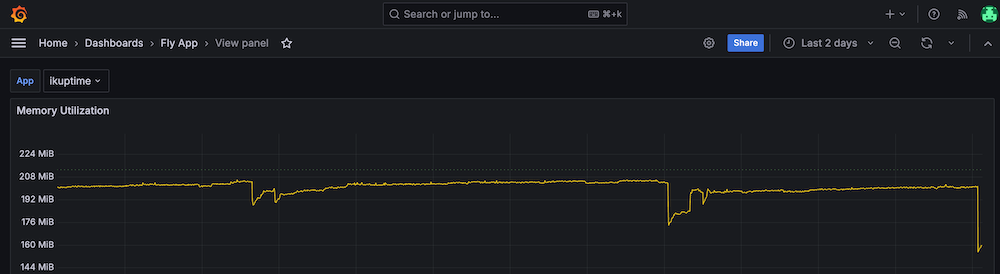
An easy fix might be to swap to a lighter weight container. You can see at the end of the graph above I’ve dropped it down to about 160MB. That was by using the image tagged with :1-alpine. I’ll keep and eye on it and see what happens.
I am running the full size container in the home lab inside an LXC, and it doesn’t seem to have the leak.
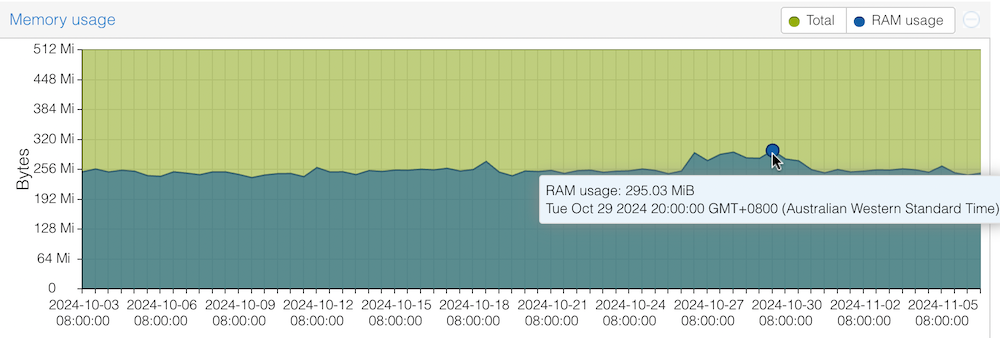
This is not quite an apples for apples comparison. Fly.io doesn’t actually run the container, it uses the container layers to build the app in a tiny VM called firecracker . This is the technology used by AWS to run serverless functions.
I guess I’ll be able to see in a day or so if I’ve solved the problem.
Edit: Update from the distant future
Perhaps the memory growth is still there (after an update it drops down 12ish MB):
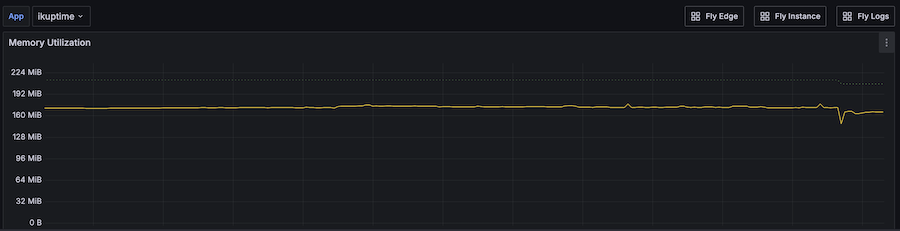
but in any case, running the Alpine base image has kept the memory use well under the limits for my free instance.
In other news, I was on a new laptop when I tried to run the fly deploy command today, so things were a tiny bit more complex. I had to:
- install the fly command line stuff with
brew install flyctl - then when I ran
fly deploy,it asked me to sign in, and opened a web page for me to do so.