User Sessions & Cookies in Node
9 Feb 2024When you are learning app development, you can create all sorts of apps that work for you, but for any serious app, it’s going to need to authenticate users and persist sessions across visits. So much so, that as a professional developer, you’ll probably build that out first - it becomes a sort of boiler plate you always drop in.
In this post, focusing on the server side, using node, express, and particularly express-session, I’ll try and build up from nothing to a reasonable usable user login system explaining the increasing complexity and reasons for it. To follow along you’ll need basic familiarity with node and express.
The problem we’re addressing
For most web applications, we need to persist state per user. For example, if you go to a drawing app and start a drawing, you want it to be there when you come back to the app. Additionally, you don’t want to come back to someone else’s half-drawn app, or, have them drawing over your picture. What we really want is something like this:
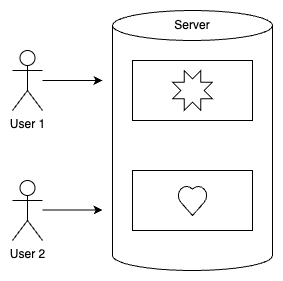
User 1 sees their picture of the star, and User 2 sees their picture of a heart.
Since HTTP is stateless - a request to /picture from one user is indistinguishable from another users request to /picture - so we need to add something to allow the server to distinguish between the two. The something would be a bit of state that the server passes back to the user, then the user sends it in with their actions so the server can identify them.
There are a few of ways to do this. The first (which is not the subject of this post) is to store that in the URL. For example, when a user in the above app requests to create a picture, we could generate a GUID for them, then redirect them to a URL based on that - perhaps /picture/cbe34f. Thereafter, all their requests could include that GUID. This can be a useful way of managing session state and has some affordances that the other method does not, but it’s not the most common.
Another system that was extensively used in the early days of the web was to embed a hidden input with the GUID in the HTML returned to the user. When the user submitted the form later, the GUID was available
The most common method is for the server to create a bit of state (our GUID), send it to the user and have the user’s browser store it, and return it with every request. You will know this bit of state as a cookie.
Code example
Enough theory, lets look at some code. If you google ‘simple node express session’ you’ll find this, or something almost identical. Instead of the state we’re trying to persist being a picture of a heart or a star, we’re trying to remember how many times each user has visited our web site. Note these are separate counts for each user - a new visitor will start at zero, then count up each time they come back or refresh their page.
We’re using a couple of packages, so to run this example, you’ll first need to install them with npm i express express-session
const express = require('express');
const session = require('express-session');

const app = express();

app.use(session({
  secret: 'your-secret-key',
  resave: false,
  saveUninitialized: true
}));

app.get('/', (req, res) => {
  // Access session data
  if (req.session.views) {
    req.session.views++;
  } else {
    req.session.views = 1;
  }

  res.send(`Views: ${req.session.views}`);
});

app.listen(3000, () => {
  console.log('Server is running on port 3000');
});
If we load this page from http://localhost:3000 it says “Views: 1”. Reloading the page it will say “Views: 2”. If I open a different browser and visit the server, we’ll be back to “Views: 1”. So what’s the magic that’s happening here?
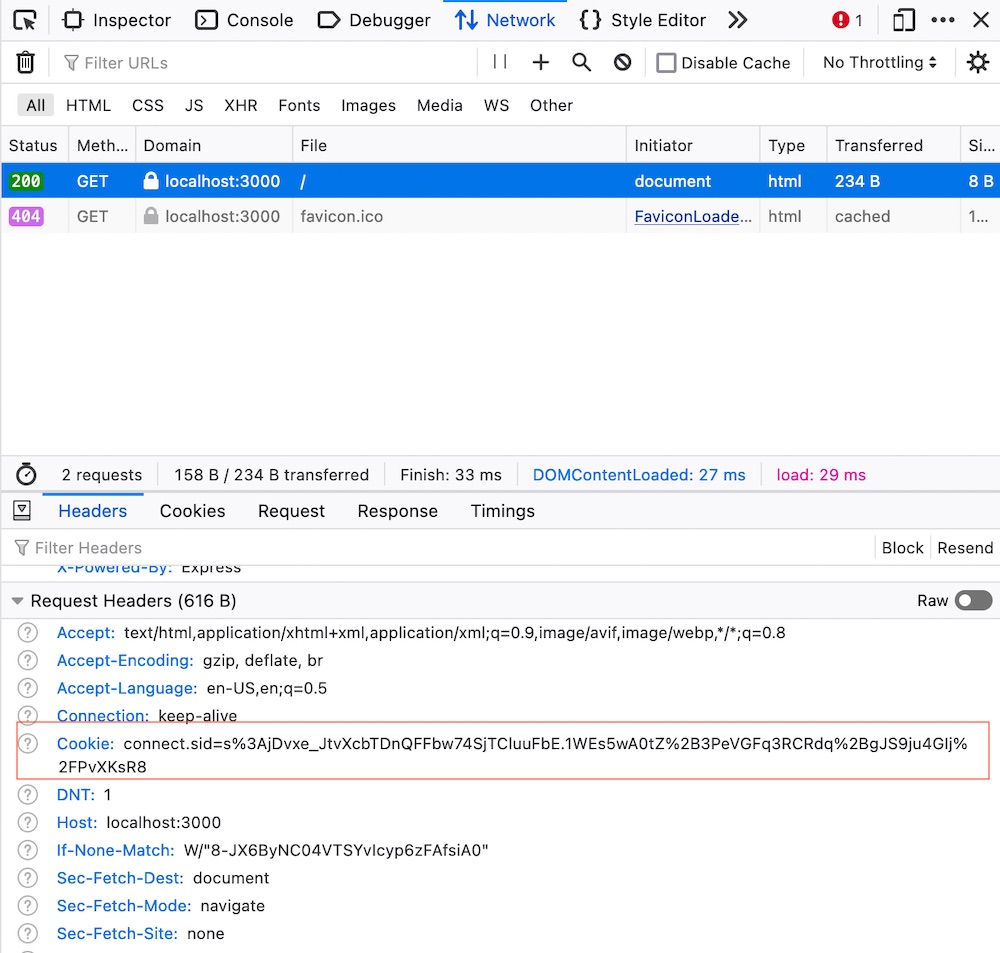
On the first request from a browser it hasn’t seen before, express-session is generating a session ID, and sending that back to the browser (along with ‘Views: 1’) and asking the browser to store it as a cookie. Thereafter, every request to this website http://localhost:3000 will include the cookie containing the session ID. The number of views is being stored on the server in memory. Express-session does the work of looking up the number of views for a particular session ID returned in a cookie so we have the luxury of just grabbing that from rec.session.views
Thanks to the magic of browser development tools, we can have a look in the request header from the browser and see the cookie with it’s session ID contents:
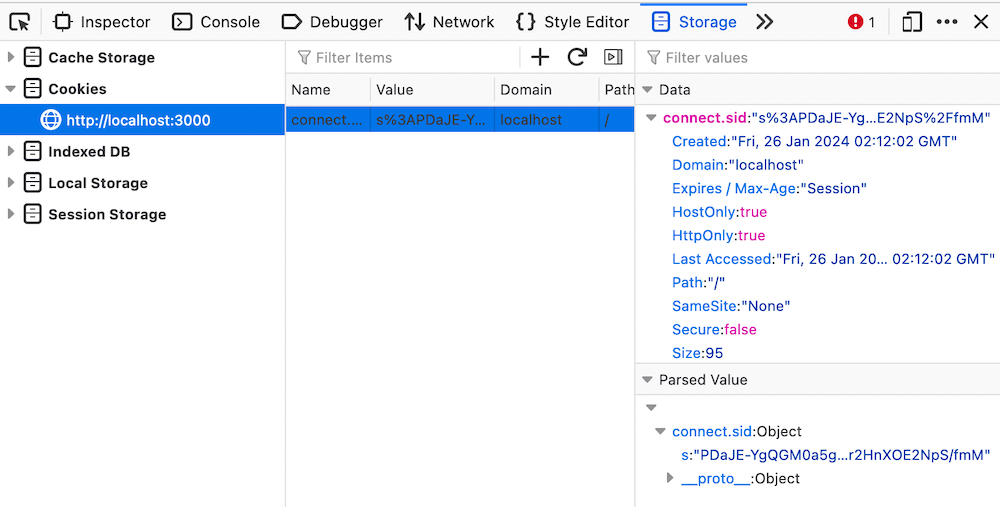
It’s also possible to go and find the cookie your browser has stored. Again, this is easiest in the developer tools - look under ‘Storage’:
Currently, we’re only storing the links between session_ids and the number of views in memory in the server, so if the server restarts, we’ll lose them, and everyone will go back to ‘Views: 1’.
Persisting across server restarts
If we want our view counts to not be reset to zero each time the server restarts, we’ll need to save them somehow. express-session doesn’t let us access its internal array of sessions, but it does provide a mechanism for that access with the concept of stores. Usually we’d keep the sessions in a database, but as files is a simpler solution for a blog post. There is a package called session-file-store that will slot into expression-session that will just use the file system to persist the session-view count key pairs for us. After installing it with npm i session-file-store, we just declare a const for it, and pass it in when initialising the session middleware.
const express = require("express");
const session = require("express-session");
const FileStore = require("session-file-store")(session);

const app = express();

app.use(
  session({
    secret: "your-secret-key", // This should be a secret, used to sign the session ID cookie
    resave: false,
    saveUninitialized: true,
    store: new FileStore,
    name: "session_cookie",
  })
);

app.get("/", (req, res) => {
  // Access session data
  if (req.session.views) {
    req.session.views++;
  } else {
    req.session.views = 1;
  }

  res.send(`Views: ${req.session.views}`);
});

app.listen(3000, () => {
  console.log("Server is running on port 3000");
});
Now view counts for each browser are persisted even when the server is re-started. If we look inside one of the files we should see a view_count field:
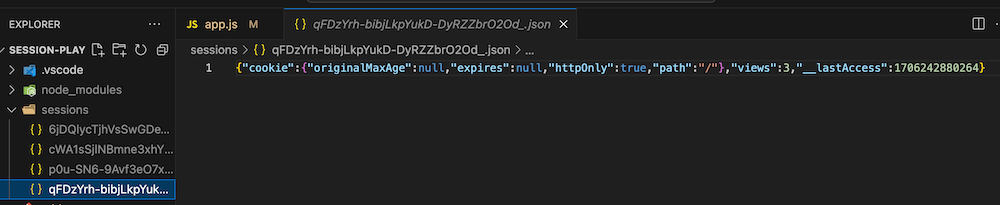
The name of each file is the session id, but these don’t match the session id’s you see in the browser cookies - presumably because they’ve been encrypted by the secret we used when establishing the express-session.
So this is a better experience - our users see their own view counts increasing on each refresh, and the view counts don’t get lost when you take the server down for maintenance. But what happens if the user wants to pick up their phone and check their view count. It’s a different browser without the cookie containing the session id, so they’ll get ‘View: 1’ again.
Or, what if your partner sits down at your laptop to check their view count, expecting it to be ‘1’ because they’ve never visited this page, and they see your view count instead?
Users
Our current system is really based around browser instances, but we want it to be about people. So a better system, and one that you’ll be used to is the concept of logging in as a user. This can solve both the problems we described above - users will be able to log in from any browser and see only their own data.
This is going to take things up a substantial step in complexity because now instead of two bits of data (the cookie with the session_id, and the session store linking the session_id and the view count) there is going to be:
- The cookie with the session_id
- The session store linking the session_id and the user
- A new store we will have to manage that links the user and the view_count
Also, we’ll need:
- Some mechanism to create a user
- Some mechanism to log in
- And log out
- If there’s no user logged in, redirect to the log in page
Log out
Logging the user out is reasonably simple - we just delete the session information. In a real app we’d have a ’log out’ button of some sort, but for simplicity here, I’m just going to add a ’log out’ route.
app.get("/logout", (req, res) => { req.session.destroy((err) => { if (err) { return console.log(err); } res.clearCookie("session_cookie"); res.redirect("/"); });});
clearCookie() tells the browser to delete the cookie - which just saves us from console messages later when the browser sends it, but express-session can’t find the matching session.
If you add this to the code from earlier and run it, view will count up as before, but when you visit the /logout endpoint views will be set back to 1.
Users & view counts
In a real application we’d be keeping this in a database, but again for simplicity of this demo, I’m just going to keep an array of objects and persist them as a text file. The array will be user_views, and somewhere at the top of our code we’ll add:
let user_views = [];// if the user_views.json file exists, read it and parse it to user_views arrayif (fs.existsSync("./user_views.json")) { user_views = JSON.parse(fs.readFileSync("./user_views.json"));}
Creating a user
We’ll use a route parameter to create a new user (like /create/jane or /create/robert where the second part is accessible in req.params). That user will be set as the session user, then we’ll add it to our array and save the array to disk.
app.get("/create/:user", (req, res) => { const user = req.params.user; const views = 0; req.session.user = user; user_views.push({ user, views }); fs.writeFile("./user_views.json", JSON.stringify(user_views), (err) => { if (err) { res.send(err); return; } }); res.send(`User ${user} created & logged in`);});
Logging a user in
If the user is in our array, we’ll set the session user to it, otherwise redirect to the create endpoint:
app.get("/login/:user", (req, res) => { // see if this user is in the user_views array if (user_views.find((u) => u.user === req.params.user)) { req.session.user = req.params.user; res.send(`User ${req.params.user} logged in`); return; } else { res.redirect(`/create/${req.params.user}`); }});
Showing the view count
The default route that shows our view count has a few jobs to do:
- Check we’re logged in, if not, tell the user to log in
- If we are logged in, fetch the view count for that user
- Increment the view count
- Show it to the user
- Re-save the user_views data since we’ve mutated it
app.get("/", (req, res) => { if (req.session.user) { const user_view = user_views.find((u) => u.user === req.session.user); user_view.views++; res.send(`User "${req.session.user}" has ${user_view.views} views`); writeUserViewFile(); } else { res.send("Please log in"); }});
So that’s our system for associating the view counts with a user done. Here’s the whole thing where we’re up to (I’ve done a little refactoring).
const express = require("express");
const session = require("express-session");
const FileStore = require("session-file-store")(session);
const fs = require("fs");
const app = express();

const user_view_file = "./user_views.json";
const cookie_name = "session_cookie";

let user_views = [];
// if the user_views.json file exists, read it and parse it to user_views array
if (fs.existsSync(user_view_file)) {
  user_views = JSON.parse(fs.readFileSync(user_view_file));
}

function writeUserViewFile() {
  fs.writeFile(user_view_file, JSON.stringify(user_views), (err) => {
    if (err) {
      console.log(err);
      return;
    }
  });
}

function findUser(user) {
  return user_views.find((u) => u.user === user);
}

app.use(
  session({
    secret: "your-secret-keyz", // This should be a secret, used to sign the session ID cookie
    resave: false,
    saveUninitialized: true,
    store: new FileStore(),
    name: cookie_name,
  })
);

app.get("/", (req, res) => {
  if (req.session.user) {
    const user_view = findUser(req.session.user);
    user_view.views++;
    res.send(`User "${req.session.user}" has ${user_view.views} views`);
    writeUserViewFile();
  } else {
    res.send("Please log in");
  }
});

app.get("/logout", (req, res) => {
  req.session.destroy((err) => {
    if (err) {
      return console.log(err);
    }
    res.clearCookie(cookie_name);
    res.redirect("/");
  });
});

app.get("/create/:user", (req, res) => {
  const user = req.params.user;
  const views = 0;
  req.session.user = user;
  user_views.push({ user, views });
  writeUserViewFile();
  res.send(`User ${user} created & logged in`);
});

app.get("/login/:user", (req, res) => {
  // see if this user is in the user_views array
  if (findUser(req.params.user)) {
    req.session.user = req.params.user;
    res.send(`User ${req.params.user} logged in`);
    return;
  } else {
    res.redirect(`/create/${req.params.user}`);
  }
});

app.listen(3000, () => {
  console.log("Server is running on port 3000");
});
Authentication
It won’t have escaped your attention that our view counting app isn’t at all secure. At the moment, any one can log in as ‘jane’ and see her view count. The common way to address this is to also require a password.
I will eventually have to start serving some actual HTML, but for this next step I’ll stick to just using the routes. So our user interface will be this:
- Logging in
/login/<user>/<password>- Check the user exists, and that this is the correct password
- Creating a new user
/create/<user>/<password>- Save the new user and password to the file.
We’ll do create first:
app.get("/create/:user/:password", (req, res) => { const user = req.params.user; const password = req.params.password; const views = 0; req.session.user = user; user_views.push({ user, password, views }); writeUserViewFile(); res.send(`User ${user} created & logged in`);});
We should probably first check there’s not an existing user with the same name to avoid having two users and the second user never being able to log in.
app.get("/create/:user/:password", (req, res) => { if (findUser(req.params.user)) { res.send(`User ${req.params.user} already exists`); return; } const user = req.params.user; const password = req.params.password; const views = 0; req.session.user = user; user_views.push({ user, password, views }); writeUserViewFile(); res.send(`User ${user} created & logged in`);});
and logging in:
app.get("/login/:user/:password", (req, res) => { const user = findUser(req.params.user); if (user && user.password === req.params.password) { req.session.user = req.params.user; res.send(`User ${req.params.user} logged in`); return; } else { res.send(`Incorrect username or password`); }});
Although this is an improvement, clearly, it would a stretch to call this improved security. Here’s a few things that are jumping out at me, and I’m sure there’s some being missed:
- We’re transmitting plaintext passwords over http
- We have plaintext passwords in a URL - any intermediate networking that’s recording access logs will the logging our passwords
- We’re storing plaintext passwords on our server in the
user_views.jsonfile. So when our server is breached, our users’ passwords will get sold on the dark web and they’ll be hacked if they’ve reused name/password combos. - Passwords are limited to characters that reliably work in URLs
- Our passwords and user names may be open to injection attacks
So it seems like there is four jobs to do:
- Encrypt the passwords
- Don’t use URLs for passing this data
- Sanitise our inputs
- Enforce HTTPS
Passwords
Although I described this as ’encrypting’ that’s not exactly what we’re going to do. The current state of the art for this is to hash and salt passwords before storing them.
hash - turn the password into some gobblygook such that that the hashed version always comes out the same if you put the same password into it. Preferably the hash is always the same length regardless of the length of the input password.
salt - mix some random characters in to the the hashed password so that the combination of hashing and salting the password comes out different every time, even though you are putting in the same password as input to the process.
How this is going to work is that once we get the users password, we’ll hash and salt it, then save the result of that in our array (and eventually file). If someone has access to that file, it’s practically impossible for them to reverse engineer the password - even if they have a known password somewhere else in the file to work from. Then when a user attempts to log in, we’ll take the password they gave us and hash it, and we’ll ‘un-salt’ the password from the file and compare those two hashed versions of the passwords. If they are the same, then we know the passwords were also the same, and we can log this user in.
This is a fun area of computational science, so it’s somewhat tempting to write our own hash and salting functions. This is widely regarded as a Bad Idea. As long as you don’t run into supply chain problems, a proper library, written by cryptographic experts, subject to public scrutiny, that gets updates when vulnerabilities are discovered is always going to be more secure. Almost universally, the answer for JS developers is bcrypt . We’ll install that with npm i bcrypt
Here’s our create and login endpoints using bcrypt with the changes highlighted.
app.get("/create/:user/:password", (req, res) => { if (findUser(req.params.user)) { res.send(`User ${req.params.user} already exists`); return; } const user = req.params.user; const hash = bcrypt.hashSync(req.params.password, saltRounds); const views = 0; req.session.user = user; user_views.push({ user, hash, views }); writeUserViewFile(); res.send(`User ${user} created & logged in`); });});app.get("/login/:user/:password", (req, res) => { const user = findUser(req.params.user); if (user && bcrypt.compareSync(req.params.password, user.hash)) { req.session.user = req.params.user; res.send(`User ${req.params.user} logged in`); return; } else { res.send(`Incorrect username or password`); }});
Forms
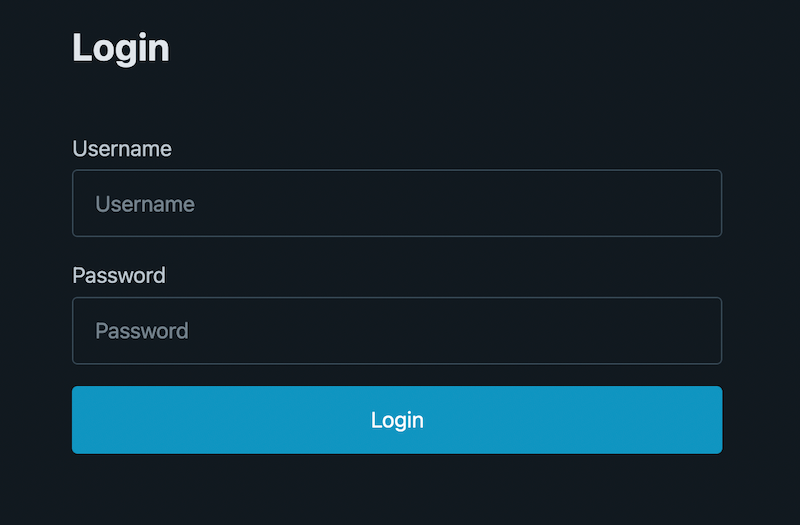
To move the passwords out of the URLs, we’ll present a simple forms to the user for creating and logging in. The log in page is the basic user name / password form you’ve built before. This is served from the app.get("/login") route.
And here’s the endpoint it posts to:
app.post("/login", (req, res) => { const user = findUser(req.body.username); if (user && bcrypt.compareSync(req.body.password, user.hash)) { req.session.user = req.body.username; req.session.save((err) => { if (err) { res.send('Cookie saving error, <a href="/login">try again</a>`'); } else { res.redirect("/"); } }); } else { res.send(`Incorrect username or password, <a href="/login">try again</a>`); }});
Normally express-session will deal with saving the session without us having to worry about, but I decided that a successful login should be followed to a re-direct to the view count page.
Since express-session normally does its saving at the end of a http response, and if we’re redirecting, that response hasn’t happened. There’s a bit more about that here (search for session save).
Apart from that, the changes are really just grabbing the user name and passwords from the form post body instead of the URL.
The /register form is the same as the log in, but with a second password field and some client side scripting to check the two passwords are the same. Processing the new user is very similar to the previous create route.
app.post("/register", (req, res) => { if (findUser(req.body.username)) { res.send(`User ${req.body.username} already exists`); return; } const user = req.body.username; const hash = bcrypt.hashSync(req.body.password, saltRounds); const views = 0; req.session.user = user; user_views.push({ user, hash, views }); writeUserViewFile(); req.session.save((err) => { if (err) { res.send('Cookie saving error, <a href="/login">try again</a>`'); } else { res.redirect("/"); } });});
Sanitising inputs
Cautious developers do not trust any input from users. There are numerous libraries to deal with cleaning it up which I’d recommend you consider, but for our case here let’s think through what the possibilities are:
password - the password is going to be hashed and salted before it is stored, and never used to build HTML. The only risk I can think of would be if a very long password might cause some sort of trouble - so we can just truncate it. Note we don’t even need to tell the user - if we truncate it when they register, and when they log in, they’ll still match.
user name - is stored in a json file, and is output to the user. In the future that output is likely to be HTML.
Here’s our users_view.json
[ { "user": "user1", "hash": "$2b$10$8Zf9LZWH78mWnSKjxKQxXe9TlPoqe7L3SOABcPHIUQ5Pq3jIbVQVm", "views": 16 }, { "user": "user2", "hash": "$2b$10$f/QAQ7we6Hh/hTx35LjfGeYtCY8aRG3ZqbJZqhEZRDXUqxkKCgPhq", "views": 14 }, { "user": "user3", "hash": "$2b$10$KBZe6orYpjG3JeIGhnLDCuyYQXxfVZYBjovGf3XIdU8rr6kXlNrLC", "views": 1 }]
The obvious attack here would be injection. For example a hacker might register with the user name:
user4", "role": "admin
That’s a smart try at privileged escalation. Even if we had an ‘admin’ role, it wouldn’t actually work though since any double quotes will be escaped by JSON.stringify(), but to be cautious, we can eliminate the possibility by just deleting any double quotes out.
Another injection possibility would be with HTML. Perhaps we will display the logged in user later inside a
<div>User: user1</div>
Our hacker might try registering this as their user name as:
user1</div><script>alert('you've been hacked')</script></div>
It’s not great to allow anyone on the internet to run code in our visitors’ browsers.
You should really use a library designed by someone who knows what they are doing, but I just wanted to do enough here to prompt you to think about. For that demo purpose, I’m going to replace all " < and > with _
// sanitise a string by replacing all " < and > with _ (underscore) // and truncating it at 20 charactersfunction sanitise(str) { return str.replace(/["<>]/g, "_").slice(0, 20);}
This is all a bit doge. If we are going to have rules like this (and the other rules we should have about min lengths) we should be implementing them in the browser and on the backend, and there should be helpful prompting to the users to enable them to understand and correct their inputs. As I mentioned earlier, this is just to get you to think about it.
HTTPS
In the list of four security improvements we wanted to make, the last one was to enforce HTTPS. There’s two places to do this. One is that when we initialise our session at the top of the app, we can tell it we want ‘secure’ cookies. This setting means that cookies will not be sent over plain HTTP, but only the end-to-end encrypted HTTPS. Currently our cookies contain a user name:
{ "cookie": { "originalMaxAge": null, "expires": null, "httpOnly": true, "path": "/" }, "__lastAccess": 1706315491081, "user": "user1"}
Even though a user name isn’t a lot of information, it could still be critical. If there was rumors about your company being acquired and a hacker leaked that j_bezos had been looking at your view counts, it could have implications. To turn on secure cookies:
app.use( session({ secret: sessionSecret, resave: false, saveUninitialized: true, store: new FileStore(), name: cookie_name, cookie: { secure: true, httpOnly: true, }, }));
Note that your infrastructure needs to support HTTPS for this to be useful - if the cookies are not sent, this particular app is rendered useless.
But we want to enforce HTTPS anyway, because a bigger problem is that if we don’t someone could intercept the login form data and collect plaintext usernames and passwords.
I generally do this by running all web services behind NGINX as a proxy. Then the NGINX configs can be set to redirect all HTTP requests to HTTPS, and valid requests can be passed off to your app. Here’s the sort of thing you might have in a config.
server { listen 80; server_name viewcount.example.com; return 301 https://$host$request_uri;}server { listen 443 ssl; server_name viewcount.example.com; # SSL certificate configuration ssl_certificate /path/to/your/certificate.crt; ssl_certificate_key /path/to/your/private-key.key; # Additional SSL configuration, such as preferred protocols and ciphers, can be added here location / { # Your application configuration goes here # Proxy pass to your Node.js or other application server # Example for proxying to a Node.js server running on localhost:3000 proxy_pass http://localhost:3000; proxy_http_version 1.1; proxy_set_header Upgrade $http_upgrade; proxy_set_header Connection 'upgrade'; proxy_set_header Host $host; proxy_cache_bypass $http_upgrade; }}
There are other security actions that can be taken at the NGINX level - things like rate limiting, blocking particular IP ranges, and access logging - all of which can be handy for protecting your endpoint from bad actors.
Other security
- I’d normally have the cookie secret in a .env file that was being .gitignored. A good hacker hobby is to scan public code repos for API keys and other secrets.
- Helmet.js is a sort of magic bullet for enforcing some security around request headers.
- Probably a stack of other things - ask your senior dev.
Here’s our app with the changes we’ve discussed:
const express = require("express");
const session = require("express-session");
const FileStore = require("session-file-store")(session);
const fs = require("fs");
const app = express();
const bcrypt = require("bcrypt");
const saltRounds = 10;

const user_view_file = "./user_views.json";
const cookie_name = "session_cookie";

app.use(express.urlencoded({ extended: false }));

let user_views = [];
// if the user_views.json file exists, read it and parse it to user_views array
if (fs.existsSync(user_view_file)) {
  user_views = JSON.parse(fs.readFileSync(user_view_file));
}

function writeUserViewFile() {
  fs.writeFile(user_view_file, JSON.stringify(user_views), (err) => {
    if (err) {
      console.log(err);
      return;
    }
  });
}

function findUser(user) {
  return user_views.find((u) => u.user === user);
}

// sanitise a string by replacing all " < and > with _ (underscore)
// and truncating it at 20 characters
function sanitise(str) {
  return str.replace(/["<>]/g, "_").slice(0, 20);
}

app.use(
  session({
    secret: "your-secret-keyz", // This should be a secret, used to sign the session ID cookie
    resave: false,
    saveUninitialized: true,
    store: new FileStore(),
    name: cookie_name,
  })
);

app.get("/", (req, res) => {
  if (req.session.user) {
    const user_view = findUser(req.session.user);
    if (!user_view) {
      res.send(`Error finding user, <a href="/login">try again</a>`);
      return;
    }
    user_view.views++;
    res.send(
      `User "${req.session.user}" has ${user_view.views} views, <a href="/">reload</a> or <a href="/logout">logout</a>`
    );
    writeUserViewFile();
  } else {
    res.redirect("/login");
  }
});

app.get("/logout", (req, res) => {
  req.session.destroy((err) => {
    if (err) {
      return console.log(err);
    }
    res.clearCookie(cookie_name);
    res.redirect("/");
  });
});

app.post("/register", (req, res) => {
  const user = sanitise(req.body.username);
  if (findUser(user)) {
    res.send(`User ${req.body.username} already exists`);
    return;
  }
  const hash = bcrypt.hashSync(req.body.password, saltRounds);
  const views = 0;
  req.session.user = user;
  user_views.push({ user, hash, views });
  writeUserViewFile();
  req.session.save((err) => {
    if (err) {
      res.send('Cookie saving error, <a href="/login">try again</a>`');
    } else {
      res.redirect("/");
    }
  });
});

app.post("/login", (req, res) => {
  const username = sanitise(req.body.username);
  const user = findUser(username);
  if (user && bcrypt.compareSync(req.body.password, user.hash)) {
    req.session.user = username;
    req.session.save((err) => {
      if (err) {
        res.send('Cookie saving error, <a href="/login">try again</a>`');
      } else {
        res.redirect("/");
      }
    });
  } else {
    res.send(`Incorrect username or password, <a href="/login">try again</a>`);
  }
});

app.get("/login", (req, res) => {
  res.status(200).sendFile(__dirname + "/login.html");
});

app.get("/register", (req, res) => {
  res.status(200).sendFile(__dirname + "/register.html");
});

app.listen(3000, () => {
  console.log("Server is running on port 3000");
});
Conclusion
Nearly every web app we write is going to need a user auth and session management solution. In this very long post we’ve looked at a way to develop that from scratch in Express/Node. In the process our code base went from about 10 lines to 130. Now that it’s done however, the only extra code to ensure users are only accessing the routes they should will be a line at the entry point of each route.
Since building out session management is such a common and onerous task, and one that can have serious consequences if not done correctly, you might be wondering if there’s libraries to do some of this, and other, lifting for us. There is, and I plan to look at some in the future.