Where Do Docker Container Logs Go?
8 Apr 2023
I’m still loving the Docker “just works” magic, despite their terrible PR skills , but sometimes I start a container, then the docker ps -a shows it exited almost immediately. Clearly I’ve made a mistake, but there’s no stdout error message to tell me what I’ve done wrong, where is it.
Let’s look at an example from today. I’m testing Filebrowser on a dev machine before I deploy it to the remote backup machine I’m assembling. And instead of following the official instructions , I’m following a blog post which has a few more details, but unfortunately also a small error.
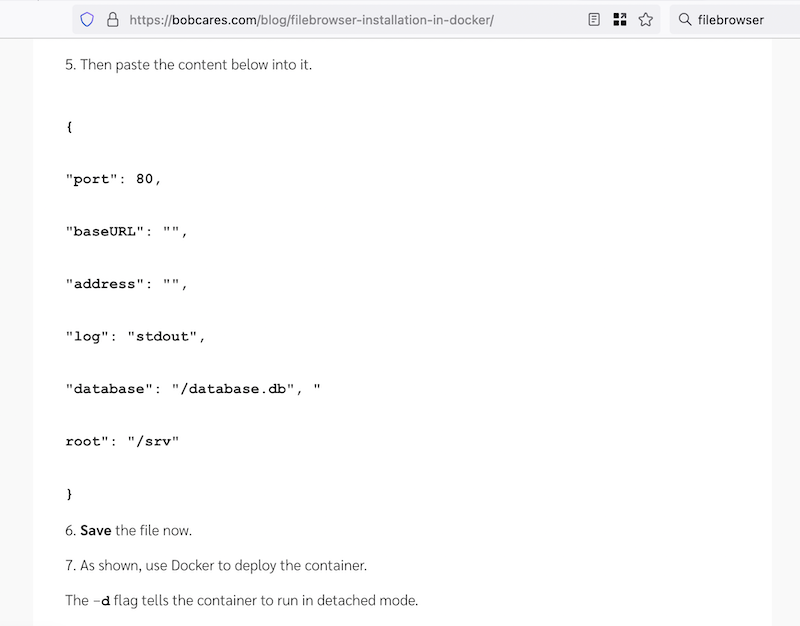
The first sign of a problem is that the container is not running after I’ve launched it.
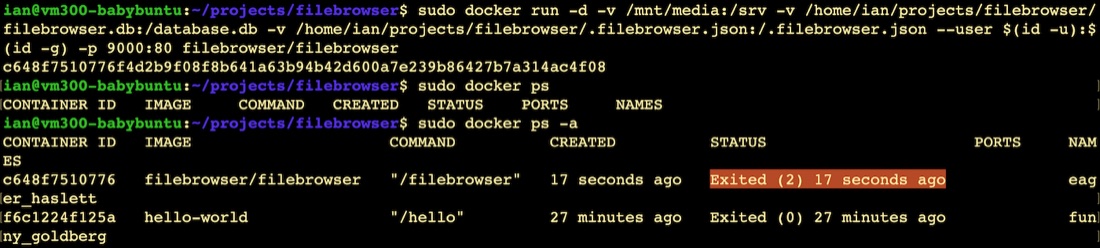
To cat the log for the exited container is simple. Note that the (randomly provided) name for the container is eager_haslett so to see the log we enter:
sudo docker logs eager_haslett
The log output was:
panic: While parsing config: invalid character '\n' in string literal

goroutine 1 [running]:
github.com/filebrowser/filebrowser/v2/cmd.initConfig()
	/home/runner/work/filebrowser/filebrowser/cmd/root.go:410 +0x346
github.com/spf13/cobra.(*Command).preRun(...)
	/home/runner/go/pkg/mod/github.com/spf13/cobra@v1.4.0/command.go:886
github.com/spf13/cobra.(*Command).execute(0x1828580, {0xc000030220, 0x0, 0x0})
	/home/runner/go/pkg/mod/github.com/spf13/cobra@v1.4.0/command.go:822 +0x44e
github.com/spf13/cobra.(*Command).ExecuteC(0x1828580)
	/home/runner/go/pkg/mod/github.com/spf13/cobra@v1.4.0/command.go:974 +0x3b4
github.com/spf13/cobra.(*Command).Execute(...)
	/home/runner/go/pkg/mod/github.com/spf13/cobra@v1.4.0/command.go:902
github.com/filebrowser/filebrowser/v2/cmd.Execute()
	/home/runner/work/filebrowser/filebrowser/cmd/cmd.go:9 +0x25
main.main()
	/home/runner/work/filebrowser/filebrowser/main.go:8 +0x17
There’s our answer right at the top of the log - there’s a newline character in the middle of a key:value pair in the config JSON. If you look at the blog page above you can see it after the database.db